1. 간단 요약
- 해상도 조절, 화면 모드, 마우스 감도, 밝기 조절 등 환경 설정 기능을 구현하기 위해 CheatManager와 GameUserSettings를 통해 함수 구현 및 테스트.
2. 세부 과정
- CheatManager
- GameUserSettings
2-1. CheatManager
해상도 조절, 화면 모드, 마우스 감도, 밝기 조절을 위해 콘솔에서 실행할 함수를 UFUNCTION(exec)로 선언 및 구현.
// Header
UCLASS()
class UProjectShooterCheatManager : public UCheatManager
{
	GENERATED_BODY()

public:
	UFUNCTION(exec)
	void PSSetResolution(int32 Width, int32 Height);

	UFUNCTION(exec)
	void PSSetWindowMode(int32 WindowMode);

	UFUNCTION(exec)
	void PSSetMouseSensitivity(float Value);

	UFUNCTION(exec)
	void PSSetAutoExposureBrightness(float Value);
};

//Cpp
void UProjectShooterCheatManager::PSSetResolution(int32 Width, int32 Height)
{
	UProjectShooterUserSettings* UserSettings = Cast<UProjectShooterUserSettings>(GEngine->GetGameUserSettings());
	if (UserSettings)
	{
		UserSettings->SetScreenResolution(FIntPoint(Width, Height));
		UserSettings->ApplySettings(false);
	}
}

void UProjectShooterCheatManager::PSSetWindowMode(int32 WindowMode)
{
	UProjectShooterUserSettings* UserSettings = Cast<UProjectShooterUserSettings>(GEngine->GetGameUserSettings());
	if (UserSettings)
	{
		EWindowMode::Type NewWindowMode = (EWindowMode::Type)WindowMode;
		UserSettings->SetFullscreenMode(NewWindowMode);
		UserSettings->ApplySettings(false);
	}
}

void UProjectShooterCheatManager::PSSetMouseSensitivity(float Value)
{
	UProjectShooterUserSettings* UserSettings = Cast<UProjectShooterUserSettings>(GEngine->GetGameUserSettings());
	if (UserSettings)
	{
		UserSettings->SetMouseSensitivity(Value);
		UserSettings->ApplySettings(false);
	}
}

void UProjectShooterCheatManager::PSSetAutoExposureBrightness(float Value)
{
	UProjectShooterUserSettings* UserSettings = Cast<UProjectShooterUserSettings>(GEngine->GetGameUserSettings());
	if (UserSettings)
	{
		UserSettings->SetAutoExposureBrightness(Value);
		UserSettings->ApplySettings(false);
	}
}SetScreenResolution, SetFullscreenMode, ApplySettings는 GameUserSettings에서 기본으로 제공하는 함수.
SetMouseSensitivity와 SetAutoExposureBrightness는 직접 선언한 함수.
2-2. GameUserSettings
기존 Setting에 포함되지 않는 마우스 감도 값과 밝기 변수를 추가 및 Set/Get 함수 선언.
UCLASS()
class UProjectShooterUserSettings : public UGameUserSettings
{
	GENERATED_BODY()

public:
	UFUNCTION(BlueprintCallable)
	float GetMouseSensitivity() const;

	UFUNCTION(BlueprintCallable)
	void SetMouseSensitivity(float Value);

	UFUNCTION(BlueprintCallable)
	float GetAutoExposureBrightness() const;

	UFUNCTION(BlueprintCallable)
	void SetAutoExposureBrightness(float Value);

protected:
	virtual void SetToDefaults() override;

protected:
	UPROPERTY(Config)
	float MouseSensitivity;

	UPROPERTY(Config)
	float AutoExposureBrightness;
};
UPROPERTY(Config) 매크로가 붙은 변수는 Saved/Config/Windows/GameUserSettings.ini에 값이 저장 됨.
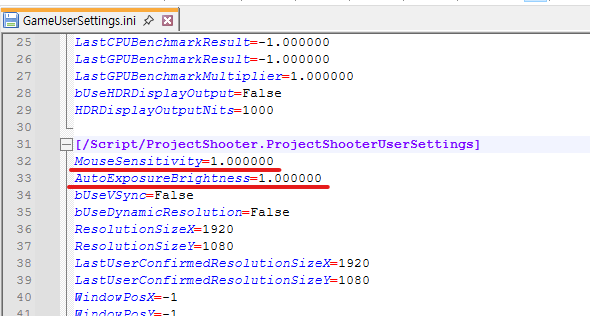
마우스 감도는 MouseSensitivity 값을 Look Action의 Value 값에 곱하는 방식으로 구현.
밝기 조절은 CameraComponent의 PostProcessSettings에서 AutoExposureMinBrightness와 AutoExposureMaxBrightness 값을 변경하는 방식으로 구현.
3. 구현 중 발생한 문제 및 해결방안
구현 중 특이사항 없음.
4. 오늘의 결과물
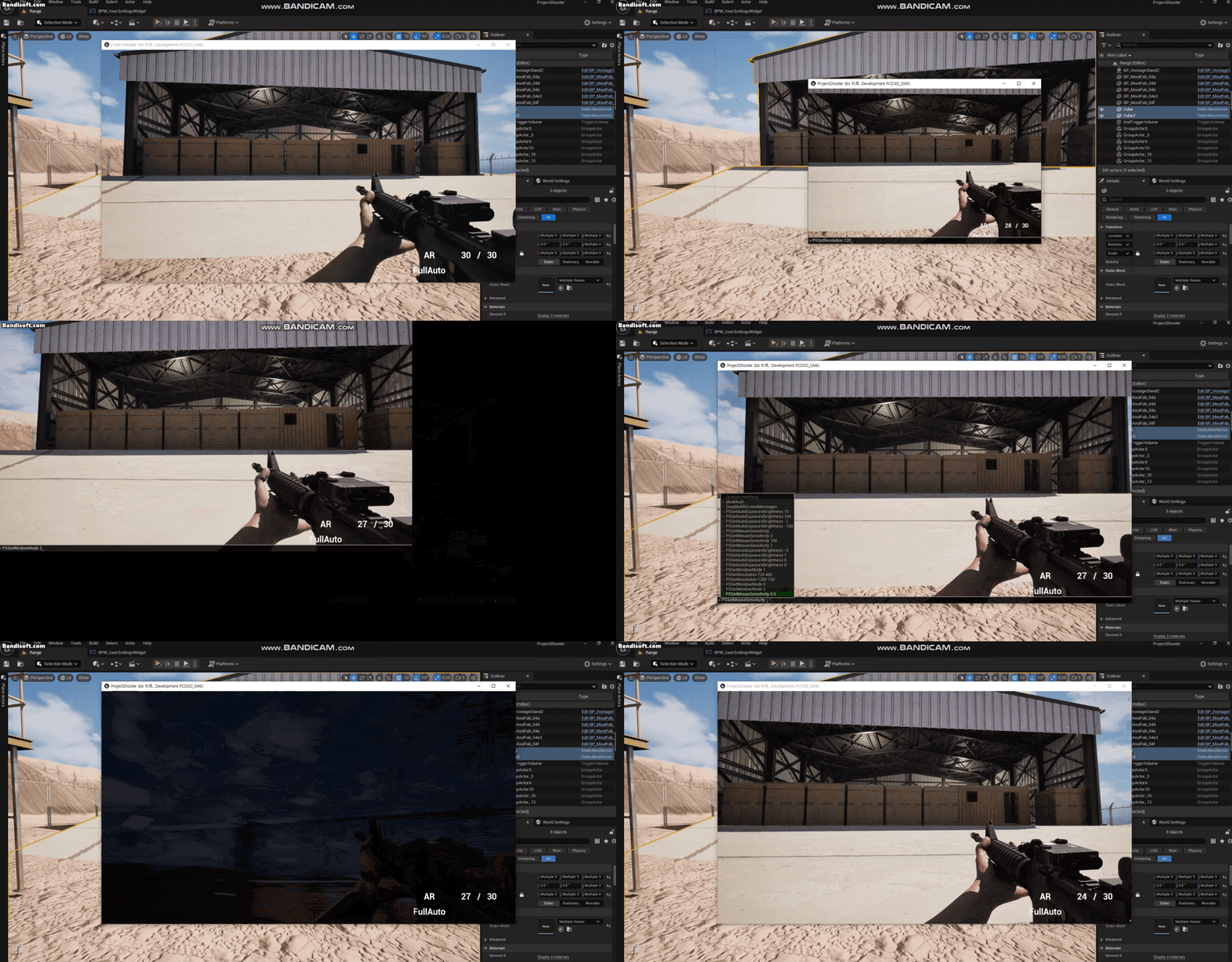
콘솔에서 명령어를 실행함에 따라 해상도 변경, 화면 모드, 마우스 감도, 밝기 조절이 변경되는 것을 확인.

Github: https://github.com/dlalsrn