🐍 MariaDB와 Python 연동
1️⃣ 데이터베이스와 서버 연결
1) 필요한 패키지 설치
MariaDB와 연동하려면 Python에서 pyMySQL 패키지를 설치해야 합니다.
pip install pymysql-
pyMySQL는 MariaDB를 파이썬에서 사용할 수 있게 해주는 공식 드라이버 -
일반적으로는 "드라이버"보다는 "패키지"라고 부름
2) MariaDB 서버 접속 및 해제
import pymysql

변수 = pymysql.connect(host = '데이터베이스위치', port=포트번호,user='계정',passwd='비밀번호', db = '데이터베이스이름', charset='인코딩방식')

# 접속해제
변수.close()
예시) 접속
import pymysql

# 접속
con = pymysql.connect(host = '127.0.0.1', port=3306, user='root',passwd='0000', db = 'autoever', charset='utf8mb4')

# 접속해제
con.close()
2️⃣ 샘플데이터 생성
- 데이터 베이스에 접속해서 생성
use autoever;

create table usertbl(
	userid char(15) not null primary key,
	name varchar(20) not null,
	birthday int not null,
	addr char(100),
	mobile char(11),
	mdate date
);

insert into usertbl values('kty', '김태연',1989,'전주','01011111111', '1989-3-9');
insert into usertbl values('bsj', '배수지',1994,'광주','01022222222', '1994-10-10');
insert into usertbl values('ksh', '김설현',1995,'부천','01033333333', '1995-1-3');
insert into usertbl values('bjh', '배주현',1991,'대구','01044444444', '1991-3-29');
insert into usertbl values('ghr', '구하라',1991,'광주','01055555555', '1991-1-13');
insert into usertbl values('san', '산다라박',1984,'부산','01066666666', '1984-11-12');
insert into usertbl values('jsm', '전소미',2001,'캐나다','01077777777', '2001-3-9');
insert into usertbl values('lhl', '이효리',1979,'서울','01088888888', '1979-5-10');
insert into usertbl values('iyou', '아이유',1993,'서울','01099999999', '1993-5-19');
insert into usertbl values('ailee','에일리',1989,'미국','01000000000','1989-05-30');

select * from usertbl;
3️⃣ Python에서 DML 수행
1) 과정
- 연결 객체의 cursor 메서드를 호출해서 sql 실행 객체를 가져온다
sql실행객체.execute(sql 문장)- 연결 객체에서
commit()을 호출하면 반영되고rollback()을 호출하면 취소
2) 데이터 삽입
#sql 실행 객체 생성
cursor = con.cursor()

# 데이터 삽입 방법 1 - statement 방식
cursor.execute("insert into usertbl values('ljy','이진연',1970,'서울','01023436782','1970-10-31')")

# 데이터 삽입 방법 2 - preparedstatement 방식 : 이 방식 권장
cursor.execute("insert into usertbl values(%s, %s, %s, %s, %s, %s)",('sohye','소혜',2000,'서울','01034523432','2000-08-07'))

con.commit()
statement 방식보다 preparedstatement 방식을 더 많이 사용한다
3) 데이터 수정
# 이진연 -> 이지연
cursor.execute("update usertbl set name = %s where name = %s",('이지연','이진연'))
con.commit()
4) 데이터 삭제
# 이지연 데이터 삭제
cursor.execute("delete from usertbl where name = %s",('이지연'))
con.commit()
4️⃣ 데이터 조회
🔍 기본 조회 함수
| 함수 | 설명 | 리턴값 |
|---|---|---|
fetchone | 하나의 데이터를 조회하는 함수 | tuple 리턴 |
fetchall | 0개 이상의 데이터를 조회하는 함수 | tuple의 tuple 리턴 |
예시) 데이터 1개 조회
# 데이터 조회
cursor.execute("select * from usertbl")

# 데이터 1개를 튜플로 가져오기
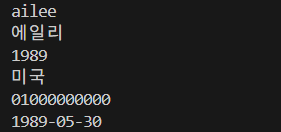
data = cursor.fetchone()

# 튜플을 순회하면서 출력
for imsi in data:
print(imsi)- 🔽출력예시
예시) 튜플 데이터 수정 - 에러발생
data[0] = 'kt'- fetchone의 리턴값인 튜플은 데이터 수정이 불가하기 때문에 에러가 발생한다
예시) 데이터 여러개 조회
# 데이터 조회
cursor.execute("select * from usertbl")

# 데이터 여러개를 튜플로 가져오기
data = cursor.fetchall()

# 튜플을 순회하면서 출력
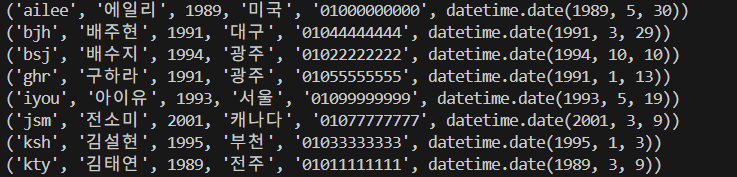
for imsi in data:
print(imsi)- 🔽출력예시