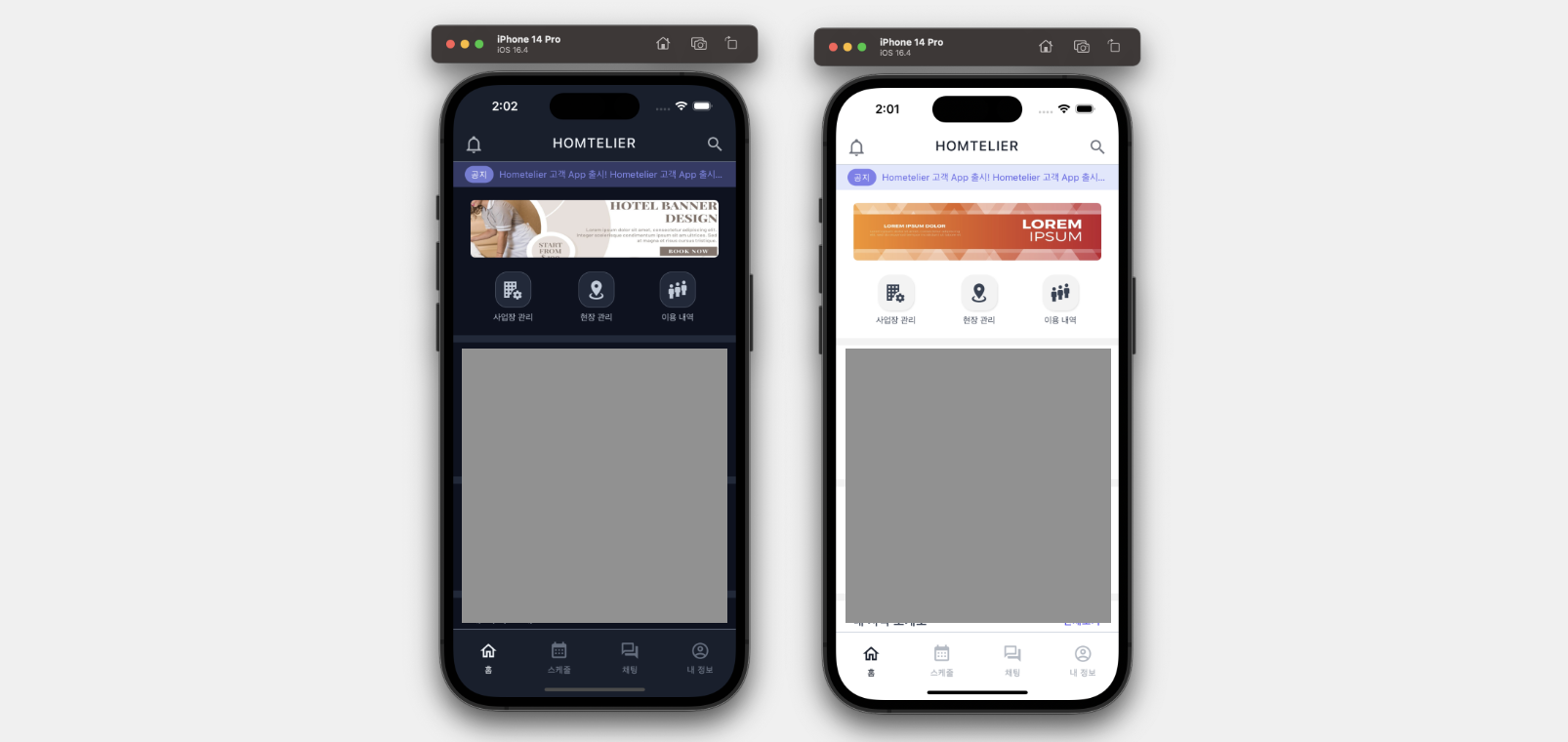
한 파일에 코드와 스타일이 같이 있어 불필요하게 코드줄이 길어지는 것을 개선하고 다크모드, 라이트모드를 적용시키기 위해 custom style hook을 만들어보았다. 스타일을 사용하는 쪽에서는 아래와 같이 사용한다.
const { style, colors, css } = useStyle();내가 만든 useStyle hook으로 스타일 및 다크 모드, 라이트 모드에 따른 색상을 가져온다.
스타일 적용은 아래와 같이 한다.
<View style={{styles.body}}>
  <View style={[css.fd_row, css.gap10]}>
  	<Text style={{color: colors.primary}}>
      Custom Style Hook으로 간편하게 스타일 적용하기!
    </Text>
  </View>
</View>
이 스타일, 색상 등은 ContextAPI를 사용하여 관리하기로 했다.
우선 다크모드일 때 색상, 라이트모드일 때 색상을 구분하였다.
src/hooks/style.tsx
Color
/* Color */
type Colors = keyof (typeof darkColors | typeof lightColors);
type ColorSet = {
  [key in Colors]: string;
};

const darkColors = {
  main: 'rgb(13, 18, 32)',
  sub: 'rgb(23, 31, 45)',
  light: 'rgb(32, 41, 58)',
  inverse: 'rgb(238, 243, 248)',
  primary: 'rgb(80, 74, 237)',
  secondary: 'rgb(187, 198, 254)',
  success: 'rgb(28, 174, 110)',
  caution: 'rgb(241, 141, 14)',
  error: 'rgb(238, 37, 76)',
  active: 'rgb(170, 177, 186)',
  inactive: 'rgb(99, 110, 128)',
  line: 'rgb(89, 100, 118)',
  ...
};

const lightColors = {
  main: 'rgb(255, 255, 255)',
  sub: 'rgb(255, 255, 255)',
  light: '#f3f3f3',
  inverse: 'rgb(23, 31, 45)',
  primary: 'rgb(80, 74, 237)',
  secondary: 'rgb(187, 198, 254)',
  success: 'rgb(28, 174, 110)',
  caution: 'rgb(241, 141, 14)',
  error: 'rgb(238, 37, 76)',
  active: 'rgb(110, 115, 126)',
  inactive: 'rgb(179, 186, 196)',
  line: 'rgb(208, 215, 225)',
  ...
};

const DefaultColors: ColorSet = Object.keys(darkColors).reduce((s, c) => {
  return {...s, [c]: ''};
}, {} as ColorSet);

const getColorSet = (mode: 'dark' | 'light') =>
  mode === 'dark' ? darkColors : lightColors;
/* Color End --------------------------------- */
그리고 mode를 입력받아 각 모드에 맞는 color set을 리턴하는 getColorSet() 함수를 만든다.
Template
그리고 특정 Screen 또는 Component에 적용할 스타일을 리턴하는 함수를 작성해주었다.
각 모드에 따라 다른 스타일을 적용해야 할 경우 (ex. shadow)가 있기 때문에 mode를 매개변수로 받는다.
그리고 색상을 적용하기 위해 위에서 만든 color 객체도 매개변수로 받는다. (mode를 받았으니 안에서 조건으로 처리할 수 있지만 스타일이 불필요하게 너무 길어져 전달받기로 하였다.)
/* Template */
type Template = {
  [key in string]: ViewStyle | TextStyle | ImageStyle;
};

const getTemplate = (
  mode: 'dark' | 'light',
  colors: typeof darkColors | typeof lightColors,
): Template => ({
  /* Common */
  bottom_tab_bar: {
    backgroundColor: colors.sub,
    borderTopWidth: 1,
    borderTopColor: colors.line,
    height: 95,
  },
  body: {
    backgroundColor: colors.main,
    padding: 18,
    paddingHorizontal: 24,
    flex: 1,
  },
  /* Banner Component */
  banner_container: {
    height: 80,
    borderRadius: 6,
    position: 'relative',
    overflow: 'hidden',
  },
  banner_slider: {
    height: '100%',
    borderRadius: 6,
    position: 'absolute',
    flexDirection: 'row',
  },
  banner_image: {
    borderRadius: 6,
    height: '100%',
    resizeMode: 'stretch',
  },
  ...
});

const getStyles = (mode: 'dark' | 'light') => {
  const colors = getColorSet(mode);
  const template = getTemplate(mode, colors);

  return StyleSheet.create(template);
};
/* Templat End ------------------------------ */
위 getTemplate()함수로 객체를 받아 스타일 객체를 생성해 리턴하는 getStyles() 함수를 만든다.
css
처음엔 위에서 만든 color와 template만 사용했었는데, 개발을 계속 진행하다보니 flex: 1 , flexDirection: 'row' 와 같은 스타일 하나하나들이 많이 필요했다. 그래서 css를 추가하였다.
/* CSS */
const css = StyleSheet.create({
  relative: {position: 'relative'},
  absolute: {position: 'absolute'},
  flex1: {flex: 1},
  ...
});
/* CSS End ----------------------------------- */
useStyle
이제 어디서든 위에서 작성한 스타일을 사용할 수 있도록 StyleContextAPI를 만들었다.
Context에서 제공하는 상태는 다음과 같다.
isDarkMode, toggleModel, styles, colors, css
type StyleContextProps = {
  isDarkMode: boolean;
  toggleMode: () => void;
  styles: ReturnType<typeof StyleSheet.create>;
  colors: ColorSet;
  css: ReturnType<typeof StyleSheet.create>;
};
const StyleContext = createContext<StyleContextProps>({
  isDarkMode: true,
  toggleMode: () => {},
  styles: {},
  colors: DefaultColors,
  css: {},
});

const StyleProvider = ({children}: PropsWithChildren) => {
  const [isDarkMode, setMode] = useState(false);

  const toggleMode = useCallback(() => {
    setMode(prevMode => !prevMode);
  }, []);

  const styles = useMemo(
    () => getStyles(isDarkMode ? 'dark' : 'light'),
    [isDarkMode],
  );

  const colors = useMemo(
    () => getColorSet(isDarkMode ? 'dark' : 'light'),
    [isDarkMode],
  );

  return (
    <StyleContext.Provider
      value={{isDarkMode, toggleMode, styles, colors, css}}>
      {children}
    </StyleContext.Provider>
  );
};

const useStyle = () => useContext(StyleContext);

export {StyleProvider, useStyle};
현재 모드 상태와 사용자가 앱에서 모드를 변경할 수 있도록 toggleMode() 함수를 만들어 제공한다.
styles와 colors는 모드가 변경되기 전까지 캐시해두기 위해 useMemo를 사용하여 메모화했다.
css는 모드와 상관이 없기 때문에 StyleProvider 바깥쪽에서 만든 객체를 그대로 사용한다.
index.js
import {AppRegistry} from 'react-native';
import { NavigationContainer } from '@react-navigation/native';
import App from './App';
import {StyleProvider} from './src/hooks/style';
import {name as appName} from './app.json';

const Container = () => {
  return (
    <NavigationContainer>
      <StyleProvider>
        <App />
      </StyleProvider>
    </NavigationContainer>
  );
};

AppRegistry.registerComponent(appName, () => Container);
App 컴포넌트에서도 colors와 css를 사용할 일이 있어 index.js에서
<StyleProvider> 컴포넌트로 <App /> 컴포넌트를 감싸주었다.
이제 어느 위치에서든 useStyle hook을 이용해 스타일을 쉽게 적용시킬 수 있다!