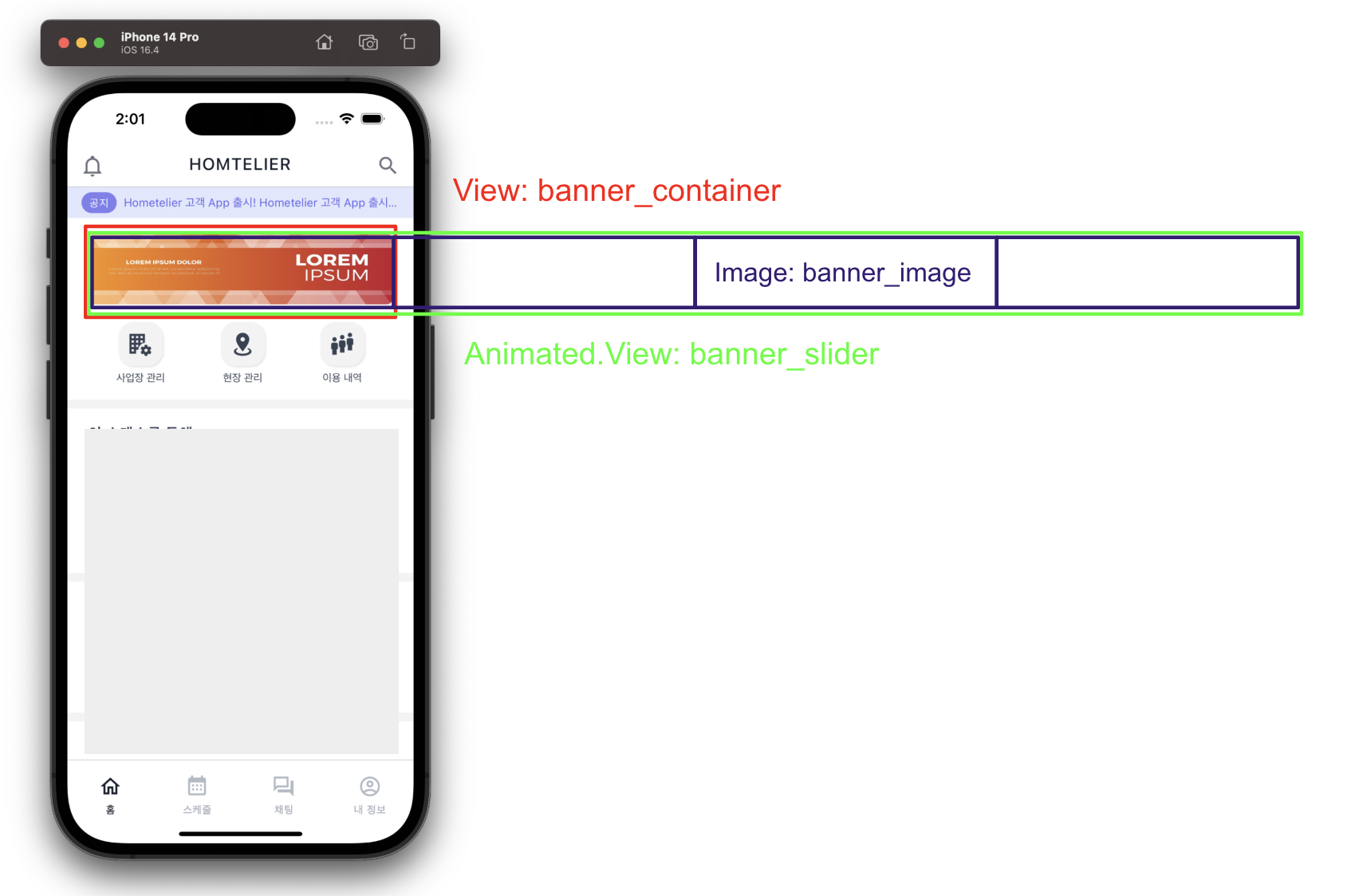
컨셉: 한 이미지 당 4초간 노출, 4초에 한 번씩 자동으로 이미지가 넘어가는 Banner.
Banner 컴포넌트의 구성은 위 이미지와 같다. 빨간색으로 표시된 부분이 눈에 보이는 부분이고, Animated.View는 각 이미지들을 감싸고 있는다.
banner의 이미지가 넘어가는 효과를 위해 animation을 사용했고, left를 조절하여 이미지를 번갈아가며 보여준다.
우선 jsx 부분만 보면 Animated.View 컴포넌트의 스타일로 left: animation을 준 것 외에는 특별한 내용은 없다. (width는 아래에 나오겠지만 useWindowDimension() hook으로 화면의 가로 너비를 가져와 padding값을 제외한 값이다.)
jsx
<View style={[styles.banner_container, {width: width - 48}]}>
  <Animated.View
    style={[
      styles.banner_slider,
      {
        width: `${BANNER_IMAGES_LENGTH * 100}%`,
        left: animation,
      },
    ]}>
    {SAMPLE_BANNER_IMAGES.map(({id, image}) => (
      <Image
        key={id}
        source={image}
        style={[styles.banner_image as ImageStyle, {width: width - 48}]}
      />
    ))}
  </Animated.View>
</View>
animation 적용
한 이미지당 4초 동안 노출되며 4초 마다 한 번씩 이미지가 넘어간다.
마지막 이미가 노출되어있는 경우 다시 첫 번째 이미지로 돌아간다. (lotation X)
...
import {SAMPLE_BANNER_IMAGES} from '../sample/data';

const BANNER_IMAGES_LENGTH = SAMPLE_BANNER_IMAGES.length;

const counterFn = (fn: (currCount: number) => void, maxCount: number) => {
  let count = 0;

  return () => {
    fn(count);
    count = count < maxCount ? count + 1 : 0;
  };
};

const Banner = () => {
  const {width} = useWindowDimensions();
  const {styles} = useStyle();
  const animation = useRef(new Animated.Value(0)).current;
  const intl = useRef<ReturnType<typeof setInterval> | null>(null);

  // eslint-disable-next-line react-hooks/exhaustive-deps
  const slide = useCallback(
    counterFn((currCount: number) => {
      Animated.timing(animation, {
        toValue:
          (width - 48) *
          (currCount === BANNER_IMAGES_LENGTH - 1 ? 0 : (currCount + 1) * -1),
        duration: 150,
        delay: 0,
        useNativeDriver: false,
        isInteraction: false,
      }).start();
    }, BANNER_IMAGES_LENGTH - 1),
    [animation, width],
  );

  ...
};
export default Banner;
banner의 이미지가 바뀔 때 다음 이미지로 넘어갈지, 처음 이미지로 돌아갈지 결정하기 위해 클로저를 사용한 counterFn() 이라는 함수를 만들고 실제 animation의 value를 변경하는 slide() 함수를 counterFn()으로 감싼다.
setInterval로 4초에 한 번씩 이미지 넘기기
useFocusEffect(() => {
  if (!intl.current) intl.current = setInterval(slide, 4000);

  return () => {
    if (intl.current) clearInterval(intl.current);
    intl.current = null;
  };
});
4초마다 한 번씩 이미지가 넘어가므로 setInterval의 콜백으로 slide() 함수를 넘겼고, delay는 4000을 주었다.
단, setInterval을 이용해 slide() 함수를 백그라운드로 넘기는 조건은 Banner가 현재 화면에 나타나있고, 백그라운드로 아직 넘어가지 않은 경우이다.
또, Banner 컴포넌트가 화면에서 사라지고 백그라운드에서 함수가 돌고있다면 clear 시켜주어야 한다.
왜 useEffect를 사용하지 않았나?
현재 앱은 NativeStack Navigator와 MaterialBottomTab Navigator를 동시에 사용하고 있다. 사실 두 내비게이터를 동시에 사용하는 것과는 상관 없이 Screen이 전환될 때 전환되기 전 Screen과 그 안의 Component들은 언마운트되지 않는다.
현재 화면에 다른 화면이 겹쳐 올라오는 것이기 때문이다. 그래서 useEffect의 cleanup 함수에서 clearInterval을 시켜주려해도 Banner컴포넌트가 언마운트되지 않으니 clear되지 않는다.