 오늘의 잔디
📌 일정 설명(메모) 기능 추가 + 오류 해결기 (feat. 진짜 사소한 오타)
✅ 구현 목표
캘린더 앱에 일정마다 간단한 메모(설명)를 입력하고 보여줄 수 있는 기능을 추가하고자 했다.
🛠 구현 과정
- 백엔드(Event 엔티티)에 description 필드 추가
@Column
private String description;- EventRequest DTO에도 description 추가 + getter/setter 정의
private String description;
public String getDescription() { return description; }
public void setDescription(String description) { this.description = description; }- POST /api/events 컨트롤러에서 description 저장 처리
event.setDescription(request.getDescription());- 프론트엔드 모달에 설명 입력창 추가
<textarea id="event-description" placeholder="일정 설명 (선택)"></textarea>- 프론트에서 fetch 요청 시 description 값 포함
const description = document.getElementById('event-description').value.trim();- 상세 모달에도 description 출력 추가
desc.textContent = ev.description || '';❗ 문제 발생
하지만 저장 후에도 description이 **항상 빈 문자열("")**로 저장되고,
상세 모달에도 아무 내용이 표시되지 않았다.
콘솔 확인 시에도 description: "" 또는 undefined였다.
🔍 원인 분석
프론트엔드 JS 코드에서…
const description = document.getElementById('eventDescription').value.trim();여기서 eventDescription이라는 오타로 인해
HTML 요소를 찾지 못했고, 결국 description 변수는 undefined로 정의되지도 않은 상태였다.
→ 그래서 fetch 시 { description: undefined }가 들어갔고
→ 백엔드는 null/빈값으로 저장
→ 프론트에서도 표시되지 않음
✅ 해결 방법
- 정확한 ID로 수정
const description = document.getElementById('event-description').value.trim();- 콘솔로 값 확인
console.log("📝 설명 입력값:", description);- 서버에 정상 전달되는지 Network 탭 확인
✅ 결과
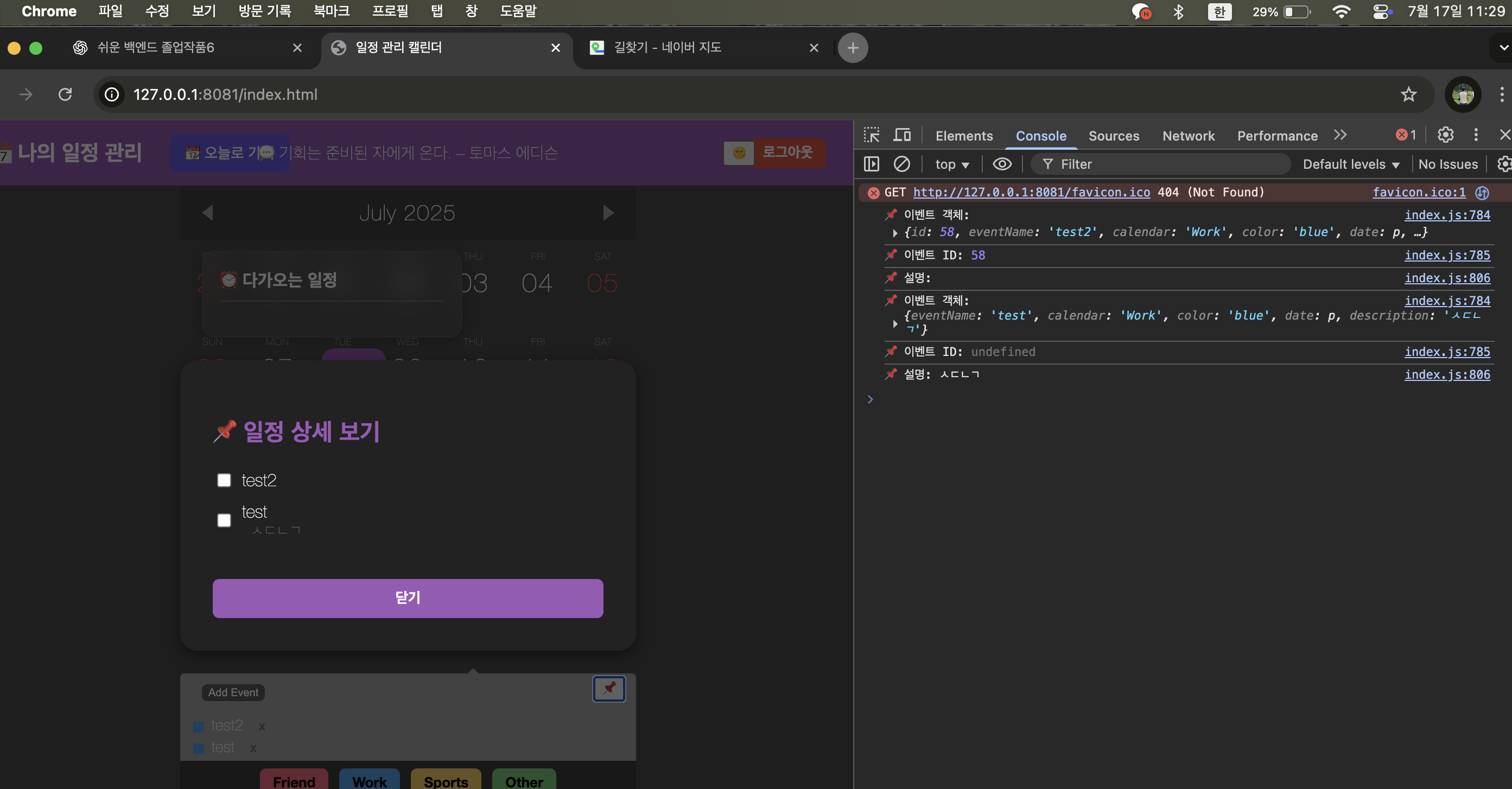
- 설명이 정상적으로 저장되고,
- 상세 보기 모달에서도 잘 출력되며,
- 콘솔에도 제대로 뜨는 걸 확인함 🎉
🧠 느낀 점
오타 하나가 전체 흐름을 망칠 수 있다!
프론트와 백엔드가 잘 연동되어도, DOM 요소 ID 하나만 틀려도 데이터 전달이 끊긴다.
이번 경험으로 디버깅 감각을 훨씬 키울 수 있었다.



끝까지 가면 내가 다 이겨