Reducer의 기본 개념
1. Reducer란 무엇인가?
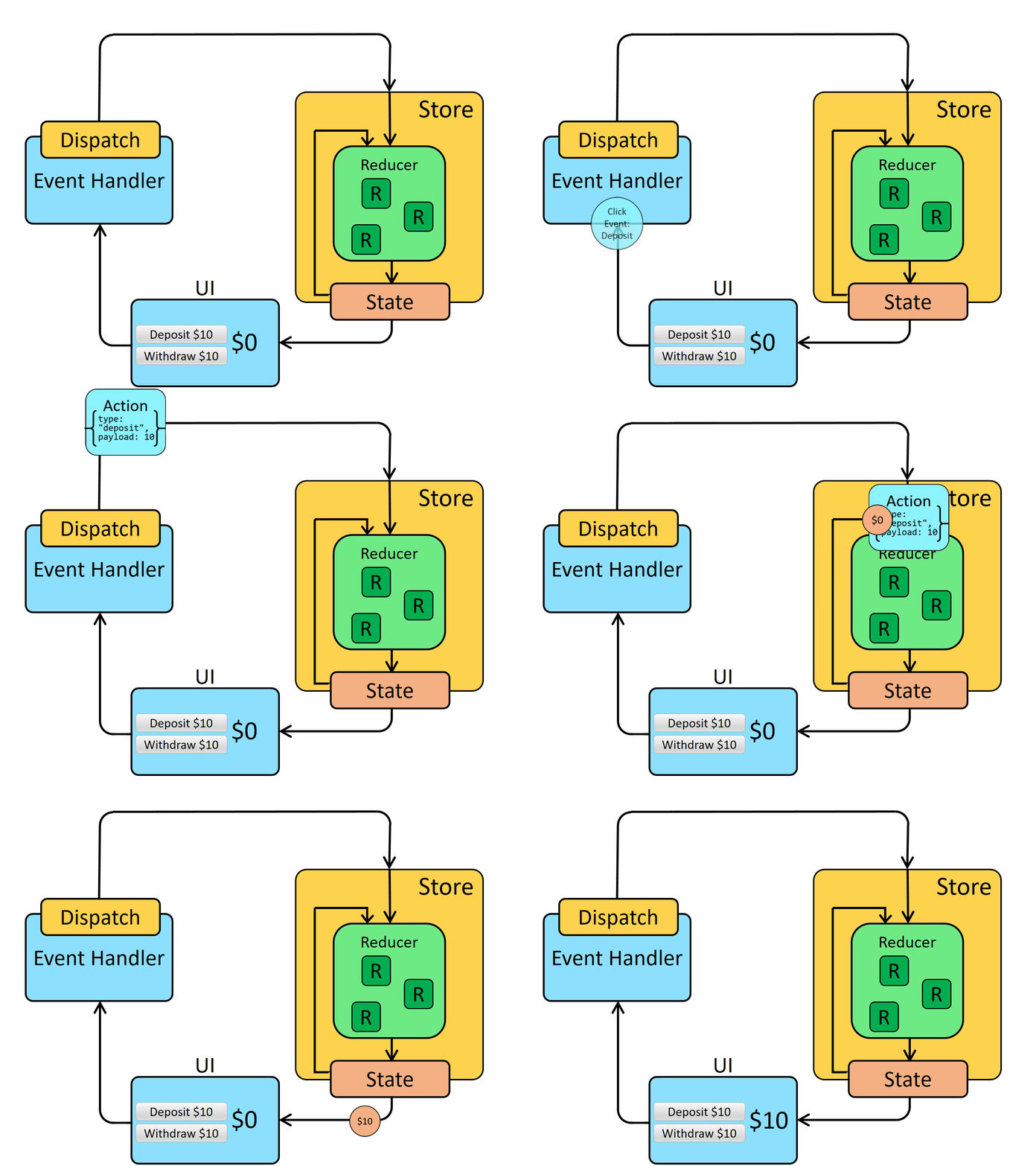
- 정의: Reducer는 현재 상태와 액션 객체를 인자로 받아 새로운 상태를 반환하는 함수다. 이는 Redux에서 영감을 받아 React의
useReducer훅에서 사용되며, 복잡한 상태 로직을 관리할 때useState보다 더 적합하다. - 작동 원리: Reducer는 '액션'(action)에 따라 어떻게 상태가 변할지 정의한다. 액션은 일반적으로
type필드를 가지며, 필요에 따라 추가 데이터를 포함할 수 있다.
2. Reducer의 사용 이유
- 상태 관리의 단순화: 중첩된 객체나 배열과 같이 복잡한 상태를 관리할 때
useState를 사용하면 코드가 복잡해지고 버그가 발생하기 쉽다. Reducer를 사용하면 상태 변경 로직을 한 곳에 모아 관리할 수 있다. - 예측 가능한 상태 변경: Reducer는 순수 함수(pure function)여야 한다. 즉, 동일한 인자에 대해 항상 동일한 결과를 반환해야 하며, 부수 효과(side effects)가 없어야 한다. 이로 인해 상태 변경이 예측 가능해진다.
3. Reducer와 useState의 차이
useState는 주로 단순한 상태 관리에 사용된다.useReducer는 상태 관리 로직이 복잡하거나 중첩된 객체를 다룰 때 유리하다.
Reducer의 실제 사용
1. Reducer 함수의 구조
function reducer(state, action) {
    switch (action.type) {
        case 'ACTION_TYPE':
            // 로직 구현
            return newState;
        default:
            return state;
    }
}
2. useReducer 훅의 사용
const [state, dispatch] = useReducer(reducer, initialState);3. 액션의 발송
dispatch({ type: 'ACTION_TYPE', payload: data });코드 예시: 중첩된 객체 관리
1. 초기 상태와 Reducer 함수 정의
const initialState = {
    user: {
        name: '',
        age: 0,
        address: {
            city: '',
            country: ''
        }
    }
};

function userReducer(state, action) {
    switch (action.type) {
        case 'UPDATE_NAME':
            return {
                ...state,
                user: {
                    ...state.user,
                    name: action.payload
                }
            };
        case 'UPDATE_CITY':
            return {
                ...state,
                user: {
                    ...state.user,
                    address: {
                        ...state.user.address,
                        city: action.payload
                    }
                }
            };
        default:
            return state;
    }
}
2. useReducer를 사용하는 컴포넌트
function UserProfile() {
    const [state, dispatch] = useReducer(userReducer, initialState);

    const handleNameChange = (name) => {
        dispatch({ type: 'UPDATE_NAME', payload: name });
    };

    const handleCityChange = (city) => {
        dispatch({ type: 'UPDATE_CITY', payload: city });
    };

    return (
        <div>
            <input
                type="text"
                value={state.user.name}
                onChange={(e) => handleNameChange(e.target.value)}
            />
            <input


                type="text"
                value={state.user.address.city}
                onChange={(e) => handleCityChange(e.target.value)}
            />
        </div>
    );
}
이 코드에서는 userReducer를 사용해 user 객체의 name과 address.city를 업데이트한다. dispatch 함수를 사용하여 특정 액션을 Reducer에 전달하며, 이를 통해 상태가 변경된다.
- 순수 함수: Reducer는 같은 입력에 대해 핵심적으로 같은 출력을 반환하는 순수 함수여야 한다. 이는 테스트와 디버깅을 용이하게 만든다.
- 불변성(Immutability): Reducer 내에서 상태를 변경할 때 불변성을 유지해야 한다. 이는 React가 상태의 변화를 정확히 감지하고 UI를 적절히 업데이트할 수 있게 한다.
https://blog.kakaocdn.net/dn/48psc/btrnCPCtZcS/R3pLS0bXmZsbvVSimayeA1/img.gif
Reducer의 고급 개념
1. 액션(Action)
액션은 상태를 변경시키기 위한 정보를 담은 객체다. 주로 type 속성을 포함하며, 추가적인 데이터를 payload로 전달할 수 있다.
{ type: 'ACTION_TYPE', payload: additionalData }2. 액션 크리에이터(Action Creators)
액션 크리에이터는 액션 객체를 생성하는 함수다. 이를 사용하면 액션을 더 일관되게 생성할 수 있다.
function createAction(payload) {
    return { type: 'ACTION_TYPE', payload };
}
3. 사이드 이펙트(Side Effects)
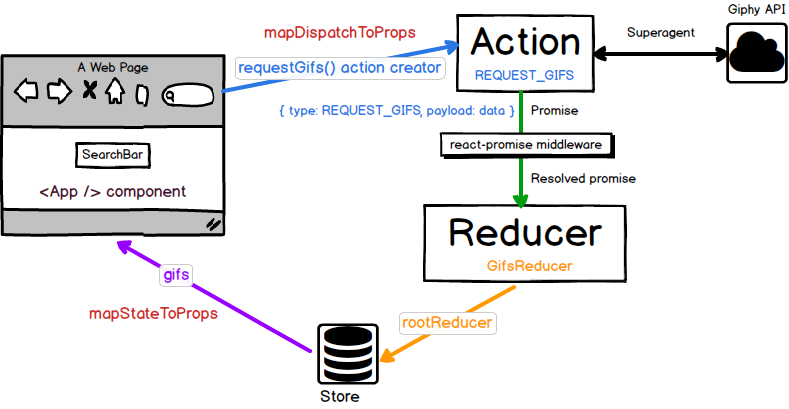
Reducer는 순수 함수여야 하므로, API 호출과 같은 사이드 이펙트는 useEffect나 미들웨어를 통해 처리한다.
4. 불변성 유지
JavaScript에서 객체나 배열을 변경할 때는 원본을 직접 수정하지 않고, 새로운 객체나 배열을 만들어 반환해야 한다.
실제 프로젝트에서의 Reducer 사용 예시
예시: 투두 리스트 관리
const initialState = {
    todos: [],
    loading: false,
    error: null
};

function todoReducer(state, action) {
    switch (action.type) {
        case 'ADD_TODO':
            return {
                ...state,
                todos: [...state.todos, action.payload]
            };
        case 'REMOVE_TODO':
            return {
                ...state,
                todos: state.todos.filter(todo => todo.id !== action.payload)
            };
        case 'SET_LOADING':
            return {
                ...state,
                loading: action.payload
            };
        case 'SET_ERROR':
            return {
                ...state,
                error: action.payload
            };
        default:
            return state;
    }
}

function TodoApp() {
    const [state, dispatch] = useReducer(todoReducer, initialState);

    // 액션 디스패치 예시
    const addTodo = (todo) => {
        dispatch({ type: 'ADD_TODO', payload: todo });
    };

    // ...

    return (
        <div>
            {/* UI 컴포넌트 */}
        </div>
    );
}
이 예시에서는 todoReducer를 사용하여 할 일 목록을 관리한다. 각 액션 타입에 따라 할 일을 추가하거나 제거하고, 로딩 상태와 에러 상태를 관리한다.
Reducer 사용 시 주의 사항!!
- 순수 함수 유지: Reducer 내에서 외부 상태에 의존하거나 사이드 이펙트를 발생시키지 않아야 한다.
- 불변성 유지: 상태를 변경할 때 기존 상태를 직접 수정하지 않고, 새로운 객체를 만들어 반환해야 한다.
- 명확한 액션 타입 정의: 액션 타입은 의미가 명확하고 예측 가능해야 한다.