오늘도 코드카타
class Solution {
    public String solution(String s, int n) {
        StringBuilder sb = new StringBuilder();

        for (char c : s.toCharArray()) {
            if(Character.isLowerCase(c)) {
                sb.append((char) ('a' + (c - 'a' + n) % 26));
            } else if (Character.isUpperCase(c)) {
                sb.append((char) ('A' + (c - 'A' + n) % 26));
            } else {
                sb.append(c);
            }
        }
        return sb.toString();
    }
}s.toCharArray(): 문자열을 문자 배열로 반환하여 각 문자에 대해 반복 작업 수행- 소문자일 경우 ->
(char) ('a' + (c - 'a' + n) % 26): 현재 문자를 'a'로부터 상대적 인덱스 값으로 변환, n 만큼 이동 후 %26으로 범위 내에서 돌도록 처리 - 대문자일 경우 ->
(char) ('A' + (c - 'A' + n) % 26): 'A'로부터 상대적 인덱스 값으로 변환, 소문자의 경우와 같음 - 그 외 문자는 그대로 결과 문자열에 추가
class Solution {
    public int solution(String s) {
        String[] nums = {"zero", "one", "two", "three", "four", "five", "six", "seven", "eight", "nine", "ten"};
        for (int i = 0; i < nums.length; i ++) {
            s = s.replace(nums[i], String.valueOf(i));
        }
        return Integer.parseInt(s);
    }
}- String.replace
- String replace(char oldChar, char newChar): 문자열 내의 특정 문자를 다른 문자로 치환
- String replace(CharSequence target, CharSequence replacement): 문자열 내의 특정 부분 문자열을 다른 문자열로 치환
- String은 불변이기에, replace는 원본 문자열을 수정하지 않고 새로운 문자열을 반환함.
- 대소문자를 구분함
- 원본 문자열에서 target 문자열이 여러 번 등장하면, 모든 부분 문자열을 치환함
String.replaceAll과의 비교
- replace: 단순 문자열 치환. 정규식 지원 x
- replaceAll: 정규식 지원. 패턴에 맞는 모든 부분 문자열 치환
String str = "123-456-789";
System.out.println(str.replace("-", ":"));     // 출력: "123:456:789" (단순 치환)
System.out.println(str.replaceAll("\\d", "*"));// 출력: "***-***-***" (정규식 사용)import java.util.Arrays;
import java.util.Comparator;
class Solution {
public String[] solution(String[] strings, int n) {
Arrays.sort(strings, new Comparator<String>() {
@Override
public int compare(String o1, String o2) {
if(o1.charAt(n) == o2.charAt(n)) {
return o1.compareTo(o2);
}
return Character.compare(o1.charAt(n), o2.charAt(n));
}
});
return strings;
}
}-
compare 메서드를 재정의하여 정렬 기준 설정
-
s1.charAt(n) == s2.charAt(n): n번째 문자가 같다면 compareTo로 전체 문자열 정렬 -
Character.compare(s1.charAt(n), s2.charAt(n)): 다르면 해당 문자 기준 정렬 -
Arrays.sort
- 배열 정렬 메서드. 기본 정렬 알고리즘을 사용하여 정렬하거나 사용자 정의 정렬 기준 적용 가능
- 기본 정렬: 숫자 배열-> 오름차순 정렬, 문자열 배열-> 사전순 정렬
- 사용자 정의 정렬: comparator를 이용하여 적용 가능
-
Comparator
- Java에서 사용자 정의 정렬 기준을 정의하기 위해 사용되는 인터페이스
- compare 메서드를 구현하여 두 객체를 비교하고 정렬 순서를 정할 수 있음
- 반환값: 음수->첫번째 객체가 두번째 객체보다 작음/0->두 객체가 같음/양수->첫번째 객체가 더 큼
- 익명 클래스, 람다식으로 구현 가능
- 주요 메서드
- comparing: 특정 키 기준 정렬
- reversed: 반대로 정렬
- thenComparing: 두번재 정렬 기준 추가
  Arrays.sort(words, Comparator.comparing(String::length));
  Arrays.sort(words, Comparator.comparing(String::length).reversed());
  Arrays.sort(words, Comparator.comparing(String::length).thenComparing(String::compareTo));
import java.util.ArrayList;
import java.util.Arrays;

class Solution {
    public int[] solution(int[] array, int[][] commands) {
        ArrayList<Integer> answer = new ArrayList<>();
        for(int i=0; i<commands.length; i++) {
            int[] sub = Arrays.copyOfRange(array, commands[i][0]-1, commands[i][1]);
            Arrays.sort(sub);
            answer.add(sub[commands[i][2]-1]);
        }

        return answer.stream().mapToInt(Integer::intValue).toArray();
    }
}
Java에서는 기본 타입을 제네릭 타입으로 사용할 수 없다
- 제네릭은 객체 타입만 지원하기 때문에 기본 타입을 사용하려면 해당 타입의 Wrapper 클래스를 사용해야 함
- 제네릭은 런타임 시점에 타입 소거(type eraure)가 발생하므로 기본 타입과 객체 타입의 충돌을 방지하기 위해 Wrapper 클래스를 사용하는 방식으로 설계됨
- 기본 타입: int, double, char 등
- wrapper class: Integer, Double, Character 등
- ArrayList<\Integer>
- 타입 안정성을 보장하기 위해 제네릭이 객체 타입만 지원하도록 설계되어 있음
- 그래서 ArrayList<\int>로 선언할 수 없고, 마지막에
answer.stream().mapToInt(Integer::intValue).toArray()로 변환해줌
타입 소거
- Java 컴파일러가 제네릭 타입을 사용한 코드를 컴파일 할 때 타입 매개변수(type parameter) 정보를 제거하고 대신 경계(bound)나 Object로 대체하는 과정
List<String> list = new ArrayList<>();
list.add("Hello");
String str = list.get(0);

// 컴파일 후 실제 변환 내용

List list = new ArrayList();
list.add("Hello");
String str = (String) list.get(0); // 명시적 캐스팅- 왜 하는걸까?
장점
-
런타임 호환성 유지 (Backward Compatibility)
- Java5에서 제네릭이 도입됨. 이전 버전의 코드와 호환성을 유지하기 위해 제네릭을 런타임에서 제거함.
- 제네릭은 컴파일 시점에만 동작하며, 런타임에는 타입 정보가 존재하지 않음
- 제네릭을 사용하지 않은 이전 버전 코드도 제네릭이 도입된 최신 버전 JVM에서 실행 가능함
// Java 1.4 이전 코드 List list = new ArrayList(); list.add("Hello"); list.add(123); // 타입 제한 없음 // Java 5 이후, 제네릭 사용 List<String> list = new ArrayList<>(); list.add("Hello"); // list.add(123); // 컴파일 오류 발생 -
타입 안전성 보장
- 타입 소거를 통해 컴파일 시점에서 타입 검증을 수행하여 타입 안정성 보장
- 컴파일러는 제네릭 타입을 사용해 잘못된 타입 사용을 방지하지만, 런타임 시에는 타입 정보를 유지하지 않기에 명시적 캐스팅을 추가함
-
JVM 복잡도 감소
- 런타임에 제네릭 타입 정보를 유지하려면 JVM이 추가적인 타입 정보를 관리해야 함->복잡성, 메모리 사용량 증가
- 제네릭 타입 정보를 제거하여 JVM의 동작을 간단하게 유지함
단점
-
런타임에 타입 정보를 사용할 수 없음
- 제네릭 타입은 컴파일 시 제거되므로 런타임에는 타입 정보가 사라짐
- 리플렉션 등 특정 작업을 어렵게 만들 수 있음
-
타입 캐스팅 필요
- 컴파일 후에는 타입 정보를 유지하지 않기에 런타임에서 명시적 캐스팅이 발생할 수 있음
-
오버로딩 제한
- 타입 소거로 인해 제네릭 타입으로는 메서드 오버로딩을 할 수 없음
타입 정보를 유지하기 위해서는?
- 일부 경우 리플렉션이나 타입 토큰을 활용함
- 궁금하면 따로 알아보기
정렬
Arrays.sort(sub)- 배열 sub의 내용을 직접 정렬. 배열 자체를 변경함(정렬이 배열에 반영됨)
- 반환값: void. 값 반환 없이 원래 배열을 정렬함
- 기존 배열의 수정으로 메모리 사용이 적음
Arrays.stream(sub).sorted()- 배열 sub을 stream으로 변환한 뒤 해당 스트림의 요소를 정렬해 반환
- 반환값: 정렬된 stream 반환. 원 배열은 그대로. 결과를 배열로 반환하려면
.toArray()사용 - 더 복잡한 연산(필터링, 매핑 등)을 추가적으로 할 때 적합
API Gateway
- 클라이언트와 백엔드 서비스 사이의 진입점(entry point) 역할을 하는 구성 요소
- 주로 MSA에서 사용되며, 클라이언트가 여러 마이크로 서비스와 직접 통신하는 대신 이를 통해 통신하도록 중개함
주요 역할(기능)
-
요청 라우팅 (Routing)
- 클라이언트 요청을 적절한 백엔드 서비스로 전달
- URL 경로, 요청 메서드 등을 기반으로 서비스 라우팅
-
로깅 및 모니터링
- 요청 및 응답을 로깅하여 트래픽 분석과 시스템 상태를 모니터링
-
인증 및 인가 (Authentication & Authorization)
- 클라이언트 요청을 백엔드로 전달하기 전 인증 및 인가 수행
- 토큰 검증(JWT 등)을 통해 보안 유지
-
로드 밸런싱 (Load Balancing)
- 여러 백엔드 서비스 인스턴스에 요청을 분산하여 성능 최적화
-
프로토콜 변환
- 클라이언트 요청과 백엔드 서비스 간의 프로토콜 변환 지원(REST <-> gRPC 등)
-
캐싱 (Caching)
- 빈번히 요청되는 데이터를 캐싱하여 응답 속도 향상
-
요청 조작 (Request Transformation)
- 요청 데이터를 변경하거나 헤더를 추가해 백엔드 서비스와의 통신을 최적화함
-
오류 처리 (Fault Handling)
- 백엔드 서비스 장애 시 클라이언트에 대체 응답 제공
장단점
장점
-
클라이언트의 편의성
- 클라이언트는 API Gateway랑만 통신하면 되기 때문에 여러 서비스의 위치나 프로토콜을 알 필요가 없음
-
보안 강화
- 인증 및 인가가 중앙화되어 관리되므로 보안 측면에서 유리함
-
트래픽 관리
- Rate Limiting(속도 제한), Circuit Breaker(서킷 브레이커) 등을 통해 트래픽 제어 가능
-
중앙 집중화된 관리
- API 요청 흐름을 중앙에서 제어 및 관리 가능
-
확장성
- 서비스에 따라 로드 밸런싱 및 스케일링 지원
단점
-
단일 장애 지점
- API Gateway가 장애를 일으키면 전체 시스템에 영향을 줄 수 있음
-
추가적인 레이턴시
- 요청이 API Gateway를 거쳐야 하므로 약간의 응답 지연 발생
-
복잡성
- 초기 설정 및 관리가 복잡할 수 있음
동작 흐름
- 클라이언트는 API Gateway에 요청 전송
- API Gateway는 요청을 분석하여 적절한 백엔드 서비스로 라우팅
- 요청 전후에 필요한 작업(인증, 로깅, 캐싱 등)을 수행
- 백엔드 서비스로부터 받은 응답을 클라이언트에 전달
Reverse Proxy
- 클라이언트의 요청을 받아 적절한 백엔드 서버로 전달하는 중계 서버
- 서버 부하 분산, 보안 강화, 캐싱 등의 목적으로 사용되며 클라이언트는 백엔드 서버의 세부 정보를 알 필요 없음
특징
- 클라이언트 요청 중계
- 서버 정보 보호
- 로드 밸런싱
- 캐싱
- SSL 종료: SSL/TLS 암호화 처리(종료)를 리버스 프록시에서 수행하여 백엔드 서버의 부하를 줄임
- HTTP 헤더 조작:요청 또는 응답 헤더를 변경하여 서버 간 통신을 최적화하거나 클라이언트 요구를 충족할 수 있음
Reverse Proxy의 동작 흐름
- 클라이언트는 백엔드 서버의 정보를 모른 채 리버스 프록시에 요청을 보냄.
- 리버스 프록시는 요청을 적절한 백엔드 서버로 전달.
- 백엔드 서버는 응답을 리버스 프록시에 전달.
- 리버스 프록시는 응답을 클라이언트에게 반환.
비슷하지 않나?
| 기능 | API Gateway | Reverse Proxy |
|---|---|---|
| 주요 역할 | 클라이언트와 백엔드 사이의 요청 중개 및 비즈니스 로직 수행 | 클라이언트 요청을 백엔드 서버로 전달 |
| 기능 확장 | 인증, 라우팅, 트래픽 제어, 캐싱 등 다양한 기능 제공 | 주로 요청 전달 및 기본적인 캐싱 지원 |
| 설계 목적 | MSA 환경에 최적화된 설계 | 단순 요청 전달 및 서버 부하 분산 |
구현 도구
| 도구 | 특징 |
|---|---|
| Spring Cloud Gateway | Spring Cloud에서 제공하는 API Gateway 솔루션. Java로 작성된 프로젝트에 적합. |
| Netflix Zuul | 넷플릭스가 개발한 API Gateway. 현재는 Spring Cloud Gateway로 대체되는 추세. |
| Kong | 오픈소스 API Gateway. 플러그인 기반 확장성 제공. |
| AWS API Gateway | AWS에서 제공하는 관리형 API Gateway 서비스. 서버리스 환경과 잘 통합. |
| NGINX | 고성능 웹 서버 및 리버스 프록시로 API Gateway 역할 가능. |
| Traefik | 마이크로서비스 및 컨테이너 환경에 최적화된 API Gateway. |
Spring Cloud Gateway
- Spring Cloud에서 제공하는 API Gateway 솔루션
- MSA에서 클라이언트와 여러 백엔드 서비스 사이의 통합된 진입점 제공
- Netflix Zuul의 대체로 설계됨
- 비동기 방식의 Netty 서버 기반으로 더 나은 성능과 확장성 제공
특징
- 비동기, 고성능 아키텍처
- Netty 기반으로 동작하며, 비동기 논블로킹 방식으로 높은 성능 제공
- 라우팅
- URL 경로, 요청 메서드, 헤더 등을 기반으로 라우팅 규칙 정의 가능
- 필터 체인
- 요청/응답을 가로채서 다양한 처리를 수행할 수 있는 필터 제공
- 커스텀 필터 구현 가능
- 로드 밸런싱
- Spring Cloud LoadBalancer와 통합하여 여러 인스턴스에 트래픽을 분산
- 보안 및 인증
- JWT, OAuth2와 같은 인증 및 인가 로직을 필터로 구현 가능
장점
- Spring 생태계와의 통합
- Spring Security, Spring Cloud LoadBalancer, Eureka 등과 손쉽게 통합
- 유연한 확장성
- 사용자 정의 필터 및 Predicate를 통해 다양한 요구사항 구현 가능
- 비동기 성능
- Netty 기반으로 높은 성능 제공
- 라우팅 유연성
- URL 경로, HTTP 메서드, 헤더 등 다양한 조건에 따라 라우팅 가능
Netflix Zuul과의 비교
| 기능 | Spring Cloud Gateway | Netflix Zuul |
|---|---|---|
| 기반 기술 | Netty (비동기, 논블로킹) | Servlet (동기, 블로킹) |
| 성능 | 고성능, 낮은 레이턴시 | 상대적으로 낮은 성능 |
| Spring 통합성 | Spring Cloud와 강력한 통합 | Spring Cloud와 통합 가능하나 설정이 더 복잡 |
| 필터 구현 | 요청/응답 모두에 대해 Global 및 Route-Specific 필터 제공 | 요청/응답에 대해 Pre/Post 필터 제공 |
| 활성화 여부 | 현재 유지 및 적극적으로 개발 | 유지보수가 중단되고 Spring Cloud Gateway로 대체 중 |
주요 구성 요소
| 구성요소 | 설명 |
|---|---|
| Route | 특정 조건(경로, 헤더 등)에 따라 요청을 라우팅하는 규칙 |
| Predicate | 조건부 라우팅을 위한 구성 요소. 요청 경로, HTTP 메서드, 헤더 등을 기반으로 라우팅 결정 |
| Filter | 요청/응답을 수정하거나, 부가 작업(인증, 로깅 등)을 수행하는 구성 요소 |
Spring Cloud Gateway 필터
체인 형태로 구성되며, 각 필터는 전처리(Pre), 후처리(Post)작업을 수행할 수 있음
- Pre 필터: 요청이 백엔드 서비스로 전달되기 전 실행
- Post 필터: 백엔드 서비스에서 반환된 응답을 클라이언트로 보내기 전 실행
필터 종류
- Global Filter
- 모든 요청에 대해 실행되는 필터
- 로깅, 인증 처리에 사용
- Route-Specific Filter
- 특정 라우트에만 적용되는 필터
- 헤더 추가, URL 변경 등에 사용
Spring Cloud Gateway 필터 구현
- GlobalFilter나 GatewayFilter 인터페이스를 구현하고 filter 메서드를 오버라이드 해야 함
Spring Cloud Gateway 필터의 동작 흐름
- 클라이언트 요청이 Gateway로 들어옴
- Gateway는 라우팅 규칙(Route)과 필터(Filter)를 확인
- Pre 필터가 실행되어 요청을 수정하거나 처리
- 백엔드 서비스로 요청이 전달
- 백엔드 서비스에서 응답을 반환
- Post 필터가 실행되어 응답을 수정하거나 처리
- 클라이언트로 응답이 반환
Spring Cloud Gateway 동작 흐름
- 클라이언트는 Gateway로 요청을 전송
- Gateway는 요청을 기반으로 라우팅 규칙과 필터 체인을 적용
- 요청을 적절한 백엔드 서비스로 전달
- 백엔드 서비스의 응답을 다시 Gateway를 통해 클라이언트로 반환
Spring Cloud Gateway 적용하기
- 의존성 설정
dependencies {
	implementation 'org.springframework.cloud:spring-cloud-starter-gateway'
	implementation 'org.springframework.cloud:spring-cloud-starter-netflix-eureka-client'
}

dependencyManagement {
	imports {
		mavenBom "org.springframework.cloud:spring-cloud-dependencies:${springCloudVersion}"
	}
}- 라우팅 설정
application.yml
server:
  port: 19091  # 게이트웨이 서비스가 실행될 포트 번호

spring:
  main:
    web-application-type: reactive  # Spring 애플리케이션이 리액티브 웹 애플리케이션으로 설정됨
  application:
    name: gateway-service  # 애플리케이션 이름을 'gateway-service'로 설정
  cloud:
    gateway:
      routes:  # Spring Cloud Gateway의 라우팅 설정
        - id: order-service  # 라우트 식별자
          uri: lb://order-service  # 'order-service'라는 이름으로 로드 밸런싱된 서비스로 라우팅
          predicates:
            - Path=/order/**  # /order/** 경로로 들어오는 요청을 이 라우트로 처리
        - id: product-service  # 라우트 식별자
          uri: lb://product-service  # 'product-service'라는 이름으로 로드 밸런싱된 서비스로 라우팅
          predicates:
            - Path=/product/**  # /product/** 경로로 들어오는 요청을 이 라우트로 처리
      discovery:
        locator:
          enabled: true  # 서비스 디스커버리를 통해 동적으로 라우트를 생성하도록 설정

eureka:
  client:
    service-url:
      defaultZone: http://localhost:19090/eureka/  # Eureka 서버의 URL을 지정
간단한 PreFilter와 PostFilter를 추가하고 실행해본다.
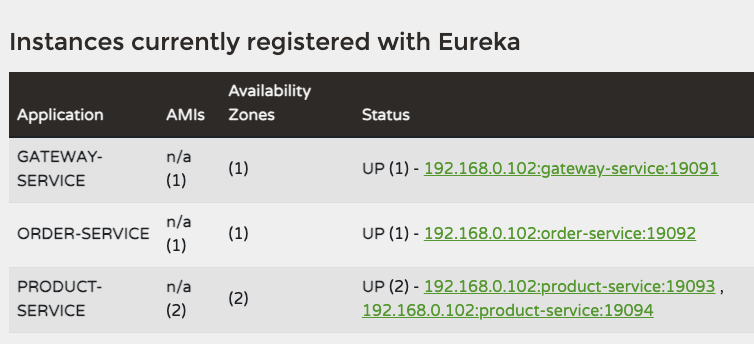
유레카 서버에 정상적으로 추가되었다.
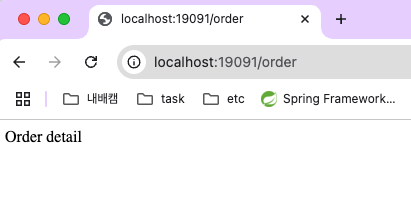
Order의 포트번호인 19092가 아닌 Gateway의 포트번호 19091로 요청을 보내도 Order에 구현된 메서드가 정상 응답한다.
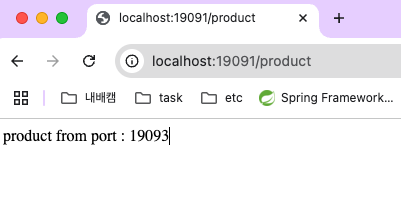
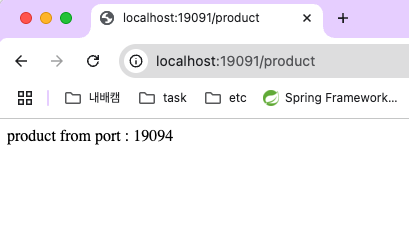
Product를 호출해도 정상 응답이 반환된다. 라운드 로빈 형식으로 번갈아 가며 포트 번호가 바뀜을 볼 수 있다.
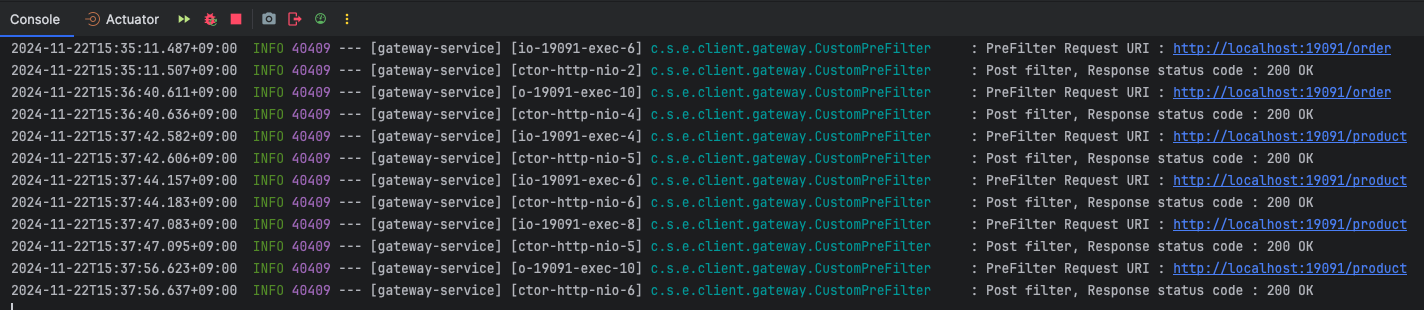
Gateway 로그를 봐도 정상적으로 동작함을 알 수 있다.
보안 구성 (OAuth2 + JWT)
MSA에서는 각 서비스가 독립적으로 배포, 통신하기에 보안이 매우 중요함
데이터 보호, 인증 및 인가, 통신 암호화 등을 통해 시스템 보안성을 확보해야 함
OAuth2
- Authorization Framework(권한 부여 프레임워크)
- 제 3자가 사용자의 자격 증명을 대신 사용하여 자원에 접근할 수 있도록 허가를 제공하는 표준 프로토콜
- 자격 증명을 안전하게 전달하면서도 사용자 비밀번호와 같은 민감 정보를 공유하지 않도록 설계됨
OAuth2의 핵심 개념
-
Resource Owner
- 사용자(User)로, 자신의 자원에 대한 접근 권한을 소유
- 리소스 소유자는 제3자 애플리케이션(client)에게 권한을 위임할 수 있음
-
Client
- 리소스 소유자가 승인한 권한을 가지고 보호된 리소스에 접근하려는 애플리케이션
- 모바일 앱, 웹 애플리케이션 등
-
Authorization Server
- 리소스 소유자의 신원을 확인하고 클라이언트에게 엑세스 토큰을 발급
-
Resource Server
- 보호된 리소스를 호스팅하는 서버
- 클라이언트가 엑세스 토큰을 사용하여 자원에 접근
-
Access Token
- 인증 서버에서 발급되는 자격 증명으로, 보호된 리소스에 접근하기 위해 사용
OAuth2의 구성 요소
- Client ID 및 Secret
- 클라이언트를 식별하기 위한 고유한 ID와 비밀번호
- Client Credentials Grant에서 클라이언트 인증에 사용
- Redirect URI
- 인증 서버가 권한 부여 코드 또는 액세스 토큰을 전달할 클라이언트의 URL
- Scopes
- 클라이언트가 요청하는 자원 및 작업의 범위를 정의
- ex) read:user, write:files
- Refresh Token
- 액세스 토큰이 만료된 경우, 새로운 액세스 토큰을 발급받기 위한 자격 증명
OAuth2의 장점
- 보안성
- 사용자의 비밀번호를 공유하지 않고 제 3자 애플리케이션에 권한을 부여
- 유연성
- 다양한 애플리케이션 유형과 시나리오에 맞는 Grant Type 제공
- 확장성
- 추가 기능(Refresh Token, Scopes 등)을 통해 다양한 요구사항 지원
- 표준화
- 인증 및 인가를 표준화하여 여러 플랫폼에서 통합 가능
OAuth2의 주요 흐름
- 권한 요청 (Authorization Request)
- 클라이언트는 리소스 소유자의 동의를 얻기 위해 인증 서버에 권한 요청을 보냄
- 권한 부여 (Authorization Grant)
- 리소스 소유자가 요청을 승인하면 인증 서버는 클라이언트에게 Authorization Grant(권한 부여 코드)를 발급
- 액세스 토큰 발급 (Access Token Issue)
- 클라이언트는 인증 서버에 권한 부여 코드를 제출하여 액세스 토큰을 발급받음
- 리소스 접근 (Resourece Access)
- 클라이언트는 액세스 토큰을 사용하여 리소스 서버에서 보호된 리소스에 접근할 수 있음
OAuth2의 권한 부여 유형
-
Authorization Code Grant
- 사용자 인증이 필요한 방식
- 브라우저 기반 애플리케이션과 서버 간 통신에 주로 사용
- 액세스 토큰이 클라이언트로 직접 노출되지 않아 비교적 더 안전함
-
Implicit Grant
- 간소화된 방식, 액세스 토큰을 직접 발급
- 브라우저 기반 클라이언트에서 사용
- 비교적 보안성이 낮음
-
Resource Owner Password Credentials Grant
- 리소스 소유자의 사용자 이름과 비밀번호를 클라이언트에 직접 제공
- 높은 신뢰가 있는 애플리케이션에서만 사용
- 현재는 잘 쓰지 않는다 함
-
Client Credentials Grant
- 클라이언트가 자신의 자격 증명(client ID와 secret)을 사용하여 리소스에 접근
- 사용자 인증이 필요없는 애플리케이션 간 통신에 사용
JWT
- JSON Web Token
- JSON 형식으로 정보를 안전하게 전송하기 위한 토큰
- 주로 사용자 인증 및 권한 부여에 사용되며, 컴팩트하고 독립적인 방식으로 정보를 표현함
- 서명을 통해 변조 여부를 확인할 수 있어, 신뢰성과 보안성을 제공
JWT의 구조
"."로 구분된 세 부분으로 구성됨
- Header
- JWT의 타입과 서명 알고리즘 정보를 포함
- JSON 형식으로 작성되며, Base64로 인코딩됨
{
"alg": "HS256",   // 서명 알고리즘 (예: HMAC-SHA256)
"typ": "JWT"      // 토큰 타입
}
- Payload
- 토큰에 포함된 Claims 데이터를 저장
- Claims: 사용자 정보나 토큰의 메타데이터 포함
- JSON 형식으로 작성되며, Base64로 인코딩됨
{ "sub": "1234567890", // 사용자 ID "name": "John Doe", // 사용자 이름 "admin": true, // 사용자 권한 정보 "iat": 1516239022 // 토큰 발급 시간 (Unix Time) } - Claims 유형
- Registered Claims(등록된 클레임): 예약된 표준 클레임(iss, exp, sub 등)
- Public Claims(공개 클레임): 사용자 정의 클레임. 충돌 방지를 위해 URI 형식 권장
- Private Claims(비공개 클레임): 클라이언트와 서버 간의 협약으로 정의된 클레임
- Signature
- 토큰의 무결성을 보장하기 위해 생성된 서명
- Header와 Payload를 결합한 후 비밀키와 함께 지정된 알고리즘으로 해싱
HMACSHA256(
base64UrlEncode(header) + "." + base64UrlEncode(payload),
secret
)
장단점
장점
- 자기 포함(Self-Contained)
- 사용자 정보와 토큰 상태를 자체적으로 포함함. 별도의 세션 저장소가 필요없음
- 컴팩트
- Base64로 인코딩된 JSON 형식이라 크기가 작아 네트워크 대역폭 절약
- 독립성
- 클라이언트와 서버 간의 프로토콜에 독립적으로 동작
- 확장성
- 사용자 정의 클레임을 추가해 다양한 요구사항을 충족할 수 있음
- 보안성
- 서명을 통해 토큰 변조 방지
- HTTPS와 함께 사용 시 높은 보안성 제공
단점
- 재발급 복잡성
- JWT는 상태를 저장하지 않음. 토큰 만료 시 재발급 로직이 복잡할 수 있음
- 서명은 무결성만 보장함
- JWT 자체는 암호화되지 않아 민감정보를 포함하면 안됨
- 민감한 데이터는 별도로 암호화하여 보호해야 함
- 토큰 크기
- Base64 인코딩으로 인해 단순 텍스트보다 크기가 커질 수 있음
- 만료 후 무효화가 어려움
- 서버에서 상태를 저장하지 않기 때문에 발급된 토큰을 강제로 무효화하기 어려움
- 이를 위해 블랙리스트나 만료시간을 짧게 설정하는 조치가 필요
JWT와 OAuth2의 관계
OAuth2는 인증 및 권한 부여를 위한 프레임워크
JWT는 OAuth2에서 사용하는 토큰 형식 중 하나
JWT는 OAuth2의 Access Token이나 ID Token으로 사용됨
JWT와 세션 기반 인증의 비교
| 특징 | JWT | 세션 기반 인증 |
|---|---|---|
| 저장 방식 | 클라이언트(브라우저/로컬 스토리지) | 서버 메모리/데이터베이스 |
| 서버 상태 유지 | 상태 비저장(Stateless) | 상태 저장(Stateful) |
| 확장성 | 높은 확장성 | 확장성이 낮음(서버 간 세션 동기화 필요) |
| 보안 | 토큰 자체로 서명 검증 가능, 민감 정보 포함 주의 | 세션 ID 노출 시 공격 가능 |
| 무효화 | 블랙리스트 관리 필요 | 서버에서 세션 직접 제거 가능 |
실습
- 의존성 추가
dependencies {
	implementation 'io.jsonwebtoken:jjwt:0.12.6'
	implementation 'org.springframework.boot:spring-boot-starter-security'
	implementation 'org.springframework.cloud:spring-cloud-starter-netflix-eureka-client'
}- yml 설정
spring:
  application:
    name: auth-service

eureka:
  client:
    service-url:
      defaultZone: http://localhost:19090/eureka/

service:
  jwt:
    access-expiration: 3600000
    secret-key: "66e56r2B7J2064qU66e56r2B66e56r2B7ZWY6rOg7Jq47KeA7JWK7Iq164uI64uk7ZWc66eI66as6rCA66e57ZWY6rOg7Jq466m064uk66W47ZWc66eI66as6rCA6r2B7ZWY6rOg7JuB64uI64uk"

server:
port: 19095- Config 작성
@Configuration
@EnableWebSecurity
public class AuthConfig {

    @Bean
    public SecurityFilterChain securityFilterChain(HttpSecurity http) throws Exception {
        http
                // CSRF 보호 비활성화
                .csrf(csrf -> csrf.disable())
                // 요청에 대한 접근 권한 설정
                .authorizeRequests(authorize -> authorize
                        // /auth/signIn 경로에 대한 접근을 허용
                        .requestMatchers("/auth/signIn").permitAll()
                        .anyRequest().authenticated()
                )
                // 세션 사용 안함
                .sessionManagement(session -> session
                        .sessionCreationPolicy(SessionCreationPolicy.STATELESS)
                );

        return http.build();
    }
}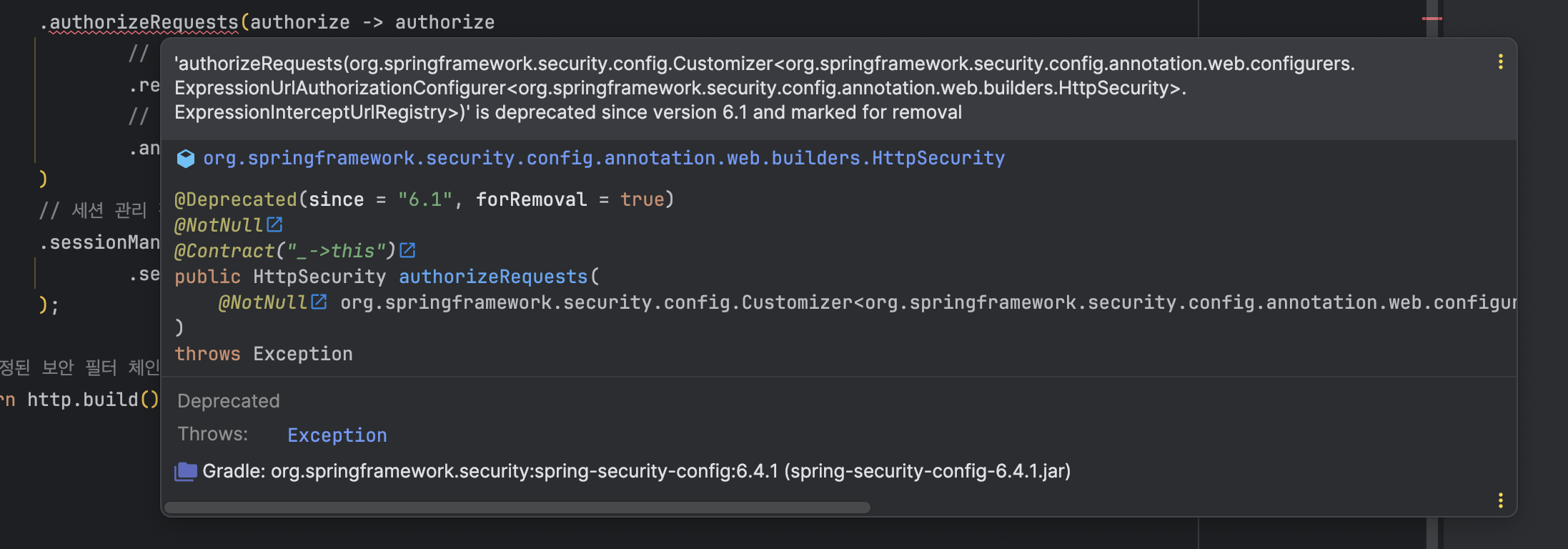
Spring Security 6.1 버전부터 authorizeRequests 메서드는 deprecated 되었으며 authorizeHttpRequests를 사용하는 것이 권장됨
- 왜 deprecated 되었을까?
-> Spring Security에서 보안 구성을 현대적이고 직관적으로 만들기 위해 꾸준히 기존 API를 개선해오고 있기 때문
authorizeHttpRequests
- Spring Security 6.x 버전에서 URL 기반의 HTTP 요청 접근 제어를 구성하는 메서드
authorizeRequests의 대체로 도입되었으며, URL 패턴에 따라 접근 권한을 보다 직관적으로 설정할 수 있도록 개선됨- 동작 흐름
- HTTP 요청이 들어오면 URL이
requestMatchers로 정의된 패턴과 비교됨 - 각 패턴에 설정된 권한 조건(permitAll, authenticated, hasRole 등)에 따라 요청이 허용되거나 차단됨
- 조건이 설정되지 않은 URL 요청은 기본 정책(anyRequest())에 따라 처리됨
- HTTP 요청이 들어오면 URL이
수정
.authorizeHttpRequests(authorize -> authorize- Controller 작성
@RestController
@RequiredArgsConstructor
public class AuthController {

    private final AuthService authService;

    @GetMapping("/auth/signin")
    public ResponseEntity<?> createAuthToken(@RequestParam String user_id) {
        return ResponseEntity.ok(new authResponse(authService.createAccessToken(user_id)));
    }

    @Data
    @AllArgsConstructor
    @NoArgsConstructor
    static class authResponse {
        private String accessToken;
    }
}- Service 작성
@Service
public class AuthService {

    @Value("${spring.application.name}")
    private String issuer;

    @Value("${service.jwt.access-expiration}")
    private Long accessExpiration;

    private final SecretKey secretKey;


    public AuthService(@Value("${service.jwt.secret-key}") String secretKey) {
        this.secretKey = Keys.hmacShaKeyFor(Decoders.BASE64URL.decode(secretKey));
    }

    public String createAccessToken(String userId) {
        return Jwts.builder()
                .claim("user_id", userId)
                .issuer(issuer)
                .issuedAt(new Date(System.currentTimeMillis())) // 생성일시
                .expiration(new Date(System.currentTimeMillis() + accessExpiration)) // 만료일시
                .signWith(secretKey, SignatureAlgorithm.HS256) // 암호화알고리즘
                .compact();
    }
}- 확인
http://localhost:19095/auth/signin?user_id=qwer 으로 요청 전송
반환
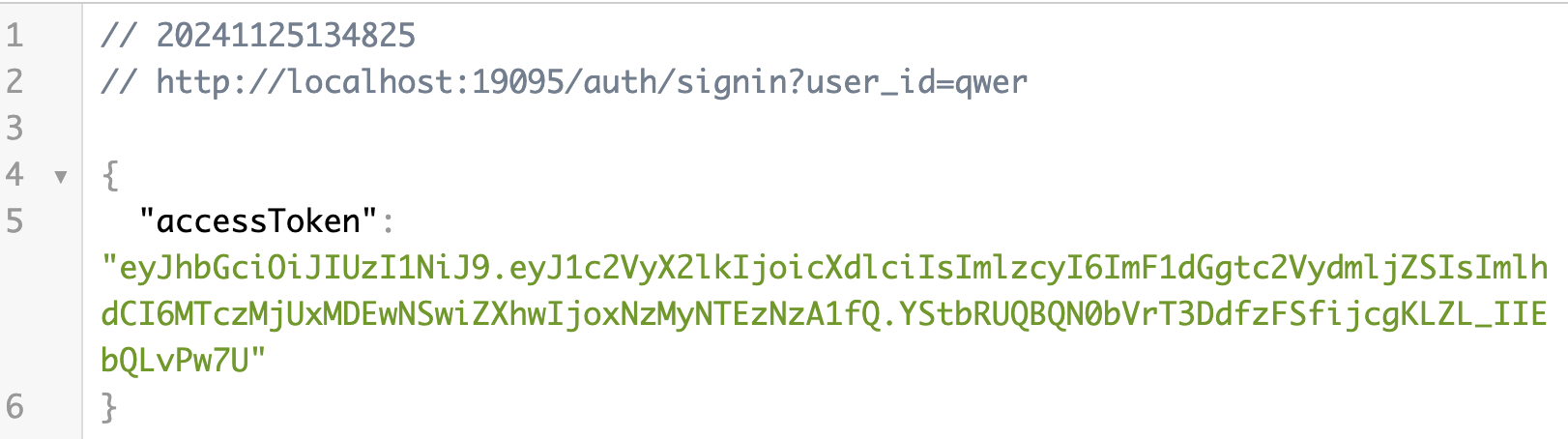
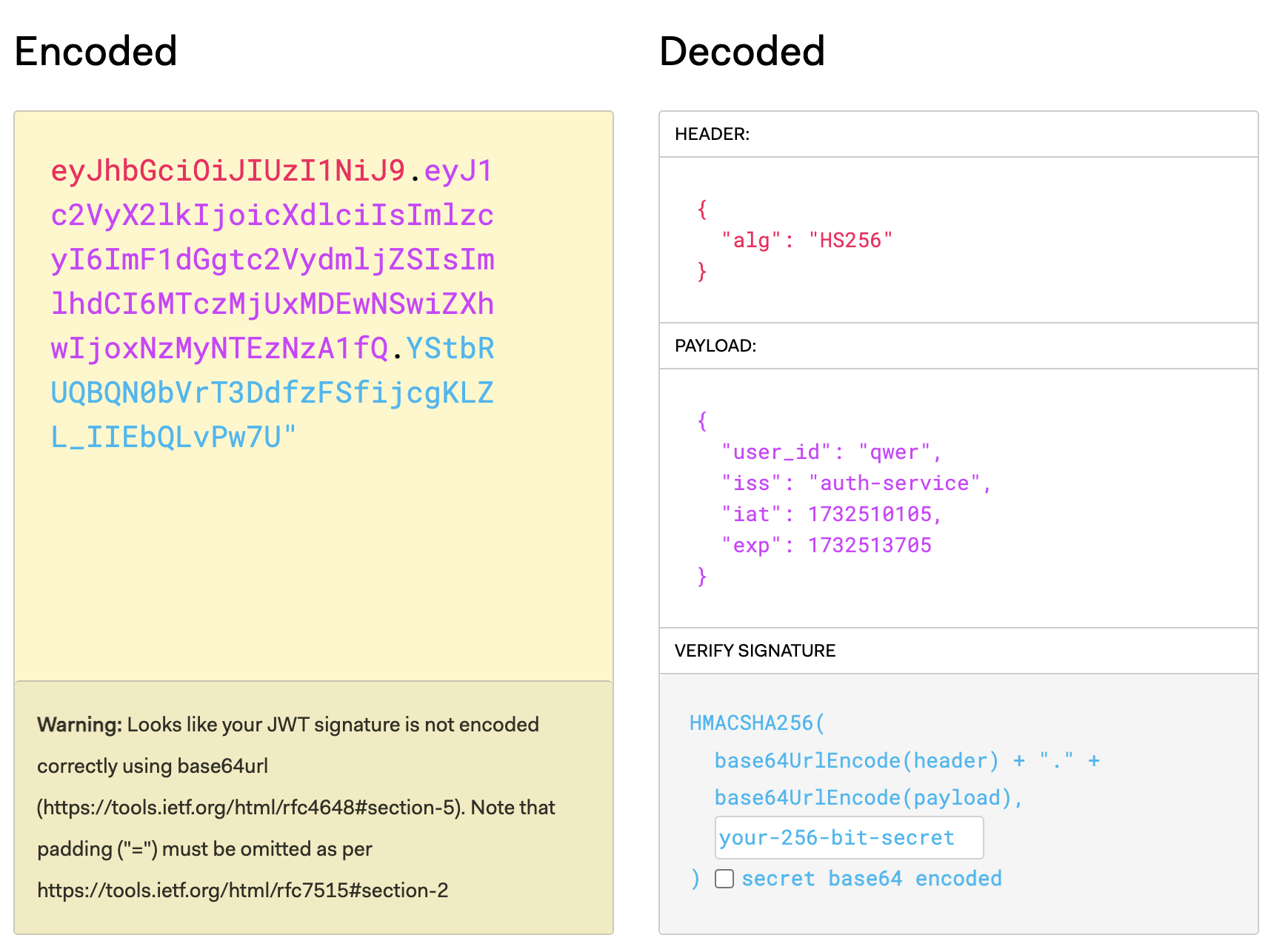
만든 access token이 정상적으로 반환되었음을 알 수 있다
header에 만들어진 access token 값을 추가하고
http://localhost:19091/product 로 요청을 보내면
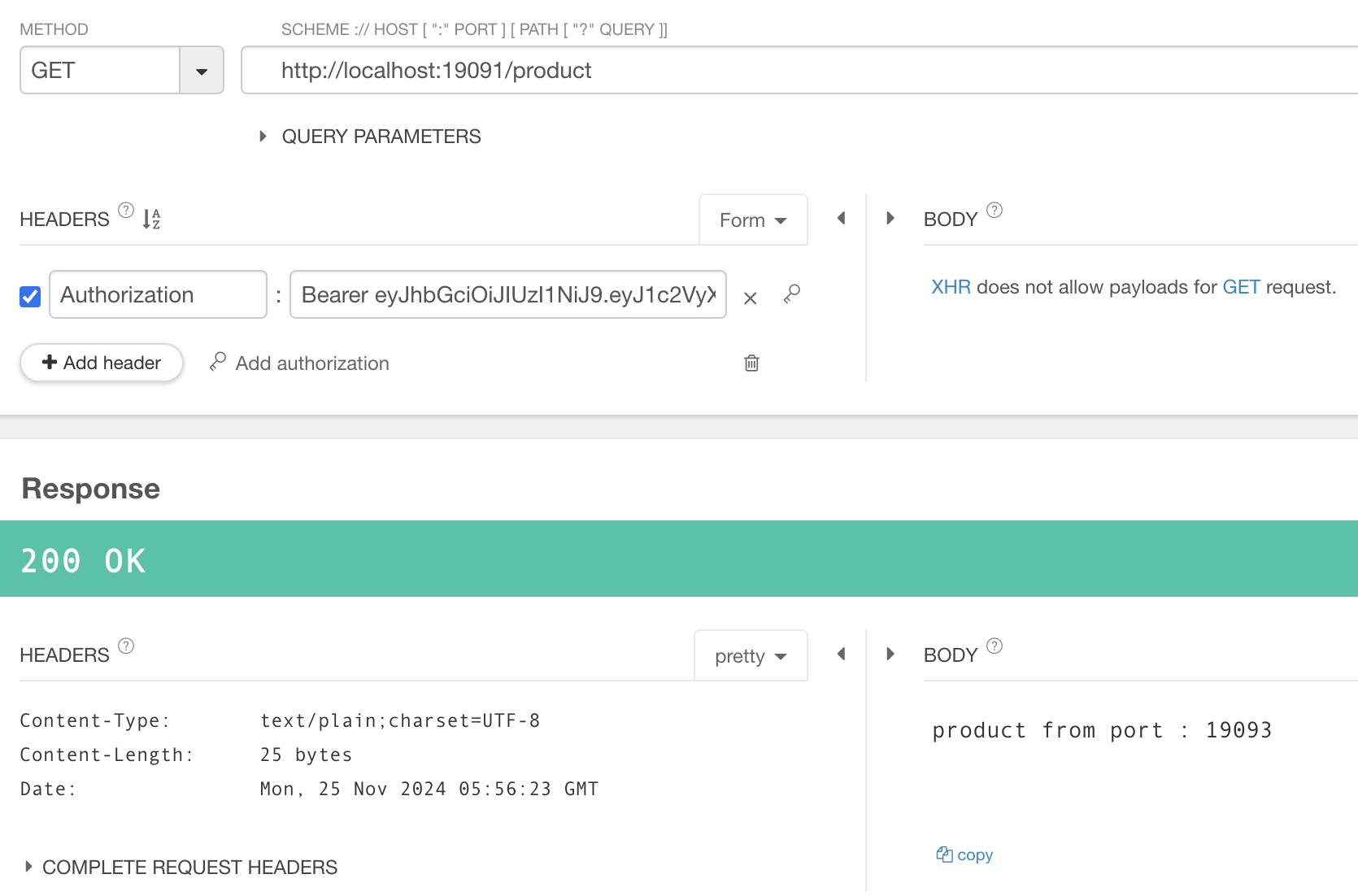
이렇게 응답이 정상 반환됨을 확인할 수 있다
토큰 없이 요청하면
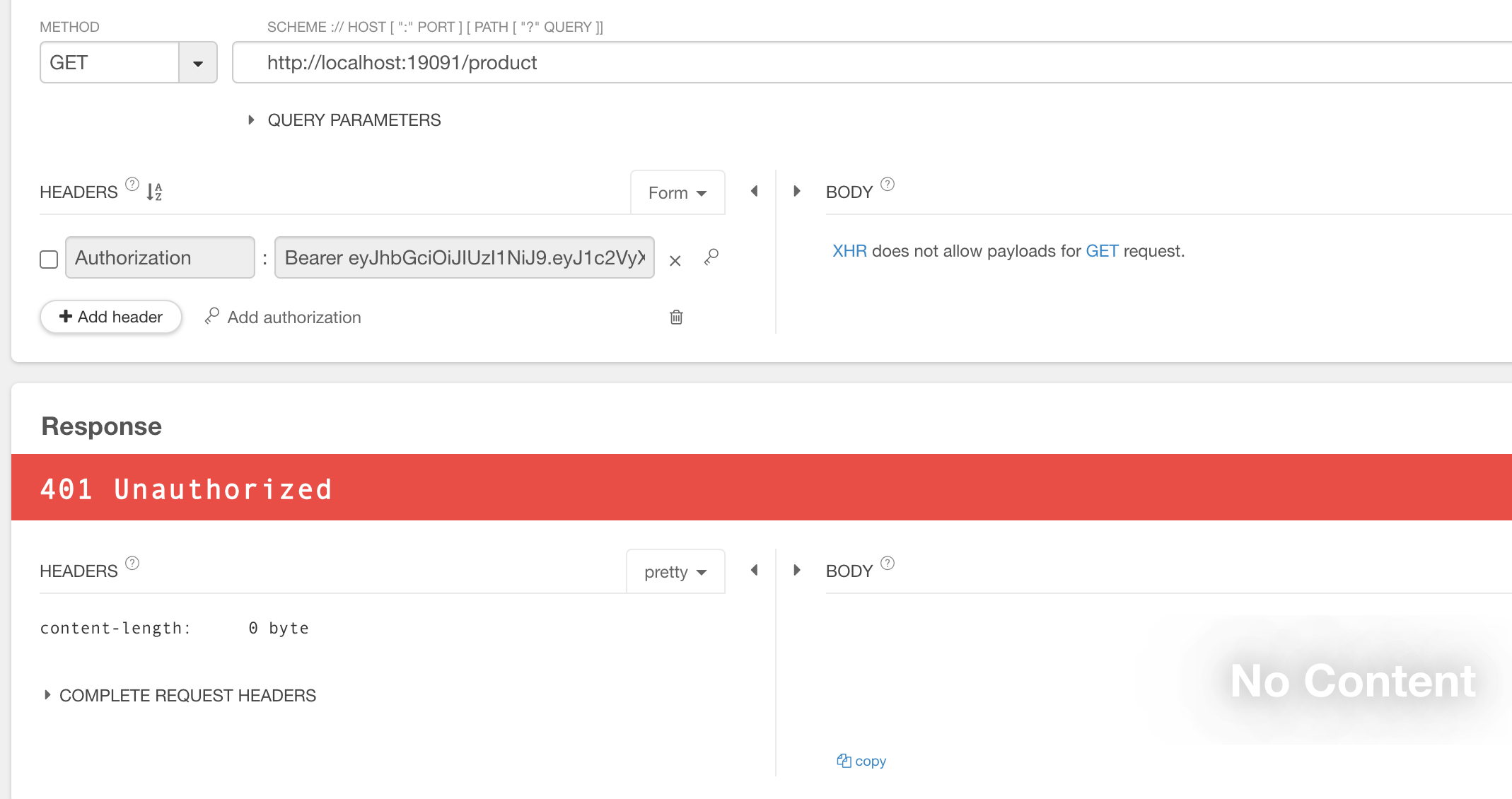
401이 정상 반환된다
오늘은 날씨가 좋아서 다들 피크닉장소에서 스몰톡했다.
소풍 온 기분으로다가 적당히 놀고 적당히 공부하는 중이다.
첫플젝 팀운이 너무 좋았던 것 같아서 너무 좋다 👍👍 채고채고