Agentic RAG + LangGraph
에이전트(Agent)는 검색 도구를 사용할지 여부를 결정해야할때 유용하다. 에이전트와 관련된 내용은 Agent페이지를 참고.
검색 에이전트를 구현하기 위해서 LLM에 검색 도구에 대한 접근 권한을 부여하기만 하면된다.
그리고 이를 LangGraph에 통합할 수있다.
from dotenv import load_dotenv

load_dotenv()
True# ! pip install faiss-cpu pdfplumber기본 PDF 기반 Retrieval Chain 생성
PDF 문서를 기반으로 Retrieval Chain을 생성한다. 가장 단순한 구조의 Retrieval Chain.
단, LangGraph 에서는 Retriever과 Chain 을 따로 생성한다. 그래야 각 노드별로 세부 처리를 할 수 있다.
from rag.pdf import PDFRetrievalChain

# pdf 문서 로드
pdf = PDFRetrievalChain(["docs/SPRI_AI_Brief_2023년12월호_F.pdf"]).create_chain()

# retriever와 chain을 생성
pdf_retriever = pdf.retriever
pdf_chain = pdf.chain['docs/SPRI_AI_Brief_2023년12월호_F.pdf']그 다음 retriever_tool을 생성한다.
document_prompt는 검색된 문서를 표현하는 프롬프트이다.
사용가능한 키
- page_content
- metadata 의 키: (예시) source, page
사용예시
"<document><context>{page_content}</context><metadata><source>{source}</source><page>{page}</page></metadata></document>"
from langchain_core.tools.retriever import create_retriever_tool
from langchain_core.prompts import PromptTemplate

# PDF 문서를 기반으로 검색 도구 생성
retriever_tool = create_retriever_tool(
    pdf_retriever,
    "pdf_retriever",
    "Search and return information about SPRI AI Brief PDF file. It contains useful information on recent AI trends. The document is published on Dec 2023.",
    document_prompt=PromptTemplate.from_template(
        "<document><context>{page_content}</context><metadata><source>{source}</source><page>{page}</page></metadata></document>"
    ),
)

# 생성된 검색 도구를 도구 리스트에 추가하여 에이전트에서 사용 가능하도록 설정
tools = [retriever_tool]
Agent 상태
그래프 정의.
각 노드에 전달되는 state 객체이다.
상태는 messages 목록으로 구성.
그래프의 각 노드는 이 목록에 내용을 추가한다.
from typing import Annotated, Sequence, TypedDict
from langchain_core.messages import BaseMessage
from langgraph.graph.message import add_messages


# 에이전트 상태를 정의하는 타입 딕셔너리, 메시지 시퀀스를 관리하고 추가 동작 정의
class AgentState(TypedDict):
    # add_messages reducer 함수를 사용하여 메시지 시퀀스를 관리
    messages: Annotated[Sequence[BaseMessage], add_messages]
노드와 엣지
에이전트 기반 RAG 그래프는 다음과 같이 구성될 수 있다.
상태는 메시지들의 집합이다.
각 노드는 상태를 업데이트(추가)한다.
조건부 엣지는 다음에 방문할 노드를 결정한다.
다음은 간단한 채점기(Grader) 이다.
from typing import Literal
from langchain import hub
from langchain_core.messages import HumanMessage
from langchain_core.output_parsers import StrOutputParser
from langchain_core.prompts import PromptTemplate
from pydantic import BaseModel, Field
from langchain_openai import ChatOpenAI
from langgraph.prebuilt import tools_condition
from langchain_teddynote.models import get_model_name, LLMs

# 최신 모델이름 가져오기
MODEL_NAME = get_model_name(LLMs.GPT4)


# 데이터 모델 정의
class grade(BaseModel):
    """A binary score for relevance checks"""

    binary_score: str = Field(
        description="Response 'yes' if the document is relevant to the question or 'no' if it is not."
    )


def grade_documents(state) -> Literal["generate", "rewrite"]:
    # LLM 모델 초기화
    model = ChatOpenAI(temperature=0, model=MODEL_NAME, streaming=True)

    # 구조화된 출력을 위한 LLM 설정
    llm_with_tool = model.with_structured_output(grade)

    # 프롬프트 템플릿 정의
    prompt = PromptTemplate(
        template="""You are a grader assessing relevance of a retrieved document to a user question. \n
        Here is the retrieved document: \n\n {context} \n\n
        Here is the user question: {question} \n
        If the document contains keyword(s) or semantic meaning related to the user question, grade it as relevant. \n
        Give a binary score 'yes' or 'no' score to indicate whether the document is relevant to the question.""",
        input_variables=["context", "question"],
    )

    # llm + tool 바인딩 체인 생성
    chain = prompt | llm_with_tool

    # 현재 상태에서 메시지 추출
    messages = state["messages"]

    # 가장 마지막 메시지 추출
    last_message = messages[-1]

    # 원래 질문 추출
    question = messages[0].content

    # 검색된 문서 추출
    retrieved_docs = last_message.content

    # 관련성 평가 실행
    scored_result = chain.invoke({"question": question, "context": retrieved_docs})

    # 관련성 여부 추출
    score = scored_result.binary_score

    # 관련성 여부에 따른 결정
    if score == "yes":
        print("==== [DECISION: DOCS RELEVANT] ====")
        return "generate"

    else:
        print("==== [DECISION: DOCS NOT RELEVANT] ====")
        print(score)
        return "rewrite"


def agent(state):
    # 현재 상태에서 메시지 추출
    messages = state["messages"]

    # LLM 모델 초기화
    model = ChatOpenAI(temperature=0, streaming=True, model=MODEL_NAME)

    # retriever tool 바인딩
    model = model.bind_tools(tools)

    # 에이전트 응답 생성
    response = model.invoke(messages)

    # 기존 리스트에 추가되므로 리스트 형태로 반환
    return {"messages": [response]}


def rewrite(state):
    print("==== [QUERY REWRITE] ====")
    # 현재 상태에서 메시지 추출
    messages = state["messages"]
    # 원래 질문 추출
    question = messages[0].content

    # 질문 개선을 위한 프롬프트 구성
    msg = [
        HumanMessage(
            content=f""" \n
    Look at the input and try to reason about the underlying semantic intent / meaning. \n
    Here is the initial question:
    \n ------- \n
    {question}
    \n ------- \n
    Formulate an improved question: """,
        )
    ]

    # LLM 모델로 질문 개선
    model = ChatOpenAI(temperature=0, model=MODEL_NAME, streaming=True)
    # Query-Transform 체인 실행
    response = model.invoke(msg)

    # 재작성된 질문 반환
    return {"messages": [response]}


def generate(state):
    # 현재 상태에서 메시지 추출
    messages = state["messages"]

    # 원래 질문 추출
    question = messages[0].content

    # 가장 마지막 메시지 추출
    docs = messages[-1].content

    # RAG 프롬프트 템플릿 가져오기
    prompt = hub.pull("teddynote/rag-prompt")

    # LLM 모델 초기화
    llm = ChatOpenAI(model_name=MODEL_NAME, temperature=0, streaming=True)

    # RAG 체인 구성
    rag_chain = prompt | llm | StrOutputParser()

    # 답변 생성 실행
    response = rag_chain.invoke({"context": docs, "question": question})
    return {"messages": [response]}
그래프
call_model 에이전트로 시작
에이전트가 함수를 호출할지 결정한다.
함수 호출을 결정한 경우, 도구(retriever)를 호출하기 위한 action을 실행한다.
도구의 출력값을 메시지(state)에 추가하여 에이전트를 호출한다.
from langgraph.graph import END, StateGraph, START
from langgraph.prebuilt import ToolNode
from langgraph.checkpoint.memory import MemorySaver

# AgentState 기반 상태 그래프 워크플로우 초기화
workflow = StateGraph(AgentState)

# 노드 정의
workflow.add_node("agent", agent)  # 에이전트 노드
retrieve = ToolNode([retriever_tool])
workflow.add_node("retrieve", retrieve)  # 검색 노드
workflow.add_node("rewrite", rewrite)  # 질문 재작성 노드
workflow.add_node("generate", generate)  # 관련 문서 확인 후 응답 생성 노드

# 엣지 연결
workflow.add_edge(START, "agent")

workflow.add_edge("agent", "retrieve")
# 검색 여부 결정을 위한 조건부 엣지 추가
# workflow.add_conditional_edges(
#     "agent",
#     # 에이전트 결정 평가
#     tools_condition,
#     {
#         # 조건 출력을 그래프 노드에 매핑
#         "tools": "retrieve",
#         END: END,
#     },
# )

# 액션 노드 실행 후 처리될 엣지 정의
workflow.add_conditional_edges(
    "retrieve",
    # 문서 품질 평가
    grade_documents,
)
workflow.add_edge("generate", END)
workflow.add_edge("rewrite", "agent")

# 그래프 컴파일
graph = workflow.compile(checkpointer=MemorySaver())
from langchain_teddynote.graphs import visualize_graph
visualize_graph(graph)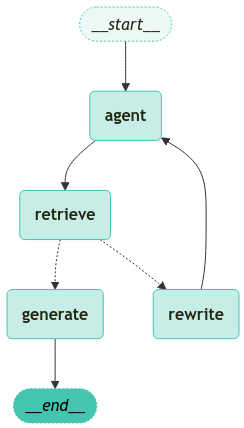
그래프 실행
from langchain_core.runnables import RunnableConfig
from langchain_teddynote.messages import stream_graph, invoke_graph, random_uuid

# config 설정(재귀 최대 횟수, thread_id)
config = RunnableConfig(recursion_limit=10, configurable={"thread_id": random_uuid()})

# 사용자의 에이전트 메모리 유형에 대한 질문을 포함하는 입력 데이터 구조 정의
inputs = {
    "messages": [
        ("user", "삼성전자가 개발한 생성형 AI 의 이름은?"),
    ]
}

# 그래프 실행
invoke_graph(graph, inputs, config)
==================================================
🔄 Node: [1;36magent[0m 🔄
- - - - - - - - - - - - - - - - - - - - - - - - -
==================================[1m Ai Message [0m==================================
Tool Calls:
pdf_retriever (call_RW2I4cii3zDQwIRnB0Ahyytb)
Call ID: call_RW2I4cii3zDQwIRnB0Ahyytb
Args:
query: 삼성전자 생성형 AI 이름
==================================================
==== [DECISION: DOCS RELEVANT] ====
==================================================
🔄 Node: [1;36mretrieve[0m 🔄
- - - - - - - - - - - - - - - - - - - - - - - - -
=================================[1m Tool Message [0m=================================
Name: pdf_retriever
<document><context>▹ 삼성전자, 자체 개발 생성 AI ‘삼성 가우스’ 공개 ···························································10
▹ 구글, 앤스로픽에 20억 달러 투자로 생성 AI 협력 강화 ················································11
▹ IDC, 2027년 AI 소프트웨어 매출 2,500억 달러 돌파 전망···········································12</context><metadata><source>docs/SPRI_AI_Brief_2023년12월호_F.pdf</source><page>1</page></metadata></document>
<document><context>SPRi AI Brief |
2023-12월호
삼성전자, 자체 개발 생성 AI ‘삼성 가우스’ 공개
KEY Contents
n 삼성전자가 온디바이스에서 작동 가능하며 언어, 코드, 이미지의 3개 모델로 구성된 자체 개발 생성
AI 모델 ‘삼성 가우스’를 공개
n 삼성전자는 삼성 가우스를 다양한 제품에 단계적으로 탑재할 계획으로, 온디바이스 작동이 가능한
삼성 가우스는 외부로 사용자 정보가 유출될 위험이 없다는 장점을 보유
£언어, 코드, 이미지의 3개 모델로 구성된 삼성 가우스, 온디바이스 작동 지원</context><metadata><source>docs/SPRI_AI_Brief_2023년12월호_F.pdf</source><page>12</page></metadata></document>
<document><context>£언어, 코드, 이미지의 3개 모델로 구성된 삼성 가우스, 온디바이스 작동 지원
n 삼성전자가 2023년 11월 8일 열린 ‘삼성 AI 포럼 2023’ 행사에서 자체 개발한 생성 AI 모델
‘삼성 가우스’를 최초 공개
∙ 정규분포 이론을 정립한 천재 수학자 가우스(Gauss)의 이름을 본뜬 삼성 가우스는 다양한 상황에
최적화된 크기의 모델 선택이 가능
∙ 삼성 가우스는 라이선스나 개인정보를 침해하지 않는 안전한 데이터를 통해 학습되었으며,
온디바이스에서 작동하도록 설계되어 외부로 사용자의 정보가 유출되지 않는 장점을 보유</context><metadata><source>docs/SPRI_AI_Brief_2023년12월호_F.pdf</source><page>12</page></metadata></document>
<document><context>어시스턴트를 적용한 구글 픽셀(Pixel)과 경쟁할 것으로 예상
☞ 출처 : 삼성전자, ‘삼성 AI 포럼’서 자체 개발 생성형 AI ‘삼성 가우스’ 공개, 2023.11.08.
삼성전자, ‘삼성 개발자 콘퍼런스 코리아 2023’ 개최, 2023.11.14.
TechRepublic, Samsung Gauss: Samsung Research Reveals Generative AI, 2023.11.08.
10</context><metadata><source>docs/SPRI_AI_Brief_2023년12월호_F.pdf</source><page>12</page></metadata></document>
<document><context>처리를 지원
∙ 코드 모델 기반의 AI 코딩 어시스턴트 ‘코드아이(code.i)’는 대화형 인터페이스로 서비스를 제공하며
사내 소프트웨어 개발에 최적화
∙ 이미지 모델은 창의적인 이미지를 생성하고 기존 이미지를 원하는 대로 바꿀 수 있도록 지원하며
저해상도 이미지의 고해상도 전환도 지원
n IT 전문지 테크리퍼블릭(TechRepublic)은 온디바이스 AI가 주요 기술 트렌드로 부상했다며,
2024년부터 가우스를 탑재한 삼성 스마트폰이 메타의 라마(Llama)2를 탑재한 퀄컴 기기 및 구글</context><metadata><source>docs/SPRI_AI_Brief_2023년12월호_F.pdf</source><page>12</page></metadata></document>
<document><context><구글 딥마인드의 범용 AI 분류 프레임워크>
성능 특수 AI 예시 범용 AI 예시
0단계: AI 아님 계산기 소프트웨어, 컴파일러 아마존 메커니컬 터크
1단계: 신진(숙련되지 않은 인간) GOFAI(Good Old Fashioned Artificial Intelligence) 챗GPT, 바드, 라마2
스마트 스피커(애플 시리, 아마존 알렉사, 구글
2단계: 유능(숙련된 인간의 50% 이상) 미달성
어시스턴트), IBM 왓슨
3단계: 전문가(숙련된 인간의 90% 이상) 문법 교정기(그래머리), 생성 이미지 모델(달리2) 미달성</context><metadata><source>docs/SPRI_AI_Brief_2023년12월호_F.pdf</source><page>18</page></metadata></document>
<document><context>온디바이스에서 작동하도록 설계되어 외부로 사용자의 정보가 유출되지 않는 장점을 보유
∙ 삼성전자는 삼성 가우스를 활용한 온디바이스 AI 기술도 소개했으며, 생성 AI 모델을 다양한 제품에
단계적으로 탑재할 계획
n 삼성 가우스는 △텍스트를 생성하는 언어모델 △코드를 생성하는 코드 모델 △이미지를 생성하는
이미지 모델의 3개 모델로 구성
∙ 언어 모델은 클라우드와 온디바이스 대상 다양한 모델로 구성되며, 메일 작성, 문서 요약, 번역 업무의
처리를 지원</context><metadata><source>docs/SPRI_AI_Brief_2023년12월호_F.pdf</source><page>12</page></metadata></document>
<document><context>제작을 포함
n 알리바바 클라우드는 급증하는 생성 AI 수요에 대응해 모델 개발과 애플리케이션 구축 절차를
간소화하는 올인원 AI 모델 구축 플랫폼 ‘젠AI(GenAI)’도 공개
∙ 이 플랫폼은 데이터 관리, 모델 배포와 평가, 신속한 엔지니어링을 위한 종합 도구 모음을 제공하여
다양한 기업들이 맞춤형 AI 모델을 한층 쉽게 개발할 수 있도록 지원
∙ 생성 AI 개발에 필요한 컴퓨팅과 데이터 처리 요구사항을 지원하기 위해 AI 플랫폼(PAI),
데이터베이스 솔루션, 컨테이너 서비스와 같은 클라우드 신제품도 발표</context><metadata><source>docs/SPRI_AI_Brief_2023년12월호_F.pdf</source><page>11</page></metadata></document>
<document><context>▹ 빌 게이츠, AI 에이전트로 인한 컴퓨터 사용의 패러다임 변화 전망································13
▹ 유튜브, 2024년부터 AI 생성 콘텐츠 표시 의무화····························································14
3. 기술/연구
▹ 영국 과학혁신기술부, AI 안전 연구소 설립 발표······························································15</context><metadata><source>docs/SPRI_AI_Brief_2023년12월호_F.pdf</source><page>1</page></metadata></document>
<document><context>£AI 기술 중 머신러닝, 텐서플로우, 딥러닝의 임금 프리미엄이 높게 평가
n 옥스퍼드 인터넷 연구소(Oxford Internet Institute)가 2023년 10월 24일 962개 기술과 2만 5천
명을 대상으로 한 연구에서 AI를 포함한 주요 기술의 경제적 가치를 분석한 결과를 발표
∙ 연구에 따르면 한 기술의 경제적 가치는 근로자의 여타 역량과 얼마나 잘 결합하는지를 보여주는
‘상보성(complementarity)’에 따라 결정됨</context><metadata><source>docs/SPRI_AI_Brief_2023년12월호_F.pdf</source><page>20</page></metadata></document>
==================================================
==================================================
🔄 Node: [1;36mgenerate[0m 🔄
- - - - - - - - - - - - - - - - - - - - - - - - -
삼성전자가 개발한 생성형 AI의 이름은 '삼성 가우스'입니다.
**Source**
- docs/SPRI_AI_Brief_2023년12월호_F.pdf (page 12)
==================================================# 그래프 스트리밍 출력
stream_graph(graph, inputs, config, ["agent", "rewrite", "generate"])==================================================
🔄 Node: [1;36magent[0m 🔄
- - - - - - - - - - - - - - - - - - - - - - - - -
삼성전자가 개발한 생성형 AI의 이름은 '삼성 가우스'입니다.==== [DECISION: DOCS RELEVANT] ====
==================================================
🔄 Node: [1;36mgenerate[0m 🔄
- - - - - - - - - - - - - - - - - - - - - - - - -
삼성전자가 개발한 생성형 AI의 이름은 '삼성 가우스'입니다.
**Source**
- (Context provided)아래는 임의로 문서 검색이 불가능한 질문 예시입니다.
따라서, 문서를 지속적으로 검색하는 과정에서 GraphRecursionError 가 발생하였습니다.
# 문서 검색이 불가능한 질문 예시
inputs = {
    "messages": [
        ("user", "테디노트의 랭체인 튜토리얼에 대해서 알려줘"),
    ]
}

# 그래프 실행
stream_graph(graph, inputs, config, ["agent", "rewrite", "generate"])
==================================================
🔄 Node: [1;36magent[0m 🔄
- - - - - - - - - - - - - - - - - - - - - - - - -
==== [DECISION: DOCS NOT RELEVANT] ====
no
==== [QUERY REWRITE] ====
==================================================
🔄 Node: [1;36mrewrite[0m 🔄
- - - - - - - - - - - - - - - - - - - - - - - - -
What is the name of the generative AI developed by Samsung Electronics?
==================================================
🔄 Node: [1;36magent[0m 🔄
- - - - - - - - - - - - - - - - - - - - - - - - -
==== [DECISION: DOCS NOT RELEVANT] ====
no
==== [QUERY REWRITE] ====
==================================================
🔄 Node: [1;36mrewrite[0m 🔄
- - - - - - - - - - - - - - - - - - - - - - - - -
What is the name of the generative AI developed by Samsung Electronics?
==================================================
🔄 Node: [1;36magent[0m 🔄
- - - - - - - - - - - - - - - - - - - - - - - - -
==== [DECISION: DOCS NOT RELEVANT] ====
no
==== [QUERY REWRITE] ====
==================================================
🔄 Node: [1;36mrewrite[0m 🔄
- - - - - - - - - - - - - - - - - - - - - - - - -
What is the name of the generative AI developed by Samsung Electronics?
==================================================
🔄 Node: [1;36magent[0m 🔄
- - - - - - - - - - - - - - - - - - - - - - - - -
---------------------------------------------------------------------------
GraphRecursionError Traceback (most recent call last)
Cell In[27], line 9
2 inputs = {
3 "messages": [
4 ("user", "테디노트의 랭체인 튜토리얼에 대해서 알려줘"),
5 ]
6 }
8 # 그래프 실행
----> 9 stream_graph(graph, inputs, config, ["agent", "rewrite", "generate"])
File c:\Users\pps\miniconda3\envs\agent\Lib\site-packages\langchain_teddynote\messages.py:363, in stream_graph(graph, inputs, config, node_names, callback)
348 """
349 LangGraph의 실행 결과를 스트리밍하여 출력하는 함수입니다.
350
(...)
360 None: 함수는 스트리밍 결과를 출력만 하고 반환값은 없습니다.
361 """
362 prev_node = ""
--> 363 for chunk_msg, metadata in graph.stream(inputs, config, stream_mode="messages"):
364 curr_node = metadata["langgraph_node"]
366 # node_names가 비어있거나 현재 노드가 node_names에 있는 경우에만 처리
File c:\Users\pps\miniconda3\envs\agent\Lib\site-packages\langgraph\pregel\__init__.py:1744, in Pregel.stream(self, input, config, stream_mode, output_keys, interrupt_before, interrupt_after, debug, subgraphs)
1735 if loop.status == "out_of_steps":
1736 msg = create_error_message(
1737 message=(
1738 f"Recursion limit of {config['recursion_limit']} reached "
(...)
1742 error_code=ErrorCode.GRAPH_RECURSION_LIMIT,
1743 )
-> 1744 raise GraphRecursionError(msg)
1745 # set final channel values as run output
1746 run_manager.on_chain_end(loop.output)
GraphRecursionError: Recursion limit of 10 reached without hitting a stop condition. You can increase the limit by setting the `recursion_limit` config key.
For troubleshooting, visit: https://python.langchain.com/docs/troubleshooting/errors/GRAPH_RECURSION_LIMITfrom langgraph.errors import GraphRecursionError
# 문서 검색이 불가능한 질문 예시
inputs = {
"messages": [
("user", "테디노트의 랭체인 튜토리얼에 대해서 알려줘"),
]
}
try:
# 그래프 실행
stream_graph(graph, inputs, config, ["agent", "rewrite", "generate"])
except GraphRecursionError as recursion_error:
print(f"GraphRecursionError: {recursion_error}")---------------------------------------------------------------------------
BadRequestError Traceback (most recent call last)
Cell In[28], line 12
4 inputs = {
5 "messages": [
6 ("user", "테디노트의 랭체인 튜토리얼에 대해서 알려줘"),
7 ]
8 }
10 try:
11 # 그래프 실행
---> 12 stream_graph(graph, inputs, config, ["agent", "rewrite", "generate"])
13 except GraphRecursionError as recursion_error:
14 print(f"GraphRecursionError: {recursion_error}")
File c:\Users\pps\miniconda3\envs\agent\Lib\site-packages\langchain_teddynote\messages.py:363, in stream_graph(graph, inputs, config, node_names, callback)
348 """
349 LangGraph의 실행 결과를 스트리밍하여 출력하는 함수입니다.
350
(...)
360 None: 함수는 스트리밍 결과를 출력만 하고 반환값은 없습니다.
361 """
362 prev_node = ""
--> 363 for chunk_msg, metadata in graph.stream(inputs, config, stream_mode="messages"):
364 curr_node = metadata["langgraph_node"]
366 # node_names가 비어있거나 현재 노드가 node_names에 있는 경우에만 처리
File c:\Users\pps\miniconda3\envs\agent\Lib\site-packages\langgraph\pregel\__init__.py:1724, in Pregel.stream(self, input, config, stream_mode, output_keys, interrupt_before, interrupt_after, debug, subgraphs)
1718 # Similarly to Bulk Synchronous Parallel / Pregel model
1719 # computation proceeds in steps, while there are channel updates.
1720 # Channel updates from step N are only visible in step N+1
1721 # channels are guaranteed to be immutable for the duration of the step,
1722 # with channel updates applied only at the transition between steps.
1723 while loop.tick(input_keys=self.input_channels):
-> 1724 for _ in runner.tick(
1725 loop.tasks.values(),
1726 timeout=self.step_timeout,
1727 retry_policy=self.retry_policy,
1728 get_waiter=get_waiter,
1729 ):
1730 # emit output
1731 yield from output()
1732 # emit output
File c:\Users\pps\miniconda3\envs\agent\Lib\site-packages\langgraph\pregel\runner.py:302, in PregelRunner.tick(self, tasks, reraise, timeout, retry_policy, get_waiter)
300 yield
301 # panic on failure or timeout
--> 302 _panic_or_proceed(
303 futures.done.union(f for f, t in futures.items() if t is not None),
304 panic=reraise,
305 )
File c:\Users\pps\miniconda3\envs\agent\Lib\site-packages\langgraph\pregel\runner.py:619, in _panic_or_proceed(futs, timeout_exc_cls, panic)
617 # raise the exception
618 if panic:
--> 619 raise exc
620 if inflight:
621 # if we got here means we timed out
622 while inflight:
623 # cancel all pending tasks
File c:\Users\pps\miniconda3\envs\agent\Lib\site-packages\langgraph\pregel\executor.py:83, in BackgroundExecutor.done(self, task)
81 """Remove the task from the tasks dict when it's done."""
82 try:
---> 83 task.result()
84 except GraphBubbleUp:
85 # This exception is an interruption signal, not an error
86 # so we don't want to re-raise it on exit
87 self.tasks.pop(task)
File c:\Users\pps\miniconda3\envs\agent\Lib\concurrent\futures\_base.py:449, in Future.result(self, timeout)
447 raise CancelledError()
448 elif self._state == FINISHED:
--> 449 return self.__get_result()
451 self._condition.wait(timeout)
453 if self._state in [CANCELLED, CANCELLED_AND_NOTIFIED]:
File c:\Users\pps\miniconda3\envs\agent\Lib\concurrent\futures\_base.py:401, in Future.__get_result(self)
399 if self._exception:
400 try:
--> 401 raise self._exception
402 finally:
403 # Break a reference cycle with the exception in self._exception
404 self = None
File c:\Users\pps\miniconda3\envs\agent\Lib\concurrent\futures\thread.py:59, in _WorkItem.run(self)
56 return
58 try:
---> 59 result = self.fn(*self.args, **self.kwargs)
60 except BaseException as exc:
61 self.future.set_exception(exc)
File c:\Users\pps\miniconda3\envs\agent\Lib\site-packages\langgraph\pregel\retry.py:40, in run_with_retry(task, retry_policy, configurable)
38 task.writes.clear()
39 # run the task
---> 40 return task.proc.invoke(task.input, config)
41 except ParentCommand as exc:
42 ns: str = config[CONF][CONFIG_KEY_CHECKPOINT_NS]
File c:\Users\pps\miniconda3\envs\agent\Lib\site-packages\langgraph\utils\runnable.py:495, in RunnableSeq.invoke(self, input, config, **kwargs)
491 config = patch_config(
492 config, callbacks=run_manager.get_child(f"seq:step:{i + 1}")
493 )
494 if i == 0:
--> 495 input = step.invoke(input, config, **kwargs)
496 else:
497 input = step.invoke(input, config)
File c:\Users\pps\miniconda3\envs\agent\Lib\site-packages\langgraph\utils\runnable.py:259, in RunnableCallable.invoke(self, input, config, **kwargs)
257 else:
258 context.run(_set_config_context, config)
--> 259 ret = context.run(self.func, *args, **kwargs)
260 if isinstance(ret, Runnable) and self.recurse:
261 return ret.invoke(input, config)
Cell In[7], line 84, in agent(state)
81 model = model.bind_tools(tools)
83 # 에이전트 응답 생성
---> 84 response = model.invoke(messages)
86 # 기존 리스트에 추가되므로 리스트 형태로 반환
87 return {"messages": [response]}
File c:\Users\pps\miniconda3\envs\agent\Lib\site-packages\langchain_core\runnables\base.py:5352, in RunnableBindingBase.invoke(self, input, config, **kwargs)
5346 def invoke(
5347 self,
5348 input: Input,
5349 config: Optional[RunnableConfig] = None,
5350 **kwargs: Optional[Any],
5351 ) -> Output:
-> 5352 return self.bound.invoke(
5353 input,
5354 self._merge_configs(config),
5355 **{**self.kwargs, **kwargs},
5356 )
File c:\Users\pps\miniconda3\envs\agent\Lib\site-packages\langchain_core\language_models\chat_models.py:284, in BaseChatModel.invoke(self, input, config, stop, **kwargs)
273 def invoke(
274 self,
275 input: LanguageModelInput,
(...)
279 **kwargs: Any,
280 ) -> BaseMessage:
281 config = ensure_config(config)
282 return cast(
283 ChatGeneration,
--> 284 self.generate_prompt(
285 [self._convert_input(input)],
286 stop=stop,
287 callbacks=config.get("callbacks"),
288 tags=config.get("tags"),
289 metadata=config.get("metadata"),
290 run_name=config.get("run_name"),
291 run_id=config.pop("run_id", None),
292 **kwargs,
293 ).generations[0][0],
294 ).message
File c:\Users\pps\miniconda3\envs\agent\Lib\site-packages\langchain_core\language_models\chat_models.py:860, in BaseChatModel.generate_prompt(self, prompts, stop, callbacks, **kwargs)
852 def generate_prompt(
853 self,
854 prompts: list[PromptValue],
(...)
857 **kwargs: Any,
858 ) -> LLMResult:
859 prompt_messages = [p.to_messages() for p in prompts]
--> 860 return self.generate(prompt_messages, stop=stop, callbacks=callbacks, **kwargs)
File c:\Users\pps\miniconda3\envs\agent\Lib\site-packages\langchain_core\language_models\chat_models.py:690, in BaseChatModel.generate(self, messages, stop, callbacks, tags, metadata, run_name, run_id, **kwargs)
687 for i, m in enumerate(messages):
688 try:
689 results.append(
--> 690 self._generate_with_cache(
691 m,
692 stop=stop,
693 run_manager=run_managers[i] if run_managers else None,
694 **kwargs,
695 )
696 )
697 except BaseException as e:
698 if run_managers:
File c:\Users\pps\miniconda3\envs\agent\Lib\site-packages\langchain_core\language_models\chat_models.py:913, in BaseChatModel._generate_with_cache(self, messages, stop, run_manager, **kwargs)
907 if self._should_stream(
908 async_api=False,
909 run_manager=run_manager,
910 **kwargs,
911 ):
912 chunks: list[ChatGenerationChunk] = []
--> 913 for chunk in self._stream(messages, stop=stop, **kwargs):
914 chunk.message.response_metadata = _gen_info_and_msg_metadata(chunk)
915 if run_manager:
File c:\Users\pps\miniconda3\envs\agent\Lib\site-packages\langchain_openai\chat_models\base.py:722, in BaseChatOpenAI._stream(self, messages, stop, run_manager, **kwargs)
720 base_generation_info = {"headers": dict(raw_response.headers)}
721 else:
--> 722 response = self.client.create(**payload)
723 context_manager = response
724 try:
File c:\Users\pps\miniconda3\envs\agent\Lib\site-packages\openai\_utils\_utils.py:279, in required_args.<locals>.inner.<locals>.wrapper(*args, **kwargs)
277 msg = f"Missing required argument: {quote(missing[0])}"
278 raise TypeError(msg)
--> 279 return func(*args, **kwargs)
File c:\Users\pps\miniconda3\envs\agent\Lib\site-packages\openai\resources\chat\completions.py:863, in Completions.create(self, messages, model, audio, frequency_penalty, function_call, functions, logit_bias, logprobs, max_completion_tokens, max_tokens, metadata, modalities, n, parallel_tool_calls, prediction, presence_penalty, reasoning_effort, response_format, seed, service_tier, stop, store, stream, stream_options, temperature, tool_choice, tools, top_logprobs, top_p, user, extra_headers, extra_query, extra_body, timeout)
821 @required_args(["messages", "model"], ["messages", "model", "stream"])
822 def create(
823 self,
(...)
860 timeout: float | httpx.Timeout | None | NotGiven = NOT_GIVEN,
861 ) -> ChatCompletion | Stream[ChatCompletionChunk]:
862 validate_response_format(response_format)
--> 863 return self._post(
864 "/chat/completions",
865 body=maybe_transform(
866 {
867 "messages": messages,
868 "model": model,
869 "audio": audio,
870 "frequency_penalty": frequency_penalty,
871 "function_call": function_call,
872 "functions": functions,
873 "logit_bias": logit_bias,
874 "logprobs": logprobs,
875 "max_completion_tokens": max_completion_tokens,
876 "max_tokens": max_tokens,
877 "metadata": metadata,
878 "modalities": modalities,
879 "n": n,
880 "parallel_tool_calls": parallel_tool_calls,
881 "prediction": prediction,
882 "presence_penalty": presence_penalty,
883 "reasoning_effort": reasoning_effort,
884 "response_format": response_format,
885 "seed": seed,
886 "service_tier": service_tier,
887 "stop": stop,
888 "store": store,
889 "stream": stream,
890 "stream_options": stream_options,
891 "temperature": temperature,
892 "tool_choice": tool_choice,
893 "tools": tools,
894 "top_logprobs": top_logprobs,
895 "top_p": top_p,
896 "user": user,
897 },
898 completion_create_params.CompletionCreateParams,
899 ),
900 options=make_request_options(
901 extra_headers=extra_headers, extra_query=extra_query, extra_body=extra_body, timeout=timeout
902 ),
903 cast_to=ChatCompletion,
904 stream=stream or False,
905 stream_cls=Stream[ChatCompletionChunk],
906 )
File c:\Users\pps\miniconda3\envs\agent\Lib\site-packages\openai\_base_client.py:1283, in SyncAPIClient.post(self, path, cast_to, body, options, files, stream, stream_cls)
1269 def post(
1270 self,
1271 path: str,
(...)
1278 stream_cls: type[_StreamT] | None = None,
1279 ) -> ResponseT | _StreamT:
1280 opts = FinalRequestOptions.construct(
1281 method="post", url=path, json_data=body, files=to_httpx_files(files), **options
1282 )
-> 1283 return cast(ResponseT, self.request(cast_to, opts, stream=stream, stream_cls=stream_cls))
File c:\Users\pps\miniconda3\envs\agent\Lib\site-packages\openai\_base_client.py:960, in SyncAPIClient.request(self, cast_to, options, remaining_retries, stream, stream_cls)
957 else:
958 retries_taken = 0
--> 960 return self._request(
961 cast_to=cast_to,
962 options=options,
963 stream=stream,
964 stream_cls=stream_cls,
965 retries_taken=retries_taken,
966 )
File c:\Users\pps\miniconda3\envs\agent\Lib\site-packages\openai\_base_client.py:1064, in SyncAPIClient._request(self, cast_to, options, retries_taken, stream, stream_cls)
1061 err.response.read()
1063 log.debug("Re-raising status error")
-> 1064 raise self._make_status_error_from_response(err.response) from None
1066 return self._process_response(
1067 cast_to=cast_to,
1068 options=options,
(...)
1072 retries_taken=retries_taken,
1073 )
BadRequestError: Error code: 400 - {'error': {'message': "An assistant message with 'tool_calls' must be followed by tool messages responding to each 'tool_call_id'. The following tool_call_ids did not have response messages: call_IDk222edolxoACeoHyCNp6oh", 'type': 'invalid_request_error', 'param': 'messages.[23].role', 'code': None}}
During task with name 'agent' and id '6a089add-46e0-0d43-26ba-23cefb42a8d4'