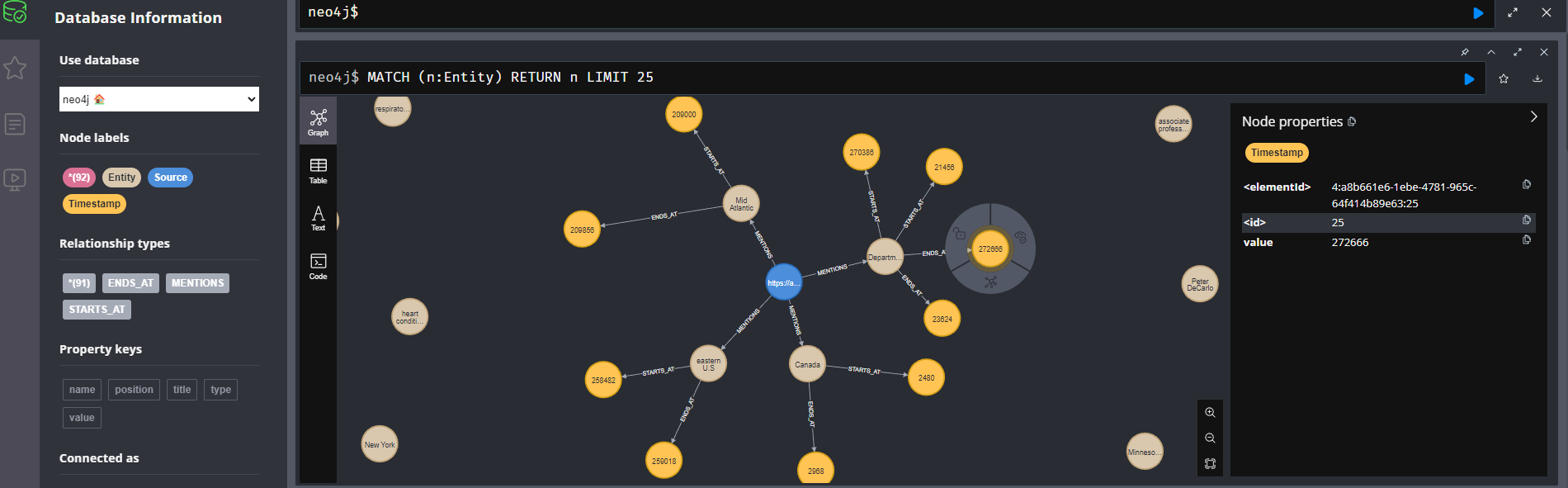
오디오 파일에서 중요한 정보를 추출하고 그래프 데이터 베이스에 저장하여 복잡한 관계를 시각화하고 분석하는 방법을 알아보자. 이 글에서는 AssemblyAI의 엔티티 감지 기능과 Neo4j그래프 데이터베이스를 결합하여 오디오 콘텐츠에서 지식 그래프를 구축하는 전체 과정을 다룰 것이다.
오디오 데이터는 인터뷰, 강의, 팟캐스트, 회의록 등 다양한 형태로 존재하며 풍부한 정보를 담고있다. 하지만 이 정보를 검색하고 분석하는것은 쉽지 않다. 특히
- 오디오 콘텐츠에서 중요한 개체(사람, 조직, 장소 등)을 추출하기 어려움
- 추출된 정보 간의 관계를 파악하고 시각화하는것이 복잡함
- 방대한 오디오 데이터에서 특정 정보를 검색하는것은 시간소요가 많음.
지식 그래프는 이러한 문제를 해결하는 강력한 도구이다. 엔티티와 그 관계를 노드와 엣지로 표현함으로써 복잡한 정보 네트워크를 구축하고 분석할 수 있다.
이 프로젝트에서 사용할 기술 스택:
- AssemblyAI: 고급 음성-텍스트 변환 및 오디오 인텔리전스 기능을 제공하는 API
- Neo4j: 그래프 데이터베이스로, 데이터 간의 관계를 효율적으로 저장하고 쿼리하는 데 최적화
- Python
- FastAPI: 선택적으로 웹 API를 구축하는 데 사용
전체 흐름
- 오디오 파일 업로드 / URL 제공
- AssemblyAI를 사용하여 오디오 파일 트랜스크립션 및 엔티티 감지
- 감지된 엔티티를 Neo4j그래프 데이터베이스에 저장
- 그래프 데이터 베이스를 통한 시각화 및 분석
환경설정
pip install uv
//병렬 설치
uv pip install assemblyai neo4j python-dotenv fastapi uvicorn.env파일에 api 키와 자격증명을 저장
ASSEMBLYAI_API_KEY=your_assemblyai_api_key
NEO4J_URI=bolt://localhost:7687
NEO4J_USER=neo4j
NEO4J_PASSWORD=your_password
오디오 파일 스크립션 및 엔티티 감지
import assemblyai as aai
from dotenv import load_dotenv
import os

load_dotenv()

# assemblyAI API 키 설정
aai.settings.api_key = os.getenv("ASSEMBLYAI_API_KEY")

def transcribe_and_detact_entities(audio_file):
    # 엔티티 감지 설정으로 트랜스크립션 구성
    config = aai.TranscriptionConfig(entity_detection=True)

    # audio file transcription
    transcript = aai.Transcriber().transcribe(audio_file, config=config)

    print(f"Transcription ID : {transcript.id}")
    print(f"Detected Entities length : {len(transcript.entities)}")

    return transcript
Neo4J 에 엔티티(노드 및 관계)업로드
트랜스크립션에서 감지된 엔티티를 Neo4j 그래프 데이터베이스에 업로드
def upload_entities_to_neo4j(source, entities):
    print(f"Uploading {len(entities)} entities from {source}")
    # Neo4j 연결 세부 정보 로드
    NEO4J_URI = os.getenv("NEO4J_URI")
    NEO4J_USER = os.getenv("NEO4J_USERNAME")
    NEO4J_PASSWORD = os.getenv("NEO4J_PASSWORD")

    print(NEO4J_URI, NEO4J_USER, NEO4J_PASSWORD)

    #  Create a list of all entities to process
    entity_data = [
        {
            "text": entity.text,
            "labels": [entity.entity_type, "_entity"],
            "start": entity.start,
            "end": entity.end,
        }
        for entity in entities
    ]
    # 처리된 엔티티 데이터 출력
    for i, entity in enumerate(entity_data[:3]):
        print(f"Entity {i}: {entity}")

    with GraphDatabase.driver(NEO4J_URI, auth=(NEO4J_USER, NEO4J_PASSWORD)) as driver:
        driver.execute_query(
            """
            MERGE (d:Source {name: $source})
            WITH d, $entities AS entities
            UNWIND entities AS entity
            MERGE (e:Entity {name: entity.text, type: entity.labels})
            MERGE (d)-[:MENTIONS]->(e)
            MERGE (s:Timestamp {value: entity.start})
            MERGE (e)-[:STARTS_AT]->(s)
            MERGE (en:Timestamp {value: entity.end})
            MERGE (e)-[:ENDS_AT]->(en)
""",
            source=source,
            entities=entity_data,
        )
    print(f"Neo4j에 {len(entities)} 엔티티가 성공적으로 업로드되었습니다")
전체 파이프라인 실행
def process_audio_file(audio_file):
    transcript = transcribe_and_detact_entities(audio_file)

    upload_entities_to_neo4j(audio_file, transcript.entities)

    return {
        "source": audio_file,
        "transcript_id": transcript.id,
        "entities_count": len(transcript.entities),
    }


if __name__ == "__main__":
    audio_url = "https://assembly.ai/wildfires.mp3"
    result = process_audio_file(audio_url)
    print(f"Process completed for {audio_url}")
    print(result)
구조 살펴보기
Neo4J 그래프 구조는 다음과 같다 :
- Source node : 오디오 파일을 나타내는 Source 레이블이 있는 노드
- Entity node : 감지된 각 엔티티를 나타내는 노드 (사람, 조직, 위치 등)
- Timestamp node : 엔티티가 언급된 시작 및 종료 시간을 나타내는 노드
- 관계:
- MENTIONS: 소스가 엔티티를 언급함
- STARTS_AT: 엔티티가 특정 시간에 시작됨
- ENDS_AT: 엔티티가 특정 시간에 종료됨
- Cypher query로 시각화 :
MATCH p = (:_source)-[:MENTIONS]->(:_entity)-[:STARTS_AT|ENDS_AT]->(:_timestamp)
RETURN p LIMIT 25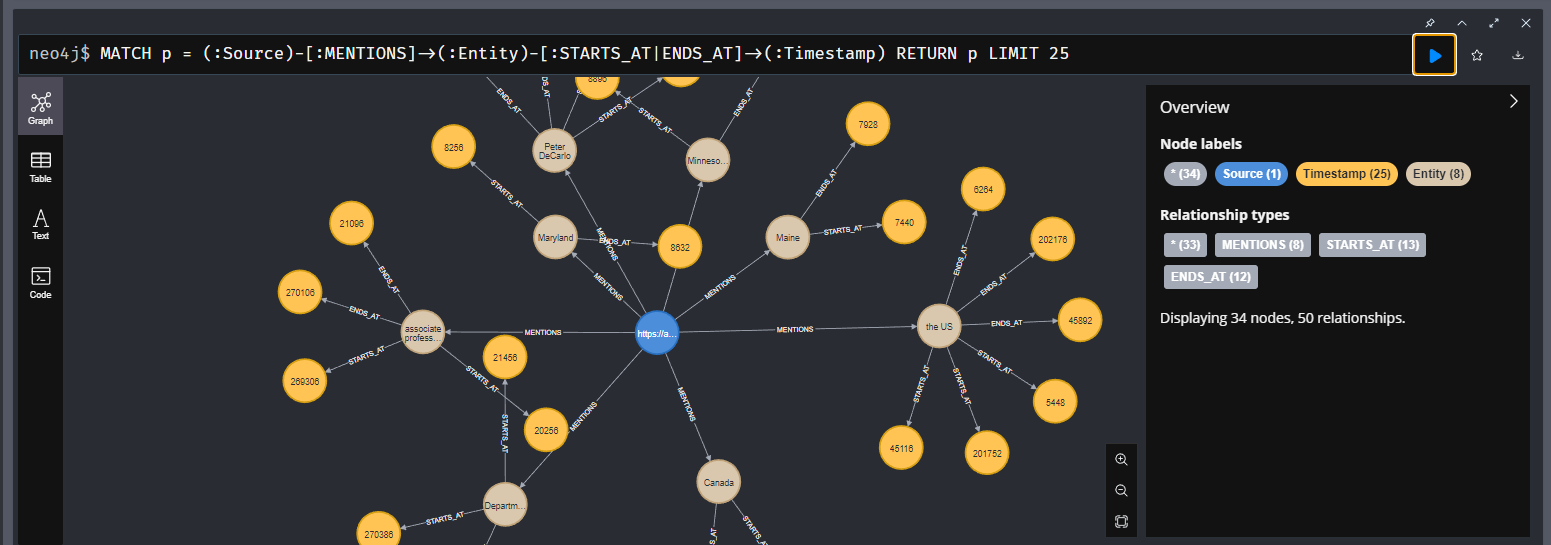
FastAPI로 확장하기
from fastapi import FastAPI, HTTPException
from pydantic import BaseModel

app = FastAPI()

class AudioFilesRequest(BaseModel):
    audio_files: list[str]

@app.post("/upload_entities")
async def upload_entities(request: AudioFilesRequest):
    try:
        print(f"{len(request.audio_files)}개의 오디오 파일 처리 중")
        results = []

        # 각 오디오 파일 처리
        for audio_file in request.audio_files:
            result = process_audio_file(audio_file)
            results.append(result)

        return {"message": "파일이 성공적으로 처리되었습니다", "results": results}
    except Exception as e:
        raise HTTPException(status_code=500, detail=str(e))

if __name__ == "__main__":
    import uvicorn
    uvicorn.run(app, host="0.0.0.0", port=8000)
AssemblyAI와 Neo4j를 결합하면 오디오 콘텐츠에서 풍부한 지식 그래프를 구축할 수 있다. 이 접근 방식은 오디오 데이터의 가치를 극대화하고, 이전에는 접근하기 어려웠던 인사이트를 발견하는 데 도움이 된다.

집요한 주니어 개발자의 호되게 당했던 기록