GPU에서 시제와 PyTorch 개체를 실행(더빠르게 계산하기)
- GPUs = 더 빠르게 계산하기 위해 사용된다. (CUDA + NVidia 하드웨어 + Pytorch 코드 )
- 하지만, MacOS에서는 GPU가 지원되지 않기 때문에 mps를 쓴다.
Getting a GPU
- Easiest way : Google Colab의 무료 GPU 사용하기 (option to upgrade as well)
- Use your own GPU : 약간의 설정과 GPU 구입에 대한 투자 필요 (구글링으로 어떤 GPU를 사용할지 검색하여 deep learning 프로젝트에 적합한 GPU를 선택하여 사용)
- Use cloud computing : GCP, AWS, Azure 같은 서비스들을 사용하여 클라우드 컴픁팅 환경을 구축하여 사용
- 따라서, 2, 3 PyTorch + GPU driver(CUDA)의 경우 약간의 설정이 필요하다. 이에 대해서는 PyTorch 문서를 참조하여 설정한다.
- 로컬 : https://pytorch.org/get-started/locally/
- 클라우드 파트너 : https://pytorch.org/get-started/cloud-partners/
GPU 종류 예시
- Tesla p100
- Tesla k80
- Tesla T4 : Google Colab에서 기본적으로 지원하는 무료 GPU
Access GPU
- PyTorch는 CPU나 GPU 또 MacOS 환경의 경우 GPU가 아닌 mps에서 컴퓨팅을 수행하기 때문에 장치에 구애받지 않는 코드를 설정하는 것이 가장 좋다.
: Device Agnostic Code 문서
google colab에서 GPU 사용하기
-
상단에서 runtime -> change runtime type 클릭
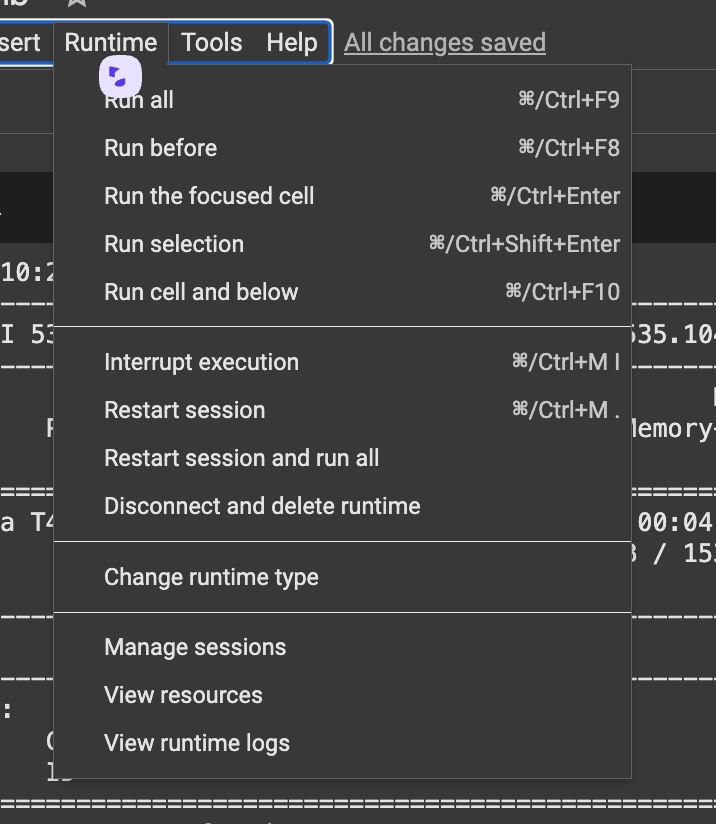
-
사용할수있는 GPU를 선택하고 save 한다.
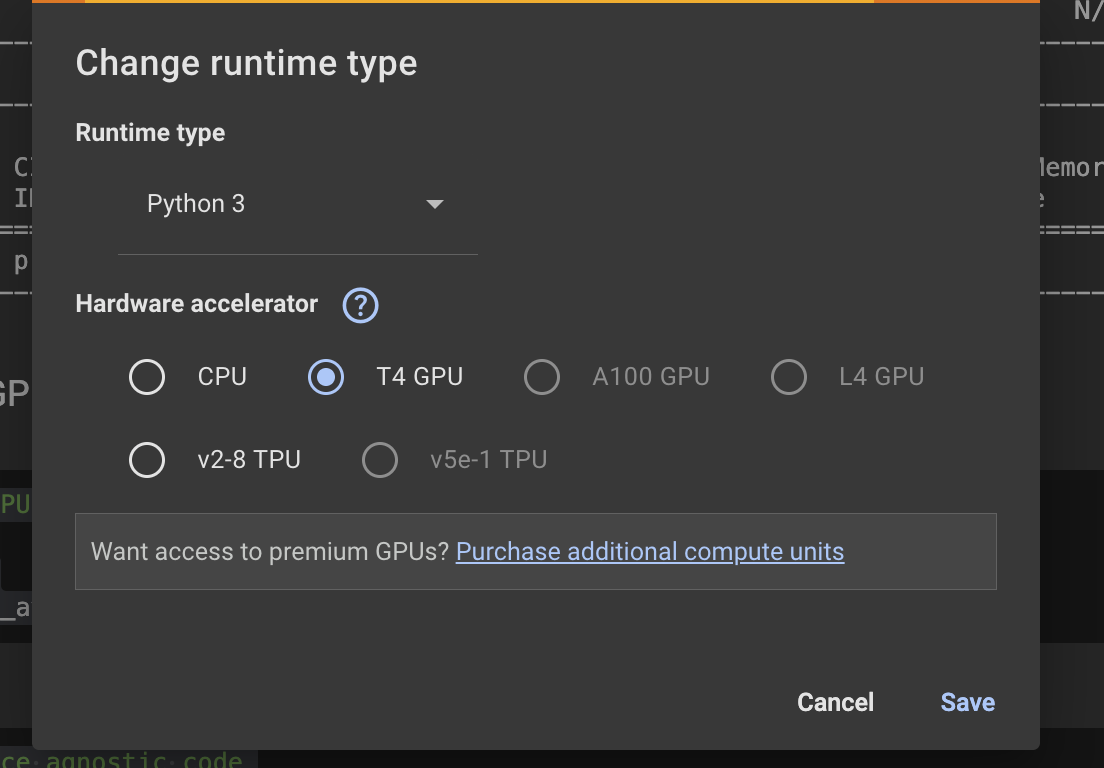
-
!nvidia-smi명령어를 실행하면 사용하고 있는 GPU상태를 볼 수있다.

MacOS에서 mps 사용
- 참고로 나는 로컬에서 작업중이기 때문에 MacOS 환경이기 때문에 cuda는 사용불가하고, 대신 'mps'를 사용할 수있다.
# Set up device agnostic code
device = "cuda" if torch.cuda.is_available() else "mps" if torch.backends.mps.is_available() else "cpu"
device
# 'mps' 출력
# Count number of devices
torch.mps.device_count()
# 1 출력Putting tensors(and models) on the GPU
- 텐서와 모델을 GPU에 배치하는 방법을 이용.
- GPU에서 tensors/models를 원하는 이유는 더 빠르게 계산하기 위해서이다.
device = "mps" if torch.backends.mps.is_available() else "cpu"


# Create a tensor(default on the CPU)
tensor = torch.tensor([1,2,3], device="cpu")

# tensor not on GPU
print(tensor, tensor.device)
미리 설정해둔 device 를 가져온다.
# Move tensor to MPS (가능하면)
tensor_on_mps = tensor.to(device)
tensor_on_mps
Moving tensors back to the CPU
-
NumPy는 CPU에서만 작동하기 때문에 텐서를 NumPy로 변환하는 것이 좋다.
-
만일 CPU가 아닌 환경에서 컴퓨팅하려 한다면 다음과 같은 에러가 발생한다.
# If tensor is on GPU or MPS, can't transform it to Numpy
tensor_on_mps.numpy()
- 때문에 numpy는 cpu로 작동시켜야함
# To fix th eGPU or MPS tensor with NumPy issue, we can first set it to the CPU
tensor_back_on_cpu = tensor_on_mps.cpu().numpy()
tensor_back_on_cpu
- 미리 설정해 놓은 tensor_on_mps의 텐서를 그대로 가져올 수있다.

집요한 주니어 개발자의 호되게 당했던 기록
짱이다!!!!!!!