PyTorch 기초
이 문서는 PyTorch의 기본적인 사용법과 텐서(Tensor) 조작 방법 터득하기 비기너 단계
PyTorch 설치 확인
MacOS에서는 CUDA(gpu)가 지원되지 않기 때문에, mps 를 사용하여 PyTorch를 구동할수 있다고한다. 나중에 자세한 이유를 알아봐야겠다. PyTorch가 올바르게 설치되었는지 확인하고, MPS 장치가 지원되는지 확인한다.
import torch

print(torch.__version__)
print(f"MPS 빌드 여부 : {torch.backends.mps.is_built()}")
print(f"MPS 사용 가능여부 : {torch.backends.mps.is_available()}")

# 디바이스 설정
device = torch.device("mps" if torch.backends.mps.is_available() else "cpu")
print(f"사용 디바이스: {device}")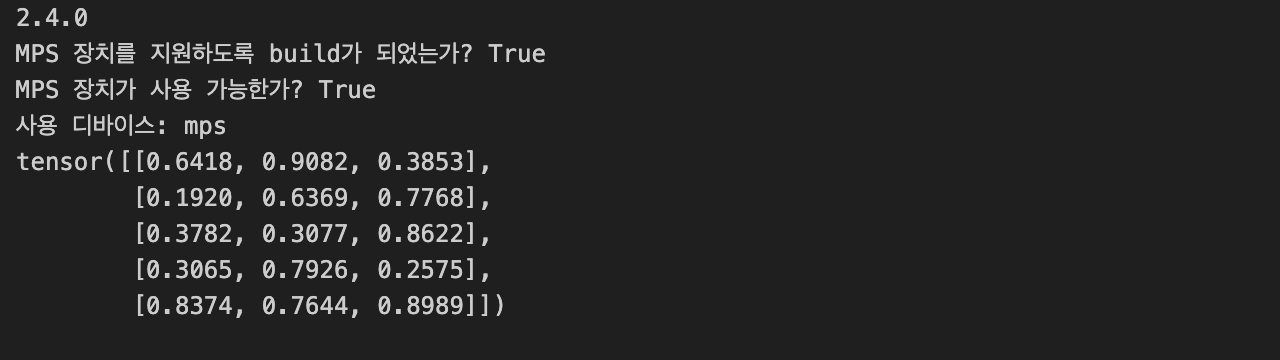
텐서 생성
PyTorch에서 텐서를 생성하는 방법
1. 스칼라(SCALAR)
스칼라는 단일 숫자를 나타내며, 차원이 0입니다.
scalar = torch.tensor(7)
print(scalar)
print(scalar.ndim) # 스칼라의 차원
print(scalar.item()) # 스칼라의 값
2. 벡터(Vector)
벡터는 1차원 배열입니다.
vector = torch.tensor([7, 7])
print(vector)
print(vector.ndim) # 벡터의 차원
print(vector.shape) # 벡터의 크기
3. 행렬(Matrix)
행렬은 2차원 배열입니다.
MATRIX = torch.tensor([[7,8],
                       [9,10]])
print(MATRIX)
print(MATRIX.ndim) # 행렬의 차원
print(MATRIX[1])
print(MATRIX.shape) # 행렬의 크기
4. 텐서(TENSOR)
텐서는 다차원 배열입니다.
TENSOR = torch.tensor([[[1,2,3,],
                        [3,6,9,],
                        [3,5,4]]])
print(TENSOR)
print(TENSOR.ndim) # 텐서의 차원
print(TENSOR.shape) # 텐서의 크기
print(TENSOR[0][0]) # 0번째 텐서의 0번째 요소
랜덤 텐서 생성
Random tensors
Why Random Tensors?
-
Random tensors are important because the way many neural networks learn is that they start with tensors full of random numbers and then adjust those random numbers to better represent the data.
-
데이터 분석 및 모델 테스트를 위해 무작위 데이터를 생성하는 것이 중요.
-
무작위 데이터를 생성하면 모델이 데이터를 학습하고 예측하는 능력을 평가할 수 있음.
start with random numbers -> look at data -> update random numbers -> look at data -> update random numbers
random_tensor = torch.rand(1, 3, 4)
print(random_tensor)
print(random_tensor.ndim) # 텐서의 차원
print(random_tensor.shape) # 텐서의 크기
제로와 원으로 구성된 텐서
모든 요소가 0 또는 1인 텐서를 생성합니다.
zeros = torch.zeros(size=(3, 4))
ones = torch.ones(size=(3, 4))
Creating a range of tensors and tensors-like
# Use torch.range() and get deprecated message, use torch.arange() instead
one_to_ten = torch.arange(start=1, end=1000, step=77) # 1부터 1000까지 77씩 증가하는 텐서
one_to_ten = torch.arange(start=1, end=11, step=1) # 1부터 10까지 1씩 증가하는 텐서


# Creating tensors like
ten_zeros = torch.zeros_like(input=one_to_ten)
Tensor data types
Note : Tensor datatypes is one of the 3 big errors you'll run into with PyTorch & deep learning.
- Tensors not data types
- Tensors not device
- Tensors not shape
Precision in computing = 데이터의 정밀도
https://en.wikipedia.org/wiki/Precision_(computer_science)
데이터 타입, 장치, 형태를 관리하는 것은 PyTorch에서 딥 러닝 모델 작성 시 필수적인 작업입니다.
데이터 타입의 종류
- PyTorch에서 지원하는 주요 데이터 타입:
- float16, float32, float64: 부동 소수점 숫자.
- int8, int16, int32, int64: 정수.
- bool: 논리값.
- complex32, complex64: 복소수. - 데이터 타입은 정밀도와 메모리 사용량에 영향을 미칩니다.
- float16: 더 적은 메모리를 사용하며 연산 속도가 빠르지만, 정밀도가 낮습니다.
- float32: 기본 데이터 타입으로, 적당한 정밀도와 메모리 사용량을 가집니다.
- float64: 높은 정밀도와 더 많은 메모리 사용량.
데이터 타입 선택의 중요성
- 정밀도:
- float16: 메모리 절약 및 빠른 계산이 필요한 경우.
- float32: 일반적인 상황에서 사용.
- float64: 높은 정밀도가 필요한 경우. - 메모리 및 성능:
- 더 낮은 비트 수의 데이터 타입(float16)은 더 적은 메모리를 사용하고 계산 속도가 빠름.
실수할 수 있는 주요 문제
- 데이터 타입 불일치:
- 서로 다른 데이터 타입의 텐서로 연산을 시도할 경우 오류 발생.
- 장치 불일치:
- 텐서가 CPU와 GPU에 각각 위치할 경우 연산 불가능.
- 동일한 장치로 이동 필요:
- 형태 불일치:
- 텐서의 차원이나 크기가 다르면 연산 불가능.
# Float 32 tensor
# 단일 정밀도
# 대부분의 경우 32비트 정밀도를 사용하는 것이 좋음.
# 메모리를 많이 사용하지만 정밀도가 높음.(더 정밀한 작업이 필요한 경우 64비트 정밀도를 사용)
float_32_tensor = torch.tensor([3.0, 6.0, 9.0],
                               dtype=torch.float32, # 데이터 타입을 지정하고 싶다면 dtype 매개변수를 사용 | What datatype is the tensor(e.g. float32 or float16) - 부동 소수점, 정수, 복소수 등 선택 가능.
                               device="mps", # 텐서가 위치할 장치('cuda(gpu)', 'mps', 'cpu') | What device is your tensor on?
                               requires_grad=False # 텐서의 그래디언트를 추적할지 여부. | 기본값은 False, 역전파 계산에 필요할 경우 True로 설정.
                               )

# Float 16 tensor
# 하프 플로트 타입은 메모리를 절반으로 줄이고 속도를 높일 수 있음.
# 정밀도가 낮음.

# float_16_tensor = torch.tensor([3.0, 6.0, 9.0], dtype=torch.float16)
float_16_tensor = float_32_tensor.to(torch.half)
Getting information in tensors
텐서의 데이터 타입, 크기, 저장된 장치에 대한 정보를 얻습니다.
- Tensors not data types - to do get datatype from a tensor, can use
tensor.dtype - Tensors not device - to get shape from a tensor, can use
tensor.shapeortensor.size() - Tensors not shape - to get device from a tensor, can use
tensor.device
some_tensor = torch.rand(3, 4)
print(f"Datatype of tensor: {some_tensor.dtype}")
print(f"Shape of tensor: {some_tensor.size()}")
print(f"Device tensor is stored on: {some_tensor.device}")
Manipulating tensors(tensor operations 텐서 연산)
Tensor operations include:
- Addition : 덧셈
- Subtraction : 뺄셈
- Multiplication(element-wise) : 요소별 곱셈
- Division : 나눗셈
- Matrix multiplication : 행렬 곱셈
Addition, Subtraction, Multiplication
tensor = torch.tensor([1, 2, 3])
print(tensor + 10)
print(tensor - 10)
print(tensor * 10)
Matrix Multiplication 행렬 곱셈
What is Matrix Multiplication? 행렬곱셈이란 무엇인가?
Two main ways of performing multiplication in neural networks and deep learning:
- Element-wise mujltiplcation
- Matrix multiplication : 가장 기본적으로 찾을수 있는 기본 텐서 연산 (dot product)
- more information on multiplying matrices : https://www.mathsisfun.com/algebra/matrix-multiplying.html
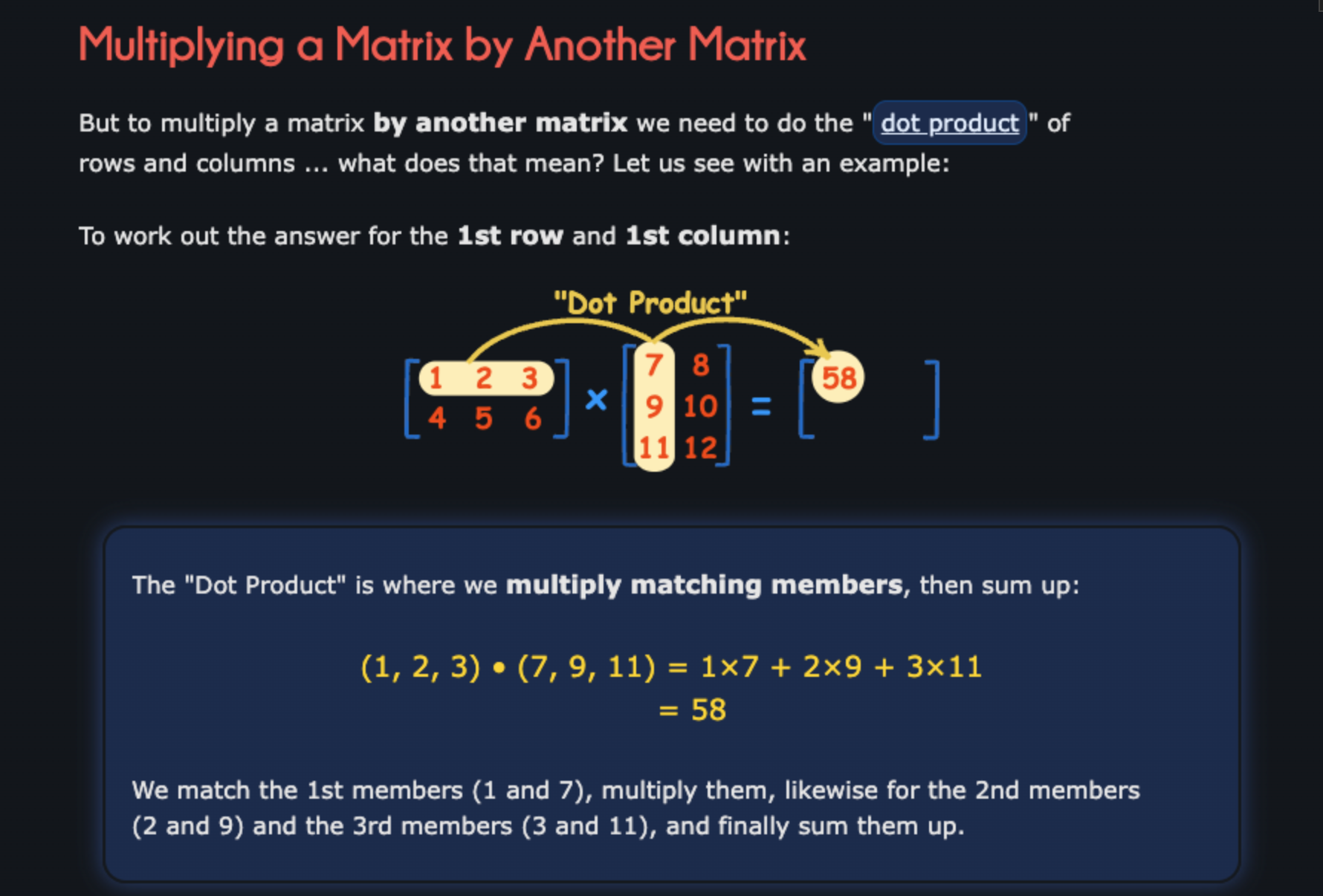
행렬 곱셈을 수행합니다.
print(torch.matmul(tensor, tensor))
짱이다!!