Sartorius - Cell Instance Segmentation Competition
OverView
-
목표
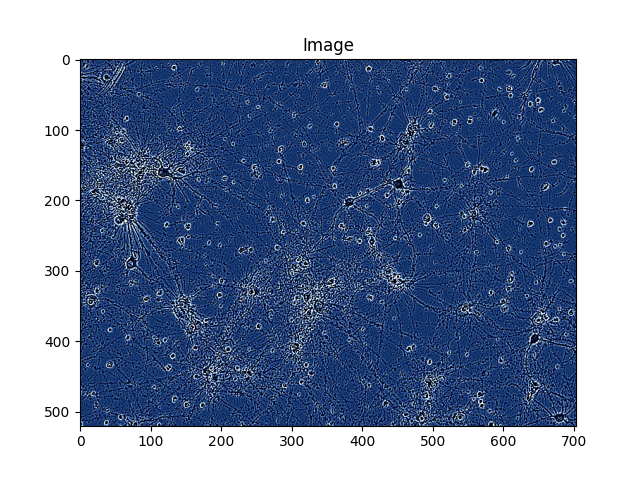
이 대회의 주요 목표는 현미경 이미지에서 단일 세포를 탐지하는 것이다. 구체적으로, 주어진 현미경 이미지에서 세포의 위치를 식별하고 단일 세포의 경계를 정확하게 분할하는 Instance Segementation Competition이다. -
입력 데이터의 특성
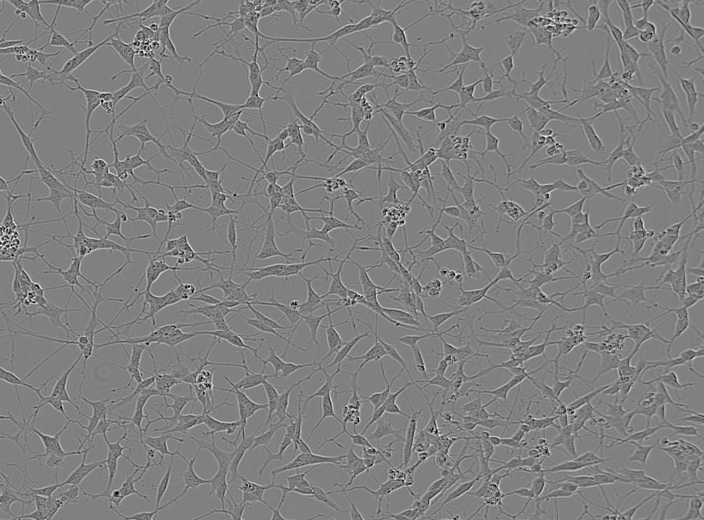
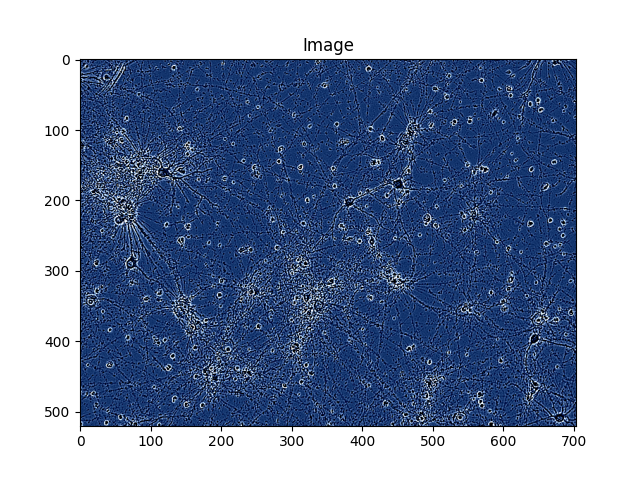
입력 데이터는 위와 같이 현미경으로 촬영된 이미지로 구성되어 있으며, 각 이미지에는 여러개의 신경 세포가 포함되어 있다. 데이터 셋은 주로 다음과 같은 파일들로 구성되어있다.- Train Images: 훈련용 이미지 파일들이 포함된 directory
- Train Annotations: 각 이미지에 대한 주석(annotation) 데이터. 이는 각 세포의 위치와 형태를 나타내는 마스크(mask) 형식으로 이루어짐.
- Test Images: 예측을 위해 제공된 test images들이 포함된 directory
각 이미지는 PNG 형식으로 제공되며, 각 이미지에 대한 주석(Annotations)은 Run-Length Encoding(RLE)형식으로 저장된 마스크 데이터로 포함된다.
-
제출 형식
제출 파일은 각 테스트 이미지에 대한 예측 결과를 포함해야 한다. 구체적으로 각 test image들에 대한 RLE 형식의 마스크 데이터를 포함해야한다. -
Run-Length Encoding(RLE)에 대하여
Wikipedia : 런 렝스 부호화
한글로 런 렝스 부호화 or 런 길이 부호화는 매우 간단한 비손실 압축 방법이다.
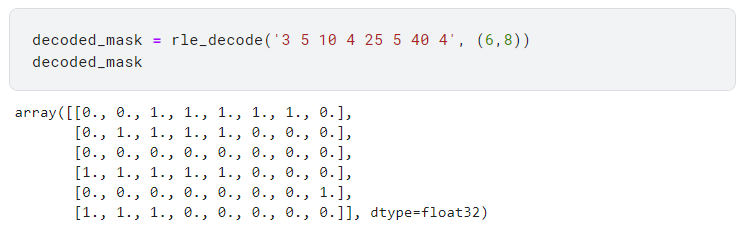
이번과 같은 binary data에서는 먼저 오는 숫자를 start index로 구분하고 뒤에 오는 숫자를 length로 받아들인다. 이에 따라 해당 index에서부터 length만큼에 1이 들어있다고 encoding 할 수 있게 된다.예시로 [3 5 10 4 25 5 40 4]으로 RLE Encoding 되어있는 array를 (6,8)shape으로 decoding 한다면 아래와 같은 형식으로 decoding 될 수 있다.
[[0., 0., 1., 1., 1., 1., 1., 0.],
[0., 1., 1., 1., 1., 0., 0., 0.],
[0., 0., 0., 0., 0., 0., 0., 0.],
[1., 1., 1., 1., 1., 0., 0., 0.],
[0., 0., 0., 0., 0., 0., 0., 1.],
[1., 1., 1., 0., 0., 0., 0., 0.]]
Code
Import
import os
import time
import random
import collections

import numpy as np
import pandas as pd
from PIL import Image
import matplotlib.pyplot as plt
from sklearn.model_selection import train_test_split

import torch
import torchvision
from torchvision.transforms import ToPILImage
from torchvision.transforms import functional as F
from torch.utils.data import Dataset, DataLoader
from torchvision.models.detection.faster_rcnn import FastRCNNPredictor
from torchvision.models.detection.mask_rcnn import MaskRCNNPredictor
Fix Randomness
머신러닝의 재현성을 보장하기 위해 난수 생성기를 고정하는 역할을 하는 fix_all_seeds함수 생성.
Numpy, random, PyTorch의 CPU와 GPU의 난수 생성기의 시드를 2021로 고정해준다.
def fix_all_seeds(seed):
    np.random.seed(seed)
    random.seed(seed)
    os.environ['PYTHONHASHSEED'] = str(seed)
    torch.manual_seed(seed)
    torch.cuda.manual_seed(seed)
    torch.cuda.manual_seed_all(seed)

fix_all_seeds(2021)
-
Configuration(설정)
기본적인 Path부터 변수와 설정값들의 Default값을 초기화하는 구간이다.
여기서 어디에 쓰는지 모르겠는 변수들이 몇몇개 나오지만 뒤에서 실질적으로 사용될 때 같이 설명하면 이해하기 더 쉬우니 사용될 때 설명을 하겠다.
TRAIN_CSV = '/kaggle/input/sartorius-cell-instance-segmentation/train.csv'
TRAIN_PATH = '/kaggle/input/sartorius-cell-instance-segmentation/train'
TEST_PATH = '/kaggle/input/sartorius-cell-instance-segmentation/test'

WIDTH = 704
HEIGHT = 520

# Reduced the train dataset to 5000 rows
TEST = False

Device = torch.device('cuda') if torch.cuda.is_available() else torch.device('cpu')

RESNET_MEAN = (0.485, 0.456, 0.406)
RESNET_STD = (0.229, 0.224, 0.225)

BATCH_SIZE = 2

# No changes tried with the optimizer yet.
MOMENTUM = 0.9
LEARNING_RATE = 0.001
WEIGHT_DECAY = 0.0005

# Changes the confidence required for a pixel to be kept for a mask.
# Only used 0.5 till now.
MASK_THRESHOLD = 0.5

# Normalize to resnet mean and std if True.
NORMALIZE = True

# Use a StepLR scheduler if True. Not tried yet.
USE_SCHEDULER = False

# Number of epochs
NUM_EPOCHS = 8

BOX_DETECTIONS_PER_IMG = 539

MIN_SCORE = 0.59
-
Training Dataset(Utilities)
위의 부분에서는 Image Transforms를 통한 Data Augmentation을 진행하는 class와 함수를 정의한다.
입력으로 들어오는 image와 target에 대하여 일정 확률로 VerticalFlip or HorizontalFlip을 수행하고 반환한다. 이 때 뒤집힌 이미지에 맞게 바운딩 박스와 마스크를 조정해서 반환한다.
Normalize class는 이미지를 RESNET_MEAN, RESNET_STD를 사용하여 각 채널을 정규화 하게 된다.
ToTensor 부분에서는 PyTorch 모델이 image를 처리할 수 있도록 Tensor 형식으로 이미지를 변환한다.
# Transforms class Compse
class Compose :
    def __init__(self, transforms) :
        self.transforms = transforms

   def __call__(self, image, target) :
        for t in self.transforms :
            image, target = t(image, target)
        return image, target

# VerticalFlip (일정 확률에 따라 수직으로)
class VerticalFlip :
    def __init__(self, prob) :
        self.prob = prob

   def __call__(self, image, target) :
        if random.random() < self.prob :
            height, width = image.shape[-2:]
            image = image.flip(-2)
            bbox = target['boxes']
            bbox[:, [1,3]] = height - bbox[:, [3,1]]
            target['boxes'] = bbox
            target['masks'] = target['masks'].flip(-2)
        return image, target

# HorizontalFlip
class HorizontalFlip :
    def __init__(self, prob) :
        self.prob = prob

   def __call__(self, image, target) :
        if random.random() < self.prob :
            height, width = image.shape[-2:]
            image = image.flip(-1)
            bbox = target['boxes']
            bbox[:, [0,2]] = width - bbox[:, [2,0]]
            target['boxes'] = bbox
            target['masks'] = target['masks'].flip(-1)
        return image, target

# Image Normalize
class Normalize :
    def __call__(self, image, target) :
        image = F.normalize(image, RESNET_MEAN, RESNET_STD)
        return image, target

class ToTensor :
    def __call__(self, image, target) :
        image = F.to_tensor(image)
        return image, target

# image Trnasforms and Compose Pipeline
def get_transforms(train) :
    transforms = [ToTensor()]
    if NORMALIZE :
        transforms.append(Normalize())

   if train :
        transforms.append(HorizontalFlip(0.5))
        transforms.append(VerticalFlip(0.5))

   return Compose(transforms)
-
RLE DECODING
입력으로 주어지는 RLE encoding 되어 있는 mask_rle를 입력으로 받아 image shape으로 decoding 해주는 함수를 정의 한다.
해당 RLE에는 1은 mask로 0은 Background로 구분되어 있게 된다. np.zeros(shape)을 통해 초기화 하고 mask_rle를 읽으며 1을 채워줌으로써 decoding이 가능하다.
# RLE 형식으로 Encoding된 마스크 데이터를 이용하여 Decoding시키는 process
def rle_decode(mask_rle, shape, color = 1) :
    '''
    mask_rle : run-length as string formated (start length)
    shape : (height, weight) of array to return
    Returns numpy array, 1 - mask, 0 - background
    '''
    s = mask_rle.split()
    starts, lengths = [np.asarray(x, dtype=int) for x in (s[0:][::2], s[1:][::2])]
    starts -= 1
    ends = starts + lengths
    img = np.zeros(shape[0]*shape[1], dtype=np.float32)
    for lo, hi in zip(starts, ends) :
        img[lo:hi] = color
    return img.reshape(shape)
example
-
Training Dataset and DataLoader
해당 코드는 PyTorch의 'Dataset'클래스를 상속받아 Custom Dataset으로 CellDataset을 정의한다.
CellDataset의 목적은 세포 이미지를 로드하고, 필요에 따라 이미지와 관련된 주석(Annotation)을 포함하여 전처리하는 역할을 한다.
생성자에서 이미지 파일이 저장된 디렉토리 경로와 데이터프레임을 입력으로 받아 self.image_info에 이미지의 정보 image_id, image_path, annotations를 저장한다.
get_box함수에서는 box를 구성하기 위한 최소한의 정보 xmin, xmax, ymin, ymax를 return해주게 된다. 이때의 logic은 np.where를 통해 a_mask에서 1이 존재하는 index를 반환받고 index의 최소 최대 값들을 통해 얻을 수 있다.
getitem 에서는 사용자가 해당 idx를 호출할 때 해당 idx의 image와 target값을 return하는 것이 목표이다. idx를 통해 image_info[idx]['image_path'] 로 image에 접근할 수 있게 된다. 각 주석(annotation)을 순회하며 RLE형식의 마스크를 디코딩하여 2차원 배열로 변환하고 get_box를 통해 bounding box를 계산하고 boxes 리스트에 추가하게 된다.
class CellDataset(Dataset) :
    def __init__(self, image_dir, df, transforms=None, resize=False) :
        self.transforms = transforms
        self.image_dir = image_dir
        self.df = df

        self.should_resize = resize is not False
        if self.should_resize :
            self.height = int(HEIGHT*resize)
            self.width = int(WIDTH*resize)
        else :
            self.height = HEIGHT
            self.width = WIDTH

        self.image_info = collections.defaultdict(dict)
        temp_df = self.df.groupby('id')['annotation'].agg(lambda x : list(x)).reset_index()

        for index, row in temp_df.iterrows() :
            self.image_info[index] = {
                        'image_id' : row['id'],
                        'image_path' : os.path.join(self.image_dir, row['id'] + '.png'),
                        'annotations' : row['annotation']}

    def get_box(self, a_mask) :
        ''' Get the bounding box of a given mask '''
        pos = np.where(a_mask)
        xmin = np.min(pos[1])
        xmax = np.max(pos[1])
        ymin = np.min(pos[0])
        ymax = np.max(pos[0])
        return [xmin, ymin, xmax, ymax]

    def __getitem__(self, idx) :
        ''' Get the image and the target '''
        img_path = self.image_info[idx]['image_path']
        img = Image.open(img_path).convert('RGB')

        if self.should_resize :
            img = img.resize((self.width, self.height), resample=Image.BILINEAR)

        info = self.image_info[idx]

        n_objects = len(info['annotations'])
        masks = np.zeros((len(info['annotations']), self.height, self.width), dtype = np.uint8)
        boxes = []

        for i, annotation in enumerate(info['annotations']) :
            a_mask = rle_decode(annotation, (HEIGHT, WIDTH))
            a_mask = Image.fromarray(a_mask)

            if self.should_resize :
                a_mask = a_mask.resize((self.width, self.height), resample=Image.BILINEAR)

            a_mask = np.array(a_mask) > 0
            masks[i, :, :] = a_mask

            boxes.append(self.get_box(a_mask))

        labels = [1 for _ in range(n_objects)]

        boxes = torch.as_tensor(boxes, dtype=torch.float32)
        labels = torch.as_tensor(labels, dtype=torch.int64)
        masks = torch.as_tensor(masks, dtype=torch.uint8)

        image_id = torch.tensor([idx])
        area = (boxes[:,3] - boxes[:,1]) * (boxes[:,2] - boxes[:,0])

        iscrowd = torch.zeros((n_objects, ), dtype=torch.int64)

        target = {
            'boxes' : boxes,
            'labels' : labels,
            'masks' : masks,
            'image_id' : image_id,
            'area' : area,
            'iscrowd' : iscrowd
        }

        if self.transforms is not None :
            img, target = self.transforms(img, target)

        return img, target

    def __len__(self) :
        return len(self.image_info)
Data Load
해당 부분에서 train dataset을 로드하고 DataLoader를 통해 batch단위로 모델에 제공하게 된다.
# CSV 파일에서 데이터 로드
df_train = pd.read_csv(TRAIN_CSV, nrows = 5000 if TEST else None)

# 데이터셋 객체 생성
ds_train = CellDataset(TRAIN_PATH, df_train, resize=False, transforms=get_transforms(train=True))

# DataLoader 객체 생성
dl_train = DataLoader(ds_train, batch_size = BATCH_SIZE, shuffle=True, num_workers=2, collate_fn=lambda x : tuple(zip(*x)))
-
Train Loop(Model) Finetuning
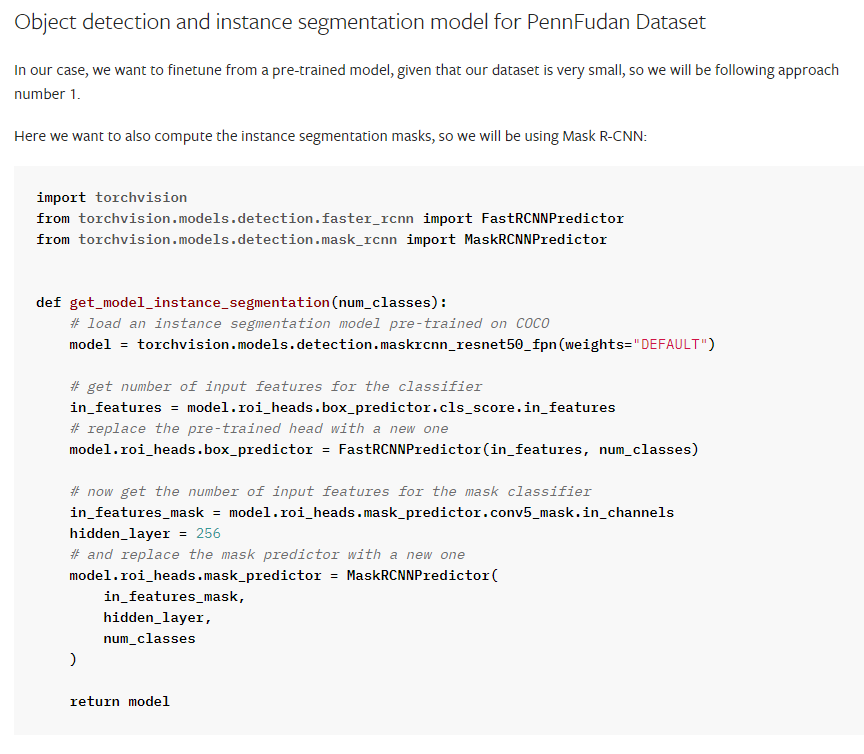
해당 부분에서는 Mask R-CNN 모델을 생성하고 설정에 따라 모델의 분류기와 마스크 예측기를 수정한다.
Classifier와 Mask prediction의 head를 Custom Dataset class에 맞게 조정을 해준다.
# 모델 초기화 -> 분류기 및 마스크 예측기 헤드 수정
def get_model() :
    # This is just a dummy value for the classification head
    # 분류기 헤드의 출력 클래스 수(Background or Detection -> 2)
    NUM_CLASSES = 2

    # If Normalize in the model, fix the custom image_mean and image_std.
    if NORMALIZE :
        model = torchvision.models.detection.maskrcnn_resnet50_fpn(pretrained=True, box_detections_per_img = BOX_DETECTIONS_PER_IMG, image_mean=RESNET_MEAN, image_std = RESNET_STD)
    else :
        model = torchvision.models.detection.maskrcnn_resnet50_fpn(pretrained=True, box_detections_per_img = BOX_DETECTIONS_PER_IMG)

    # get the number of input features for the classifier
    # in_features : get the number of features in the classifier
    in_features = model.roi_heads.box_predictor.cls_score.in_features

    # replace the roi_heads.box_predictor to the FastRCNNPredictor
    model.roi_heads.box_predictor = FastRCNNPredictor(in_features, NUM_CLASSES)

    # now get the number of input features for the mask classifier
    # 기존 마스크 예측기 헤드의 입력 특징 수
    in_features_mask = model.roi_heads.mask_predictor.conv5_mask.in_channels
    hidden_layer = 256

    # and replace the mask predictor with a new one
    # model.roi_heads.mask_predictor를 새로운 MaskRCNNPredictor로 교체.
    model.roi_heads.mask_predictor = MaskRCNNPredictor(in_features_mask, hidden_layer, NUM_CLASSES)

    return model
Reference
Get Model
Mask R-CNN 모델을 생성하고 모델을 학습 모드로 설정한다.
# Get the Mask R-CNN model
# The model does classification, bounding boxes and MASKs for individuals, all at the same time
# We only car about Masks
model = get_model()
model.to(Device)

# 기본적으로 parameter들은 학습가능으로 설정되어 있음 skip 해도됨.
for param in model.parameters() :
    param.requires_grad = True

# model.train()의 의미
# 모델을 학습 모드로 전환 (Dropout or BatchNormalization과 같은 레이어 때문)
# model.train(), model.eval()
model.train();
-
Training Loop
Epoch와 batch_size만큼 학습을 하는 구간이다.
weight_decay: Loss Function이 작아지는 방향으로만 단순하게 학습을 진행하면 특정 weight의 값이 너무 큰 값을 가져 Overfitting을 야기할 수 있다. 이를 방지하기 위해 Weight가 너무 커질경우에 대한 패널티 Weight_decay를 패널티 항목으로 설정하여 과적합을 방지한다.
lr_scheduler: 학습하는 과정에서 learning_rate를 조정하는 방법이다. 이때는 StepLR을 통해 step_size마다 learning_rate에 gamma를 곱해주는 방법을 사용했다. 이러한 미세조정을 통해 학습이 더 잘된다는 연구결과가 많다고 한다.
학습 모드인 Mask R-CNN 모델은 loss_dict = model(images, targets) 으로 모델 예측 및 손실 계산이 모두 이루어지게 된다. 이때 Predict의 반환값으로 loss_dict에는 'loss_classifier', 'loss_box_reg', 'loss_mask', 'loss_objectness', 'loss_rpn_box_reg' 등의 손실 항목이 포함된다.
그렇게 순서대로 Predict - Backprop - Update이 이루어진다.
# 학습 가능한 파라미터 추출
params = [p for p in model.parameters() if p.requires_grad]

# SGD optimzer -> Model Parameter update
# weight_decay : weight가 너무 커져서 과적합을 일으키는 것을 방지
optimizer = torch.optim.SGD(params, lr=LEARNING_RATE, momentum=MOMENTUM, weight_decay=WEIGHT_DECAY)

# lr_scheduler : 학습과정에서 learning_rate를 조정하는 방법
# StepLR : step_size마다 gamma 비율로 lr을 감소 시킨다.(step_size 마다 gamma를 곱한다.)
lr_scheduler = torch.optim.lr_scheduler.StepLR(optimizer, step_size=5, gamma = 0.1)

n_batches = len(dl_train)

# loop for num_epochs
for epoch in range(1, NUM_EPOCHS + 1) :
    print(f'Starting epoch {epoch} of {NUM_EPOCHS}')

    time_start = time.time()
    loss_accum = 0.0
    loss_mask_accum = 0.0

    # DataLoader 사용 per minibatch load and train
    for batch_idx, (images, targets) in enumerate(dl_train, 1) :

        # Predict
        # images 와 targets을 디바이스로 이동
        images = list(image.to(Device) for image in images)
        targets = [{k : v.to(Device) for k, v in t.items()} for t in targets]

        # 학습 모드에서 Mask R-CNN 모델을 호출 후 예측을 수행하고 손실 딕셔너리 반환
        loss_dict = model(images, targets)
        # 총 손실 계산
        loss = sum(loss for loss in loss_dict.values())

        # Backprop
        optimizer.zero_grad()
        loss.backward()
        optimizer.step()

        # Logging
        loss_mask = loss_dict['loss_mask'].item()
        loss_accum += loss.item()
        loss_mask_accum += loss_mask

        if batch_idx % 50 == 0 :
            print(f' [Batch {batch_idx:3d} / {n_batches:3d}] Batch train loss : {loss.item():7.3f}. Mask-only loss: {loss_mask:7.3f}')

    if USE_SCHEDULER :
        lr_scheduler.step()

    # calcum the loss of each Epochs
    train_loss = loss_accum / n_batches
    train_loss_mask = loss_mask_accum / n_batches

    elapsed = time.time() - time_start

    torch.save(model.state_dict(), f'pytorch_model-e{epoch}.bin')
    prefix = f'[Epoch {epoch:2d} / {NUM_EPOCHS:2d}]'
    print(f'{prefix} Train mask-only loss: {train_loss_mask:7.3f}')
    print(f'{prefix} Train loss: {train_loss:7.3f}. [{elapsed:.0f} secs]')
-
Analyze Prediction results for train set
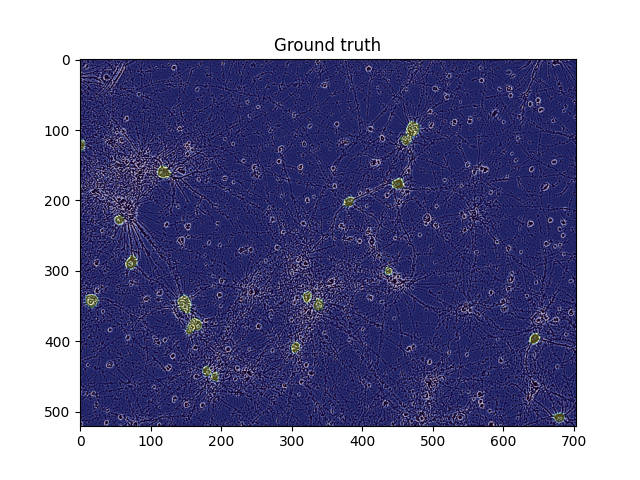
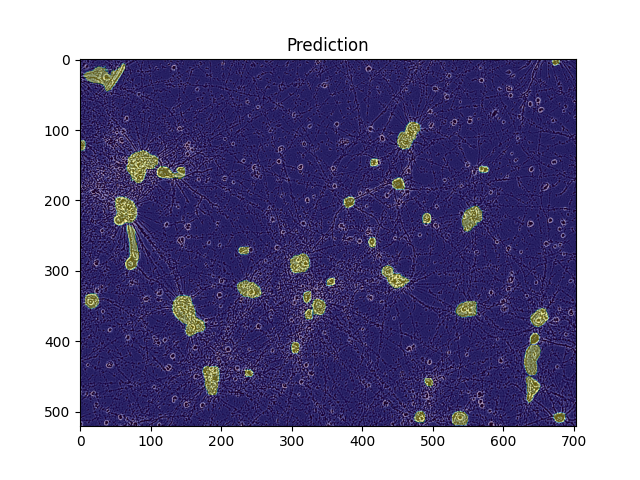
주어진 모델과 데이터셋을 이용하여 특정 샘플의 분석을 수행하여 이미지로 시각화하는 부분이다. 이때 우리는 원본 이미지, 실제 마스크, 모델이 예측한 마스크를 각각 시각화하고 저장할 수 있다.
세번째 부분에서 model.eval() 을 통해 모델을 평가 모드로 전환하고 data를 input으로 넣었을 때 반환하는 image를 통해 mask를 만들어 준다.
# Plots: the image, The image + the ground truth mask, The image + the predicted mask

def analyze_train_sample(model, ds_train, sample_index) :

    # sample data load and Visualize Original Image
    img, targets = ds_train[sample_index]
    plt.imshow(img.numpy().transpose((1,2,0)))
    plt.title('Original')
    plt.savefig('original.png')
    plt.show()

    # 빈 마스크 배열 초기화 후 실제 마스크를 반복하며 합친다.
    # original 마스크 위에 mask를 0.3 alpha값으로 위에 씌운다.
    masks = np.zeros((HEIGHT, WIDTH))
    for mask in targets['masks'] :
        masks = np.logical_or(masks, mask)
    plt.imshow(img.numpy().transpose(1,2,0))
    plt.imshow(masks, alpha = 0.3)
    plt.title('Ground truth')
    plt.savefig('Ground_truth.png')
    plt.show()

    # 평가 모드 전환
    model.eval()
    with torch.no_grad() :
        preds = model([img.to(Device)])[0]

   plt.imshow(img.cpu().numpy().transpose((1,2,0)))
    all_preds_masks = np.zeros((HEIGHT, WIDTH))
    for mask in preds['masks'].cpu().detach().numpy() :
        all_preds_masks = np.logical_or(all_preds_masks, mask[0] > MASK_THRESHOLD)
    plt.imshow(all_preds_masks, alpha = 0.4)
    plt.title("Prediction")
    plt.savefig('Prediction.png')
    plt.show()
Example
-
Prediction(Test Dataset and DataLoader)
학습된 model을 기반으로 Test Dataset을 Predict하기 위한 Test Dataset을 정의한다.
이 클래스는 이미지 디렉토리에서 이미지를 로드하고 필요에 따라 변환을 적용하여 image와 image_id를 반환한다.
class CellTestDataset(Dataset) :
    # class 생성자
    def __init__(self, image_dir, transforms=None) :
        self.transforms = transforms
        self.image_dir = image_dir

        # 이미지 디렉토리 내의 모든 파일명을 가져와서 확장자를 제거한 리스트를 생성
        # 각 이미지의 고유 ID를 포함한다.
        self.image_ids = [f[:-4] for f in os.listdir(self.image_dir)]

    # 이미지 파일을 열고 RGB모드로 변환
    def __getitem__(self, idx) :
        image_id = self.image_ids[idx]
        image_path = os.path.join(self.image_dir, image_id + '.png')
        image = Image.open(image_path).convert('RGB')

        if self.transforms is not None :
            image, _ = self.transforms(image=image, target=None)
        return {'image' : image, 'image_id' : image_id}

    def __len__(self) :
        return len(self.image_ids)
Test DataLoad
Test Data를 Load한다.
ds_test = CellTestDataset(TEST_PATH, transforms=get_transforms(train=False))
plt.imshow(ds_test[0]['image'].numpy().transpose((1,2,0)))
plt.show()
-
Utility
Submission의 형식에 맞게 RLE Encoding을 하기 위한 함수를 정의 해준다.
# Binary-Mask-Image -> RLE Encoding
def rle_encoding(x) :
    # 값이 1인 위치의 인덱스를 dots에 저장
    dots = np.where(x.flatten() == 1)[0]
    run_lengths = []
    prev = -2
    for b in dots :
        if (b>prev+1):
            run_lengths.extend((b+1, 0))
        run_lengths[-1] += 1
        prev = b
    return ' '.join(map(str,run_lengths))

# 주어진 마스크에서 다른 마스크와 겹치는 픽셀 제거
def remove_overlapping_pixels(mask, other_masks) :
    for other_mask in other_masks :
        if np.sum(np.logical_and(mask, other_mask)) > 0 :
            mask[np.logical_and(mask, other_mask)] = 0
    return mask
-
Run Predictions
해당 과정은 Model을 학습 모드로 변환하고 TestDataset을 순회하며 각 data를 Predict하여 마스크를 예측한 후 RLE 형식으로 변환하여 제출 파일을 생성하는 과정이다.
model.eval();

submission = []
for sample in ds_test :
    img = sample['image']
    image_id = sample['image_id']
    with torch.no_grad() :
        result = model([img.to(Device)])[0]

    previous_masks = []
    for i, mask in enumerate(result['masks']) :

        # Filter-out low-scoring results. Not tried yet.
        score = result['scores'][i].cpu().item()
        if score < MIN_SCORE :
            continue

        mask = mask.cpu().numpy()
        binary_mask = mask > MASK_THRESHOLD
        binary_mask = remove_overlapping_pixels(binary_mask, previous_masks)
        previous_masks.append(binary_mask)
        rle = rle_encoding(binary_mask)
        submission.append((image_id, rle))

    # Add empty prediction if no RLE was generated for this image
    all_images_ids = [image_id for image_id, rle in submission]
    if image_id not in all_images_ids :
        submission.append((image_id, ''))

df_sub = pd.DataFrame(submission, columns=['id', 'predicted'])
df_sub.to_csv('submission.csv', index=False)
df_sub.head()