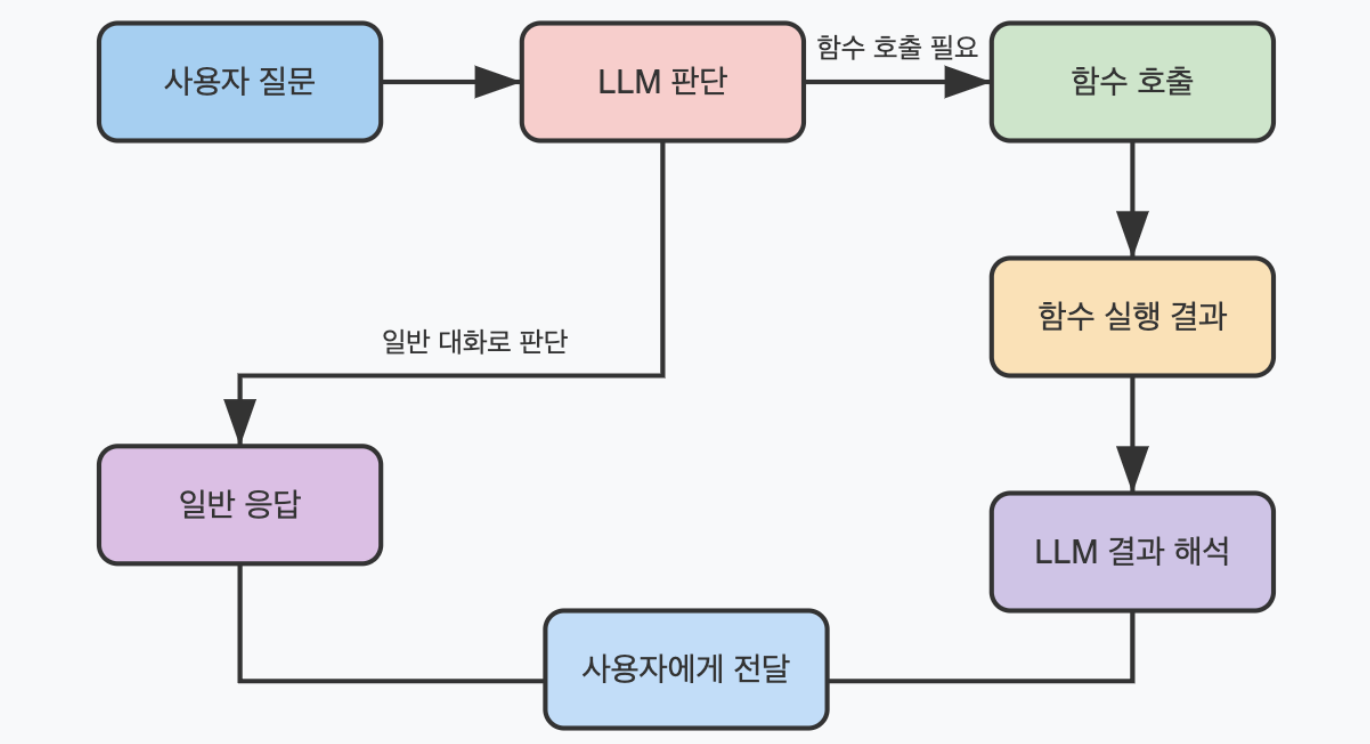
LLM이 답변을 생성하기 위해 외부 함수(API) 를 직접 호출하도록 설계된 메커니즘을 말한다. LLM 자신만으로는 정확한 정보를 생성하기 어렵거나 외부 시스템에 접근이 필요한 질문에 대한 대답을 생성할 때 사용된다. 외부 시스템에는 데이터베이스, API 등이 있다.
이런 질문을 받았을 때 LLM 은 적절한 함수를 선택하고 필요한 파라미터를 추론한 뒤, 함수를 호출해 얻은 결과를 이용해 답변을 생성한다.
이제 쇼핑몰에서 사용할 수 있는 챗봇을 예시로 Function Call 을 알아보자.
함수 정의
고객의 이름과 주문 날짜를 반환하는 함수를 작성하자.
from datetime import datetime

def get_delivery_date(order_id):
    """
    order_id: str
        id of corresponding order

    returns: delivery date converted to string format
    """
    return datetime.today().strftime("%Y-%m-%d")

def get_customer_name(c_name):
    return c_name
Tool
LLM 이 특정 작업을 수행하기 위해 사용하는 도구다. 어떤 일을 해야 하는지, 언제 사용되어야 하는지, 동작에 필요한 정보가 무엇인지 등이 정의된다.
여기서는 우리가 위에서 정의한 함수를 넣는데, 이외에도 API 호출 도구, DB 조회 도구 등이 포함될 수 있다.
delivery_tool = {
    "type": "function",
    "function": {
        "name": "get_delivery_date",
        "description": "고객의 주문에 대한 배송 날짜를 확인합니다. 예를 들어, 고객이 '내 패키지가 어디에 있나요?'라고 물을 때 이 함수를 호출하세요.",
        "parameters": {
            "type": "object",
            "properties": {
                "order_id": {"type": "string", "description": "고객의 주문 id"}
            },
            "required": ["order_id"],
            "additionalProperties": False,
        },
    },
}

parse_name_tool = {
    "type": "function",
    "function": {
        "name": "get_customer_name",
        "description": "고객의 이름을 확인합니다. 예를 들어, 고객이 '내 패키지가 어디에 있나요?'라고 물을 때 이 함수를 호출하세요. ",
        "parameters": {
            "type": "object",
            "properties": {"c_name": {"type": "string", "description": "고객의 이름"}},
            "required": ["c_name"],
            "additionalProperties": False,
        },
    },
}

tools = [delivery_tool, parse_name_tool]
Message 작성
위에서 정의한 도구가 사용될 예시 대화 내용이다.
messages = []
messages.append(
    {
        "role": "system",
        "content": "당신은 도움이 되는 고객 지원 어시스턴트입니다. 제공된 도구를 사용하여 사용자를 지원하세요.",
    }
)
messages.append(
    {
        "role": "user",
        "content": "안녕하세요, 제 이름은 John 입니다. 주문의 배송 날짜를 알려주실 수 있나요?",
    }
)
messages.append(
    {
        "role": "assistant",
        "content": "안녕하세요! 제가 도와드릴 수 있습니다. 주문 ID를 알려주시겠어요?",
    }
)
messages.append({"role": "user", "content": "제 생각엔 order12345인 것 같아요"})

response = client.chat.completions.create(
    model="gpt-4o-mini", messages=messages, tools=tools
)
Tool Call
LLM 이 tool 을 사용해 도출된 결과인 tool call 은 json 형태로 사용자에게 반환된다.
첫 번째 tool 인 delivery_tool 의 tool call 을 조회해보자.
print(tool_call[0])

>>> ChatCompletionMessageToolCall(id='call_LMa4EqF3Xy7uxZMFJjFE6pux',
function=Function(arguments='{"c_name": "John"}', name='get_customer_name'),
type='function')
우리가 추출하고자 했던 함수 인자는 arguments 에 저장된다.
import json

arguments = []
arguments.append(json.loads(tool_call[0].function.arguments))
arguments.append(json.loads(tool_call[1].function.arguments))

arguments

>>> [{'c_name': 'John'}, {'order_id': 'order12345'}]
arguments list 에서 keyword argument unpacking 연산자를 이용해 인자를 추출할 수 있다. 이 값을 이용해 답변을 생성할 수 있다.
name = get_customer_name(**arguments[0])
date = get_delivery_date(**arguments[1])

name, date

>>> ('John', '2024-10-18')

ML Engineer @ ABLY