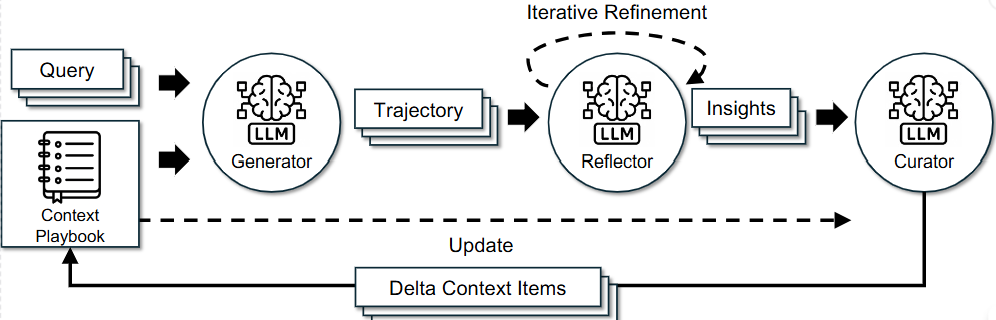
Agentic-Context-Engineering-for-Services는 2025년 10월에 발표된 논문 Agentic Context Engineering: Evolving Contexts for Self-Improving Language Models 을 조금 더 서비스가 가능한 수준으로 개선한 프로젝트입니다.
논문에서의 핵심 개념은 다음과 같습니다.
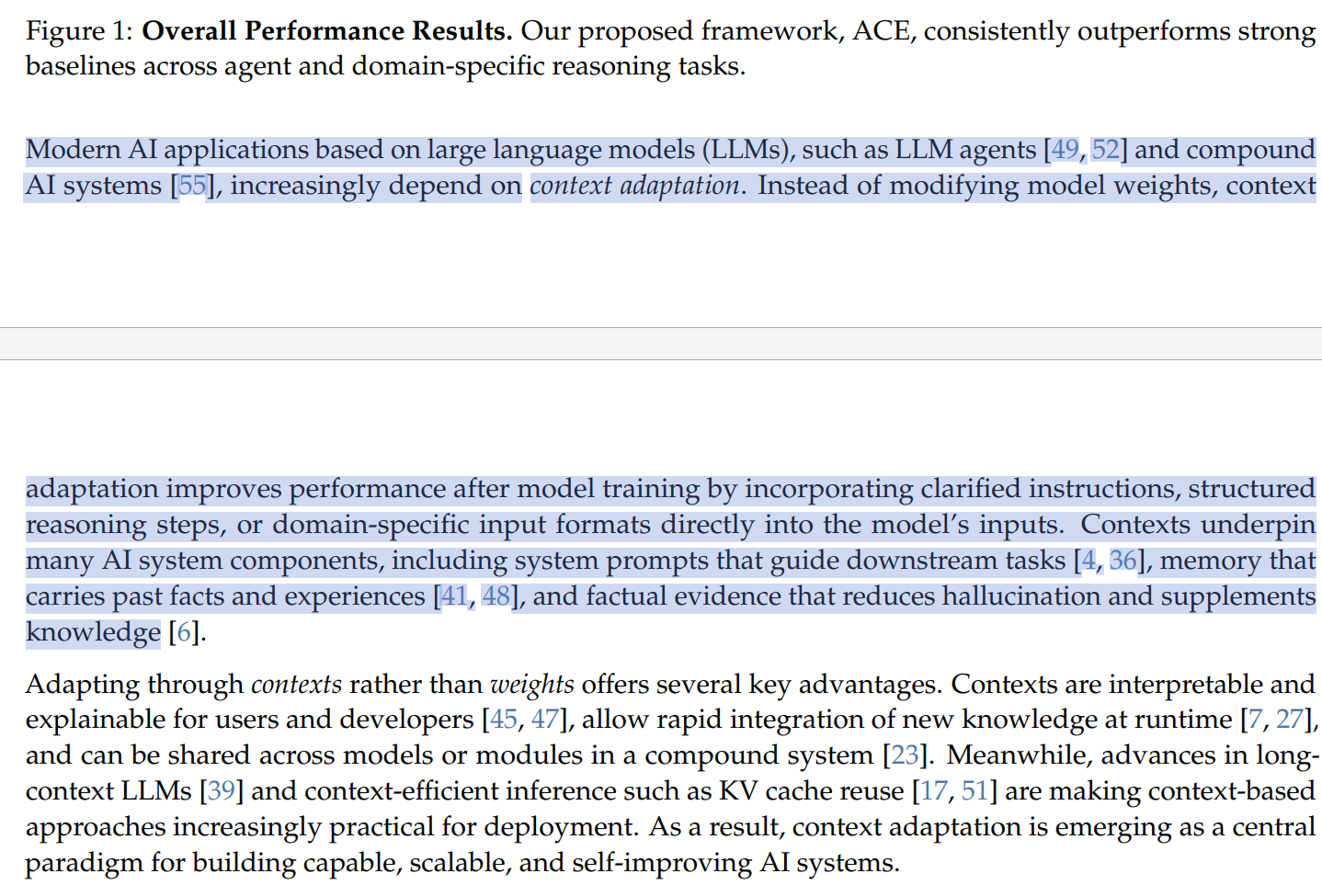
LLM은 같은 실수를 반복한다.
RAG를 사용해도 LLM은 여전히 같은 문맥에서 같은 실수를 반복하곤 합니다. 파인튜닝은 비용이 비싸고 데이터셋 준비고 어렵기 때문에 가중치를 건드리지 않고, 수십번의 경험과 피드백을 통해 개선한다고 설명이 되어있습니다.
몇 가지 에이전트를 통해 이를 개선한다.
논문에서는 이를 개선하기 위해 4가지 핵심에이전트인
Generator
Reflector
Curator
Delta Update (위의 개념과 다르게 후처리 기법에 가깝지만 중요하다고 생각)
를 도입했습니다.
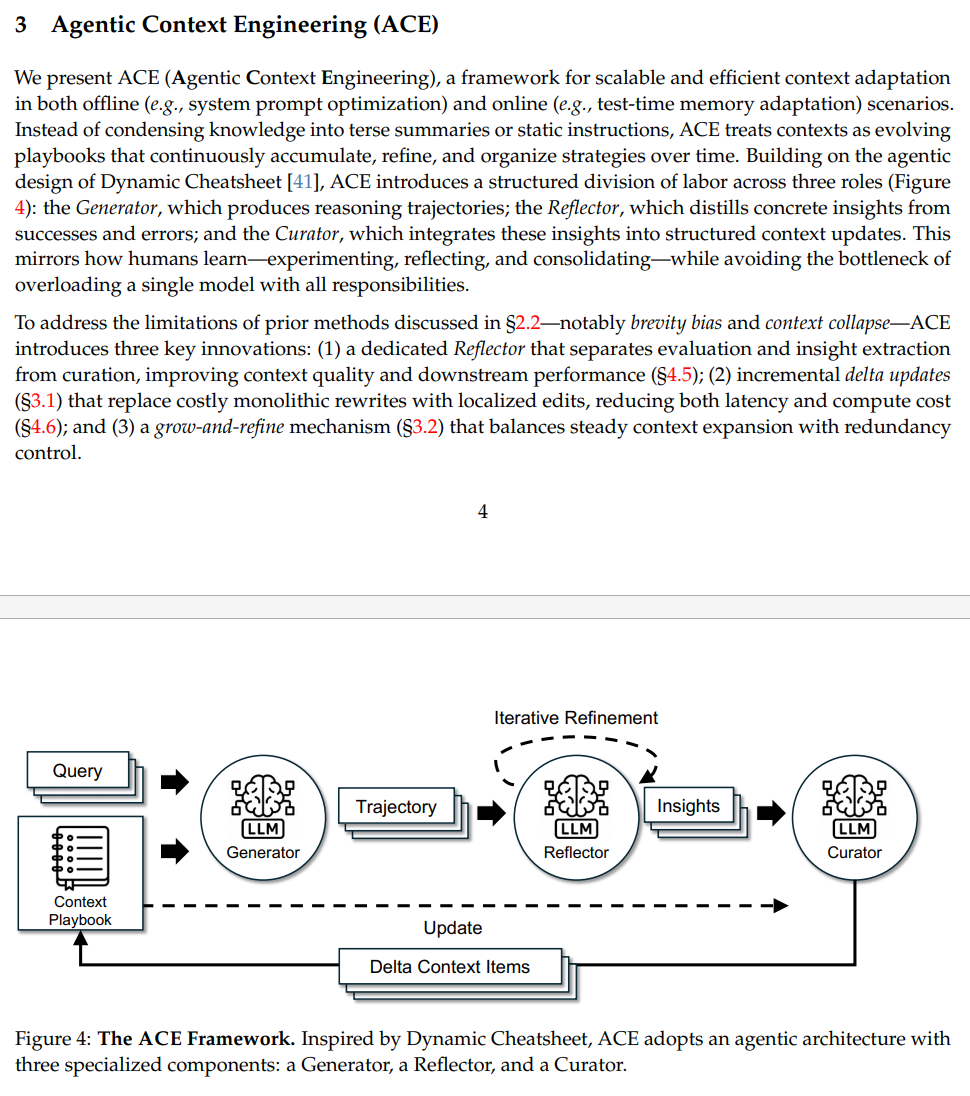
각 에이전트의 역할은 다음과 같습니다.
Generator
주어진 문제와 현재의 Context (논문에서는 Playbook 이라고 언급)을 보고 실제로 문제를 해결합니다. 이 과정에서 정답뿐만 아니라 Trajectory를 생성하여 Playbook을 self-evolving 할 수 있게 합니다.
Reflector
Genetaor가 만든 정답과 Trajectory를 평가합니다. 여기에서 어떤 전략이 유효했는지와 원인이 무엇인지를 분석합니다.
Curator
Reflector가 찾아낸 통찰을 기존 Playbook에 어떻게 반영할지 결정합니다. 중복을 피하고, 정보를 구조화하여 최종적인 업데이트 명령을 내립니다.
Delta Update
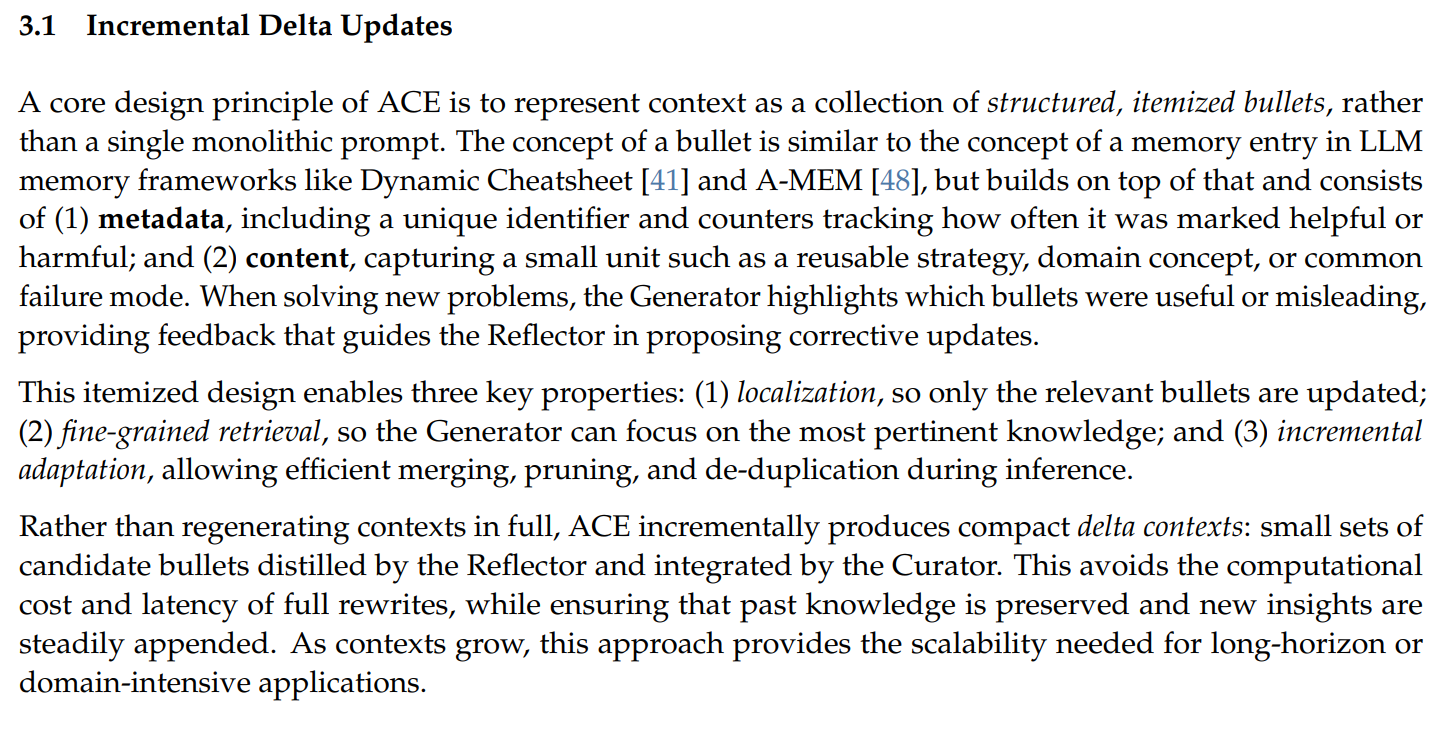
Playbook을 개별 항목(bullets)의 집합으로 관리하며, Context를 다시 덮어씌우는 방식이 아니라 추가(ADD), 업데이트(UPDATE) 과 같은 패치만 생성합니다.
구현
논문은 이 구조를 제안했지만, 실제 서비스로 구현하기에는 Sequential 방식이라 너무 느리며, 굳이 모든 질문에 대한 해답을 Playbook에 축적할 필요가 없다고 느껴서 이 구조를 LangGrah를 이용해 비동기 파이프라인으로 개선했습니다.
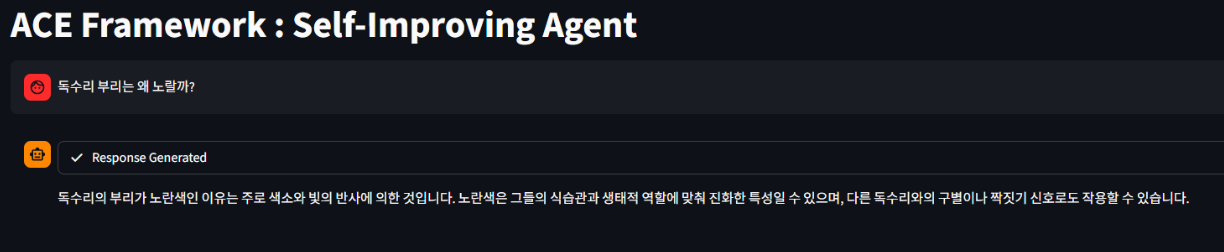
가령 이런 질문은 굳이 Playbook에 넣을 필요가없죠
State 정의
LangGraph를 구축할 때 가장 먼저 해야 할 일은 노드 간 데이터를 주고 받을 State를 정의하는 것입니다.
Playbook Entry
class PlaybookEntry(TypedDict):
    entry_id : str
    category : str
    content : str
    helpful_count : int
    harmful_count : int

    # timestamp
    created_at : datetime
    updated_at : datetime
    last_used_at : NotRequired[datetime]
PlaybookEntry 는 실제 벡터스토어에 들어갈 데이터입니다. 논문은 Context Collapse를 막기 위해 텍스트 덩어리 대신 Bullets로 플레이북을 관리할 것을 제안했습니다. Incremental Delta Updates 의 섹션을 거의 그대로 반영했습니다.
각 엔트리의 역할은 다음과 같습니다.
entry_id : 고유 식별자 (uuid)
category : 어떤 전략으로 사용했는지 결정합니다. 논문에서는 code_snippet, pitfall, strategy 이렇게 3가지를 사용하였지만 저는 code_snippet | pitfall | best_practice | strategy 총 4개를 사용했습니다.
content : 컨텍스트 내용
helpful_count : 성공 기여도
harmful_count : 해로운 지식 필터링용
State
여기에서는 LangGraph의 상태를 공유하기 위한 설정값들이 들어있습니다.
class State(TypedDict):
    query : str
    playbook : list[PlaybookEntry]
    solution : Optional[str]
    verbose : Optional[bool]
    router_decision : str
    session_id : str

    # model
    llm_provider : Literal["openai", "anthropic", "google"]
    llm_model : str

    # playbook retrieve
    retrieved_bullets : list[PlaybookEntry]
    used_bullet_ids : list[str]

    # learning state
    trajectory : list[str]
    reflection : Optional[dict]
    new_insights : Optional[list[dict]]
    feedback : Optional[dict]

    max_playbook_size : int
    dedup_threshold : float
    retrieval_threshold : float
    retrieval_topk : int

    # evaluation state
    test_code : NotRequired[str]
    test_id : NotRequired[str]
    ground_truth : NotRequired[str]
query : 사용자의 질문 쿼리
solution : generator의 답변
verbose : 로그 확인용
router_decision : LLM이 판단해서 쿼리에 Playbook이 필요하다면 reflector와 Curator로 넘기고, LLM의 pretrained된 지식으로 해결할 수 있다면 넘기지 않습니다.
session_id : Redis로 장기기억 메모리에 사용될 세션
retrieved_bullets : 현재 쿼리에 대한 문제해결에 필요한 전략
used_bullet_ids : 위 전략의 ID(uuid) 값
trajectory : generator의 사고 과정
reflection : reflector의 원인 분석 결과
new_insights : curator가 정제한 새로운 지식
feedback : evaluator(논문에는 나오지 않는 개념입니다.)의 평가 결과
max_playbook_size : 최대 플레이북 사이즈
dedup_threshold : 중복된 값을 측정하는 threshold
retrieval_threshold : 코사인 유사도를 통해 이 threshold 이상 값 retrieve
retrieval_topk : 벡터스토어의 k 값
그외에
   # evaluation state
    test_code : NotRequired[str]
    test_id : NotRequired[str]
    ground_truth : NotRequired[str]
이 값은 평가(openai/humanEval, HotPot 등)할때 사용한 지표입니다.
벡터스토어 구축
ACE 프레임워크에서 생성된 Playbook들은 단순한 텍스트가 아니라, 나중에 유사한 문제 상황에서 검색되어야 하므로 벡터스토어에서 관리되며 저장되어야 합니다.
이를 위해 qdrant를 기반으로 한 커스텀 VectorStore 클래스를 구현했습니다.
class VectorStore:
    """
    Manages a Qdrant vector store for document embeddings.

    This class handles the initialization of the embedding model and the Qdrant client,
    providing methods to add documents to the store and retrieve the store instance.

    Args:
        embedding_dir_or_repo_name (Optional[str]):
            The local directory path or Hugging Face repository name for the embedding model.
            If None, it attempts to use a default model specified in `EmbeddingPreprocessor`,
            which typically requires a Hugging Face token to be available in the environment.
            Defaults to None.
        db_name (Optional[str]):
            The name of the Qdrant collection (database).
            If None, it falls back to the name specified by the `get_vector_store_name`
            environment variable. Defaults to None.
        **kwargs:
            Additional keyword arguments that are passed directly to the HuggingFaceEmbeddings
            model constructor, allowing for custom model configuration.
    """
    huggingface_token = env.get_huggingface_token
    def __init__(self,
                 embedding_dir_or_repo_name : Optional[str] = None,
                 db_name : Optional[str] = None,
                 **kwargs
                 ):
        self.embedding_model = self._init_embedding_model(embedding_dir_or_repo_name, **kwargs)
        self.vector_store_dir = env.get_vector_store_dir
        self.db_path, self.db_name = self._get_db_info(db_name)

        qdrant_host = os.getenv("QDRANT_HOST")
        if qdrant_host:
            # docker
            self.client = QdrantClient(url=f"http://{qdrant_host}:6333")
        else:
            # local
            self.client = QdrantClient(path=self.db_path)
def _init_embedding_model(self, embedding_dir_or_repo_name: Optional[str], **kwargs) -> HuggingFaceEmbeddings:
if embedding_dir_or_repo_name is None:
return EmbeddingPreprocessor.default_embedding_model(**kwargs)
elif embedding_dir_or_repo_name is not None:
return EmbeddingPreprocessor.embedding_model(embedding_dir_or_repo_name, **kwargs)
elif embedding_dir_or_repo_name is None and self.huggingface_token is None:
raise ValueError(
"Either a Hugging Face token or an embedding directory or repo name must be provided."
)
else:
raise ValueError("Invalid initialization parameters for VectorStore.")임베딩 모델을 선언하는 함수로, 기본 임베딩 모델로는 google/embeddinggemma-300m 을 사용했습니다.
    def to_disk(
        self,
        data: list[Document],
        verbose: bool = True,
    ):
        """
        Append documents to an existing local Qdrant vector store.
        If the store does not exist, create a new one.
        """
        try:
            self.client.get_collection(self.db_name)
            if verbose:
                logger.debug(f"Appending documents to existing Qdrant collection: {self.db_name}")

        except Exception:
            if verbose:
                logger.debug(f"Creating new Qdrant collection: {self.db_name} at {self.db_path}")

            try:
                embedding_size = self.embedding_model._client.get_sentence_embedding_dimension()
            except AttributeError:
                try:
                    embedding_size = self.embedding_model._client.get_sentence_embedding_dimension()
                except AttributeError:
                    logger.warning("Could not find get_sentence_embedding_dimension(). Inferring size from dummy text.")
                    embedding_size = len(self.embedding_model.embed_query("test"))

            self.client.create_collection(
                collection_name=self.db_name,
                vectors_config=models.VectorParams(
                    size=embedding_size,
                    distance=models.Distance.COSINE,
                )
            )
            if verbose:
                 logger.info(f"Collection '{self.db_name}' created at {self.db_path}")

        vector_store = QdrantVectorStore(
            client=self.client,
            collection_name=self.db_name,
            embedding=self.embedding_model,
        )

        vector_store.add_documents(data)

        if verbose:
            logger.info(f"Collection '{self.db_name}' successfully updated with {len(data)} new documents.")
새로운 Playbook Entry가 생성되면 이를 벡터화해서 저장합니다.
    def from_disk(self) -> QdrantVectorStore:

        if not os.path.exists(self.db_path):
            raise FileNotFoundError(f"The path {self.db_path} doen't exist")

        collection = QdrantVectorStore(
            client=self.client,
            collection_name=self.db_name,
            embedding=self.embedding_model
        )

        return collection
저장된 벡터를 로드하여 Langchain의 Retriever 가 사용할 수 있는 객체를 반환합니다.
    def delete_by_entry_ids(self, entry_ids : list[str]):
        if not entry_ids:
            return

        self.client.delete(
            collection_name=self.db_name,
            points_selector=models.Filter(
                should=[
                    models.FieldCondition(
                        key='metadata.entry_id',
                        match=models.MatchValue(value=entry_id)
                    ) for entry_id in entry_ids
                ]
            ),
            wait=True
        )
        logger.info(f"Delete {len(entry_ids)} entries from vector store")
ACE 논문에서 언급된 Grow-and-Refine을 구현하기 위한 메서드입니다. Playbook의 MAX_SIZE를 초과하거나, 특정 전략이 harmful 하다고 판단되면 해당 플레이북을 삭제해야합니다. Qdrant의 points_selecor 를 사용하여 특정 entry_id를 가진 벡터를 삭제합니다.
    def get_doc_count(self) -> int:
        try:
            count_result = self.client.count(collection_name=self.db_name, exact=True)
            return count_result.count

        except (ValueError) as e:
            logger.warning(f"Could not count docs in {self.db_name} (collection may not exist) : {e}")
            return 0
    def get_entry_by_id(self, entry_id : str) -> dict | None:
        records, _ = self.client.scroll(
            collection_name=self.db_name,
            scroll_filter=models.Filter(
                must=[
                    models.FieldCondition(
                        key="metadata.entry_id",
                        match=models.MatchValue(value=entry_id)
                    )
                ]
            ),
            limit=1,
            with_payload=True,
            with_vectors=False
        )

        if not records:
            return None

        point = records[0]
        return point.payload

    def get_all_entries(self) -> list[dict]:
        all_records = []
        next_page_offset = None

        while True:
            records, next_page_offset = self.client.scroll(
                collection_name=self.db_name,
                scroll_filter=None,
                limit=100,
                with_payload=True,
                with_vectors=False,
                offset=next_page_offset
            )

            if not records:
                break

            all_records.extend([r.payload for r in records])

            if next_page_offset is None:
                break

        return all_records
벡터스토어에 저장된 컨텍스트를 조회하거나 특정 ID 데이터를 가져올 때 사용합니다.
메모리 구축
Qdrant 벡터스토어는 데이터를 관리하고 통계를 내는 데에는 한계가 있습니다. 게다가 벡터값은 실수값들의 나열이라 개발자가 눈으로 보고 파악하기가 불가능합니다.
그래서 Playbook의 메타데이터를 관리하는 SQlite 기반의 DB를 별도로 구축했습니다.
class PlayBookDB:
    def __init__(self):
        self.db_path = env.get_db_path
        self.engine : Engine = create_engine(f"sqlite:///{self.db_path}", echo=False, future=True)
        self.metadata = MetaData()

        self.playbook = Table(
            "playbook",
            self.metadata,
            Column("entry_id", String, primary_key=True),
            Column("category", String, nullable=False),
            Column("content", String, nullable=False),
            Column("helpful_count", Integer, default=0),
            Column("harmful_count", Integer, default=0),
            Column("created_at", DateTime, nullable=False),
            Column("updated_at", DateTime, nullable=False),
            Column("last_used_at", DateTime, nullable=True),
        )

        self.metadata.create_all(self.engine)
def add_entry(self, entry: PlaybookEntry):
stmt = insert(self.playbook).values(
entry_id = entry['entry_id'],
category = entry['category'],
content = entry['content'],
helpful_count = entry['helpful_count'],
harmful_count = entry['harmful_count'],
created_at = ensure_datetime(entry['created_at']),
updated_at = ensure_datetime(entry['updated_at']),
last_used_at = ensure_datetime(entry.get('last_used_at'))
).prefix_with("OR REPLACE")
with self.engine.begin() as conn:
conn.execute(stmt)새로운 Playbook이 추가되거나 수정될 때 사용합니다.
    def update_last_used(self, entry_id : str, timestamp : datetime):
        stmt = (
            update(self.playbook)
            .where(self.playbook.c.entry_id == entry_id)
            .values(last_used_at = timestamp, updated_at = datetime.now())
        )
        with self.engine.begin() as conn:
            conn.exec_driver_sql(stmt)
Playbook이 사용될 때마다 이 함수가 호출되어 last_used_at을 현재 시간으로 갱신합니다. 나중에 Playbook이 MAX_SIZE를 초과했을때 가장 오래된 항목을 찾아내야 삭제하는 LRU 알고리즘의 기준점이 됩니다.
    def delete_entry(self, entry_id : str):
        stmt = delete(self.playbook).where(self.playbook.c.entry_id == entry_id)
        with self.engine.begin() as conn:
            conn.execute(stmt)
VectorStore.delete_by_entry_ids() 가 호출될 때 이 함수도 같이 호출하여, 벡터 저장소와 DB간의 데이터 불일치 문제를 방지합니다.
    def get_entry(self, entry_id : str) -> PlaybookEntry | None:
        stmt = select(self.playbook).where(self.playbook.c.entry_id == entry_id)
        with self.engine.connect() as conn:
            result = conn.execute(stmt).mappings().first()
            return dict(result) if result else None

    def get_all_entries(self) -> list[PlaybookEntry]:
        stmt = select(self.playbook)
        with self.engine.connect() as conn:
            results = conn.execute(stmt).mappings().all()
            return [dict(r) for r in results]
그 외에 총 Playbook 갯수(프론트엔드 표시용), 전체 Playbook 리스트(디버그용) 등의 유틸함수로 이루어져 있습니다.