Nodes
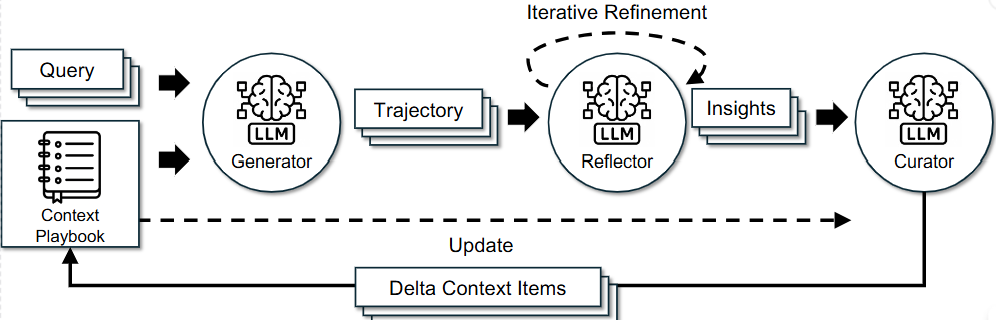
State 가 완성되었으니, 노드를 만들차례입니다.
LangGraph의 각 노드는 독립적인 역할을 수행하는 에이전트입니다. 전체 파이프라인의 첫 시작이자 RAG 성능을 좌우하는 Retriever 부터 살펴보겠습니다.
retriever
단순한 RAG 시스템은 사용자의 질문을 그대로 벡터로 변환하여 검색합니다. 하지만 이 방식은 크게 두 가지 치명적인 문제가 있습니다.
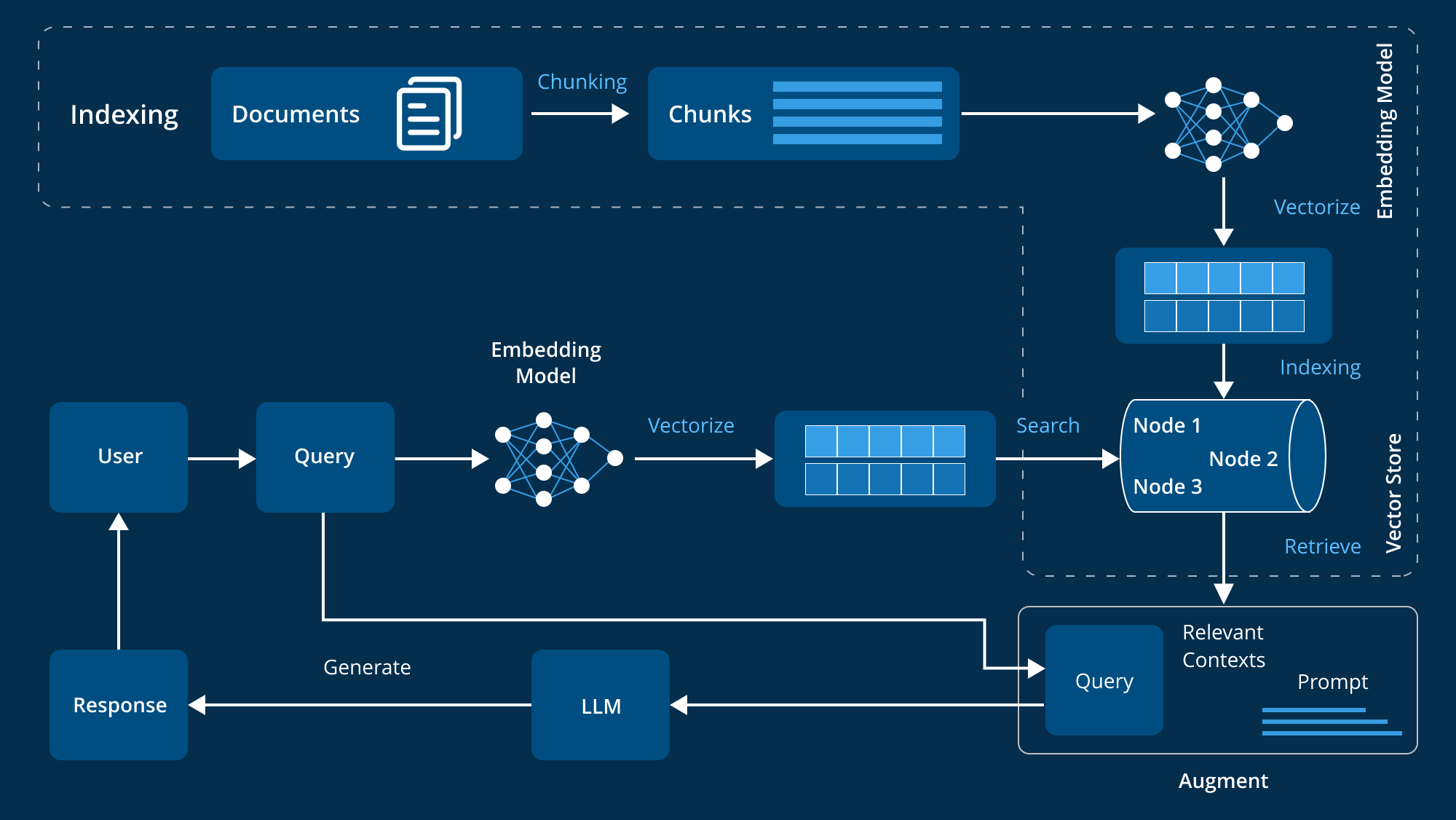
출처 : https://www.leewayhertz.com/advanced-rag/
- 사용자는 한국어(다른 외국어 포함)로 묻지만, Playbook의 핵심 content는 영어로 저장되어있습니다.
- 사용자는 내 코드의
abc_func라고 묻지만, 여기에서 필요한 지식은 함수 디버깅 전략입니다.
이를 해결하기 위해 Query Rewriting 단계를 retrieve 전에 배치했습니다. 이 노드가 실행되면 아래의 시스템프롬프트가 적용된 LLM이 사용자의 질문을 표준화된 영어 검색 쿼리로 변환합니다.
Prompt
You are a **Universal Search Query Optimizer** for an AI Agent Service.
Your goal is to translate the user's raw input into a concise **ENGLISH search query** to retrieve relevant "Strategies", "Pitfalls", or "Best Practices" from the Playbook.

**CORE INSTRUCTIONS:**
1. **Analyze the Input Type:**
   - **Case A (Code/Technical):** If the input is code (Python, SQL, etc.) or a technical question, extract the **algorithmic intent** or **technical goal**.
   - **Case B (General/Reasoning):** If the input is a general question (e.g., writing, planning, logic), extract the **problem-solving pattern** or **core objective**.

2. **Rewrite Rule:**
   - Strip away specific entities (names, variable names, specific numbers) unless they are crucial keywords.
   - Format the output as a generic **"How-to"** or **"Strategy to..."** phrase.
   - **MUST translate into ENGLISH.**

**Examples:**

--- Case A: Code/Technical ---
Input:
def get_unique_sorted(lst):
    return sorted(list(set(lst)))
Output:
Strategy to remove duplicates and sort a list in Python

Input: How to manage state in React?
Output:
Best practices for state management in React applications

--- Case B: General/Reasoning ---
Input: Recommend a 3-day trip to Jeju Island
Output:
Strategy for planning a multi-day travel itinerary

Input: How to write apology email to angry boss?
Output:
Template and tone for writing a professional apology email

Input: "Who is the president of US?" (Simple Fact)
Output:
Strategy to retrieve current political figures

**CRITICAL: Output ONLY the English query string. No explanations.**
이 프롬프트 덕분에 사용자가 파이썬 리스트에서 중복을 제거하면서 순서를 유지하는 방법은? 이라고 한국어로 물어도 Retriever 노드 내부적으로 Strategy to remove duplicates and maintain order in Python list 라는 키워드로 Playbook을 검색합니다.
변환된 쿼리를 이용해 벡터 스토어에 저장된 Playbook에서 유사한 context를 가져옵니다.
Node
async def retriever_playbook_node(state : State) -> State:
    logger.debug("PLAYBOOK RETRIEVER")
    # DB
    vector_store = get_vector_store_instance()
    db = get_db_instance()
    embedding_model = vector_store.get_embedding_model

    # model import
    provider = state.get("llm_provider")
    model = state.get("llm_model")

    query = state.get("query")
    rewritten_query = await rewrite_chain.ainvoke(
        {"query" : query},
        config={"configurable" : {"llm_provider" : provider, "llm_model" : model}}
        )
    top_k = int(state.get("retrieval_topk", env.get_playbook_config['RETRIEVAL_TOP_K']))
    threshold = float(state.get("retrieval_threshold", env.get_playbook_config['RETRIEVAL_THRESHOLD']))


    # if state.get("verbose", False):
    #     highlight_print(rewritten_query, 'blue')

    query_embedding = embedding_model.embed_query(rewritten_query)

    # 맨 처음 실행할때(벡터스토어가 존재하지 않을때) from_disk() 메서드를 실행하면 콜렉션을 못찾음
    vector_store_doc_count = vector_store.get_doc_count()

    # 벡터스토어에서 찾은 retrieved 결과를 playbook으로 전달해줘야 curator가 보고 판단함
    if vector_store_doc_count == 0:
        return {
            "retrieved_bullets": [],
            "playbook" : []
            }

    retriever = vector_store.from_disk()
    docs = retriever.similarity_search_by_vector(
        embedding=query_embedding,
        k=top_k,
        score_threshold=threshold
    )

    retrieved = []
    current_time = datetime.now()
    for doc in docs:
        meta = doc.metadata
        retrieved.append({
            "entry_id": meta.get("entry_id"),
            "category": meta.get("category"),
            "content": doc.page_content,
            "helpful_count": meta.get("helpful_count", 0),
            "harmful_count": meta.get("harmful_count", 0),
            "created_at": meta.get("created_at"),
            "updated_at": meta.get("updated_at"),
            "last_used_at" : current_time
        })

    if state.get("verbose", False):
        highlight_print(f"PLAYBOOK 벡터스토어에서 {len(retrieved)} 항목 검색됨", 'green')

    return {
        "retrieved_bullets" : retrieved,
        "playbook" : retrieved
        }
이 과정에서 score_threshold를 두어 유사도가 낮은 정보는 아예 가져오지 않도록 차단했습니다.
일반적인 RAG 시스템은 사전에 방대한 문서를 임베딩해주는 과정이 필수적입니다. 데이터가 없으면 검색이 불가능하기 때문입니다.
하지만 ACE 프레임워크는 빈 손으로 시작할 수 있다는 강력한 특징이있습니다.
시스템을 처음 런칭했을 때, Playbook은 비어있습니다. 그리고 retriever 에는 이를 위한 로직이 구현되어있습니다.
    # 맨 처음 실행할때(벡터스토어가 존재하지 않을때) from_disk() 메서드를 실행하면 콜렉션을 못찾음
    vector_store_doc_count = vector_store.get_doc_count()

    # 벡터스토어에서 찾은 retrieved 결과를 playbook으로 전달해줘야 curator가 보고 판단함
    if vector_store_doc_count == 0:
        return {
            "retrieved_bullets": [],
            "playbook" : []
            }
이 빈 리스트가 반환되는 순간이 바로 진화의 시작점 입니다.
이 시스템은 질문을 많이 받으면 받을수록, 실수를 많이 하면 할수록 Playbook에 데이터가 쌓이고 점점 더 똑똑해지는 구조를 가지고 있습니다.
generator
retriever 가 Playbook을 가져왔다면, generator는 Playbook을 기반으로 답변을 생성하는 노드입니다.
이 노드는 RAG, Memory 그리고 COT(Chain of Thought)가 결합된 복합적인 에이전트입니다.
generator에게 중요한 요구사항은 두 가지입니다.
- 답변을 만드는데 어떤 플레이북이 쓰였는가?
- 어떤 논리 과정을 거쳐 이 답이 나왔는가?
이를 위해 JSON 응답을 출력하는 커스텀파서(기존 Langchain의 JsonOutputParser 보다 좀 더 강력한)을 만들고 이를 기반으로 시스템 프롬프트를 작성했습니다.
Prompt
    system_template = """
You are an expert AI agent specialized in problem-solving and task execution.

Your role is to:
1. Carefully analyze the provided, highly-relevant playbook entries. These have been specifically selected for the current task.
2. Apply the insights from these entries to generate a high-quality solution.
3. Provide a concise explanation of your approach.

**CRITICAL: You must respond in {language}.**

**CRITICAL OUTPUT FORMAT:**
You MUST respond with ONLY a valid JSON object.
The JSON must have exactly this structure:

{{
  "rationale": "Your step-by-step thought process",
  "used_bullet_ids": ["entry_id1", "entry_id2"],
  "solution": "Your solution here"
}}

**Output Format Rules:**
- "rationale": Your step-by-step thought process as a string.
- "used_bullet_ids": Array of entry_id strings that you found helpful from the provided entries.
- "solution": The actual solution. For code-related solutions, you MAY include markdown code blocks (```python, ```java, etc.) within this field.

IMPORTANT:
- Do NOT add any text before or after the JSON object
- The entire response must be valid JSON
- Properly escape special characters in JSON strings:
  * Use \\n for newlines
  * Use \\" for quotes
  * Use \\\\ for backslashes
- For code blocks in the "solution" field, include them as part of the string value with proper escaping
- Start your response directly with {{ and end with }}

Example for code solutions:
{{
  "rationale": "The user needs a Python function to calculate factorial",
  "used_bullet_ids": ["entry_123"],
  "solution": "Here's the solution:\\n\\n```python\\ndef factorial(n):\\n    if n == 0:\\n        return 1\\n    return n * factorial(n-1)\\n```\\n\\nThis uses recursion to calculate the factorial."
}}
"""

    human_template = """
## Retrieved Playbook (Highly Relevant Learnings):
{retrieved_bullets}

## Current Task:
{query}

Please execute this task using the provided playbook entries.
"""rationale: 모델의 COT를 추출합니다. 추후에 Reflector가 판단하는 데이터가 됩니다.used_bullet_ids: generator가 참고한 playbook 항목의 ID 리스트입니다.language: 내부적으로는 영어 playbook을 참고하더라도, 최종 출력은 사용자의 언어로 변환합니다.
이제 이 프롬프트를 실행하는 generator 노드를 보겠습니다. Redis(단기 기억)과 Vector Store(장기 기억)을 결합하여 LLM에게 전달합니다.
Node
async def generator_node(state : State) -> State:
    logger.debug("GENERATOR")

    # model import
    provider = state.get("llm_provider")
    model = state.get("llm_model")

    # Retrieved Playbook
    retrieved_bullets = state.get("retrieved_bullets", [])

    session_id = state.get("session_id")
    history_messages = await memory_manager.get_langchain_message(session_id)

    inputs = {
        "query" : state.get("query"),
        "chat_history" : history_messages,
        "retrieved_bullets" : retrieved_bullets
    }
    generation = await generator_chain.ainvoke(
        inputs,
        config={"configurable" : {"llm_provider" : provider, "llm_model" : model}}
        )

    solution = generation.get("solution", "")
    rationale = generation.get("rationale", "")
    trajectory_content = f"## Rationale (Thought Process):\n{rationale}\n\n## Solution :\n{solution}"


    # [uuid-123, uuid-456] 같은 playbook의 entry_id 값
    used_bullet_ids = generation.get("used_bullet_ids", [])

    return {
        "solution" : solution,
        "trajectory" : [trajectory_content],
        "used_bullet_ids" : used_bullet_ids
    }
이 코드를 통해 generator는 단순히 질문에 답하는 것을 넘어, chat histroy + playbook을 모두 고려한 답변을 대놓으며, COT를 남겨 스스로 진화할 수 있는 발판을 마련합니다.
Memory
빠르고 휘발성 있는 데이터 처리에 특화된 redis 를 사용하여, LangChain과 연동되는 비동기 메모리 RedisMemoryManager 를 구현하여 chat history를 구현했습니다.
class RedisMemoryManager:
    def __init__(self):
        # 도커 환경변수부터 확인
        env_host = os.getenv("REDIS_HOST")
        env_port = os.getenv("REDIS_PORT")
        self.redis_host = env_host if env_host else env.get_redis_host
        self.redis_port = int(env_port) if env_port else int(env.get_redis_port)

        self.max_memory_size = env.get_memory_config['MAX_MEMORY_SIZE']

        self.r = redis.Redis(
            host=self.redis_host,
            port=self.redis_port,
            decode_responses=True
        )

    async def save_user_message(self, session_id : str, user_question : str):
        message = {
            "type" : "user",
            "content" : user_question
        }

        await self.r.lpush(f"session:{session_id}:history", json.dumps(message))
        await self.r.sadd("all_sessions", session_id)

    async def get_all_session_ids(self):
        session_ids = await self.r.smembers("all_sessions")
        return list(session_ids)

    async def save_ai_message(self, session_id : str, llm_response : str):
        message = {
            "type" : "assistant",
            "content" : llm_response
        }
        await self.r.lpush(f"session:{session_id}:history", json.dumps(message))

    async def get_history(self, session_id : str):
        key = f"session:{session_id}:history"
        messages = await self.r.lrange(key, 0, -1)
        return [json.loads(msg) for msg in reversed(messages)]

    async def trim_history(self, session_id : str):
        key = f"session:{session_id}:history"
        max_messages = self.max_memory_size
        await self.r.ltrim(key, 0, max_messages - 1)

    async def clear_session(self, session_id : str):
        key = f"session:{session_id}:history"
        await self.r.delete(key)
        await self.r.srem("all_sessions", session_id)

    async def get_langchain_message(self, session_id : str, limit : int = None):
        if limit is None:
            limit = int(memory_limit)

        key = f"session:{session_id}:history"
        raw = await self.r.lrange(key, 0, limit -1)

        parsed = [json.loads(m) for m in reversed(raw)]

        messages = []
        for m in parsed:
            if m['type'] == 'user':
                messages.append(HumanMessage(content=m['content']))
            elif m['type'] == 'assistant':
                messages.append(AIMessage(content=m['content']))
        return messages
Evaluator
Generator 노드가 답변을 생성했다면, 이제 Learning이 시작됩니다. 그 첫 단계는 이 답변이 맞았는가, 틀렸는가를 판단하는 평가입니다.
이 노드는 ACE 프레임워크의 신뢰성을 검증하는 단계입니다. 잘못된 답변을 맞았다라고 평가하면, reflector가 꼬이고 결국 잘못된 지식이 playbook에 저장되기 때문입니다.
이 문제를 해결하기 위해 Hybrid Evaluator 아키텍처를 설계했습니다.
Prompt
    system_template = """
You are an expert AI code reviewer and quality assurance analyst.
Your sole purpose is to meticulously evaluate a generated solution against a given query (requirements).

**CRITICAL: You must respond in English.**

Your evaluation process:
1. Read the query carefully to fully understand all explicit and implicit requirements.
2. Analyze the provided solution to see how it addresses those requirements.
3. Check for correctness, completeness, efficiency, and adherence to constraints.
4. Provide a definitive 'positive' or 'negative' rating.
5. Write a concise, evidence-based comment explaining your rating.

**IMPORTANT:** If the rating is 'negative', explicitly identify the type of error:
- 'Syntax Error': Code has invalid syntax
- 'Logical Error': Logic doesn't match requirements
- 'Hallucinated API/Method': Used non-existent functions or methods
- 'Requirement Missed': Failed to address part of the requirements
- 'Runtime Error': Code would fail during execution
- 'Incomplete Solution': Solution is partial or missing key components

If the solution used a non-existent function or method, state that clearly in the comment.

**Output Format:** Your response MUST be a JSON object with:
- "rating": "positive" or "negative"
- "comment": A brief, specific explanation for your rating (include error type if negative)

**Example Outputs:**
{{
  "rating": "negative",
  "comment": "Hallucinated API/Method: The solution uses .sort_values() on a Python list, but this method only exists for pandas DataFrames. Should use .sort() or sorted() instead."
}}

{{
  "rating": "positive",
  "comment": "Solution correctly implements all requirements using appropriate Python list methods and handles edge cases."
}}
"""

    human_template = """
## Query (Requirements):
{query}

## Generated Solution to Evaluate:
{solution}

Please evaluate if the solution successfully meets all requirements from the query.
Return your evaluation in the specified JSON format, in English.
"""
일반적인 대화에서는 라벨이나 Ground Tturh가 없습니다. 따라서 LLM에게 QA 분석가 페르소나를 부여하도록 했습니다.
이 프롬프트는 단순히 O/X가 아니라 왜 틀렸는지를 JSON으로 반환하게 하여, 다음 단계인 reflector가 구체적인 원인 분석을 할 수 있도록 돕습니다.
Node
evaluator 노드의 코드를 보면, 입력된 데이터의 성격에 따라 채점 방식이 동적으로 분기되는 것을 볼 수 있습니다.
async def evaluator_node(state : State) -> State:
    logger.debug("EVALUATOR")

    # model import
    provider = state.get("llm_provider")
    model = state.get("llm_model")

    query = state.get("query")
    solution = state.get("solution")

    # HumanEval
    if state.get("test_code") and state.get("test_id"):
        test_code = state.get("test_code")
        test_id = state.get("test_id")

        is_success, message = run_human_eval_test(solution, test_code, test_id)
        rating = "positive" if is_success else "negative"

        feedback = {
            "rating": rating,
            "comment": f"Execution Result: {rating.upper()}.\nDetails: {message}"
        }

    # HotpotQA
    elif state.get("ground_truth"):
        ground_truth = state.get("ground_truth")

        is_success, message = run_hotpot_eval_test(solution, ground_truth)
        rating = "positive" if is_success else "negative"

        feedback = {
            "rating": rating,
            "comment": f"Evaluation Result: {rating.upper()}.\nDetails: {message}"
        }

    # for normal
    else:
        inputs = {
            "query" : query,
            "solution" : solution
        }

        # rating 과 comment 형식의 feedback
        feedback = await evaluator_chain.ainvoke(
            inputs,
            config={"configurable" : {"llm_provider" : provider, "llm_model" : model}}
            )

    return {
        "feedback" : feedback
    }
HumanEval 과 HotpotQA 는 논문의 성능을 정량적으로 증명하기 위해 만든 로직입니다.
실제 서비스에서는 정답지가 없으므로, for normal 경로가 사용됩니다. 앞서 정의한 evaluator prompt를 사용하여 LLM이 스스로 논리를 점검합니다.