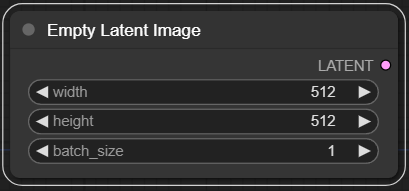
Empty Latent Image 노드입니다. 지정된 크기와 배치 사이즈를 입력하여 비어있는 latent representation을 생성합니다.
def empty_latent_image(width : int = 512, height : int = 512, batch_size : int = 1):
    """
    The EmptyLatentImage node is designed to generate a blank latent space representation with specified dimensions and batch size. This node serves as a foundational step in generating or manipulating images in latent space, providing a starting point for further image synthesis or modification processes.

    ## Input types

    width : Specifies the width of the latent image to be generated. This parameter directly influences the spatial dimensions of the resulting latent representation.

    height : Determines the height of the latent image to be generated. This parameter is crucial for defining the spatial dimensions of the latent space representation.

    batch_size : Controls the number of latent images to be generated in a single batch. This allows for the generation of multiple latent representations simultaneously, facilitating batch processing.

    ## Output types
    latent : The output is a tensor representing a batch of blank latent images, serving as a base for further image generation or manipulation in latent space.
    """

    empty_latent = (batch_size, num_channels_latents, height // vae_scale_factor, width // vae_scale_factor)
    return empty_latent
실제 empty_latent 변수는 텐서가 아니라 shape 정보를 담은 튜플을 반환합니다.
첫번째 shape 에는 배치사이즈를 할당하고
두번째 shape 에는 num_channels_latents를 할당하는데, num_channels_latents 는 Unet의 in_channels입니다.
이를 확인하려면 Stable Diffusion 또는 SDXL 모델의 Unet의 config 옵션에서 확인할 수 있습니다. Stable Diffusion 의 경우
{
  "_class_name": "UNet2DConditionModel",
  "_diffusers_version": "0.6.0",
  "act_fn": "silu",
  "attention_head_dim": 8,
  "block_out_channels": [
    320,
    640,
    1280,
    1280
  ],
  "center_input_sample": false,
  "cross_attention_dim": 768,
  "down_block_types": [
    "CrossAttnDownBlock2D",
    "CrossAttnDownBlock2D",
    "CrossAttnDownBlock2D",
    "DownBlock2D"
  ],
  "downsample_padding": 1,
  "flip_sin_to_cos": true,
  "freq_shift": 0,
  "in_channels": 4,
  "layers_per_block": 2,
  "mid_block_scale_factor": 1,
  "norm_eps": 1e-05,
  "norm_num_groups": 32,
  "out_channels": 4,
  "sample_size": 64,
  "up_block_types": [
    "UpBlock2D",
    "CrossAttnUpBlock2D",
    "CrossAttnUpBlock2D",
    "CrossAttnUpBlock2D"
  ]
}
이렇게 되어있으니 num_channels_latents 는 4라는걸 알 수 있습니다.
그 다음 width와 height 를 vae_scale_factor 만큼 정수나눗셈 연산을 수행합니다. 이 변수는
이렇게 나타나는데, 이름에도 나와있듯이 VAE 모델의 block_out_channels 의 개수를 알아야 계산이 가능해집니다.
역시 Stable Diffusion의 VAE의 config를 보면
{
  "_class_name": "AutoencoderKL",
  "_diffusers_version": "0.6.0",
  "act_fn": "silu",
  "block_out_channels": [
    128,
    256,
    512,
    512
  ],
  "down_block_types": [
    "DownEncoderBlock2D",
    "DownEncoderBlock2D",
    "DownEncoderBlock2D",
    "DownEncoderBlock2D"
  ],
  "in_channels": 3,
  "latent_channels": 4,
  "layers_per_block": 2,
  "norm_num_groups": 32,
  "out_channels": 3,
  "sample_size": 512,
  "up_block_types": [
    "UpDecoderBlock2D",
    "UpDecoderBlock2D",
    "UpDecoderBlock2D",
    "UpDecoderBlock2D"
  ]
}
이렇게 나와있고, block_out_channels 의 길이가 총 4이니
8이란 계산이 나옵니다.
실제로
def empty_latent_image(width : int = 512, height : int = 512, batch_size : int = 1)이렇게 기본값대로 하면
(1, 4, 64, 64)형태의 튜플이 나오는걸 확인할 수 있습니다.

LLM 개발자