크롬 공룡게임 만들기 최종!
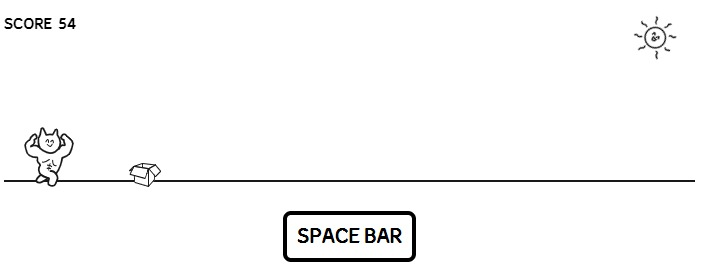
완성본
https://seolynne.github.io/muscleCatRun/
💡 개선해야 했던 사항들
1. 헬스냥 여러번 짬프 금지
2. 장애물 소환되는 시간대 랜덤하게
3. 점수판 만들기
4. 게임오버 시 뜨는 화면 만들기
배경은 html이랑 css만 사용했으니 쿨하게 패스한다👍
1.헬스냥 여러번 짬프 금지
let lastSpacePressTime = 0;
document.addEventListner('keydown', function(e){
	if(e.code === 'Space'){
      const currentTime = Date.now();
      const timeSinceLastPress = currentTime - lastSpacePressTime;

      if (timeSinceLastPress > 500) {
      	jumpSwitch = true;
        lastSpacePressTime = currentTime;
      }
    }
}
마지막으로 스페이스바가 눌린 시간에서 0.5초동안 스페이스바 입력을 무시해주는 코드를 스페이스바 이벤트 함수에 추가해준다.
원래 y값이 원래 자리로 돌아오기 전에는 스페이스바를 무시하게 해주려고 했는데, 뭔가 좀 답답해 보여서 그냥 0.5초 제약을 주고 박스 리스폰 확률을 높여줬다🤔
2.장애물 소환되는 시간대 랜덤하게
function frameRun(){
	if (Math.random() < 0.01) {
    	let box = new Box();
      	manyBoxes.push(box);
    }
}
기존에 120프레임 당 나오게 하던 함수를 랜덤함수로 수정해준다.
Math.random() < 0.01 1%의 확률로 박스를 소환해준다.
3.점수판 만들기
let score = 0;
let scoreInterval;

function updateScore(){
	score += 1;
  	document.querySelectore('.score span').textContent = score;
}


function frameRun() {
  	if (timer % 10 === 0) {
    updateScore();
    }
}

scoreInterval = setInterval(updateScore, 2000);
크롬 공룡게임처럼 시간이 지날수록 1의자리 수가 올라가는 점수판을 만들었다.
updateScore()함수를 만들고 프레임 호출 함수에 집어넣어 프레임마다 호출해서 점수를 업데이트 한다.
scoreInterval을 2초로 설정해 2초에 10점씩 올라가게 설정해줬다.
4.게임 다시 시작
개선사항 4번 게임오버시 뜨는 팝업은 그냥 간단한 스타일 변경 이벤트니까
const replayBtn = document.querySelector('.replay');
replayBtn.addEventListener('click', () => {
resetGame();
});

function resetGame(){
	cancleAnimationFrame(animation);
  	clearInterval(scoreInterval);
  	score = 0;
  	document.querySelector('.score span').textContent = score;
  	manyBoxes = [];
  	currentCat = 0;
  	jumpSwitch = false:
   	lastSpacePressTime = 0;

  frameRun();

}
리플레이 버튼 클릭 시 게임 상태가 초기화되면서, 게임이 다시 시작하는 이벤트를 추가해줬다.
기존에 있던 게임과 점수를 모두 좋은곳으로 날려버리고 재선언을 해준 후 프레임마다 다시 실행해준다.
5.깃허브 호스팅 후 나는 에러
게임을 완성하고 깃허브 호스팅을 해보니 html만 로드되며 css와 js는 무시해버리는 에러가 있었다.
"Some Checks were not successful"라는 에러가 떴는데 처음엔 아직 로드가 덜 된줄 알고 하염없이 기다렸다..
1시간이 넘도록 감감무소식이였고...😇
진짜 어이없는 실수를 한 걸 발견했다.
<link rel="stylesheet" href="/style.css" />모든 첨부파일들을 이런식으로 저장해놨는데
<link rel="stylesheet" href="./style.css" />이렇게 ./을 추가해 줘야 했다...쉣...내 한시간..😇
애처롭게 소중한 시간을 날려버리고, 겨우겨우 정상적으로 호스팅이 완료되니 또 다른 못된 놈이 날 기다리고 있었다.
"Uncaught DOMException: Failed to execute 'drawImage' on 'CanvasRenderingContext2D': The HTMLImageElement provided is in the 'broken' state."
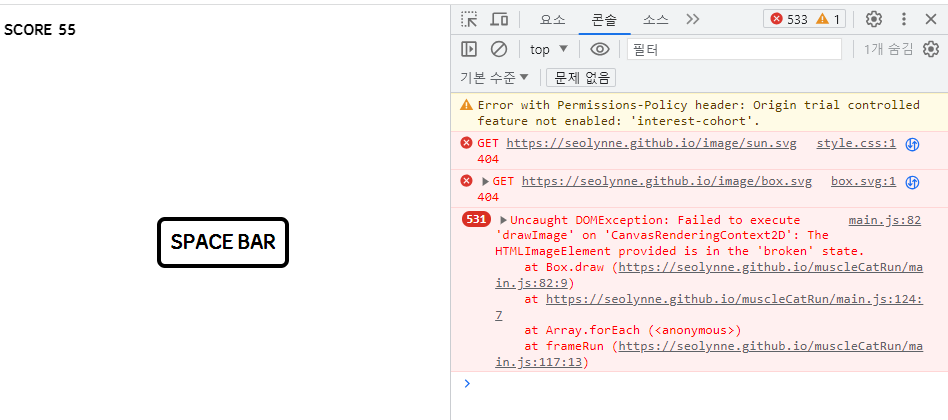
롸?
박스가 나타나는(걸로추정되는)시간대에 헬스냥이 사라지며 에러폭탄이 투척되는 대참사가 일어났다.
박스가 이미지 로딩 전에 게임이 시작해버린걸까?🤔
헬스장 가는걸 포기하고 이미지 로딩 후 게임시작되는 코드를 추가하고, 익숙하지 않은 깃허브와 몇시간동안 서로 멱살잡고 싸우면서 없어지지 않는 에러에 정신이 혼미해졌다.
그러다 설마설마 하면서 에러의 주범인 박스의 코드를 뒤져봤다.
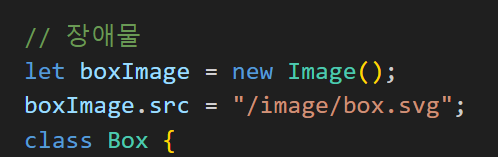
.......ㅋㅋㅋ......걍 헬스장 못 간 사람 됨😇
최종 코드
let canvas = document.getElementById("canvas");
let ctx = canvas.getContext("2d");
canvas.width = window.innerWidth;

// 헬스냥
const catSvg1 = `svg 코드~~~`;
const catSvg2 = `svg 코드~~~`;

// catSvg1과 catSvg2를 이미지 객체로 변환
const catImages = [new Image(), new Image()];
catImages[0].src = "data:image/svg+xml," + encodeURIComponent(catSvg1);
catImages[1].src = "data:image/svg+xml," + encodeURIComponent(catSvg2);

let currentCat = 0;

let muscleCat = {
  x: 20,
  y: 120,
  width: 50,
  height: 60,
  draw() {
    ctx.drawImage(
      catImages[currentCat],
      this.x,
      this.y,
      this.width,
      this.height
    );
  },
  jump() {
    if (this.y > 40) {
      this.y -= 10;
    }
  },
  fall() {
    if (this.y < 120) {
      this.y += 10;
    }
  },
};

// 장애물
let boxImage = new Image();
boxImage.src = "./image/box.svg";
class Box {
  constructor() {
    this.width = 32;
    this.height = 24;
    this.x = canvas.width - this.width;
    this.y = 156;
  }
  draw() {
    ctx.drawImage(boxImage, this.x, this.y, this.width, this.height);
  }
}

// score
let score = 0;
let scoreInterval;

function updateScore() {
  score += 1;
  document.querySelector(".score span").textContent = score;
}

let timer = 0;
let jumpTimer = 0;
let manyBoxes = [];
let animation;

// 프레임마다 실행하기
function frameRun() {
  animation = requestAnimationFrame(frameRun);
  timer++;
  ctx.clearRect(0, 0, canvas.width, canvas.height);

  // 이미지 교체 & score 처리
  if (timer % 10 === 0) {
    currentCat = (currentCat + 1) % 2;
    updateScore();
  }
  // 무작위로 장애물 소환
  if (Math.random() < 0.01) {
    let box = new Box();
    manyBoxes.push(box);
  }
  // x좌표가 0미만이면 제거
  manyBoxes.forEach((a, i, o) => {
    if (a.x < 0) {
      o.splice(i, 1);
    }
    a.x -= 2;
    // 충돌 체크
    crash(muscleCat, a);
    a.draw();
  });

  // 점프!
  if (jumpSwitch == true) {
    muscleCat.jump();
    jumpTimer++;
  }
  if (jumpSwitch == false) {
    if (muscleCat.y < 120) {
      muscleCat.y++;
    }
  }
  if (jumpTimer > 10) {
    jumpSwitch = false;
    jumpTimer = 0;
  }
  muscleCat.draw();
}

// 충돌확인
function crash(muscleCat, box) {
  let xCalculate = box.x - (muscleCat.x + muscleCat.width);
  let yCalculate = box.y - (muscleCat.y + muscleCat.height);
  if (xCalculate < 0 && yCalculate < 0) {
    ctx.clearRect(0, 0, canvas.width, canvas.height);
    cancelAnimationFrame(animation);
    clearInterval(scoreInterval);
    const totalScore = document.querySelector(".total-score");
    totalScore.textContent = `${score}`;
    const sun = document.querySelector(".sun");
    const gameOver = document.querySelector(".game-over");
    sun.style.animationPlayState = "paused";
    gameOver.style.display = "block";
  }
}

// score 업데이트
scoreInterval = setInterval(updateScore, 2000);

// 리셋 버튼
const replayBtn = document.querySelector(".replay");

replayBtn.addEventListener("click", () => {
  resetGame();
});

// 헬스냥 spaceBar
var jumpSwitch = false;
let lastSpacePressTime = 0;

document.addEventListener("keydown", function (e) {
  if (e.code === "Space") {
    const currentTime = Date.now();
    const timeSinceLastPress = currentTime - lastSpacePressTime;

    if (timeSinceLastPress > 500) {
      jumpSwitch = true;
      lastSpacePressTime = currentTime;
    }
  }
});

// 게임리셋
function resetGame() {
  cancelAnimationFrame(animation);
  clearInterval(scoreInterval);
  score = 0;
  document.querySelector(".score span").textContent = score;
  manyBoxes = [];
  currentCat = 0;
  jumpSwitch = false;
  lastSpacePressTime = 0;

  frameRun();

  const sun = document.querySelector(".sun");
  const gameOver = document.querySelector(".game-over");
  sun.style.animationPlayState = "running";
  gameOver.style.display = "none";

  // 스코어 인터벌 제거
  if (scoreInterval) {
    clearInterval(scoreInterval);
  }
  // 스코어 인터벌 다시시작
  scoreInterval = setInterval(updateScore, 2000);
}

frameRun();
어쨌든 완성!
마무리는 귀여운 상자에 갇힌 냥으로