forage : Commonwealth Bank Cybersecurity Job Simulation
- Splunk Enterprise 설치·구성 후 제공 데이터 세트 탐색 및 사기 관련 데이터 시각화 대시보드 제작
- 사고 세부 정보 기반 사이버 공격 유형 식별 및 격리·해결·복구를 포함한 대응 절차 수립
- 사고 재발 방지를 위한 사후 조치 및 예방 대책 문서화
- ACSC 안전 비밀번호 모범 사례를 기반으로 인포그래픽 제작 및 사원 교육 자료 PDF 배포
- HackThisSite 기본 챌린지 11레벨 완료 후 취약성 분석·결과·보안 권장사항을 포함한 침투 테스트 보고서 작성
☑️ Splunk Enterprise 설치·구성 후 제공 데이터 세트 탐색
※ 데이터 세트는 무작위로 생성되어 가상 경험을 위해 만들어졌습니다.
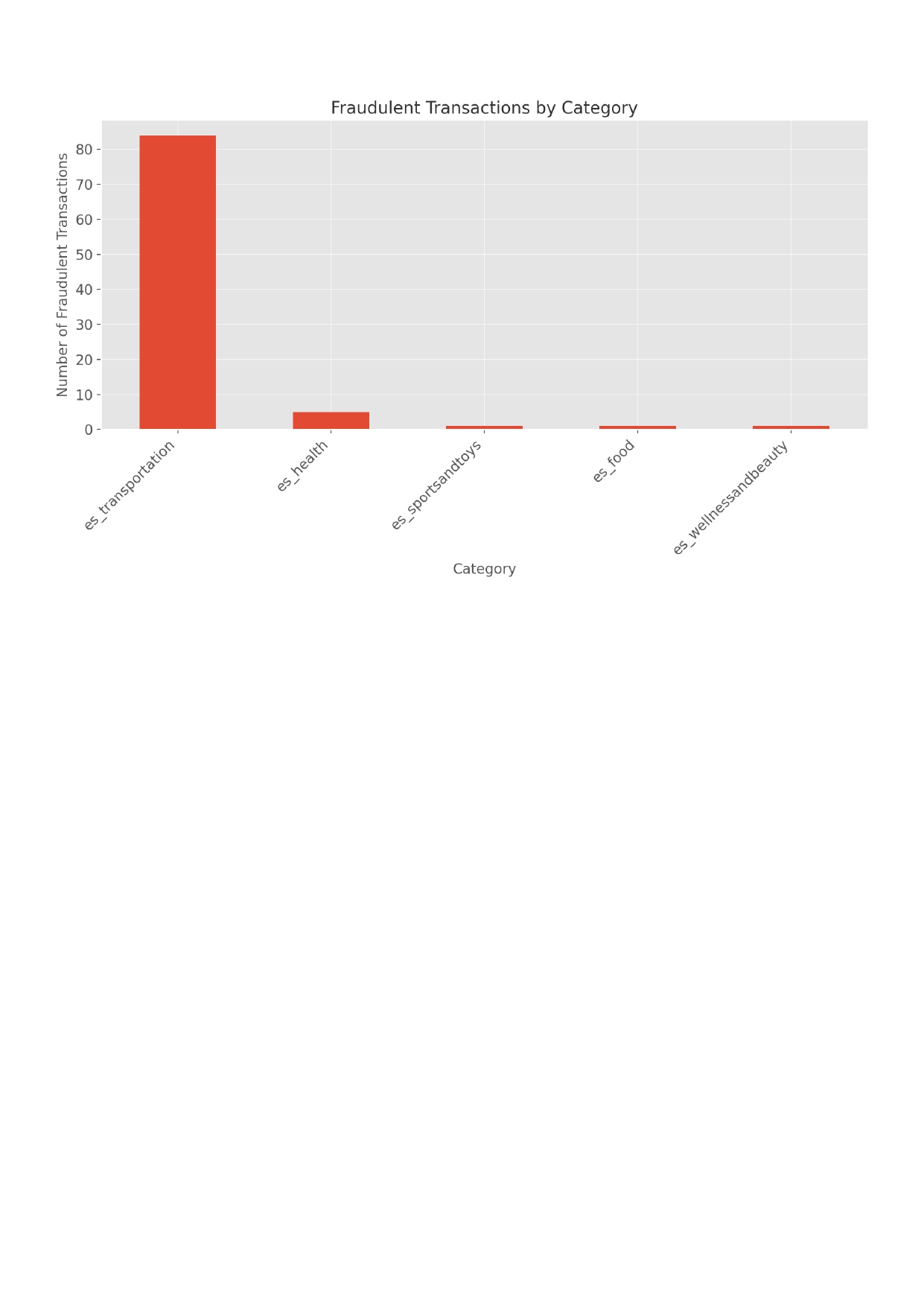
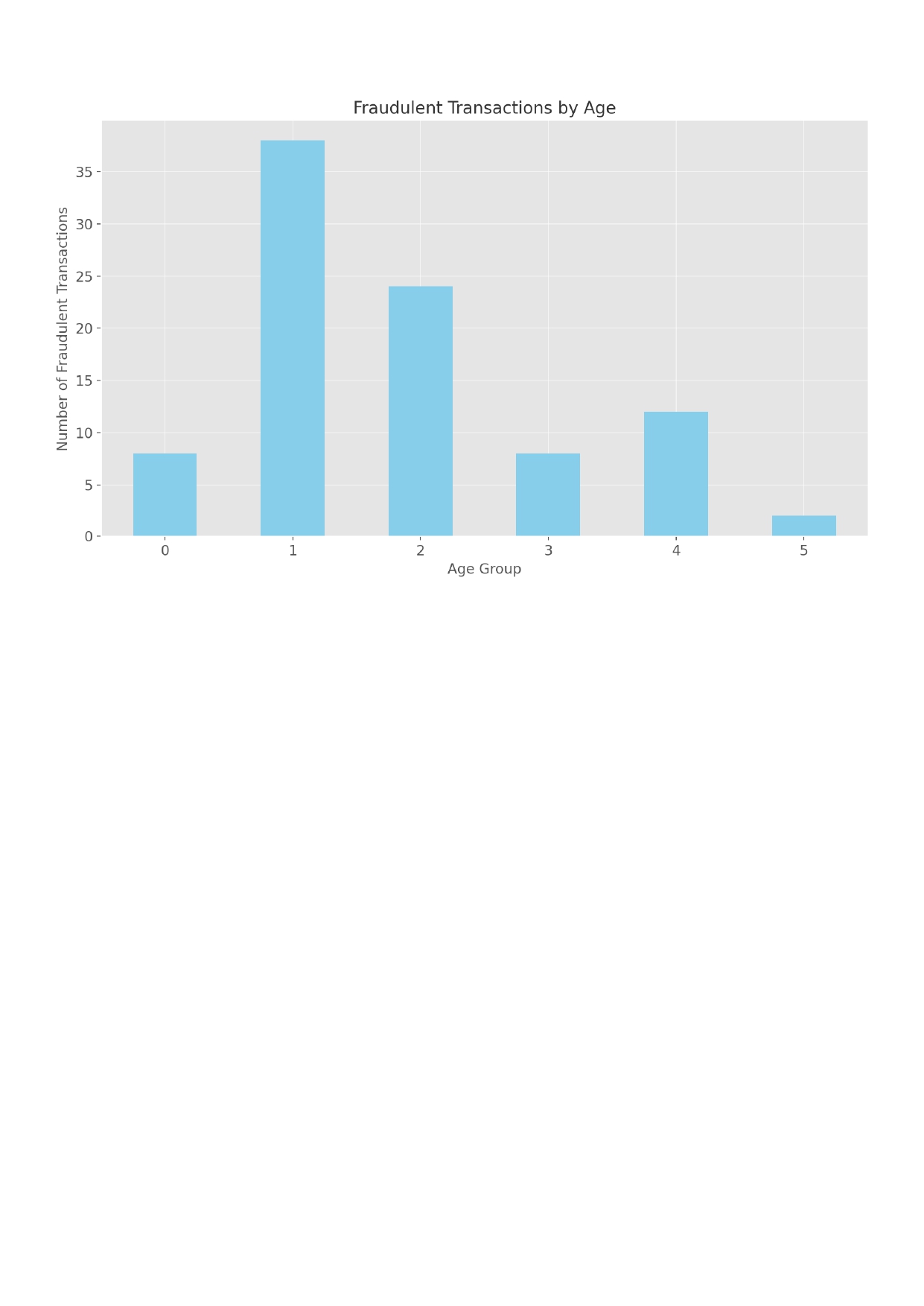
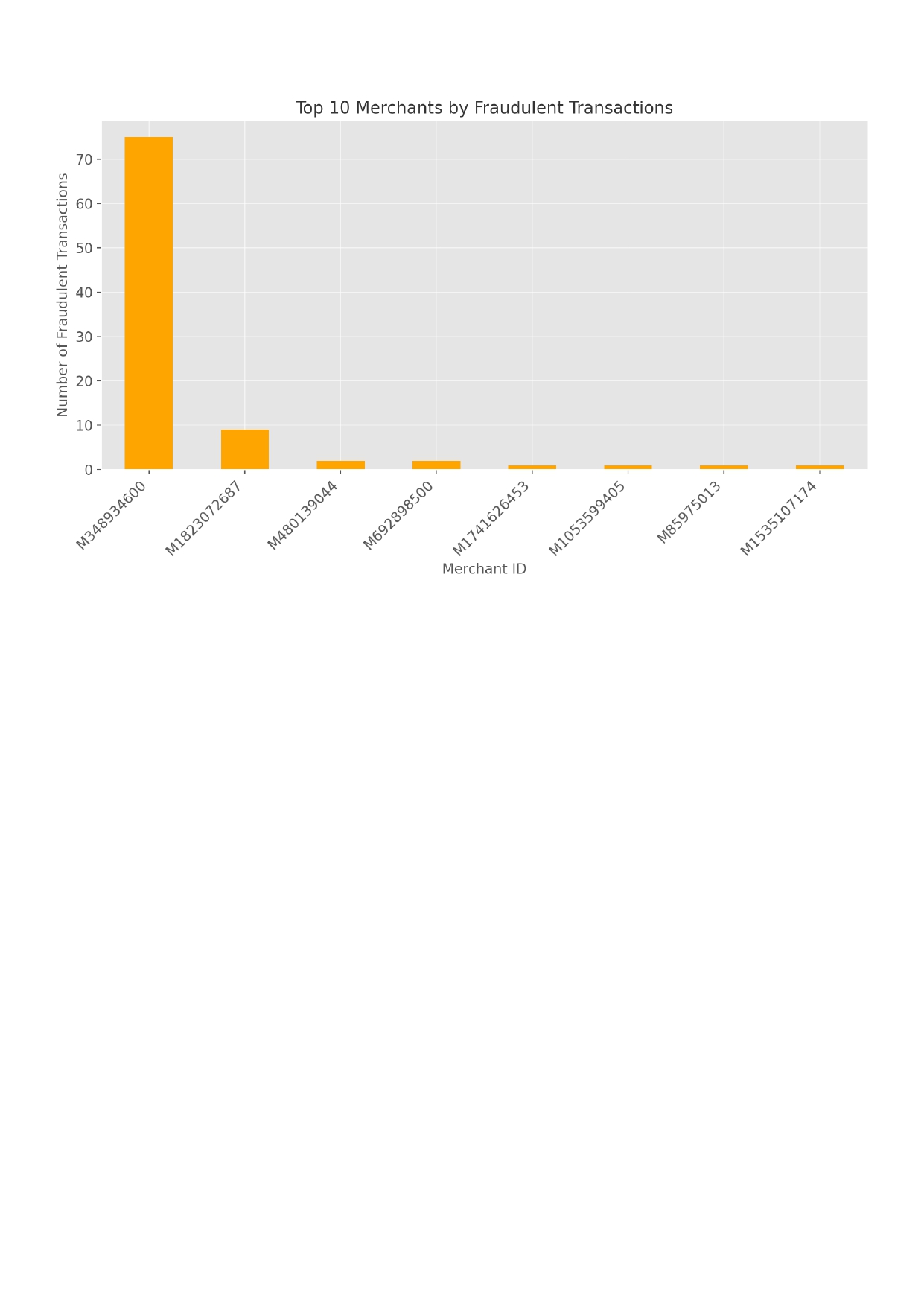
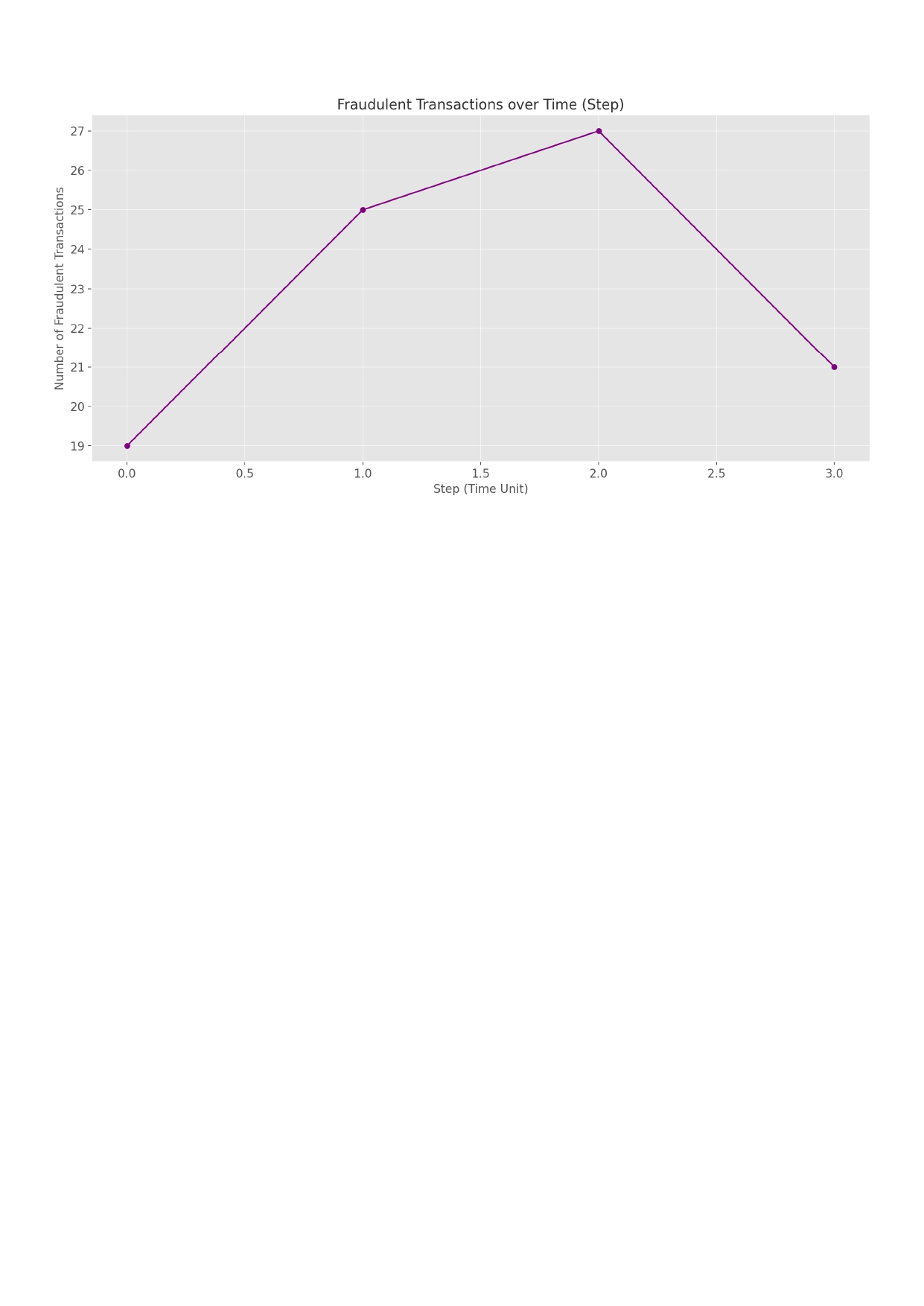
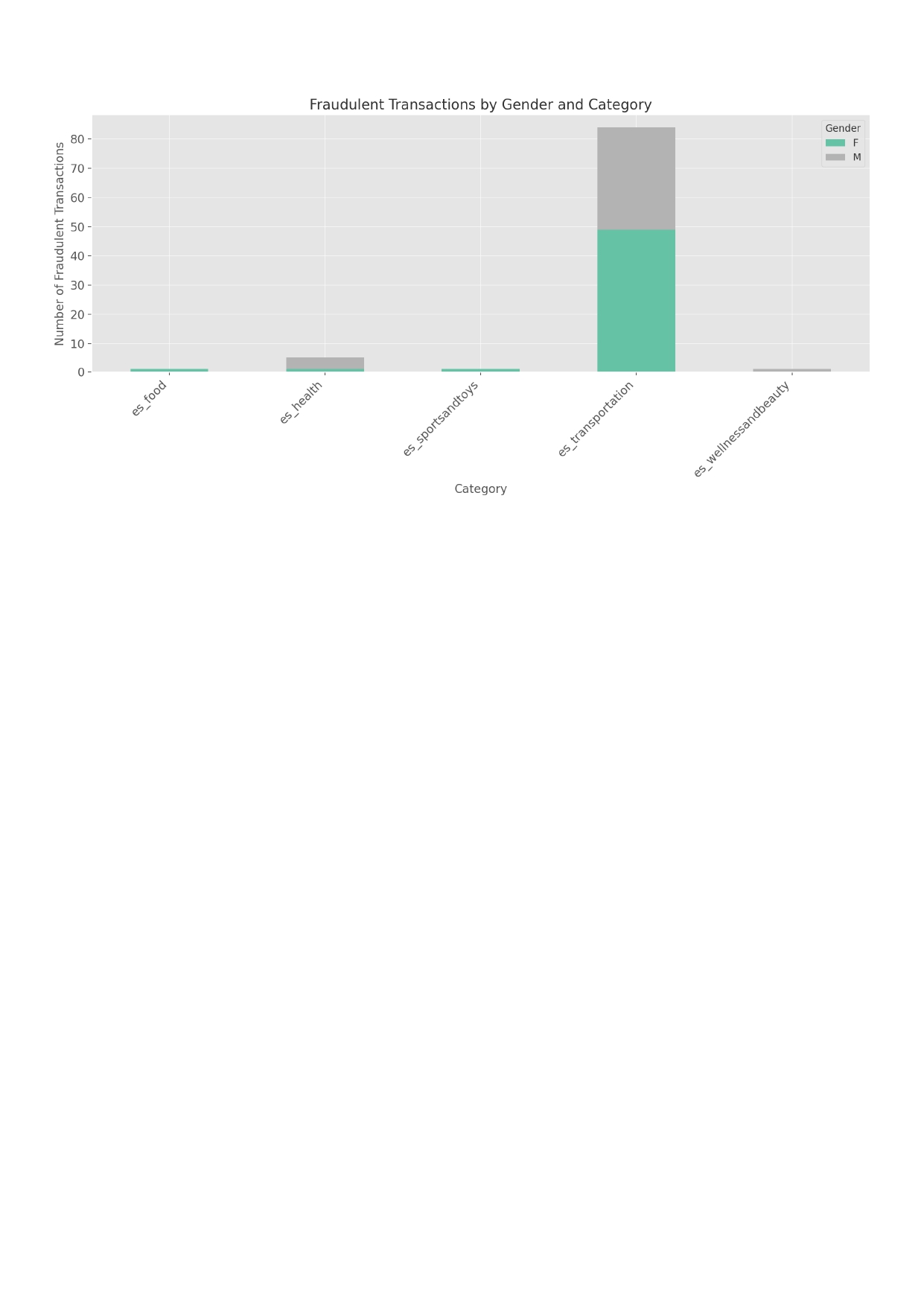
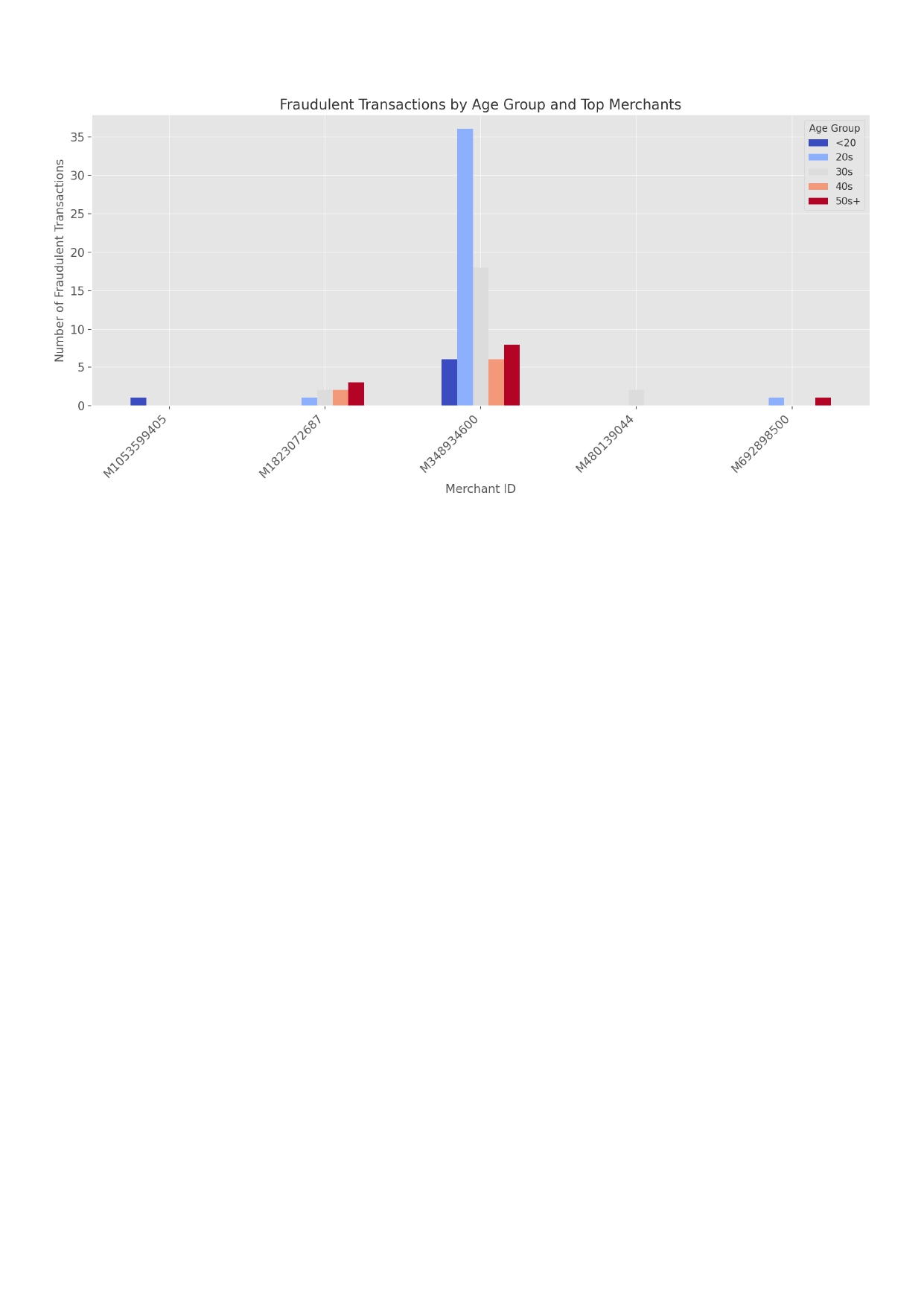
☑️사이버 보안 공격 유형과 사고 발생 후 취해야 할 단계탐색 후 조치
1. What type of attack occurred and why do you believe so?

This incident appears to be a ransomware attack.
The following observations support this conclusion:

Files on affected user machines were suddenly encrypted,

File extensions changed to .locked, .crypt, or similar,

Ransom notes were left in folders or displayed on the desktop, demanding payment in Bitcoin,

Several users reported opening suspicious email attachments shortly before the issue occurred.

This sequence of events aligns with a typical ransomware infection, likely originating from a phishing email.


2. What are the next steps you should take as a cybersecurity analyst?

(List all applicable steps)

Initial Response

Immediately isolate the infected devices from the network

Notify the incident response team

Secure a forensic image and memory dump of affected systems

Scope Identification

Determine how many systems were compromised

Collect backend logs (firewall, EDR, email server)

Identify malware hashes and gather Indicators of Compromise (IoCs)

Attack Path Analysis

Analyze email headers and sender IP addresses

Check for lateral movement within the network

Investigate signs of privileged account compromise

Internal Communication

Send out security awareness alerts to users

Advise staff to avoid clicking suspicious links or attachments

Encourage immediate reporting of any unusual activity


3. How would you contain, eradicate, and recover from this incident?

(List all applicable actions)

Containment

Quarantine all infected systems

Block communication with command-and-control (C2) servers (IP/domain filtering)

Segment the network to prevent further spread

Eradication

Remove ransomware payloads and any persistence mechanisms (e.g., scheduled tasks, registry keys)

Disable unauthorized admin accounts

Patch vulnerable systems and eliminate known exploits

Recovery

Restore affected systems from verified backups

Reset user credentials and implement additional access controls

Reconnect systems after thorough inspection

Enable continuous monitoring for signs of reinfection


4. What should be done after the incident?

Prepare a post-incident report outlining the timeline, root cause, and lessons learned

Conduct security awareness training to improve user vigilance

Review and enhance email filtering, EDR, and SIEM configurations

Implement Multi-Factor Authentication (MFA) and consider adopting a Zero Trust architecture

If required, report the incident to external authorities (e.g., government agencies or data protection authorities)
☑️ 동료 직원들의 비밀번호 보안에 대한 보안 인식을 높이기 위한 효과적인 인포그래픽 설계
Is Your Password Really Safe?
Why Passwords Matter
- 81% of hacking breaches involve weak or stolen passwords
- A 6-character password can be cracked in under 1 second
- Reusing passwords across sites increases your risk
How to Create a Strong Password (ACSC Advice)
- Use 3 or more random words (e.g., dog-pizza-library)
- Length is more important than complexity
- Avoid personal info like birthdays or pet names
- Never reuse the same password
Use a Password Manager
- Tools like Bitwarden, 1Password, or LastPass help store passwords securely
- Only one master password to remember
- Automatically fill in your passwords safely
Top 5 Tips for Password Safety
- Turn on Multi-Factor Authentication (MFA)
- Use a unique password for every site
- Don't write your password on sticky notes
- Never share your login credentials
- Change your password if it's ever leaked
Follow ACSC guidance at cyber.gov.au for safer password habits
☑️ HackThisSite 취약성 분석·결과·보안 권장사항을 포함한 침투 테스트 보고서 작성
HackThisSite Basic Levels 1-11

Level 1 - HTML Comment Disclosure
Vulnerability: Information Disclosure
Description: The password is stored within an HTML comment on the login page.
Attack Method: Right-click -> "View Page Source" -> Locate the comment containing the password.
Security Recommendation: Never store sensitive information like passwords in client-side HTML. All
authentication logic must be handled server-side.

Level 2 - JavaScript Form Validation Bypass
Vulnerability: Client-Side Validation Bypass
Description: JavaScript validation can be bypassed using developer tools.
Attack Method: Use browser console to manually submit the form: document.forms[0].submit()
Security Recommendation: Validate all inputs on the server, not just on the client side.

Level 3 - JS Password Check Bypass
Vulnerability: Hardcoded Password
Description: The password is embedded in the JavaScript file.
Attack Method: Inspect the JS code in the browser to find the password.
Security Recommendation: Never hardcode authentication credentials in client-side code.

Level 4 - URL Parameter Manipulation
Vulnerability: Insecure Access Control via GET Parameters
Description: Access is granted or denied based on a modifiable URL parameter (e.g., ?auth=false).
Attack Method: Manually change the parameter to true in the URL.
Security Recommendation: Always implement access control on the server side.

Level 5 - Cookie Manipulation
Vulnerability: Client-Controlled Authentication
Description: A cookie stores authentication status in plaintext.
Attack Method: Edit the cookie to isAdmin=true using browser developer tools.
Security Recommendation: Use signed/encrypted cookies and verify authentication server-side.

Level 6 - JavaScript Encryption Trick
Vulnerability: Obfuscated Password in JavaScript
Description: The password is encrypted or encoded in JS but easily reverse-engineered.
Attack Method: Analyze and decode the JavaScript logic to retrieve the password.
Security Recommendation: Avoid putting any sensitive logic or data in the client-side code.

Level 7 - Password Guessing with Social Clues
Vulnerability: Weak Password Policy
Description: The challenge relies on guessing a password based on social hints (e.g., pet name).
Attack Method: Use clues provided on the page to manually guess the password.
Security Recommendation: Enforce strong password policies and avoid guessable passwords.

Level 8 - SQL Injection Login Bypass
Vulnerability: SQL Injection
Description: Login fields are vulnerable to SQL queries.
Attack Method: Enter ' OR '1'='1 as the password to bypass login.
Security Recommendation: Use parameterized queries (prepared statements) and sanitize all inputs.

Level 9 - Username Enumeration
Vulnerability: User Enumeration
Description: Different responses are shown depending on whether a username exists.
Attack Method: Use the provided hint and test various usernames.
Security Recommendation: Return generic error messages regardless of login input.

Level 10 - Information Leakage in Server Response
Vulnerability: Information Disclosure
Description: Server responses or error messages contain internal system information.
Attack Method: Analyze the page source or HTTP response to find clues.
Security Recommendation: Do not expose system details in responses or error messages.

Level 11 - Authentication Logic Exploit
Vulnerability: Insecure Authentication Logic
Description: The challenge contains flawed logic that can be manipulated to bypass authentication.
Attack Method: Reverse-engineer the logic using hints and test combinations until success.
Security Recommendation: Carefully design and test all authentication flows for logic flaws.
어른이 되면 하늘에 건담이 날아 다닐줄 알았어