도커 저장소
도커 저장소 소개
Docker 이미지는 컨테이너 실행을 위한 핵심 요소이며, 이를 효율적으로 관리하려면 중앙화된 저장소(Registry)가 필요하다.
이미지 저장소(Registry)를 사용하는 이유
- 중앙 관리: 여러 환경(개발, 스테이징, 운영)에서 동일한 이미지를 쉽게 배포 가능
- 배포 자동화: CI/CD 파이프라인에서 자동으로 이미지를 빌드하고 배포 가능
- 버전 관리: 태그를 활용해 특정 버전의 이미지를 관리 가능 (v1.0, latest 등)
- 보안 강화: 접근 제어 및 이미지 스캔 기능을 통해 보안성을 높일 수 있음
- 스토리지 절약: 이미지 압축 및 중복 제거 기능을 제공하여 저장 공간 절약
이미지 저장소 종류
- Docker Hub (https://hub.docker.com/) - 가장 많이 사용되는 기본적인 퍼블릭 저장소
- GitHub Container Registry (GHCR) - GitHub와 통합되어 GitHub Actions에서 CI/CD 자동화 가능
- Google Artifact Registry (GCR) - Google Cloud에서 제공하는 컨테이너 이미지 저장소
- Amazon Elastic Container Registry (ECR) - AWS 환경에서 컨테이너를 관리할 때 유용
- Quay.io - Red Hat에서 제공하는 레지스트리
- Harbor (오픈소스) - CNCF(Cloud Native Computing Foundation)에서 지원하는 오픈소스 컨테이너 레지스트리
- Nexus Repository - 컨테이너 이미지뿐만 아니라 Maven, npm 등의 패키지도 함께 관리 가능
할일
- 이미지 저장소 선정
- 도커 파일 관리
- 도커 이미지 관리
절차
- 이미지 저장소 선정
- 프로그램 생성, 로컬 테스트
- 도커 파일 생성
- 이미지 생성, 이미지 테스트
- 도커 로그인
- 이미지 태깅/푸시
- 이미지 확인, PULL/RUN
이미지 저장소 선정
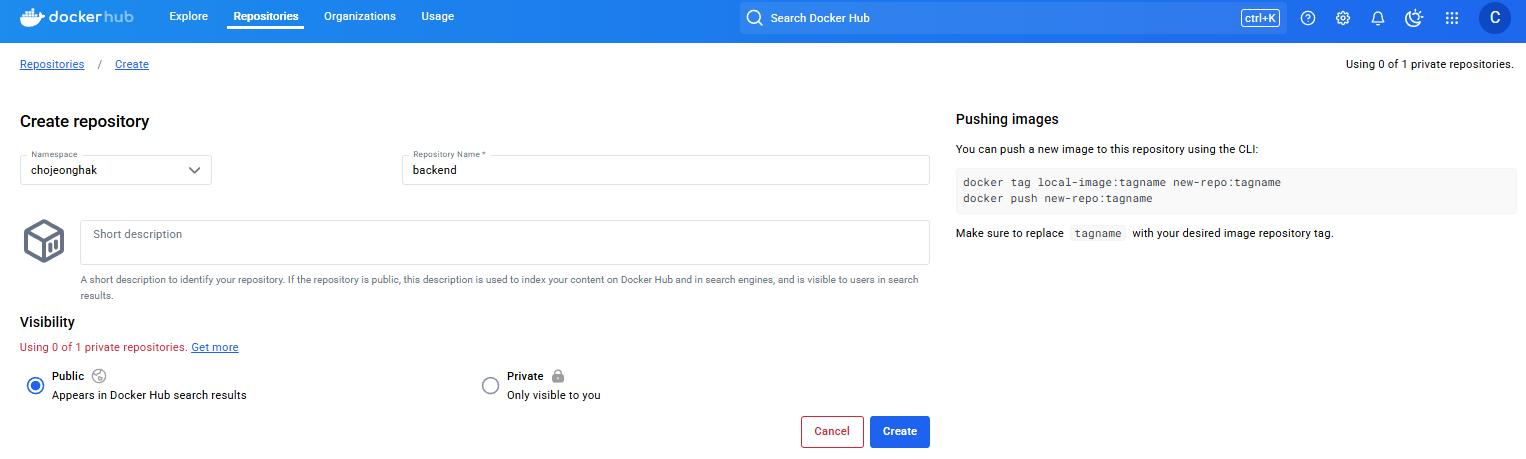
퍼블릭으로 가장 인기있는 도커 허브를 선택했다. dockerhub 계정을 생성한 후 아래 처럼 리포지토리를 생성한다.
- 리포지토리 생성
프로그램 생성
파이썬으로 BFF (backend for frontend) 를 간단히 만들었다. 프로그램 작동 확인을 위해 루트에 접근 시 간단한 웰컴 메시지를 보여준다. /bff 로 접근할 경우 벡엔드 API를 호출한다. 포트는 3000으로 잡았다. 벡엔드는 5000이다.
import requests
from flask import Flask, jsonify

app = Flask(__name__)

@app.route('/', methods=['GET'])
def web_home():
    return jsonify({
        "title": "Welcome to Web",
        "content": "This is web-specific content."
    })

@app.route('/bff')
def call_bff():
    print("CALLED backend for frontend!")
    response = requests.get("http://backend:5000/health")
    return f"BFF RESPONSE: {response.text}"

if __name__ == '__main__':
    app.run(host='0.0.0.0', port=3000)
로컬에서 프로그램 테스트를 진행한다. 파이썬이 설치되어 있어야 한다.
vagrant@slave1:~$ pip install flask

vagrant@slave1:~$ python3 bff.py
 * Serving Flask app 'bff'
 * Debug mode: off
WARNING: This is a development server. Do not use it in a production deployment. Use a production WSGI server instead.
 * Running on all addresses (0.0.0.0)
 * Running on http://127.0.0.1:3000
 * Running on http://10.0.2.15:3000
Press CTRL+C to quit
다른 콘솔을 열고 3000 포트에 접근한다.
vagrant@slave1:~$ curl localhost:3000/
{"content":"This is web-specific content.","title":"Welcome to Web"}
도커 파일 생성
도커파일의 네이밍룰을 Dockerfile.서비스명-환경종류 로 정의했다. Dockerfile.bff-dev 파일에 아래 내용을 담는다. 관리를 위해 LABEL을 추가했다.
FROM python:3.11-slim

LABEL maintainer="chojeonghak@gmail.com"
LABEL version="1.0"
LABEL description="BFF"

USER root
WORKDIR /app
RUN apt-get update && \
    apt-get install -y curl vim && \
    apt-get clean && \
    rm -rf /var/lib/apt/lists/*

RUN pip install flask
RUN pip install requests
COPY ./bff.py /app

EXPOSE 3000

CMD ["python3", "bff.py"]
도커 빌드
sudo docker build . -t bff:0.1 -f Dockerfile.bff-devvagrant@slave1:~$ sudo docker images
REPOSITORY TAG IMAGE ID CREATED SIZE
bff latest 2275199385bc 4 minutes ago 196MB도커 테스트를 한다.
vagrant@slave1:~/bff$ sudo docker run -p 3000:3000 bff:0.1
 * Serving Flask app 'bff'
 * Debug mode: off
WARNING: This is a development server. Do not use it in a production deployment. Use a production WSGI server instead.
 * Running on all addresses (0.0.0.0)
 * Running on http://127.0.0.1:3000
 * Running on http://172.17.0.2:3000
Press CTRL+C to quit
vagrant@slave1:~$ curl localhost:3000
{"content":"This is web-specific content.","title":"Welcome to Web"}도커 로그인
도커 허브에 로그인한다.
vagrant@master:~$ docker logout
Removing login credentials for https://index.docker.io/v1/

vagrant@master:~$ docker login -u chojeonghak
Password:
WARNING! Your password will be stored unencrypted in /home/vagrant/.docker/config.json.
Configure a credential helper to remove this warning. See
https://docs.docker.com/engine/reference/commandline/login/#credential-stores

Login Succeeded
도커 이미지 태깅/푸시
sudo docker tag bff:0.1 chojeonghak/bff:0.1
sudo docker push chojeonghak/bff:0.1
태깅 확인은 이미지로 확인할 수 있다.
vagrant@slave1:~/bff$ sudo docker images
REPOSITORY        TAG       IMAGE ID       CREATED          SIZE
chojeonghak/bff   0.1       563f537485d3   10 minutes ago   196MB
bff               0.1       563f537485d3   10 minutes ago   196MB
도커 허브에 bff:0.1이 잘 업로드 된것을 확인한다.
도커 이미지 실행 확인
로컬의 이미지를 삭제한다.
sudo docker rmi chojeonghak/bff:0.1로컬에서 이미지를 삭제한 상태에서 도커 허브로 부터 이미지를 가져와 잘 실행됨을 확인한다.
sudo docker run -p 3000:3000 chojeonghak/bff:0.1
vagrant@slave1:~/bff$ sudo docker run -p 3000:3000 chojeonghak/bff:0.1
Unable to find image 'chojeonghak/bff:0.1' locally
0.1: Pulling from chojeonghak/bff
Digest: sha256:94d6c58b37ea2c612b3abb3e51e6fe6166b9eb9b7a574378165fd4aee9d464b4
Status: Downloaded newer image for chojeonghak/bff:0.1
 * Serving Flask app 'bff'
 * Debug mode: off
WARNING: This is a development server. Do not use it in a production deployment. Use a production WSGI server instead.
 * Running on all addresses (0.0.0.0)
 * Running on http://127.0.0.1:3000
 * Running on http://172.17.0.2:3000
Press CTRL+C to quit
khagor