
[C#과 유니티, 실전 게임으로 제대로 시작하기]섹션2-2. 스터디
플레이어 구현하기
player gameobject
-
gameObject : 해당 script가 부착된 game object
-
. : ~의
-
SetActive() : 메서드
-
Frame : 한 장 한장을 의미한다.
- FPS(Frame Per Second) : 60FPS는 1초에 60번의 프레임이 발생한다는 의미이다.
void Start(){
bool isHidden = false;
bool isDead = true;

gameObject.SetActive(isHidden||isDead); // isHidden||isDead -> true
}
transform, position
-
transform.position() : component의 position 값을 가리킨다.
-
vector : 크기와 방향을 갖는 물리값이다. 쉽게말해 좌표값을 의미한다.(ex> (x,y))
-
vector2 : (x,y)
-
vector3 : (x,y,z)
ex> vector2.one -> (1,1)
void Start(){

Vector2 pos = transform.position; //(0,0)
pos.x+=3; //(3,0)
transform.position = pos; //(3,0)

//transform.position.x += 3; 코드는 오류가난다.
//직접 vector자료형을 선언하여 대입해야한다.
플레이어 이동
- Input.Getkey() : 키보드의 입력을 받는 메서드이다.
void Update(){
if(Input.Getkey(KeyCode.A))  //A가 눌릴 때마다 GetKey는 True를 반환한다.
	Debug.Log("A를 눌렀다.");
}
-> A를 누를 때마다 콘솔창에 "A를 눌렀다."가 출력된다.
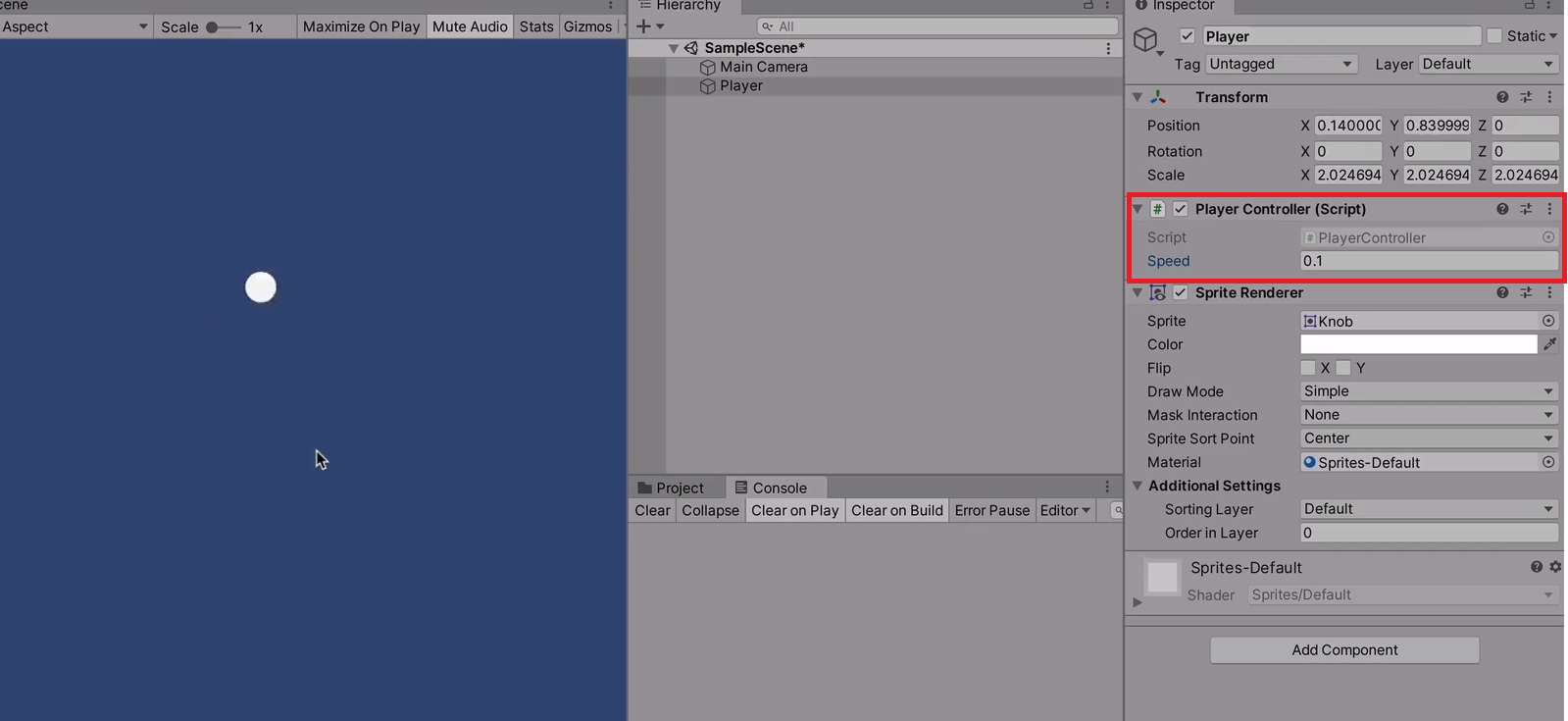
public float speed = 0.02f; //player controller에 speed변수가 생긴다.
							//게임 중에 inspector에서 스피드를 조절할 수 있게 된다.
void Update(){

if(Input.Getkey(KeyCode.W))  //W를 누르면 위로 움직인다.
	transform.Translate(0,speed,0);
if(Input.Getkey(KeyCode.A))  //A를 누르면 왼쪽으로 움직인다.
	transform.Translate(-speed,0,0)
if(Input.Getkey(KeyCode.S))  //S를 누르면 아래쪽으로 움직인다.
	transform.Translate(0,-speed,0)
if(Input.Getkey(KeyCode.D))  //D를 누르면 오른쪽으로 움직인다.
	transform.Translate(speed,0,0)

}
프리팹
- Prefab : 현장에서 필요한 것들을 필요할 때마다 가져다 쓸 수 있게한다.
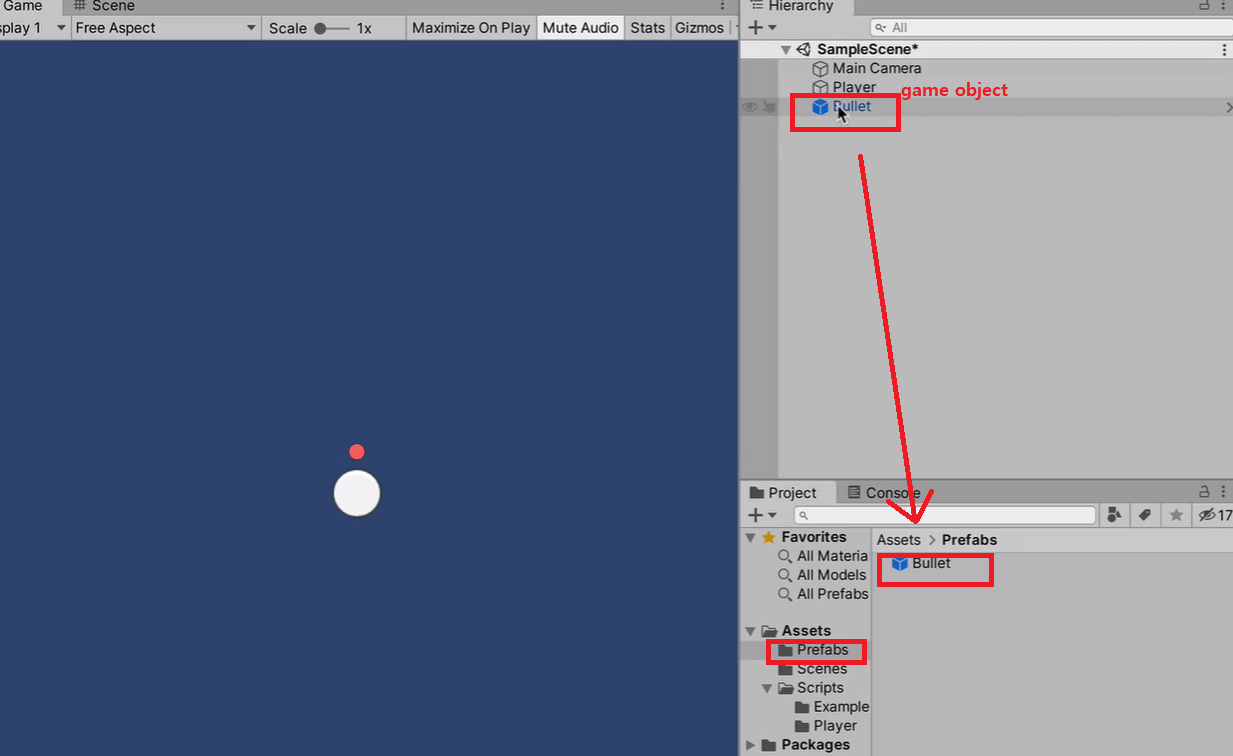
Prefab화 하는 방법
asset floder에 prefabs folder를 만든다. -> Hierarchy에 있는 game object를 prefabs folder에 drag&drop한다.
public GameObject BulletPrefab; // inspector에 BulletPrefabs를 보이게 한다.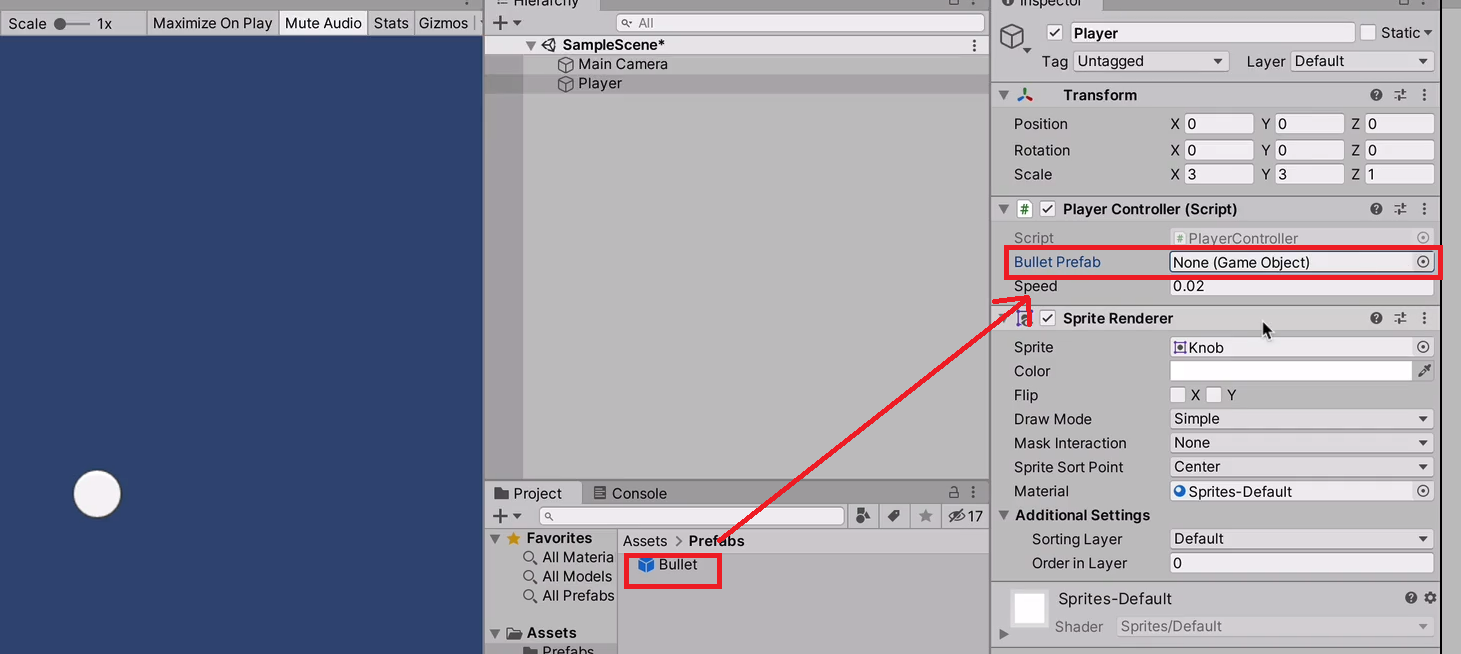
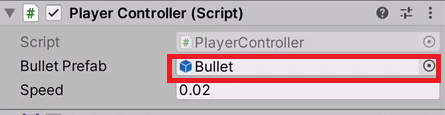
** Prefabs folder에 있는 Bullet Prefabs을 Script 안에 가져오는 과정이다.
** Hierarchy에 있는 gameobject가 아닌 asset folder안에 있는 frefab asset을 Player Controller의 Bullet Prefab에 담아야한다.
public GameObject BulletPrefab;
public bulletspeed = 100;

void Update(){
if(Input.GetkeyDown(KeyCode.Space)){
	GameObject bullet = Instantiate(BulletPrefab);
    bullet.transform.position=transform.position; //space를 누를때마다 Player의 위치에 bullet gameobject가 생성된다.
    bullet.GetComponent<Rigidbody2D>().AddForce(Vector2.up * bulletspeed); //Bullet game object에 부착되어있는 Rigidbody2D Component를 가져온다.
    											// AddForce는 힘을 가해주는 메서드이다.
                                                //Vector2.up의 값인 (0,1)에 bulletspeed의 값 100을 곱하면 (0,100)이 된다
	}
}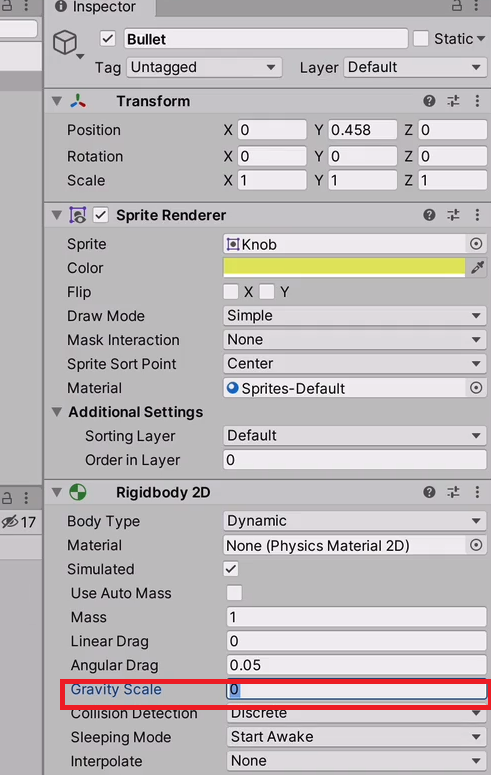
** bullet이라는 gameobject가 밑으로 떨어지지않게. 즉, 중력이 가하지 않도록 하기 위해서 Gravity Scale의 값을 0으로 설정한다.
해결하고 싶은 문제
문제1> Bullet의 game object가 생성되고 실행되었을 때 Bullet Hierarchy에 사라지지않고 계속 남아있다.
문제2> Space를 누를 때 Bullet 객체를 여러개 생성하길 원한다.
문제3> Bullet의 game object의 위치가 Player 몸에서 생성된다.
문제1 해결방법
Bullet의 game object가 생성되고 실행되었을 때 Bullet Hierarchy에 사라지지않고 계속 남아있다.
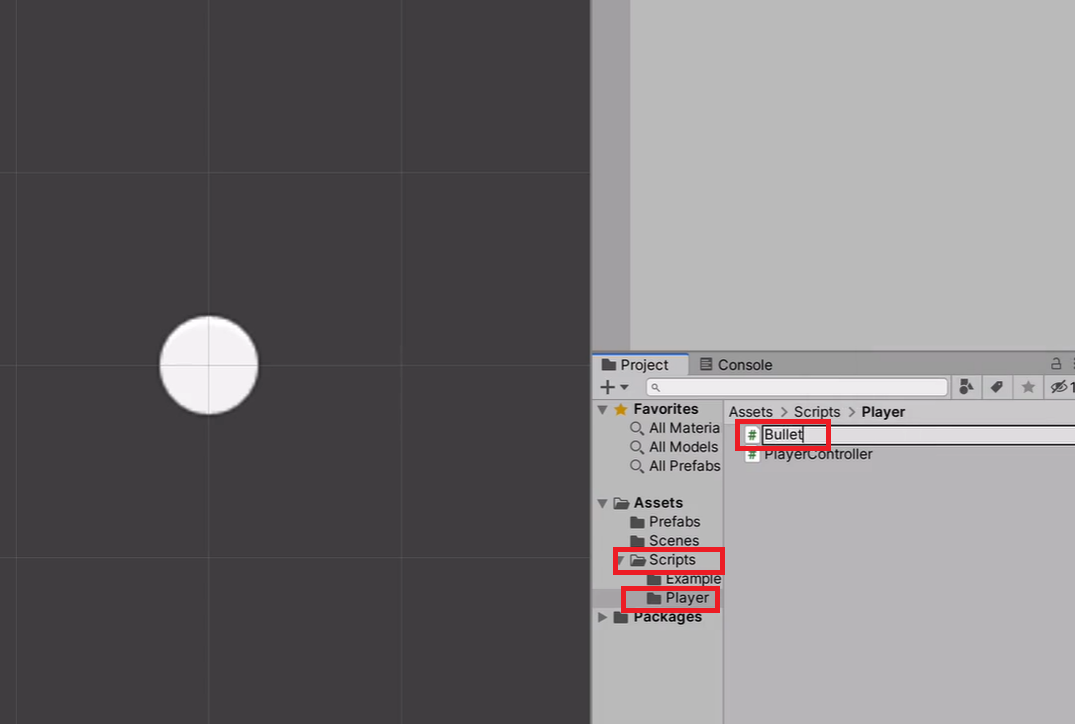
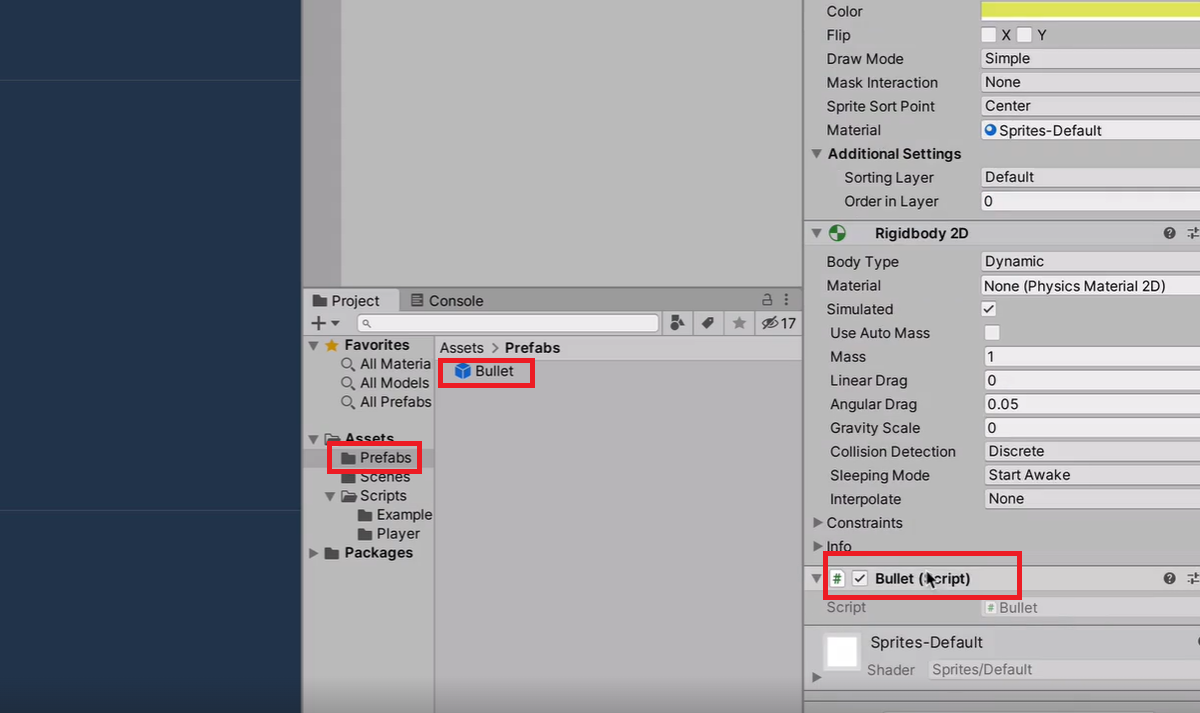
Scripts-Player folder에 Bullet Script를 생성한다. -> Prefabs-Bullet의 inspector에 Bullet Script를 추가한다.
Bullet Script
void Start(){
Invoke("DestroySelf",2.0f); //Invoke()는 어떤 메서드를 일정시간 뒤에 실행시켜주는 메소드이다.
						//2초 뒤 DestroySelf의 메서드를 실행시킨다.

}
void DestroySelf(){
	Destroy(gameObject); //Destroy()는 gameObject를 파괴한다.
}
문제2 해결방법
Space를 누를 때 Bullet 객체를 여러개 생성하길 원한다.
Player Controller Script로 돌아온다.
방법1) 각각의 bullet gameObject 속도값을 다르게 한다.
public GameObject BulletPrefab;
public bulletspeed = 100;

void Update(){


if(Input.GetkeyDown(KeyCode.Space)){
    for(int i = 0; i < 3 ; i++){ // 반복문을 사용하여 3개의 Bullet gameObject가 생성된다.
		GameObject bullet = Instantiate(BulletPrefab);
    	bullet.transform.position=transform.position;
    	bullet.GetComponent<Rigidbody2D().AddForce(Vector2.up * bulletspeed * (1+(i*0.1f));
    }
  }
}
정해진 값은 없으니 유동적으로 곱하거나 나누는 값을 정한다.
방법2) 각각의 bullet gameObject 위치값을 변화한다.
public GameObject BulletPrefab;
public bulletspeed = 100;

void Update(){


if(Input.GetkeyDown(KeyCode.Space)){
    for(int i = 0; i < 3 ; i++){
		GameObject bullet = Instantiate(BulletPrefab);
    	bullet.transform.position=transform.position;
        Vector2 pos = bullet.transform.position;
        pos.y+=i*0.3f;
        bullet.transform.position = pos;
    	bullet.GetComponent<Rigidbody2D().AddForce(Vector2.up * bulletspeed * (1+(i*0.1f));
    }
  }
}
방법1과는 다르게 방법2는 속도가 같다.
문제3 해결방법
Bullet의 game object의 위치가 Player 몸에서 생성된다.
방법1) Vector의 메서드를 사용한다.
public GameObject BulletPrefab;
public bulletspeed = 100;

void Update(){
if(Input.GetkeyDown(KeyCode.Space)){
    for(int i = 0; i < 3 ; i++){
		GameObject bullet = Instantiate(BulletPrefab);
    	vector3 bulletStartPosition = transform.position + new vector(0,0.5f,0);
    /* Vector3 bulletStartPos = transform.position;
       Vector3 up = new Vector3(0,0.5f,0);
       bulletStartPos += up;
       동일한 코드이다.*/
    bulletStartPos.y += i*0.3f;
    bullet.transform.position = bulletStartPos;

  	bullet.GetComponent<Rigidbody2D>().AddForce(Vector2.up * bulletspeed);
	}
  }
}
방법2) gun game objectfmf 생성하여 bullet의 위치를 정한다.

Gun이라는 gameObject를 드래그해서 Player한테 붙이면 Gun은 child Object, Player은 parent Object라고 불리게 된다.
Child Object를 Scene에서 움직였을 때 Parent Object는 변동이 없지만, Parent Object를 Scene에서 움직였을 때 Child Object에도 똑같이 변동이 생긴다.(모둠화가 된다.)
public GameObject BulletPrefab;
public GameObject Gun;
public bulletspeed = 100;

void Update(){
if(Input.GetkeyDown(KeyCode.Space)){
    for(int i = 0; i < 3 ; i++){
		GameObject bullet = Instantiate(BulletPrefab);
    Vector3 bulletStartPos = Gun.transform.position; // Scene에 있는 Gun game object의 위치를 bulletStartPos에 대입된다.
    bulletStartPos.y += i*0.3f;
    bullet.transform.position = bulletStartPos;

  	bullet.GetComponent<Rigidbody2D>().AddForce(Vector2.up * bulletspeed);
	}
  }
}