
📅 2025-09-18
➡️ JavaScript 동기/비동기, Promise에 대해 새롭게 알게 된 것 또는 헷갈리는 부분 정리 + 🤔❓
🔎 학습 리마인드
📌 데이터 타입
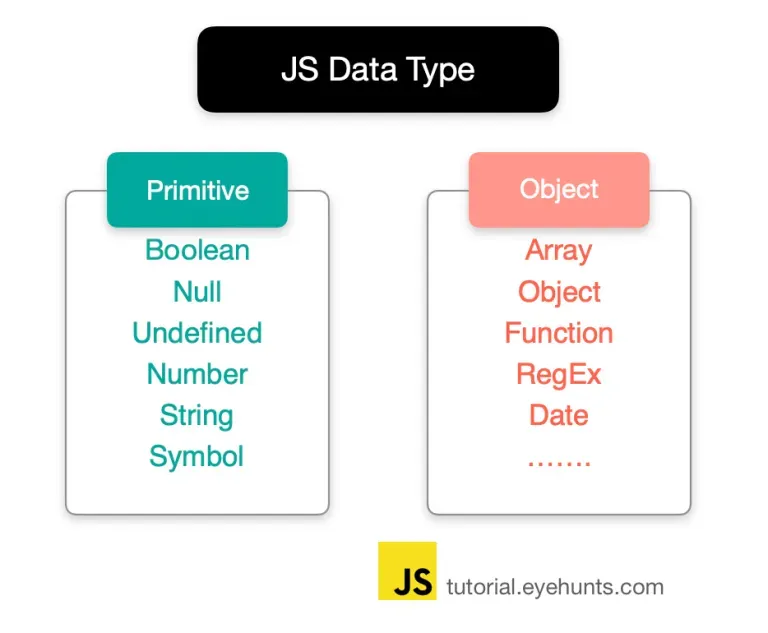
💡 자바스크립트 데이터 타입의 두 가지 분류
- 저장 방식과 불변성 여부에 따라 두 가지로 나뉨
데이터 타입 저장 방식 불변성 여부 기본형(Primitive Type) == 원시값 - 값 자체를 저장
- 값이 담긴 주소값을 바로 복제불변성을 가짐 참조형(Reference Type) - 값이 저장된 주소를 참조
- 값이 담긴 주소값을 복제불변성을 가지지 않음
💡 불변성
- 값 자체가 변경되지 않고 새로운 값이 생성되는 성질
- 기존 값은 그대로 두고, 새로운 메모리 공간에 저장되는 것
💡 깊은 복사 방법
-
깊은 복사 함수 만들기
function copyObjectDeep(target) { if (typeof target !== "object" || target === null) { return target; // 기본형은 그대로 반환 } const result = Array.isArray(target) ? [] : {}; for (let key in target) { result[key] = copyObjectDeep(target[key]); // 재귀 복사 } return result; }- 재귀를 이용해서 객체 안에 들어 있는 객체까지 전부 복사
var post = { title: "자바스크립트 기초", category: "programming", author: { name: "철수", email: "chul@example.com", }, }; var post2 = copyObjectDeep(post); post2.author.name = "영희"; post2.category = "advanced"; console.log(post.author.name); // 철수 console.log(post2.author.name); // 영희 console.log(post.category, post2.category); // programming advanced- post와 post2는 완전히 독립적인 객체
- 중첩된 author 객체까지 안전하게 분리됨
-
JSON활용var post = { title: "자바스크립트 기초", category: "programming", author: { name: "철수", email: "chul@example.com", }, }; var post2 = JSON.parse(JSON.stringify(post)); post2.author.name = "영희"; console.log(post.author.name); // 철수❗ 이 방법에 대한 문제점
- JSON을 이용한 깊은 복사는 모든 정보를 복사하지 않음. 함수, undefined, symbol 복사가 안됨
- 객체가 중복된 경우 복사 안됨
-
structuredClone()- 브라우저 환경에서 제공하는 심플한 깊은 복사 방법
📎 https://developer.mozilla.org/ko/docs/Web/API/Window/structuredClone
📌 콜백 함수
- 다른 함수(또는 메서드)에게 인자로 넘겨 그 쪽에서 적절한 시점에 실행하는 함수
- 제어권을 넘겨줄께 너가 알아서 로직 처리해!
💡 콜백 지옥
-
콜백이 많아지면? → 여러 동작을 순서대로 연결해야 할 문제가 생김
getUser(1, function(user){ getPosts(user.id, function(posts){ getComments(posts[0].id, function(comments){ console.log(`첫 번째 댓글 ${comments[0].text}`); }); }); });- 이런 식의 플로우가 계속 깊어짐 / 가독성 ↓ / 에러 처리 및 수정 어려움
-
콜백만으로 복잡한 비동기 흐름을 관리하기 어려움 →
Promise와async/await// async/await 예시 async function main() { const user = await getUser(1); const posts = await getPosts(user.id); const comments = await getComments(posts[0].id); console.log("첫 번째 댓글:", comments[0].text); } main();
📌 동기 비동기
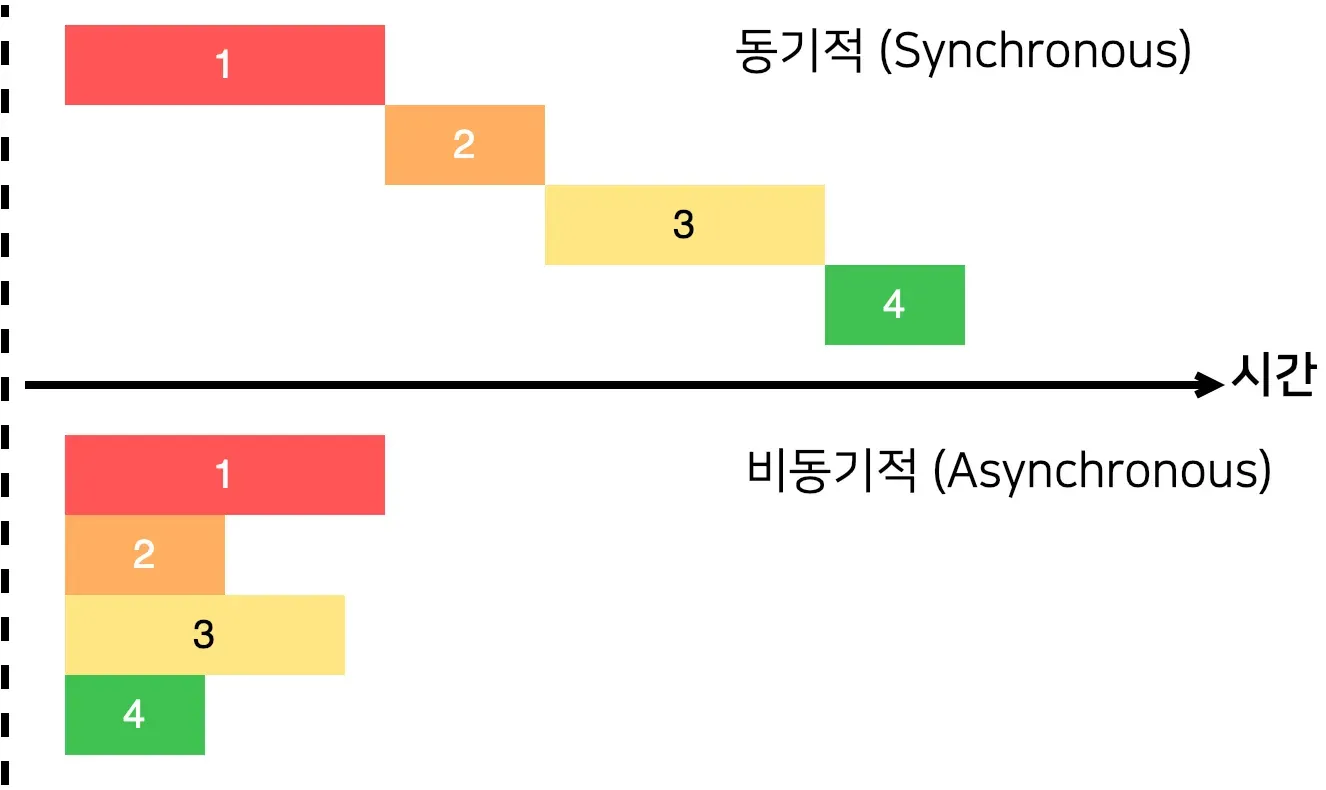
💡 동기
- 코드가 위에서 차례대로, 하나 끝나야 다음 줄 실행
- 앞의 작업이 오래 걸리면, 뒤의 작업은 기다려야 함
- cpu가 직접 처리할 수 있는 연산(계산, 변수 할당, 반복문) 대부분 동기적으로 실행
💡 비동기
- 어떤 작업이 오래 걸리면 기다리지 않고, 나중에 결과가 준비되면 실행
- 코드 흐름은 계속 진행되고 특정 시점에 결과가 콜백 등으로 돌아옴
console.log("A");

setTimeout(function() {
  console.log("B");
}, 1000);

console.log("C");
/*
실행 결과
A
C
(1초뒤) B
*/- 오래 걸리는 작업(타이머, 이벤트 대기, 네트워크 요청)은 브라우저 or 런타임 에게 맡겨 두고, CPU는 계속 작업
- 오랜 작업이 끝나 결과가 준비되면 다시 불러와서 실행
📌 콜백함수 Promise
- Promise는 비동기 작업이 완료되면 결과(성공 또는 실패)를 전달하겠다는 계약(약속)을 표현하는 객체
const getPromiseWork = new Promise((resolve, reject) => {
  console.log("작업 시작!");
  setTimeout(() => {
    const success = false;
    if (success) {
      resolve("완료됨");
    } else {
      reject("실패");
    }
  }, 2000);
});

getPromsieWork
  .then((result) => {
    console.log("then:", result);
  })
  .catch((err) => {
    console.error("catch:", err);
  })
  .finally(() => {
    console.log("항상 실행되는 finally");
  });
new Promise를 호출하면 콜백 함수가 즉시 실행됨- 콜백 함수에서 **
resolve(성공) 또는 **reject(실패)를 호출해야 다음 단계로 진행 resolve/reject호출 전까지는.then(다음),.catch(오류)로 넘어가지 않음- 따라서 비동기 작업을 동기적으로 표현할 수 있습니다.
.finally는 성공/실패 상관없이 항상 실행됨
Promise 상태
- Pending(대기) : 비동기 처리 로직이 아직 완료되지 않은 상태
- Fulfilled(이행) : 비동기 처리가 완료되어 프로미스가 결과 값을 반환해준 상태
- Rejected(실패) : 비동기 처리가 실패하거나 오류가 발생한 상태
💡 pending(대기)
new Promise()를 호출하게 되면 대기 상태가 됨new Promise(); // 콜백 함수를 선언하고, 인자값으로 resolve(성공) / reject(실패) new Promsie(function(resolve, reject){});
💡 Fulfilled(이행)
- 비동기 작업이 성공적으로 끝나면 콜백 함수의 인자
resolve를 호출 하게 되면 상태가Fulfilled로 전환new Promise(function(resolve, reject) { resolve(); }); .then을 통해 결과값을 받을 수 있음function getNumber() { return new Promise(function (resolve, reject){ let result = 30; resolve(result); } } getNumber().then(function(value){ console.log( "결과 :" ,value); });
💡 Rejected(실패)
- 비동기 작업이 에러나 문제로 실패 상태를 나타냄
-
reject()를 호출하면 상태가Rejected로 전환 -
.catch()를 통해 실패를 처리 할 수 있습니다.function getDataWithError() { return new Promise(function (resolve, reject) { reject(new Error("데이터 요청 실패")); }); } getDataWithError() .then(function (v) { console.log("성공:", v); }) .catch(function (err) { console.error("에러 발생:", err.message); // 에러 발생: 데이터 요청 실패 });
-
💡 Promise 체이닝
- 여러 개의 비동기 작업을 순서대로 실행할 때,
.then()을 연속적으로 연결하는 방식function step1() { return new Promise(function (resolve) { setTimeout(function () { console.log("1단계: 버거 빵 준비"); resolve("빵"); }, 500); }); } function step2(prev) { return new Promise(function (resolve) { setTimeout(function () { console.log("2단계: 패티 굽고 추가 →", prev); resolve(prev + " + 패티"); }, 500); }); } function step3(prev) { return new Promise(function (resolve) { setTimeout(function () { console.log("3단계: 소스 뿌리기 →", prev); resolve(prev + " + 소스"); }, 500); }); } // 체이닝 step1() .then(step2) .then(step3) .then(function (result) { console.log("최종 결과 완성된 버거 :", result); });
🌊 Deep Dive
🤔 JSON에 대해 알아보자
- JSON(JavaScript Object Notation)은 Javascript 객체 문법으로 구조화된 데이터를 표현하기 위한 문자 기반의 표준 포맷
- Javascript 객체 문법을 따르는 문자 기반의 데이터 포맷
- 문자열 형태로 존재
❗ 오직 프로퍼티만 담을 수 있음. 메서드는 담을 수 없음
❗ 문자열과 프로퍼티의 이름 작성 시 큰 따옴표만 사용해야 함
❗ 콤마나 클론을 잘 못 배치하는 사소한 실수로 작동하지 않을 수 있음
JSONLint → JSON 유효성 검사
💡 JSON.parse()
- JSON 문자열의 구문을 분석하고, 그 결과에서 JavaScript 값이나 객체를 생성
const json = '{"result":true, "count":42}'; const obj = JSON.parse(json); console.log(obj.count); // Expected output: 42 console.log(obj.result); // Expected output: true - 후행 쉼표 사용 불가
// 둘 다 SyntaxError
JSON.parse("[1, 2, 3, 4, ]");
JSON.parse('{"foo" : 1, }');
💡 JSON.stringify()
- JavaScript 값이나 객체를 JSON 문자열로 변환
JSON.stringify({}); // '{}' JSON.stringify(true); // 'true' JSON.stringify("foo"); // '"foo"' JSON.stringify([1, "false", false]); // '[1,"false",false]' JSON.stringify({ x: 5 }); // '{"x":5}' JSON.stringify(new Date(2006, 0, 2, 15, 4, 5)); // '"2006-01-02T15:04:05.000Z"' undefined, 함수, 심볼(symbol)은 변환될 때 생략되거나(객체 안에 있을 경우)null로 변환됨(배열 안에 있을 경우)// Symbols: JSON.stringify({ x: undefined, y: Object, z: Symbol("") }); // '{}' JSON.stringify({ [Symbol("foo")]: "foo" }); // '{}'
📎 https://developer.mozilla.org/ko/docs/Web/JavaScript/Reference/Global_Objects/JSON
📎 https://developer.mozilla.org/ko/docs/Web/JavaScript/Reference/Global_Objects/JSON/parse
📎 https://developer.mozilla.org/ko/docs/Web/JavaScript/Reference/Global_Objects/JSON/stringify