
📅 2025-12-16
➡️ Supabase 타입 생성과 Next.js 번들 최적화에 대해 새롭게 알게 된 것 또는 헷갈리는 부분 정리
🔎 학습 리마인드
📌 Supabase
💡 타입 자동 생성 (Type Generation)
🔗 Generating TypeScript Types | Supabase Docs
- Supabase는 DB 스키마 기반 TypeScript 타입을 자동으로 생성해주는 기능을 제공함 → API 응답, 테이블 컬럼, 관계 타입을 컴파일 타임에 보장할 수 있음
설치
npm i -D supabase
npx supabase login
npx supabase init
타입 생성 스크립트 설정
package.json"gen:types": "supabase gen types typescript --project-id iliskgpwcsahcqctogsn --schema public > database.types.ts"
→ 실행 시npm run gen:typesdatabase.types.ts파일이 자동 생성됨
💡 Supabase Client에 타입 주입하기
- 생성된
Database타입을 Supabase Client에 주입하여 완전한 타입 안정성 확보
브라우저 클라이언트
import { createBrowserClient } from "@supabase/ssr";
import { Database } from "../../database.types";
export function createClient() {
  return createBrowserClient<Database>(
    process.env.NEXT_PUBLIC_SUPABASE_URL!,
    process.env.NEXT_PUBLIC_SUPABASE_PUBLISHABLE_KEY!
  );
}

const browserClient = createClient();
export default browserClient;
서버 클라이언트
import { createServerClient } from "@supabase/ssr";
import { cookies } from "next/headers";
import { Database } from "../../database.types";

export async function createClient() {
  const cookieStore = await cookies();

  return createServerClient<Database>(
    process.env.NEXT_PUBLIC_SUPABASE_URL!,
    process.env.NEXT_PUBLIC_SUPABASE_PUBLISHABLE_KEY!,
    {
      cookies: {
        getAll() {
          return cookieStore.getAll();
        },
        setAll(cookiesToSet) {
          try {
            cookiesToSet.forEach(({ name, value, options }) =>
              cookieStore.set(name, value, options)
            );
          } catch {
            // The `setAll` method was called from a Server Component.
            // This can be ignored if you have middleware refreshing
            // user sessions.
          }
        },
      },
    }
  );
}
📌 Next.js Bundle Analyzer
- Next.js 번들 분석 도구 → 어떤 라이브러리 / 컴포넌트가 번들 사이즈를 크게 차지하는지 시각화
설치
yarn add -D @next/bundle-analyzer설정
next.config.tsimport type { NextConfig } from "next"; import bundleAnalyzer from "@next/bundle-analyzer"; const withBundleAnalyzer = bundleAnalyzer({ enabled: process.env.ANALYZE === "true", }); const nextConfig: NextConfig = { images: { remotePatterns: [ { protocol: "https", hostname: "picsum.photos", }, ], }, }; export default withBundleAnalyzer(nextConfig);
빌드 실행
ANALYZE=true yarn build→ 빌드 후 번들 시각화 페이지 자동 오픈
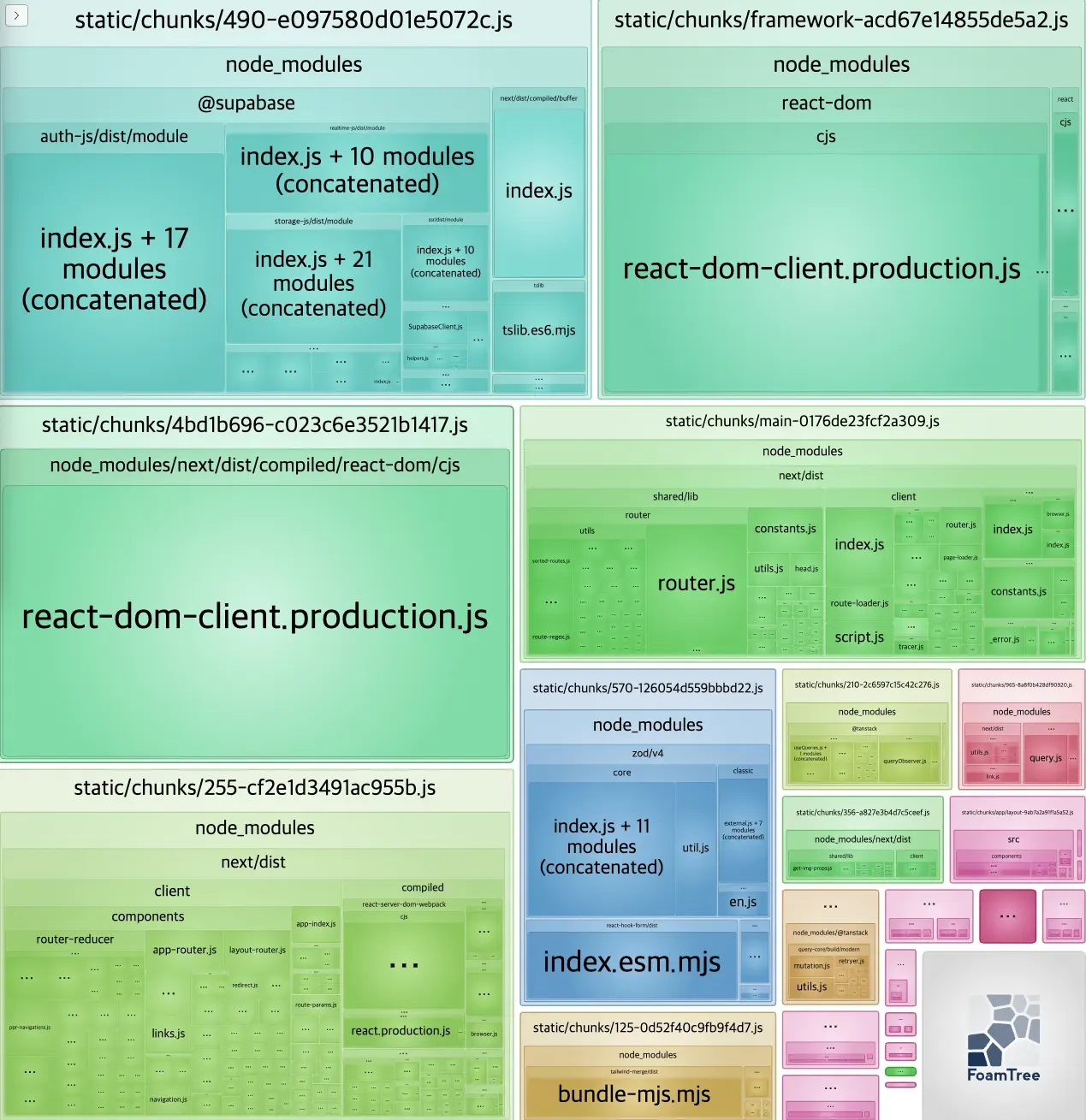
활용 포인트
- 특정 라이브러리 추가 후 성능 저하 원인 파악
- 번들 사이즈 급증 원인 분석
- 초기 로딩 JS 크기 최적화 판단 근거 제공
💡 번들 사이즈 줄이는 방법
-
dynamic import (지연 로딩)
import dynamic from "next/dynamic"; const HeavyChart = dynamic( () => import("@/components/HeavyChart"), { ssr: false } // 서버 사이드 렌더링시 절대 참여하지 않도록 해주는 옵션 );- 초기 번들에서 제외
- 실제 필요할 때만 로드
- 무거운 차트 / 에디터 / 지도 컴포넌트에 적합
-
모듈 단위 동적
importconst { getBooks } = await import("./server-action");- 항상 필요하지 않은 로직을 분리
- 서버 액션, 유틸 함수 등에 효과적