필요성
객체를 씬에서 생성하다보면, 동일한 간격으로 같은 객체를 만들어야할 때가 있습니다,
이를 수작업으로 하나하나 복사 생성 후, 간격을 조정하는 것은 비효율적입니다.
그렇기에, 객체를 복사하여 자동으로 일정한 간격으로 세팅할 수 있는 툴을 구현했습니다.
사용
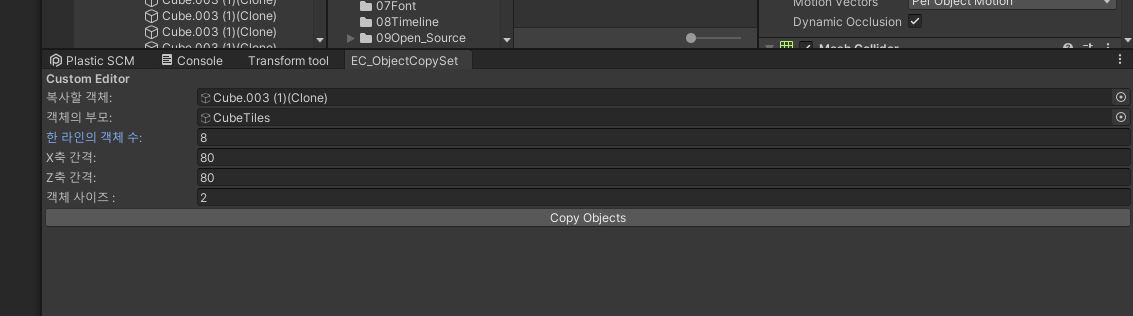
객체 복사 생성기 툴의 UI는 위와 같습니다.
복사할 객체를 드래그 하여 붙여넣고, 생성한 객체를 붙여넣을 부모 객체를 드래그 하여 선택합니다.
이후, 한 라인의 객체수.
X축과 Z축의 간격을 설정해줍니다.
설정한 간격을 기준으로 객체는 자동으로 생성됩니다.
객체 사이즈는 생성할 객체의 localScale을 조정할 수 있는 flaot 변수입니다.
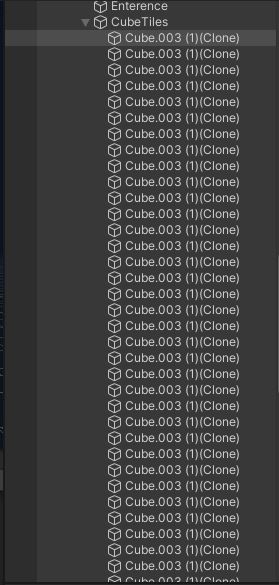
생성 결과는 다음과 같습니다.
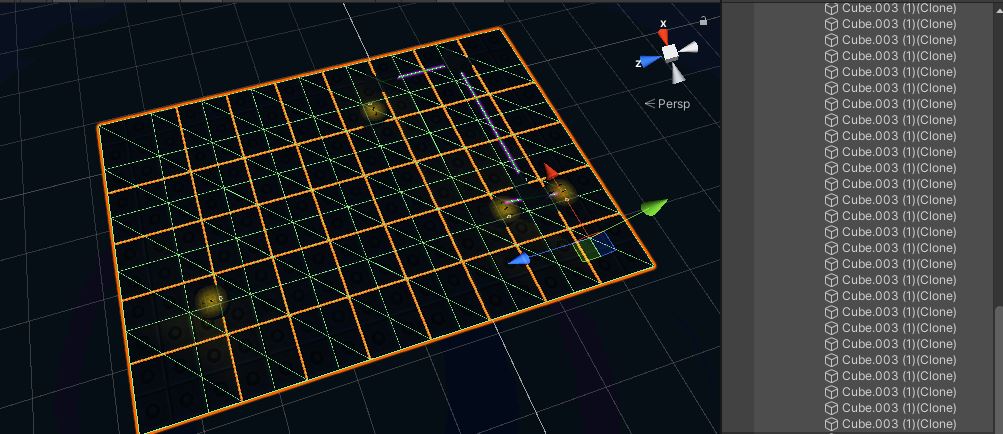
복사한 객체가 일정한 간격으로, 바둑판 모양(Grid)으로 생성되었음을 확인할 수 있습니다.
코드
using System.Collections;
using System.Collections.Generic;
using UnityEngine;
using UnityEditor;
public class EC_ObjectCopySet : EditorWindow
{
    GameObject originalObject; // 복사할 오브젝트
    GameObject parentObject; // 배치할 부모 오브젝트
    int numberOfCopies = 1; // 생성할 객체의 수
    float spacingX = 1f; // X축 간격
    float spacingZ = 1f; // Z축 간격
    float scaleSize = 1f;
    [MenuItem("Tools/EC_ObjectCopySet")]
    static void Init()
    {
        EC_ObjectCopySet window = (EC_ObjectCopySet)EditorWindow.GetWindow(typeof(EC_ObjectCopySet));
        window.Show();
    }

    void OnGUI()
    {
        GUILayout.Label("Custom Editor", EditorStyles.boldLabel);
        originalObject = EditorGUILayout.ObjectField("복사할 객체:", originalObject, typeof(GameObject), true) as GameObject;
        parentObject = EditorGUILayout.ObjectField("객체의 부모:", parentObject, typeof(GameObject), true) as GameObject;
        numberOfCopies = EditorGUILayout.IntField("한 라인의 객체 수:", numberOfCopies);
        spacingX = EditorGUILayout.FloatField("X축 간격:", spacingX);
        spacingZ = EditorGUILayout.FloatField("Z축 간격:", spacingZ);
        scaleSize = EditorGUILayout.FloatField("객체 사이즈 : ", scaleSize);

        Vector3 originVector3 = originalObject.transform.position;
        if (GUILayout.Button("Copy Objects"))
        {
            if (originalObject != null)
            {
                if (parentObject != null)
                {
                    for (int i = 0; i < numberOfCopies; i++)
                    {
                        for (int j = 0; j < numberOfCopies; j++)
                        {
                            Vector3 newPosition = originVector3 + new Vector3(i * spacingX, 0f, j * spacingZ);
                            GameObject copiedObject = Instantiate(originalObject, newPosition, Quaternion.identity);
                            copiedObject.transform.SetParent(parentObject.transform);
                            copiedObject.transform.localScale = new Vector3(scaleSize, scaleSize, scaleSize);
                        }
                    }
                }
                else
                {
                    Debug.LogError("Please select a parent object to copy objects into.");
                }
            }
            else
            {
                Debug.LogError("Please select an original object to copy.");
            }
        }
    }
}

훌륭한 개발자를 꿈꾸는 중입니다