css import
<!DOCTYPE html>
<html lang="en">
<head>
<meta charset="UTF-8">
<meta name="viewport" content="width=device-width, initial-scale=1.0">
<title>import</title>
<style>
section{
background-color: #ff0;
}
section > div:nth-child(3){
background-color: #0f0;
}
</style>
<link rel="stylesheet" href="aaa.css">
<link rel="stylesheet" href="../cs_ff/bbb.css">
<style>
section > div:nth-child(3){
background-color: #0af;
}
</style>
</head>
<body>
<h1>import</h1>
<section>
<div>box1</div>
<div>box2</div>
<div>box3</div>
<div>box4</div>
<div>box5</div>
</section>
<style>
article > div:nth-child(1){
color: #f00;
}
section > div:nth-child(4){
background-color: #afa;
}
section > div:nth-child(3){
background-color: #0af;
}
section > div:nth-child(3){
background-color: #aaa;
}
</style>
<link rel="stylesheet" href="../cs_ff/ccc.css">
<article>
<div>box1</div>
<div>box2</div>
<div>box3</div>
<div>box4</div>
<div>box5</div>
</article>
</body>
</html>
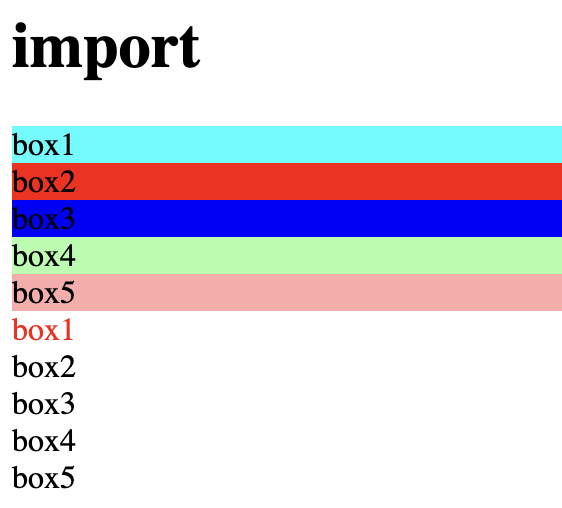
- import를 활용하여 해당 코드 안에 style이 아닌 다른 css파일에 작성된 style을 적용할 때 사용
- 좋은 점 :
- 다른 사람과 협업시 style만 모아볼 수 있어서 좋음
- 메인으로 사용하는 것은 공용으로 사용
- 서브로 각자 페이지에는 각자 이름의 파일로 사용
- style (link 포함) 중첩 되었을 경우 마지막에 작성한 것으로 적용
- html 로드시 style 먼저 로드 후 화면이 구현됨
- 찾아보기 쉽게 style은 웬만하면 head 부분에 넣기
⌨️ 문법
<link rel="stylesheet" href="aaa.css">
- style을 'aaa.css' 파일에 작성된 style로 적용