반응(상태) 선택자
- event
- 대상 (ex. 버튼)
- 이벤트핸들러 (ex. 누른다)
- action
- 행동 (ex. 등이 켜진다)
- 단, event 대상과 action 대상이 같을 필요없음
- CSS는 보통 event 대상과 action 대상이 같음
<!DOCTYPE html>
<html lang="en">
<head>
<meta charset="UTF-8">
<meta name="viewport" content="width=device-width, initial-scale=1.0">
<title>09_gallery</title>
<style>
*{
margin: 0;
padding: 0;
}
.wrapper{
position: relative;
}
.wrapper > div{
float: left;
position: relative;
}
.wrapper > div:first-of-type{
width: 122px;
height: 488px;
}
label > img{
width: 100px;
height: 100px;
padding: 5px;
margin-top: 5px;
border: 1px solid #ccc;
}
.wrapper > div:last-of-type{
width: 500px;
height: 500px;
}
input + img{
position:absolute;
left: 0px;
top: 0px;
width: 500px;
height: 500px;
padding: 5px;
margin-top: 5px;
border: 1px solid #ccc;
opacity: 0;
transition-duration: 0.5s;
}
input:checked + img{
opacity: 1;
}
input{
display: none;
}
</style>
</head>
<body>
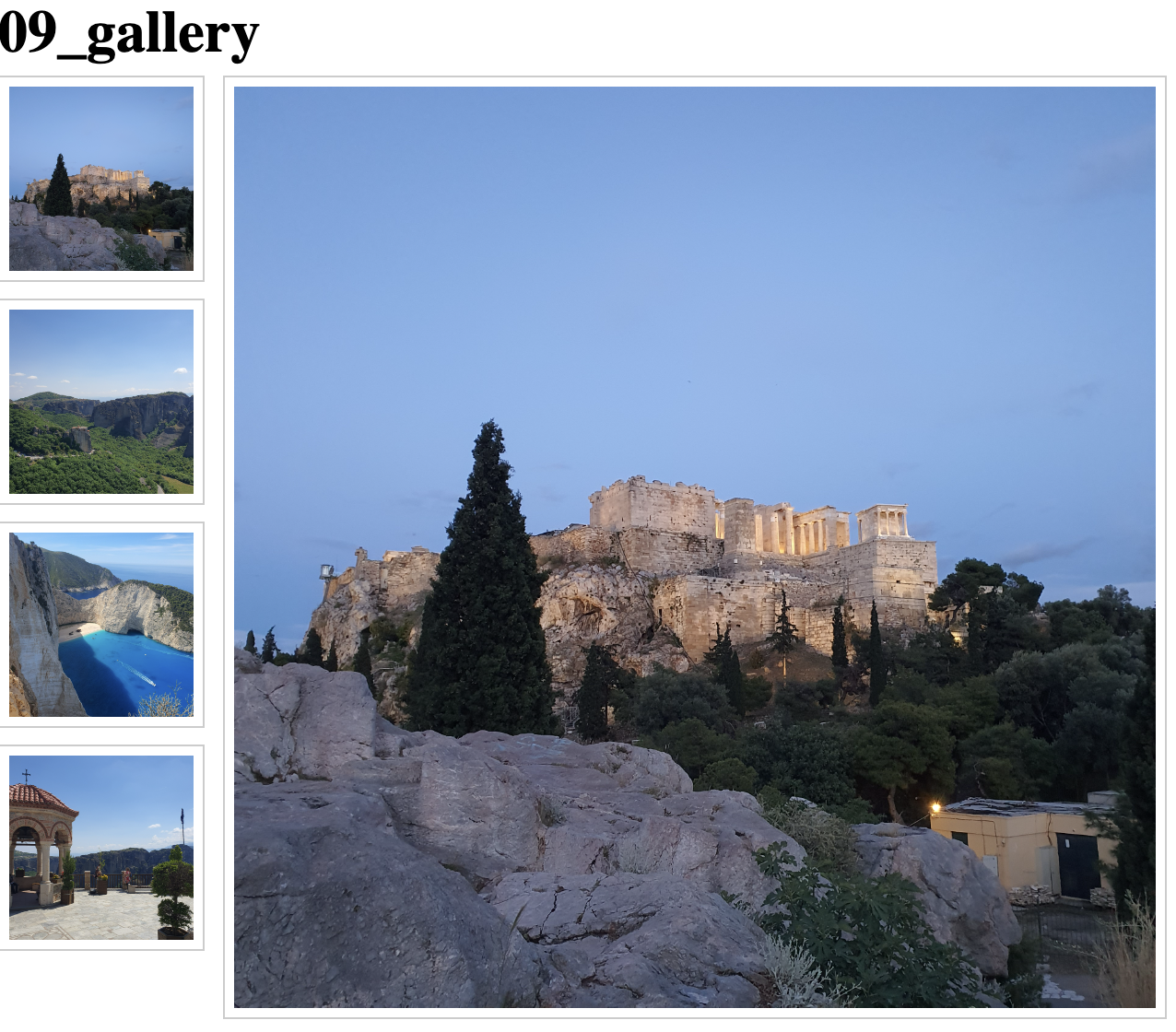
<h1>09_gallery</h1>
<div class="wrapper">
<div>
<label for="c1">
<img src="../note_source/acropolis.jpeg" alt="">
</label>
<label for="c2">
<img src="../note_source/meteora.jpeg" alt="">
</label>
<label for="c3">
<img src="../note_source/zakynthos.jpeg" alt="">
</label>
<label for="c4">
<img src="../note_source/saint.jpeg" alt="">
</label>
</div>
<div>
<input type="radio" name="big" id="c1">
<img src="../note_source/acropolis.jpeg" alt="">
<input type="radio" name="big" id="c2">
<img src="../note_source/meteora.jpeg" alt="">
<input type="radio" name="big" id="c3">
<img src="../note_source/zakynthos.jpeg" alt="">
<input type="radio" name="big" id="c4">
<img src="../note_source/saint.jpeg" alt="">
</div>
</div>
</body>
</html>
선택자: active
⌨️ 문법
선택자:active
- 형제 요소에서 같은 종류 중 마지막에서 수열 번째 요소
선택자: hover
⌨️ 문법
선택자:hover
선택자: checked
⌨️ 문법
선택자:checked
선택자: focus
⌨️ 문법
선택자:nth-last-of-type()
속성 선택자
속성이란?
<input type="text" asdf="qwer">
- 속성: input 안에 text, qwer 속성이 있음
📖 용어정리
- | : vertical bar(linux : pipe)
- ` : backtick
- ' : single quoto
- " : double quoto
<!DOCTYPE html>
<html lang="en">
<head>
<meta charset="UTF-8">
<meta name="viewport" content="width=device-width, initial-scale=1.0">
<title>11_attribute</title>
<style>
*{
margin: 0;
padding: 0;
}
div{
width: 200px;
height: 50px;
margin: 10px;
border: 1px solid #999;
}
div[ttt-data=abc]{
color: #f00;
}
div[ttt-data~=abc]{
font-weight: 700;
}
div[ttt-data|=abc]{
font-style: italic;
}
div[ttt-data*=abc]{
text-decoration: underline;
}
div[ttt-data^=abc]{
text-align: center;
}
div[ttt-data$=abc]{
background-color: #ff0;
}
.abc{
background-color: #f0f;
}
.bbb{
font-size: 2rem;
}
.ccc{
text-align: right;
}
div[class="abc bbb"]{
color: #0f0;
}
div[class$="c"]{
color: #faf;
}
img{
width: 100px;
}
img[src*="jp"]{
border: 1px solid #f00;
}
img[src*="bmp"]{
border: 1px solid #00f;
}
img[src*="gif"]{
border: 1px solid #00f;
}
img[src*="png"]{
border: 1px solid #0f0;
}
</style>
</head>
<body>
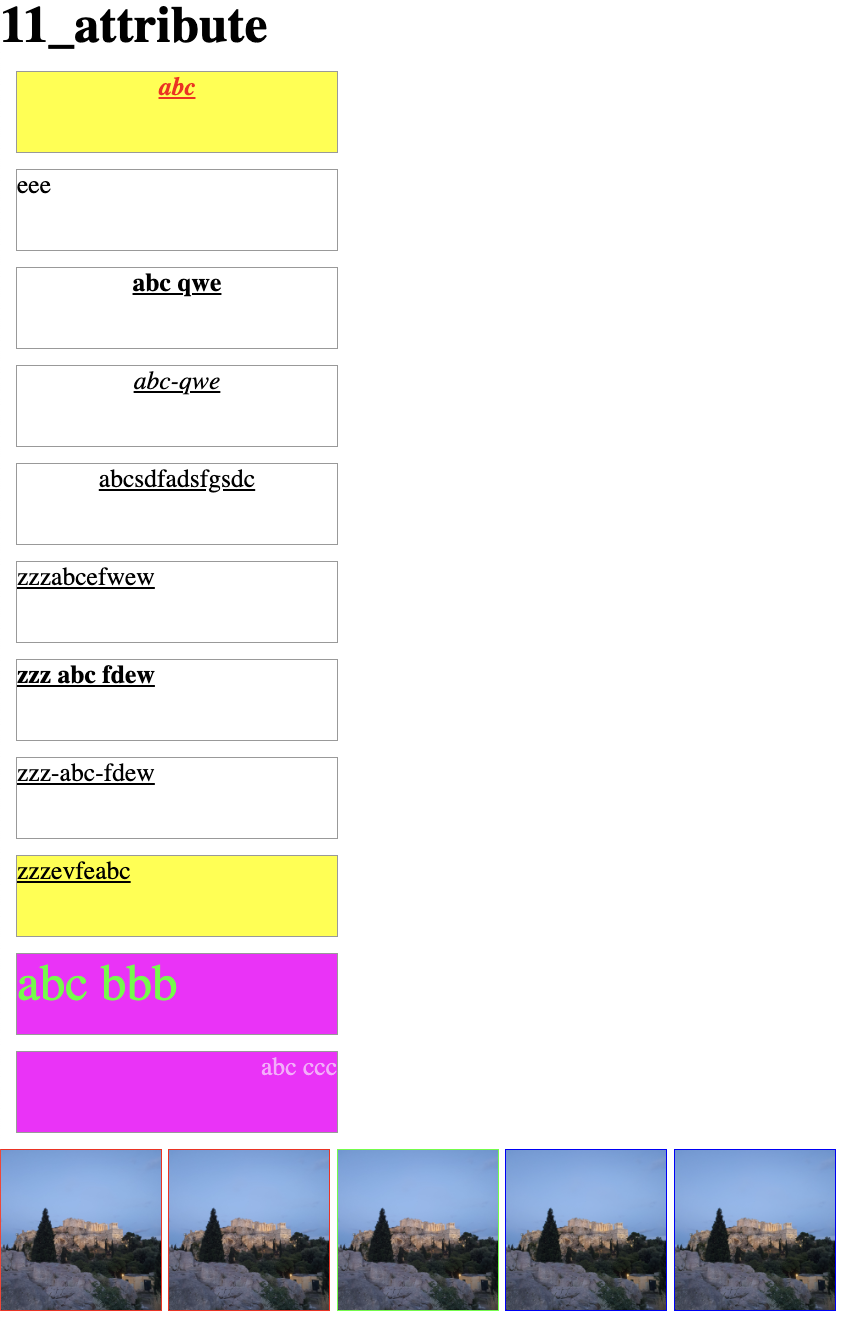
<h1>11_attribute</h1>
<div ttt-data="abc">abc</div>
<div ttt-data="eee">eee</div>
<div ttt-data="abc qwe">abc qwe</div>
<div ttt-data="abc-qwe">abc-qwe</div>
<div ttt-data="abcsdfadsfgsdc">abcsdfadsfgsdc</div>
<div ttt-data="zzzabcefwew">zzzabcefwew</div>
<div ttt-data="zzz abc fdew">zzz abc fdew</div>
<div ttt-data="zzz-abc-fdew">zzz-abc-fdew</div>
<div ttt-data="zzzevfeabc">zzzevfeabc</div>
<div class="abc bbb">abc bbb</div>
<div class="abc ccc">abc ccc</div>
<img src="../note_source/acropolis.jpg" alt="">
<img src="../note_source/acropolis.jpeg" alt="">
<img src="../note_source/acropolis.png" alt="">
<img src="../note_source/acropolis.bmp" alt="">
<img src="../note_source/acropolis.gif" alt="">
</body>
</html>
속성 명="값"
⌨️ 문법
div[속성="값"]{}
속성 명~="값"
⌨️ 문법
div[속성~="값"]{}
속성 명|="값"
⌨️ 문법
div[속성|="값"]{}
속성 명*="값"
⌨️ 문법
div[속성*="값"]{}
속성 명^="값"
⌨️ 문법
div[속성^="값"]{}
속성 명$="값"
⌨️ 문법
div[속성 명$="값"]{}
문자 선택자
<!DOCTYPE html>
<html lang="en">
<head>
    <meta charset="UTF-8">
    <meta name="viewport" content="width=device-width, initial-scale=1.0">
    <title>12_char</title>
    <style>
        *{
            margin: 0;
            padding: 0;
        }
        p{
            font-size: 1.5rem;
        }
        p::first-letter{
            background-color: #ff0;
            font-size: 2rem;
            padding: 2px;
            border: 2px solid #00f;
        }
        p::first-line{
            text-decoration: underline;
        }
        p:not(.asdf){
            background-color: #0f0;
        }
        p::selection{
            color: #f00;
        }
    </style>
</head>
<body>
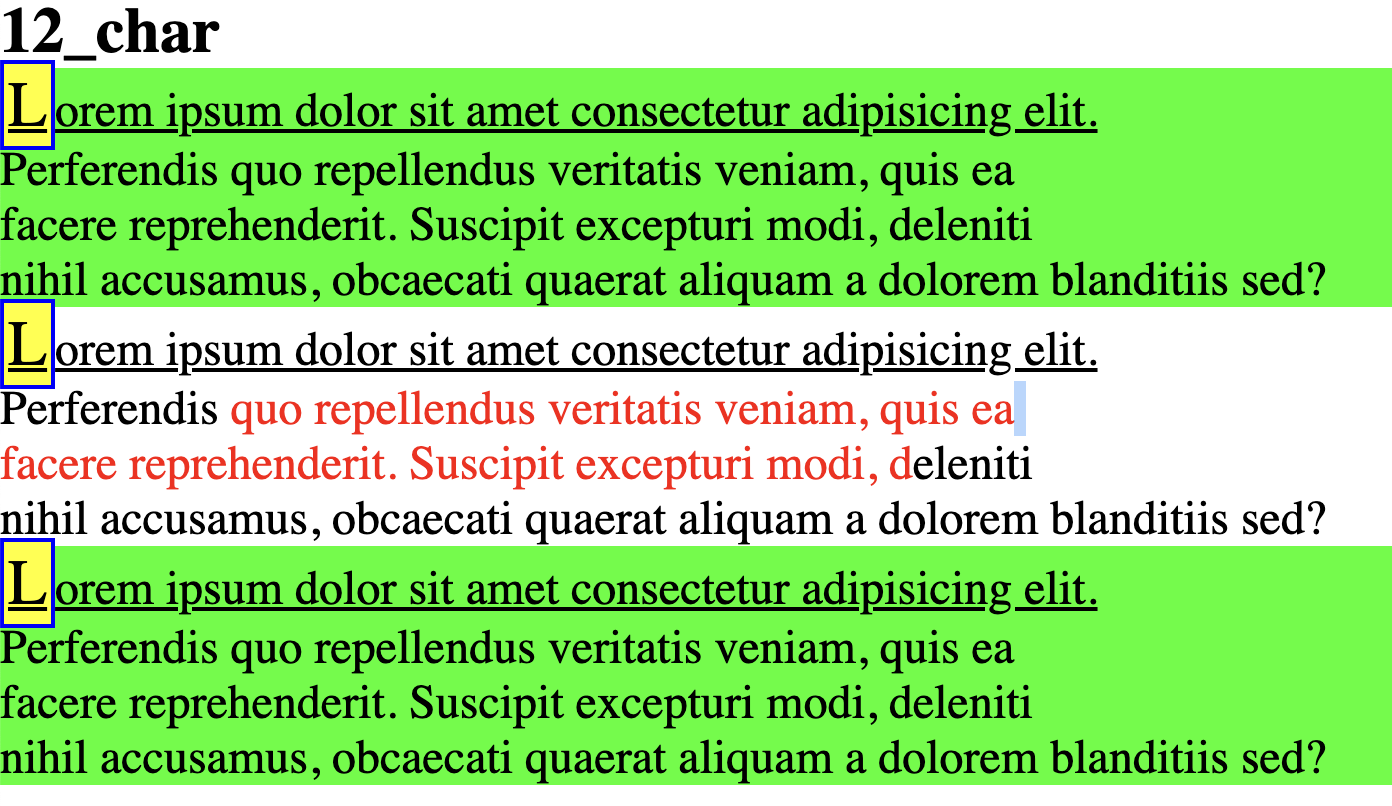
    <h1>12_char</h1>
    <p>
        Lorem ipsum dolor sit amet consectetur adipisicing elit. <br/>
        Perferendis quo repellendus veritatis veniam, quis ea <br/>
        facere reprehenderit. Suscipit excepturi modi, deleniti <br/>
        nihil accusamus, obcaecati quaerat aliquam a dolorem blanditiis sed?
    </p>
    <p class="asdf">
        Lorem ipsum dolor sit amet consectetur adipisicing elit. <br/>
        Perferendis quo repellendus veritatis veniam, quis ea <br/>
        facere reprehenderit. Suscipit excepturi modi, deleniti <br/>
        nihil accusamus, obcaecati quaerat aliquam a dolorem blanditiis sed?
    </p>
    <p>
        Lorem ipsum dolor sit amet consectetur adipisicing elit. <br/>
        Perferendis quo repellendus veritatis veniam, quis ea <br/>
        facere reprehenderit. Suscipit excepturi modi, deleniti <br/>
        nihil accusamus, obcaecati quaerat aliquam a dolorem blanditiis sed?
    </p>
</body>
</html>
::first-letter
⌨️ 문법
p::first-letter{}
::first-line
⌨️ 문법
p::first-line{}
:not
⌨️ 문법
p:not(.asdf){}
::selection
⌨️ 문법
p::selection{}
가상 선택자
- 마크업에 없는 가상요소
- 필수로 {content:"";}이 들어가야 함
- 기본 inline 속성을 가지고 있으므로 크기 값을 주려면 {display: inline- block;} 혹은 {display: block;} 속성을 넣어줘야 함.
<!DOCTYPE html>
<html lang="en">
<head>
<meta charset="UTF-8">
<meta name="viewport" content="width=device-width, initial-scale=1.0">
<title>13_virtual</title>
<style>
*{
margin: 0;
padding: 0;
}
.box{
width: 200px;
height: 200px;
background: #0f0;
}
.box::before{
content: "before입니다";
width: 100px;
height: 50px;
background: #ff0;
display: block;
}
.box::after{
content: "after입니다";
width: 100px;
height: 50px;
background: #0ff;
display: block;
}
.aaa{
width: 200px;
height: 200px;
background: #f0f;
}
.aaa:hover::before{
content: "hh before";
width: 100px;
height: 50px;
background: #ff0;
display: block;
}
.aaa:hover::after{
content: "";
background-image: url(../note_source/santorini.jpeg);
background-size: 100px 100px;
width: 100px;
height: 100px;
display: block;
}
.bbb{
width: 100px;
height: 200px;
background: #fb4;
position: relative;
}
.bbb::before{
content: "bbb::before";
width: 100px;
height: 50px;
background: rgba(0, 255, 0, 0.3);
display: block;
position: absolute;
left: 250px;
top: -200px;
}
.bbb::after{
content: "bbb::after";
width: 100px;
height: 50px;
background: rgba(255, 0, 0, 0.3);
display: block;
position: absolute;
left: 250px;
top: -300px;
}
.ccc{
width: 100px;
height: 120px;
background: #ff0;
position: relative;
}
.ccc::before{
content: url(../fff/img/small01.jpg);
width: 100px;
height: 30px;
display: block;
}
.ddd{
width: 100px;
height: 80px;
background: #fa3;
counter-reset: var-count;
}
.ddd > p::before{
counter-increment: var-count;
content: counter(var-count) "번 ";
}
</style>
</head>
<body>
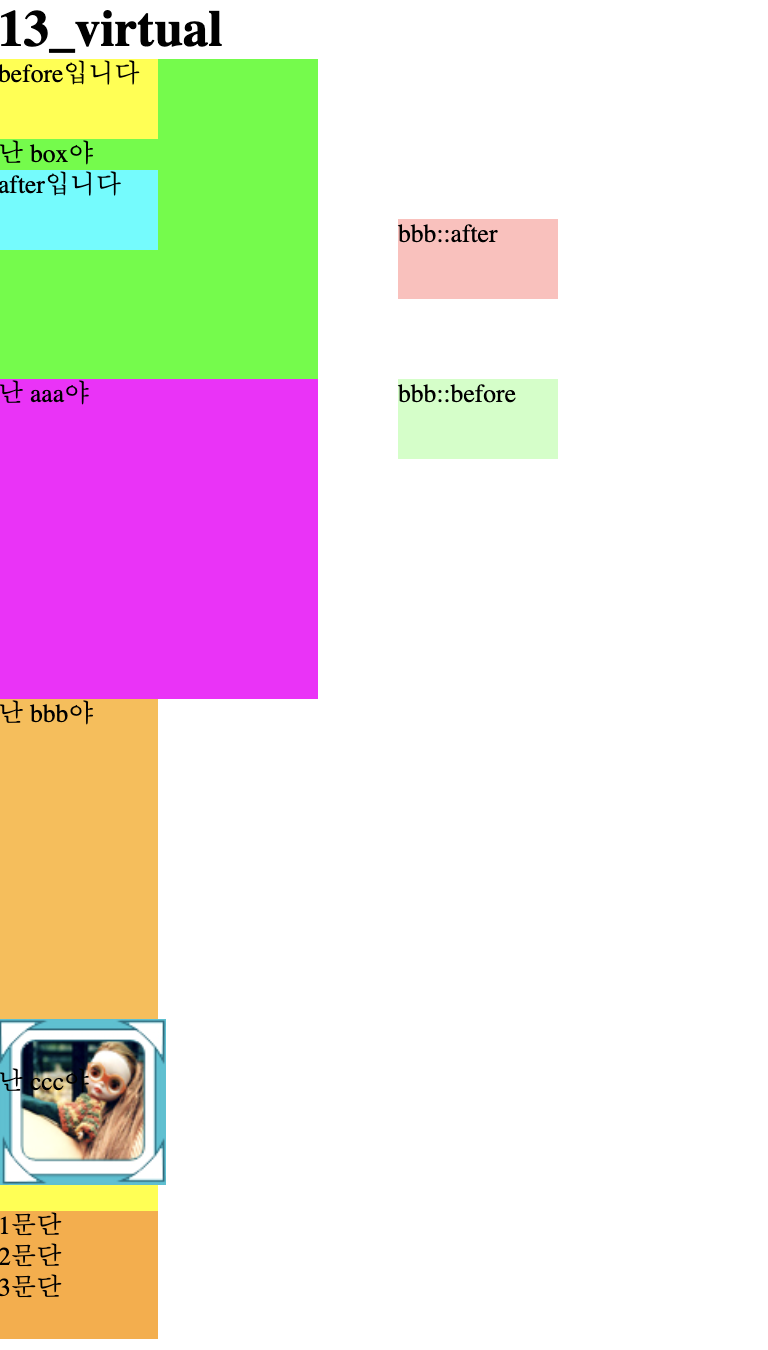
<h1>13_virtual</h1>
<div class="box">난 box야</div>
<div class="aaa">난 aaa야</div>
<div class="bbb">난 bbb야</div>
<div class="ccc">난 ccc야</div>
<div class="ddd">
<p>문단</p>
<p>문단</p>
<p>문단</p>
</div>
</body>
</html>
::before
⌨️ 문법
.box::before{}
- 가상 선택자 코딩위치 :
<before위치><box></box>
::after
⌨️ 문법
.box::after{}
- 가상 선택자 코딩위치 :
<box><after위치></box>