배경
요즘 AI 이미지 생성 서비스들이 많은데, 직접 로컬에서 돌려보고 싶어서 HuggingFace의 Stable Diffusion 모델을 Python으로 실행해봤다.
GPU는 RTX 3060, OS는 Windows 환경.
환경 세팅
Python 설치
Python 3.11 버전을 사용했다. 처음엔 3.13을 설치했는데 torch와 호환이 안되어서 변경했다.
https://www.python.org/downloads/release/python-3119/설치 시 "Add Python to PATH" 체크해야 함.
가상환경 생성
python -m venv venv

# 활성화 (Windows PowerShell)
venv\Scripts\activate
라이브러리 설치
처음에 그냥 pip install torch 했다가 이상한 버전(2.11.0)이 설치되는 문제가 있었다... ai에 물어보니 CUDA 버전을 명시해서 설치해야 한다고 한다.
# CUDA 12.1 버전 torch 설치
pip install torch torchvision torchaudio --index-url https://download.pytorch.org/whl/cu121

# 나머지 라이브러리
pip install diffusers transformers accelerate pillow
GPU 확인
import torch
print(torch.cuda.is_available())     # True
print(torch.cuda.get_device_name(0)) # NVIDIA GeForce RTX 3060
True 뜨면 GPU 사용 가능한 상태다.
코드 작성
from diffusers import StableDiffusionPipeline
import torch

# 모델 로드
pipe = StableDiffusionPipeline.from_pretrained(
    "stable-diffusion-v1-5/stable-diffusion-v1-5",
    torch_dtype=torch.float16  # GPU는 float16 사용
)

# GPU로 이동
pipe = pipe.to("cuda")

# 이미지 생성
prompt = "a cute cat sitting on a desk, digital art" // customizing 가능
image = pipe(prompt).images[0]

# 저장
image.save("output.png")
print("output.png 저장 완료!")
실행 결과
프롬프트: "a cute cat sitting on a desk, digital art"
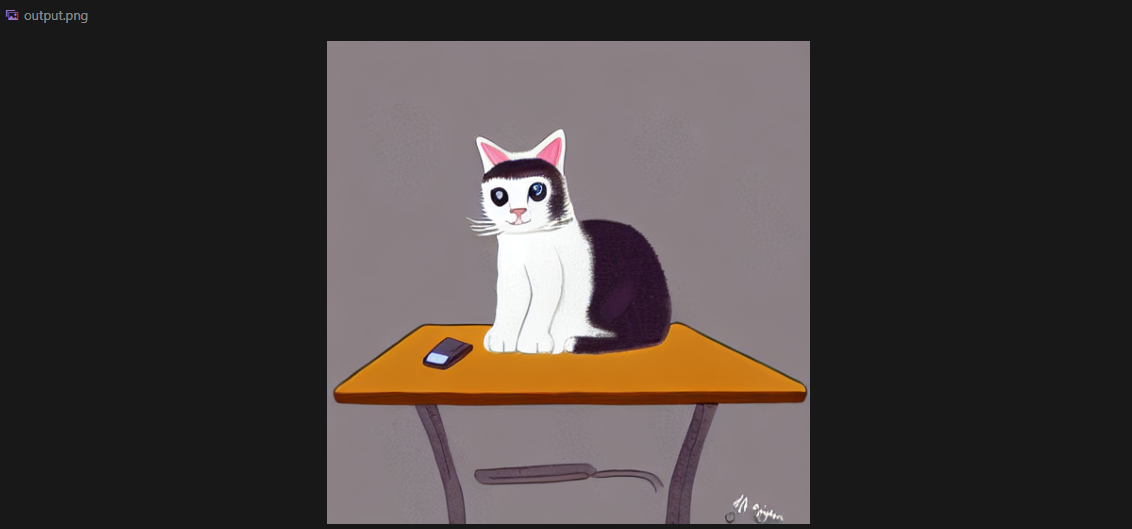
책상 위에 귀여운 고양이가 생성됐다. RTX 3060 기준으로 약 1분정도 소요됐다.
트러블슈팅
1. torch DLL 오류
OSError: [WinError 1114] DLL 초기화 루틴을 실행할 수 없습니다.원인: Visual C++ 재배포 패키지 미설치 또는 torch 버전 문제
해결:
- Visual C++ 재배포 패키지 설치 →
https://aka.ms/vs/17/release/vc_redist.x64.exe - torch 버전 명시해서 재설치
pip uninstall torch torchvision torchaudio -y
pip cache purge
pip install torch==2.4.1 --index-url https://download.pytorch.org/whl/cu121
2. torch.cuda.is_available() → False
원인: CPU 버전 torch가 설치된 것
해결: CUDA 버전으로 재설치 (위 명령어 참고)
3. runwayml/stable-diffusion-v1-5 404
원인: RunwayML이 HuggingFace에서 모델을 내림
해결: 아래 경로로 교체
# 기존 (404)
"runwayml/stable-diffusion-v1-5"

# 교체
"stable-diffusion-v1-5/stable-diffusion-v1-5"
마치며
HuggingFace 덕분에 모델 로드는 몇 줄이면 끝난다. 어려운 부분은 오히려 환경 세팅이었다. 특히 Windows에서 torch CUDA 버전 맞추는 게 까다로웠는데, 버전을 명시해서 설치하면 해결된다.
참고
- HuggingFace Diffusers 공식 문서: https://huggingface.co/docs/diffusers
- Stable Diffusion v1.5: https://huggingface.co/stable-diffusion-v1-5/stable-diffusion-v1-5
- PyTorch 공식 설치 가이드: https://pytorch.org/get-started/locally/

About me: https://resume-seven-beige.vercel.app/