google cloud 용어정리
Lables
key-value pair로 구성되며, 데이터 값에 대한 정보를 제공하는데 사용된다.
Monitored-resource types과 Metric types에 대한 label이 각각 존재한다.
예시) "버킷 이름 : 눈누나난나" 이 자체가 label이라는 뜻
Components of the metric model
-
Monitored-resource types
	```
	bucket_name: bangeul
	project_id: 001233
	location: Seoul
	```
- Metric types
``` response_code: OK method: read ``` - Time series : monitored-resource label에 따른 데이터를 시간별로 제시하는데 metric type label도 같이 제공해준다.
즉 bucket:1234에 대한 데이터 값과 metric type을 제공한다.
	요약본)
	#resource type, metric type, data
	bucket:1234, response_code: OK, method:read, {(2, wed 2:00pm), (8, wed 2:05pm)}
	bucket:1234, response_code: FAIL, method:write, {(2, wed 2:01pm), (1, wed 2:04pm)}
	bucket:9908, response_code: OK, method:write, {(0, wed 2:01pm), (1, wed 2:04pm)}


	원본)
	{
      "metric": {
        "labels": {
          "log": "kubelet",
          "severity": "DEFAULT"
        },
        "type": "logging.googleapis.com/log_entry_count"
      },
      "resource": {
        "type": "gce_instance",
        "labels": {
          "instance_id": "5106847938295940291",
          "zone": "us-central1-a",
          "project_id": "a-gcp-project"
        }
      },
      "metricKind": "DELTA",
      "valueType": "INT64",
      "points": [
        {
          "interval": {
            "startTime": "2019-12-20T20:25:38Z",
            "endTime": "2019-12-20T20:26:38Z"
          },
          "value": {
            "int64Value": "20"
          }
        }
      ]
    }


metirc kinds and value types
------
metric타입을 다룰 때, metric kind와 value type을 다루게 된다.
1. value type : 특정 시점에서의 데이터 타입

	`BOOL`
	`INT64`
	`DOUBLE`
	`STRING`


	`DISTRIBUTION` 여러 값들이 그룹으로 묶여있을 때는 DISTRIBUTION을 사용하며 mean, count, max, and other statistics로 표현할 수 있다. 내가 주로 보는 타입이다.


2. Metric kind : 특정 시점에서의 메트릭 종류로, 값들의 관계를 해석할 때 사용한다.

	- gauge metric : cpu utilization, current temperature
	- delta metric : start time, end time
	- cumulative metric : sent bytes, total bytes

google cloud의 metric list 가져오는 api
----------
#### **metricDescriptor의 결과값**
```python
{
  "name": string,
  "type": string,
  "labels": [
    {
      object (LabelDescriptor)
    }
  ],
  "metricKind": enum (MetricKind),
  "valueType": enum (ValueType),
  "unit": string,		#단위 %, s, h, d, M, k ...
  "description": string,
  "displayName": string,
  "metadata": {
    object (MetricDescriptorMetadata)
  },
  "launchStage": enum (LaunchStage),
  "monitoredResourceTypes": [
    string
  ]
}
naver cloud의 metric list 가져오는 api :
SearchMetricList 결과값
{
  "metrics": [
    {
      "desc": "user ratio",		#그냥 메트릭에 대한 설명
      "dimensions": [
        {
          "dim": "type",
          "val": "cpu"
        },
        {
          "dim": "cpu_idx",
          "val": "0"
        }
      ],
      "idDimension": "instanceNo",		#gcp의 key값
      "metric": "used_rto",		#메트릭 이름
      "options": {
        "Min1": [
          "COUNT",
          "SUM",
          "MAX",
          "MIN",
          "AVG"
        ],
        "Min5": [
          "COUNT",
          "SUM",
          "MAX",
          "MIN",
          "AVG"
        ],
        "Min30": [
          "COUNT",
          "SUM",
          "MAX",
          "MIN",
          "AVG"
        ],
        "Hour2": [
          "COUNT",
          "SUM",
          "MAX",
          "MIN",
          "AVG"
        ],
        "Day1": [
          "COUNT",
          "SUM",
          "MAX",
          "MIN",
          "AVG"
        ]
      },
      "prodKey": "xxxxxxxxxxxxxxxxxx",
      "unit": "%"
    },
    {
      "desc": "user ratio",
      "dimensions": [
        {
          "dim": "type",
          "val": "cpu"
        },
        {
          "dim": "cpu_idx",
          "val": "1"
        }
      ],
      "idDimension": "instanceNo",
      "metric": "used_rto",
      "options": {
        "Min1": [
          "COUNT",
          "SUM",
          "MAX",
          "MIN",
          "AVG"
        ],
        "Min5": [
          "COUNT",
          "SUM",
          "MAX",
          "MIN",
          "AVG"
        ],
        "Min30": [
          "COUNT",
          "SUM",
          "MAX",
          "MIN",
          "AVG"
        ],
        "Hour2": [
          "COUNT",
          "SUM",
          "MAX",
          "MIN",
          "AVG"
        ],
        "Day1": [
          "COUNT",
          "SUM",
          "MAX",
          "MIN",
          "AVG"
        ]
      },
      "prodKey": "xxxxxxxxxxxxxxxxxx",
      "unit": "%"
    }
  ],
  "prodKey": "xxxxxxxxxxxxxxxxxx"
}
구글 - 네이버 같은 의미 연결하기
key - idDimension (메트리 고유 식별자)
name - metric (메트릭 이름)
unit - unit (단위)
metric_query - payload (입력값)
cloudforet-google-cloud-monitoring의 list_metrics 코드 분석
    def list_metrics(self, query):
        metrics_info = []

        if 'name' in query:
            for metric_filter in query.get('filters', []):
                _query = {
                    'name': query['name'],
                    'filter': self.set_metric_filter(metric_filter)
                }

                for gc_metric in self.list_metric_descriptors(_query):		#gc_metric은 dictionary형
                    metric_kind = gc_metric.get('metricKind', '')	#'GAUGE' or 'DELTA' or 'CUMULATIVE'
                    value_type = gc_metric.get('valueType', '')		#'BOOL' or 'INT64' or 'DOUBLE' or 'STRING' or 'DISTRIBUTION'
                    key = gc_metric.get('type', '')		#"type": "gce_instance"

                    if metric_kind in ['DELTA', 'GAUGE'] and value_type in ['DOUBLE', 'INT64']:		#metric_kind와 value_type이 특정 조건을 만족하면 데이터 수집한다.
                        gc_metric_info = {
                            'key': key,
                            'name': gc_metric.get('displayName', ''),		#"displayName": "VM Instance"
                            'unit': self._get_metric_unit(gc_metric.get('unit')),
                            'metric_query': {
                                'name': query['name'],
                                'resource_id': query['resource_id'],
                                'filter': {
                                    'metric_type': key,
                                    'labels': metric_filter.get('labels')
                                }
                            }
                        }

                        metrics_info.append(gc_metric_info)

        return {'metrics': metrics_info}
cloudforet-naver-cloud-monitioring의 list_metrics 코드 작성하기
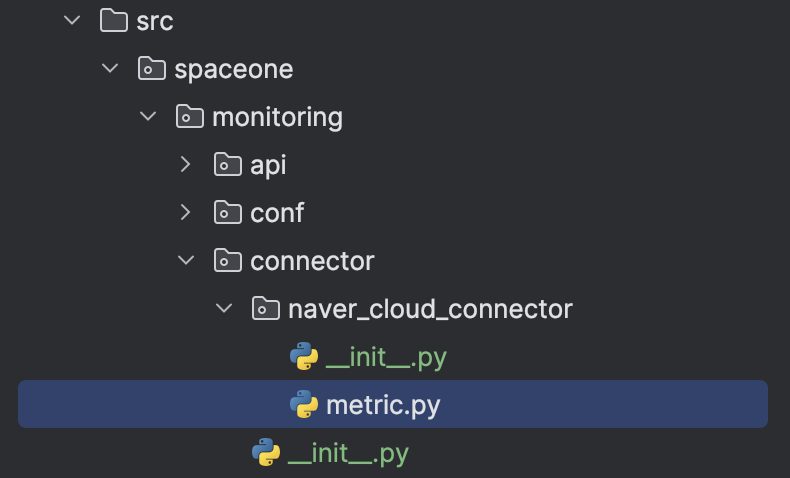 헷갈리는 점이 있다면 spaceone에서는 connector를 구현할 때, init.py와 metric.py를 모두 사용한다.
init에서 api를 사용하여 연결하고, metric에서 클라우드포렛의 규격화된 데이터 형식에 맞게 변환한다고 생각하면 된다. 데이터가 잘 이동하는 지는 test_connector를 이용한다.
코드 보는 순서는 test->init->metric이라 생각하면 된다.
**test.py**

class TestNaverCloudConnector(unittest.TestCase):
    secret_data = {
        'ncloud_access_key_id': AKI,
        'ncloud_secret_key': SK,
    }
    @classmethod
    def setUpClass(cls):
        super().setUpClass()

    def test_list_metrics(self):
        options = {}
        payload = {
            "prodKey": "460438727509020672"
        }
        secret_data = self.secret_data
        endpoint = '/cw_fea/real/cw/api/rule/group/metric/search'
        self.naver_cloud_connector = NaverCloudConnector(secret_data=secret_data)		#init으로 가서 connect

        self.naver_cloud_connector.set_connect({}, options=options, secret_data=secret_data, endpoint=endpoint, payload=payload)
        metrics_info = self.naver_cloud_connector.list_metrics(payload)		#init에서 metric으로 가는 부분

        print_data(metrics_info, 'test_list_metrics')		#최종적으로 원하는 규격으로 데이터 가공 성공
        #metrics_info [{'key': 'instanceId', 'name': 'concurrent_session', 'unit': None, 'metric_query': {'dimValues': [], 'query': [], 'dimensionsSelectedList': [], 'prodKey': '460438727509020672'}}, {'key': 'instanceId', 'name': 'concurrent_session', 'unit': None, 'metric_query': {'dimValues': [], 'query': [], 'dimensionsSelectedList': [], 'prodKey': '460438727509020672'}}, {'key': 'instanceId', 'name': 'concurrent_session', 'unit': None, 'metric_query': {'dimValues': [], 'query': [], 'dimensionsSelectedList': [], 'prodKey': '460438727509020672'}}, {'key': 'instanceId', 'name': 'connections_per_second', 'unit': None, 'metric_query': {'dimValues': [], 'query': [], 'dimensionsSelectedList': [], 'prodKey': '460438727509020672'}}, {'key': 'instanceId', 'name': 'connections_per_second', 'unit': None, 'metric_query': {'dimValues': [], 'query': [], 'dimensionsSelectedList': [], 'prodKey': '460438727509020672'}}, {'key': 'instanceId', 'name': 'connections_per_second', 'unit': None, 'metric_query': {'dimValues': [], 'query': [], 'dimensionsSelectedList': [], 'prodKey': '460438727509020672'}}, {'key': 'instanceId', 'name': 'traffic_in_byte', 'unit': None, 'metric_query': {'dimValues': [], 'query': [], 'dimensionsSelectedList': [], 'prodKey': '460438727509020672'}}, {'key': 'instanceId', 'name': 'traffic_in_byte', 'unit': None, 'metric_query': {'dimValues': [], 'query': [], 'dimensionsSelectedList': [], 'prodKey': '460438727509020672'}}, {'key': 'instanceId', 'name': 'traffic_in_byte', 'unit': None, 'metric_query': {'dimValues': [], 'query': [], 'dimensionsSelectedList': [], 'prodKey': '460438727509020672'}}, {'key': 'instanceId', 'name': 'traffic_out_byte', 'unit': None, 'metric_query': {'dimValues': [], 'query': [], 'dimensionsSelectedList': [], 'prodKey': '460438727509020672'}}, {'key': 'instanceId', 'name': 'traffic_out_byte', 'unit': None, 'metric_query': {'dimValues': [], 'query': [], 'dimensionsSelectedList': [], 'prodKey': '460438727509020672'}}, {'key': 'instanceId', 'name': 'traffic_out_byte', 'unit': None, 'metric_query': {'dimValues': [], 'query': [], 'dimensionsSelectedList': [], 'prodKey': '460438727509020672'}}]
**__init__.py**

class NaverCloudConnector(BaseConnector):
    def __init__(self, *args, **kwargs):
        super().__init__(*args, **kwargs)
        self.client = None
        self.base_url = 'https://cw.apigw.ntruss.com'

    def make_signature(self, access_key, secret_key, method, uri, timestamp):
        message = method + " " + uri + "\n" + timestamp + "\n" + access_key
        message = bytes(message, 'UTF-8')
        secret_key = bytes(secret_key, 'UTF-8')
        signingKey = base64.b64encode(hmac.new(secret_key, message, digestmod=hashlib.sha256).digest())
        return signingKey.decode()

    def set_connect(self, schema, options: dict, secret_data: dict, endpoint, payload):
        self.url = f"{self.base_url}{endpoint}"
        self.endpoint = endpoint
        method = 'POST'
        timestamp = str(int(time.time() * 1000))
        metric_access_key = secret_data['ncloud_access_key_id']
        metric_secret_key = secret_data['ncloud_secret_key']

        headers = {
            'x-ncp-apigw-signature-v2': self.make_signature(metric_access_key, metric_secret_key, method,
                                                       endpoint,
                                                       timestamp),
            'x-ncp-apigw-timestamp': timestamp,
            'x-ncp-iam-access-key': metric_access_key,
            'Content-Type': 'application/json'
        }
        if options is None:
            options = {}

        self.client = requests.post(self.url, headers=headers, json=payload).json()

    def list_metrics(self, *args):		#payload가 인자
        return NaverCloudMetric(self.client, self.url).list_metrics(*args)		#init에서 metric으로 가는 부분
**metric.py**

class NaverCloudMetric(object):
    def __init__(self, client, url):
        self.client = client
        self.url = url

    def list_metrics(self, payload):		#cloudforet에 저장된 데이터값 형태를 최대한 따르기 위해 metric_info 딕셔너리를 생성
        metrics_info = []
        for metric in self.client['metrics']:
            metric_info = {
                'key': metric.get('idDimension'),
                'name': metric.get('metric'),
                'unit': metric.get('unit'),
                'metric_query': {
                    'dimValues': payload.get('dimValues', []),
                    'query': payload.get('query', []),
                    'dimensionsSelectedList': payload.get('dimensionsSelectedList', []),
                    'prodKey': payload['prodKey']
                }
            }
            metrics_info.append(metric_info)
        return {'metrics': metrics_info}		#이렇게 반환된 값은 다시 metric->init->test로 가서 metrics_info 형태로 저장 완료
Reference)
google cloud documentation
google cloud metricDescriptor api
naver cloud search metric list api
plugin-google-stackdriver-mon-datasource

안녕하세여
안녕하세요, 네이버 클라우드 플랫폼입니다.
네이버클라우드의 기술 콘텐츠 리워드 프로그램 ‘이달의 Nclouder(5월)’ 도전자로 초대합니다 🙂
네이버 클라우드 플랫폼 서비스와 관련된 모든 주제로 6/5(수) 23시까지 신청 가능합니다. (*5월 작성 콘텐츠 한정 신청 가능)
Ncloud 크레딧을 포함한 다양한 리워드가 준비되어 있으니 많은 관심 부탁드립니다!
자세한 내용은 아래 링크에서 확인부탁드립니다.
https://blog.naver.com/n_cloudplatform/223441521295
신청 링크
https://navercloud.typeform.com/to/lF8NUaCF