Why bother?
Virtually, there is no hard limit on the size of payloads.
All modern web servers and browsers support compressed content using the HTTP Accept- Encoding and Content-Encoding headers. Specific API requests and responses can utilize these headers by specifying the compression algorithm that is used for the content—for example, gzip. Compression can reduce network bandwidth and latencies by 50% or more.
The trade-off cost is the compute cycles to compress and decompress the content. This is typically small compared to the savings in network transit times.
- Ian Gorton
How does it go?
It generally follows the following diagram.
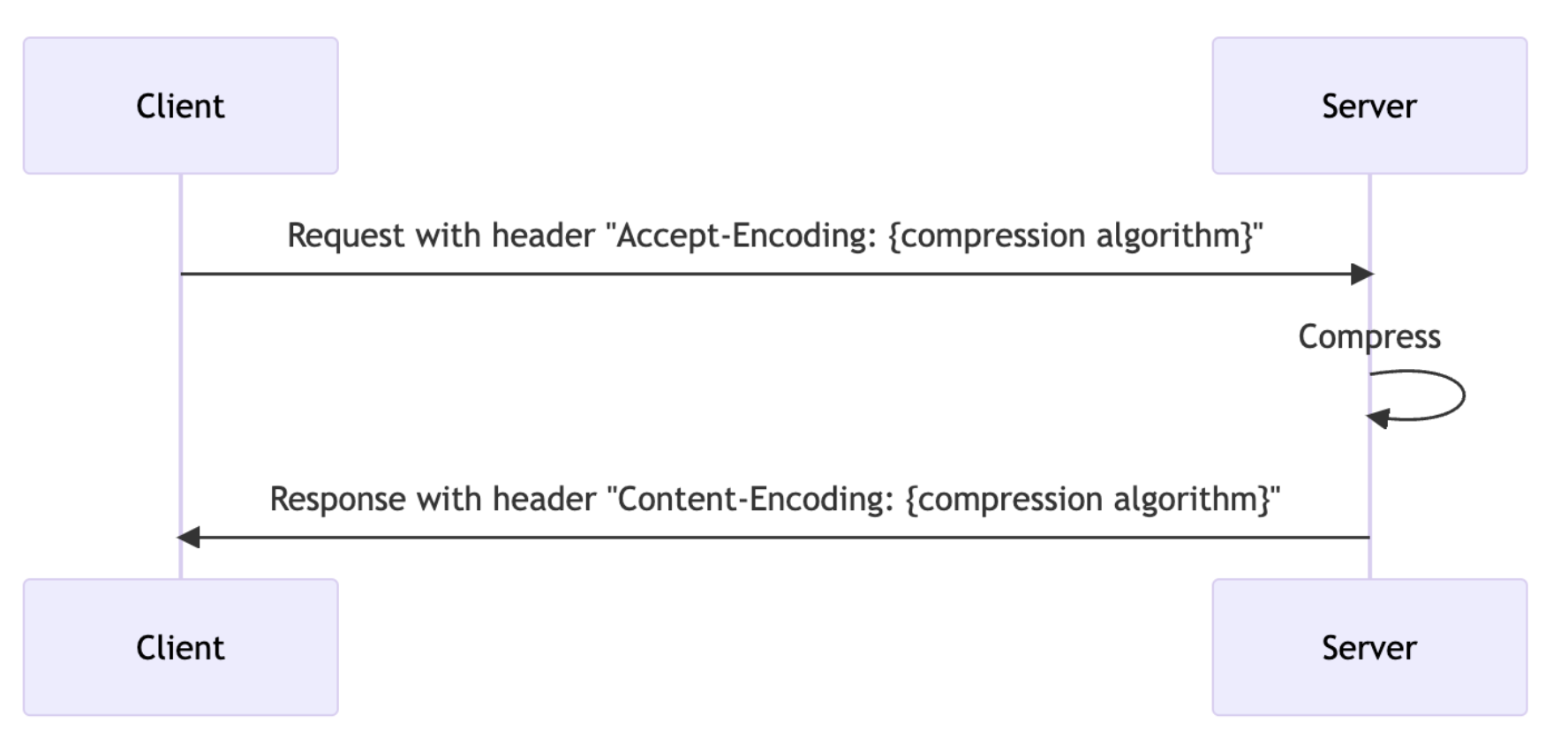
But the real-life network environment is a lot more complicated than this. Say, as of writing this(10th of Jan, 2025) the simplest network topology we have is as follows.
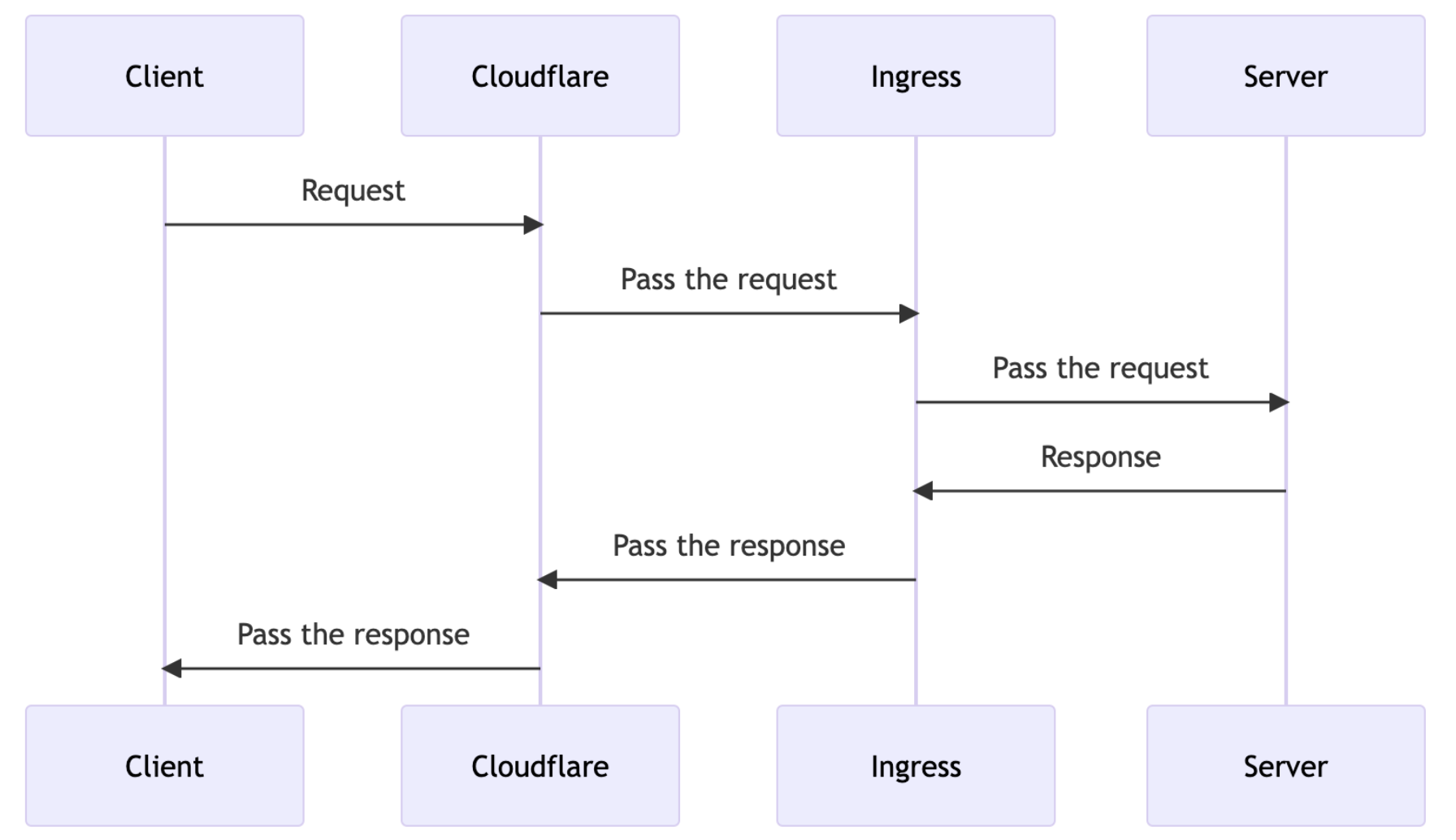
Applying compression
So, given the topology, we can apply compression on any layer of the network, Say if we apply end-to-end compression, it will be as follows:
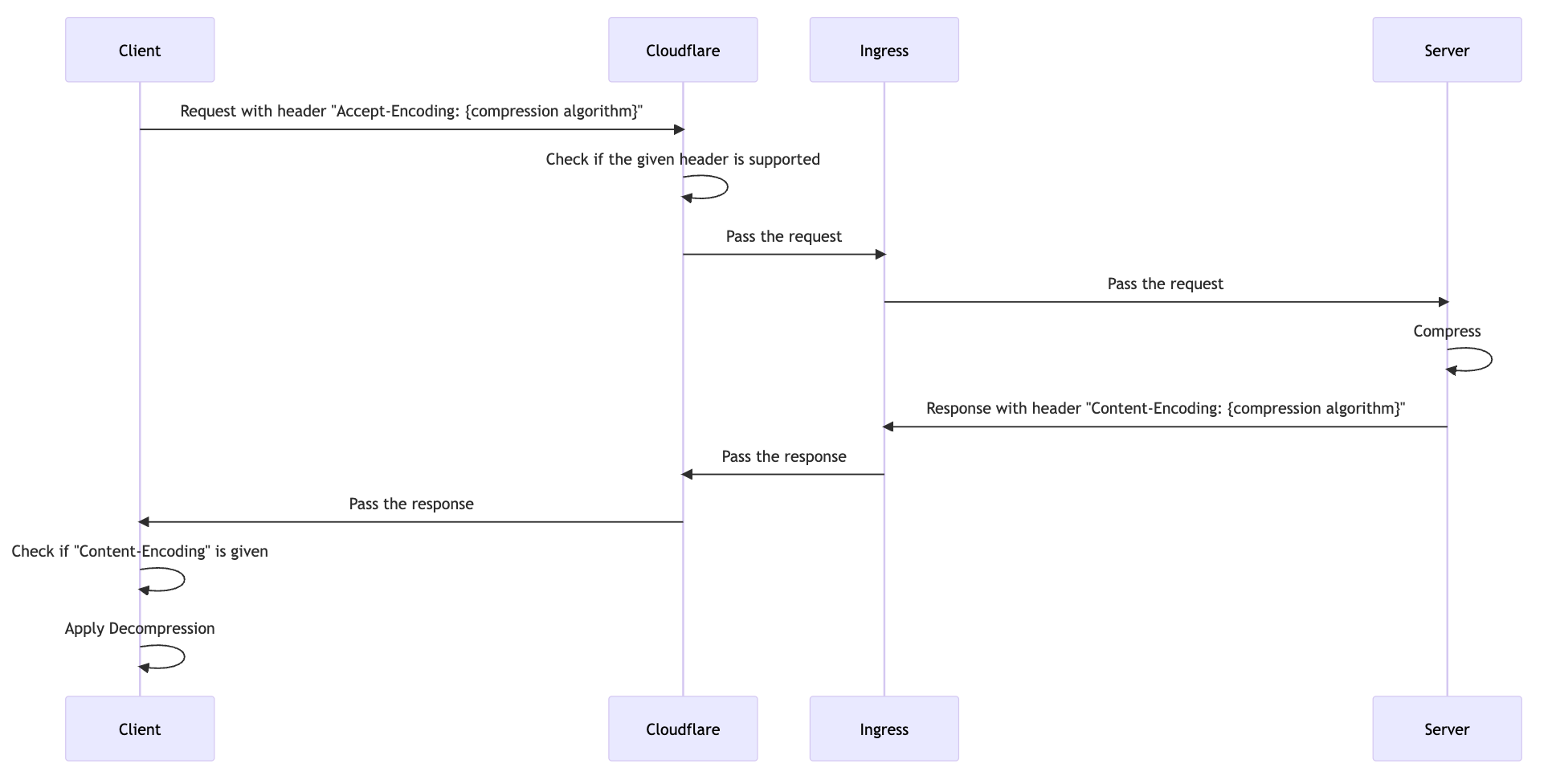
Bear in mind, however, that when you use network service like CloudFlare and if you enable following example settings, it will recompress/redecompress:
- Automatic HTTPS rewrites
- Email address obfuscation
- Javascript detections - to identify bot requests
- RUM
However, the actual cost you pay for the compression might be negligible. I’ll touch on this later in the next section.
So, what do all of these mean?
- Applying compression logic successfully requires decent understanding of how network infrastructure is provisioned for the service.
- The data that the server returns can hop over the network multiple times.
- Reducing the data size in this picture means that you can reduce the size of data for each hop.
And this is the exact reason why compression logic can be a good option.
Where do we have to apply compression logic?
There are two options you can go for :
- End-to-end compression
- Origin server compresses
- Client decompresses
- Consider this flow when the network time between your server and load-balancer hosting service(such as cloudflare) is significant.
- Most of the time, those network hosting services have points of presence(PoPs) close to your origin server. This means even for say, 42KB vs 5KB, the transfer time difference might be in milliseconds.
- Intermediary compression
- Your origin server doesn’t have to do anything
- Network hosting service looks at the header and apply appropriate compression logic
- Given the PoPs, generally recommended.
Performance analysis on compression algorithm
Before we go further, we need to understand why the smaller it gets it performs better although that itself seems self-explanatory. The key thing is this - although the size of your data IS variable, the size of packet and segment you transfer over the network is not variable - it’s fixed!
So, much of how data is transferred over the network when the size goes beyond its fixed limit is by either fragmentation or segmentation. Knowing when it gets fragmented or segmented is crucial when the service is expected to deliver a significant amount of data and it definitely affects user experiences.
For example, maximum segment size(MSS) is 1460 bytes(approx, 1.5kb). So if you want to send the data, it gets segmented when the size of them exceeds - There comes performance gain. By sending less data, you achieve network efficiency, though it may come at the cost of additional processing on both the server and client sides.
As you can imagine, processing time for data depends on the specific compression implementation. For example, brotli1(brotli has three variants(1,9,11)), shows 98.3MB/s for compression and 334MB/s for decompression, which means to decompress 80KB, it will take around less than 0.001 second - 1mills for compression. For your reference, I will leave the table that shows some of the algorithms, its compression ratio and speed for compression and decompression:
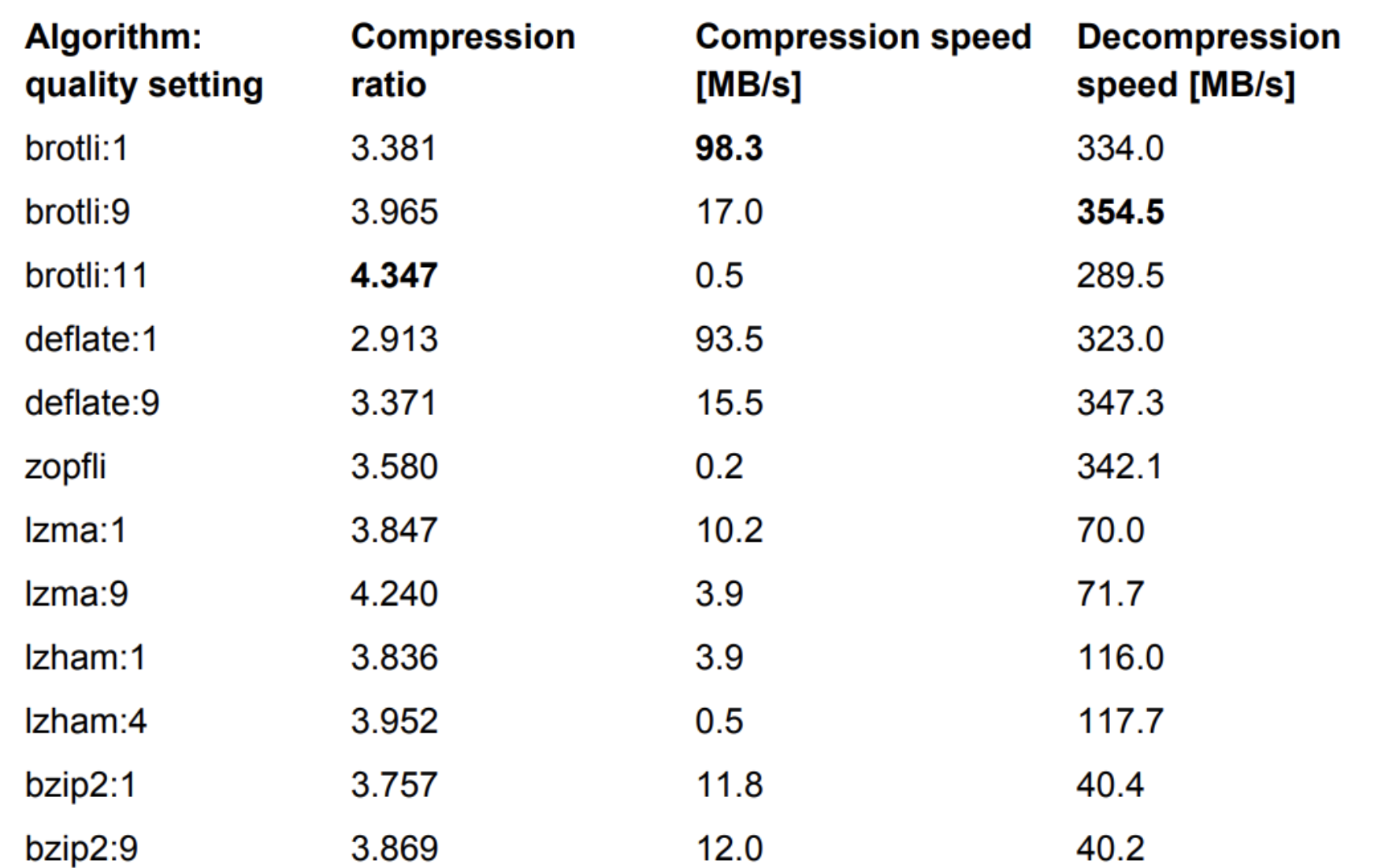
Plus, these algorithms are run with single-thread by default. But bear in mind that if the content you are delivered is natively compressed such as PNG files, compressing it down again may give you less benefit. Thankfully, most of the data we render are subject to compression such as HTML, JSON, XML, Javascript and CSS.
What if the client’s hardware is not capable of running decompression logic?
This is the least of your worries because:
- Most of the compression logics are asymmetric algorithms - they’re designed to be much faster to decompress than compress. Not surprisingly, this is intended for web use cases.
- Even budget mobile processors today have SIMD instructions and these accelerate compression/decompression.
Real world example:
Let’s say we want to send 100KB data
Without compression
Over 4G(~50Mbps) internet, for example, it takes 160ms transfer time
With compression
Using brotli1 the size will be around 30KB, which translates to 52ms transfer time.
To decompress it, it takes 1-2 ms.
Net gain: 107ms even including decompression overhead
One catch: You don’t only send 1 segment at a time
A bit of CS101, when a threeway handshake is made, client and server exchange their congestion window(CWND) and advertised window(RWND). What it essentially does is it holds off on sending small amounts of data until:
- The buffer contains enough data to fill an MSS (Maximum Segment Size).
- An acknowledgment (ACK) is received for previously sent data.
This is what’s called Nagle’s algorithm and this is the default behaviour of TCP now. And the size of CWND is 10MSS by default on Linux, and macOS for example. With them, what it means is that:
- Assume MSS = 1460 bytes and the congestion window is 10 MSS.
- The sender can send 10 TCP segments (each 1460 bytes) before waiting for an ACK to increase the window further.
Plus, considering that the network in the world is built on top of asynchronous assumptions, these are translated into ‘Any data that’s equal or smaller than window size may take the same time.
Experiment
Given the knowledge we learned, we should be able to prove the followings:
- Compression/decompression should work fast.
- If the size of data is negligible:
- Whether you apply compression or not, TTI should be the same because it doesn’t exceed the window buffer.
- If you do apply compression, the size of data you receive should get downsized.
- If the size of data is significantly large:
- There should be an increase in TTI time.
- the size of data you receive should get downsized.
Now, I enabled the encoding header for the pro QA environment, turned on brotli and gzip(which merely takes adding a few lines of code.)
To simulate client, I used debug mode with single thread program as follows:
#[tokio::main(flavor = "current_thread")]
async fn main() {
   // get env variable
   let compression_applied: Option<String> =
       std::env::var("COMPRESS").map(|v| Some(v)).unwrap_or(None);
   let decomp = std::env::var("DECOMP")
       .map(|v| v == "true")
       .unwrap_or(false);

   if let Some(compression) = &compression_applied {
       println!(
           "RUN WITH COMPRESSION: {:?}\n decompression applied: {}",
           compression, decomp
       );
   } else {
       println!("RUN WITHOUT COMPRESSION");
   }
   let num_calls = 1000;
   println!("RUNNING {num_calls} calls");
   let handler = tokio::spawn(caller(num_calls, compression_applied, decomp));
   let with_compression = handler.await.unwrap();
   println!("Takes average {:?}", with_compression);
}
And run the program with the different environment variable :
- No compression
- Get gzip compressed data with no decompression applied
- Get gzip compressed data with decompression applied
- Get brotli compressed data with no decompression applied
- Get brotli compressed data with decompression applied
The result
#1 No compression
# run the “program” with the different

program > non-compress.txt &
COMPRESS=gzip program > gzip-no-decode.txt &
COMPRESS=gzip DECOMP=true program > gzip-decode.txt &
COMPRESS=br program > brotli-no-decode.txt &
COMPRESS=br DECOMP=true program > brotli-decode.txt

wait
#2 Get gzip compressed data with no decompression applied
RUN WITH COMPRESSION: "gzip"
 decompression applied: false
RUNNING 1000 calls
Status: 200 OK Took 1067 ms, size: 6852
Status: 200 OK Took 694 ms, size: 6852
...
...
Status: 200 OK Took 676 ms, size: 6852
Status: 200 OK Took 726 ms, size: 6852
Status: 200 OK Took 620 ms, size: 6852
Takes average 719
#3 Get gzip compressed data with decompression applied
RUN WITH COMPRESSION: "gzip"
 decompression applied: true
RUNNING 1000 calls
Status: 200 OK Took 1067 ms, size: 42523
Status: 200 OK Took 710 ms, size: 42523
...
...
Status: 200 OK Took 688 ms, size: 42523
Status: 200 OK Took 739 ms, size: 42523
Status: 200 OK Took 746 ms, size: 42523
Takes average 717
#4 Get brotli compressed data with no decompression applied
RUN WITH COMPRESSION: "br"
 decompression applied: false
RUNNING 1000 calls
Status: 200 OK Took 926 ms, size: 5516
Status: 200 OK Took 904 ms, size: 5516
...
...
Status: 200 OK Took 661 ms, size: 5516
Status: 200 OK Took 675 ms, size: 5516
Status: 200 OK Took 761 ms, size: 5514
Takes average 716
#5 Get brotli compressed data with decompression applied
RUN WITH COMPRESSION: "br"
 decompression applied: true
RUNNING 1000 calls
Status: 200 OK Took 832 ms, size: 42523
Status: 200 OK Took 998 ms, size: 42523
...
...
Status: 200 OK Took 668 ms, size: 42523
Status: 200 OK Took 684 ms, size: 42523
Takes average 719
Conclusion
-
Compression/decompression should work fast (confirmed)
-
Whether you apply compression or not, TTI should be the same because it doesn’t exceed the window buffer If the size of data is negligible (confirmed).
-
If you do apply compression, the size of data you receive should get downsized If the size of data is negligible (confirmed).
For the large data that exceeds default window size, I could not confirm that it shows significant improvement both in size and response time because I couldn’t find endpoints, meaning we may not have a good use case for the compression although we can gain some wins in network bandwidth.