Why callback
Say, you have a write_b function that writes b to the console. Your team decides to make abc this time. What do you have to do? Perhaps, it could be like this:
 fn write_b() {
 	print!("b")
 }

 fn writes(){
 	print!("a");
    write_b();
    print!("c");
 }
This time, your team needs a different implementation that write abcd. Well, still easy:
fn writes2(){
 	print!("a");
    write_b();
    print!("c");
    print!("d");
 }
If it goes like this all the time, however, you not only repeat yourself but also each implementation will have less modularities.
What you can do instead is, having one function that does writes job and implementing specific functios for different write operations:
fn write_b() {
	print!("b")
}

fn write_a() {
	print!("a")
}

fn write_c() {
	print!("c")
}

fn writes(callbacks: &[Box<dyn Fn()>]) {
    callbacks.iter().for_each(|f| f());
}

writes(&[Box::new(write_a), Box::new(write_b), Bow::new(write_c)]);
Asynchronous callback
This approach shines especially when you don't know how long the operation takes. Say, the operation to write things to console takes 30 minutes;
fn write_b() {
    sleep(Duration::from_secs(60 * 30));
    print!("b")
}

fn write_a() {

    print!("a")
}

fn write_c() {
    print!("c")
}

fn writes(callbacks: Vec<Box<dyn Fn() + Send + Sync>>) {
    callbacks.into_iter().for_each(|f| {
        thread::spawn(f);
    });
}

writes(vec![
    Box::new(write_a),
    Box::new(write_b),
    Box::new(write_c),
]);
Similarly, when the calling function (or thread) does not rely on the immediate execution of the callback function, it is referred to as an asynchronous callback.
Callback hell
Imagine you are trying to process a task that requires executing four different subsystem. When it is synchronous job, it could be written quite straighforwardly:
a = SystemA();
b = SystemB(a);
c = SystemC(b);
d = SystemD(c);
However, when it is written in asynchrnous manner, it would look like:
SystemA(func(a)
{
	SystemB(a, function(b)
    {
    	SystemC(b, function(c)
        {
        	SystemD(c, function(d)
            {
            	...
            }
        }
    }
}
Needless to say, the asynchronous approach is much harder to understand and, as a result, more difficult to maintain. But is it possible to achieve both readability and simplicity in the code? This is where coroutines come to the rescue.
Asynchronous Call
Asynchronous calls are commonly used for tasks like disk read/write operations, data transfers over the network, and database jobs—essentially any I/O operations that take a significant amount of time.
For instance, a disk read/write operation would block the program if done synchronously, as it would have to wait until the desired data is fully read.
If done asynchronously, before the desired data is read, the control is turned back to the caller and the caller can preceed(non-blocking).
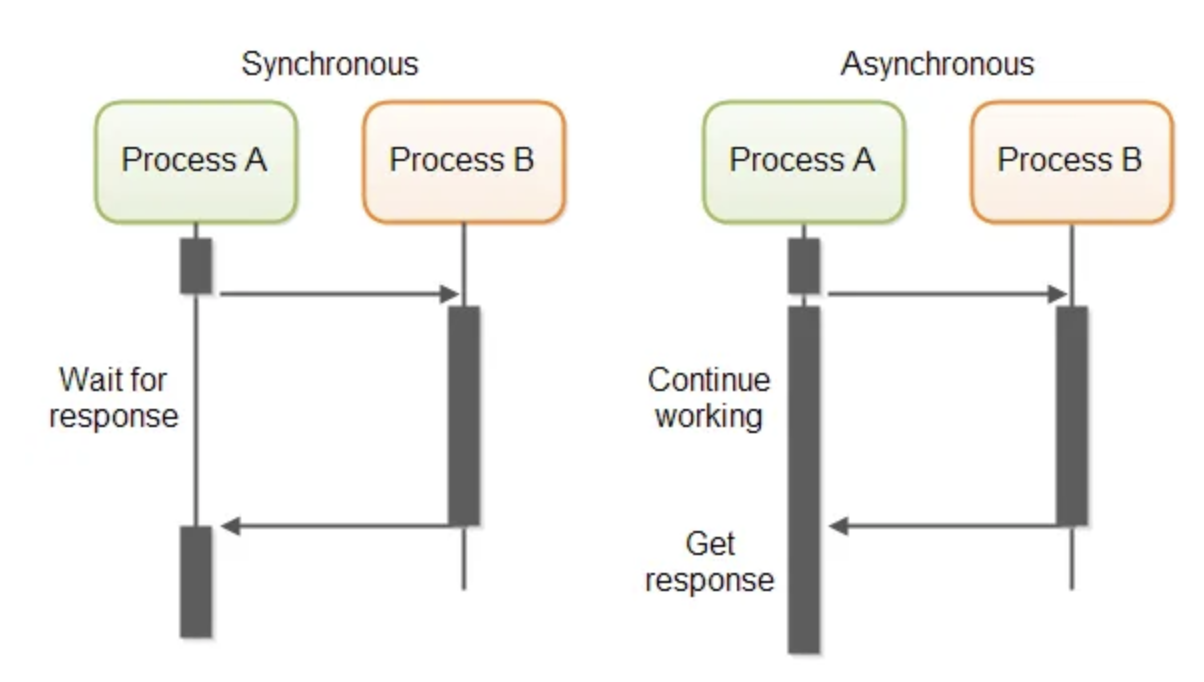
How does application receive completed async tasks?
1) When a caller doesn't care about the result of async task
In this case, the caller simply send code lines(callback funciton) and forget about it. Basically, what this means is "when you finished your job, procede with the function I'm passing now."
2) When a caller needs the result of async task
In this scenario, a form of notification is needed, where the system sends a completion message to the caller. Typically, asynchronous function calls involve two threads — one for the caller and another for the callee.
Web application example:
Say, to process a user request, the system involves 5 steps:
- A
- B
- Database query
- C
- D
And you receives two requests at the same time. What happens if done synchronously is:

As you can see, there are gaps between executions in the main thread.
If done asynchronously, however, there are two possible cases as mentioned before:
When a caller doesn't care about the result of async task
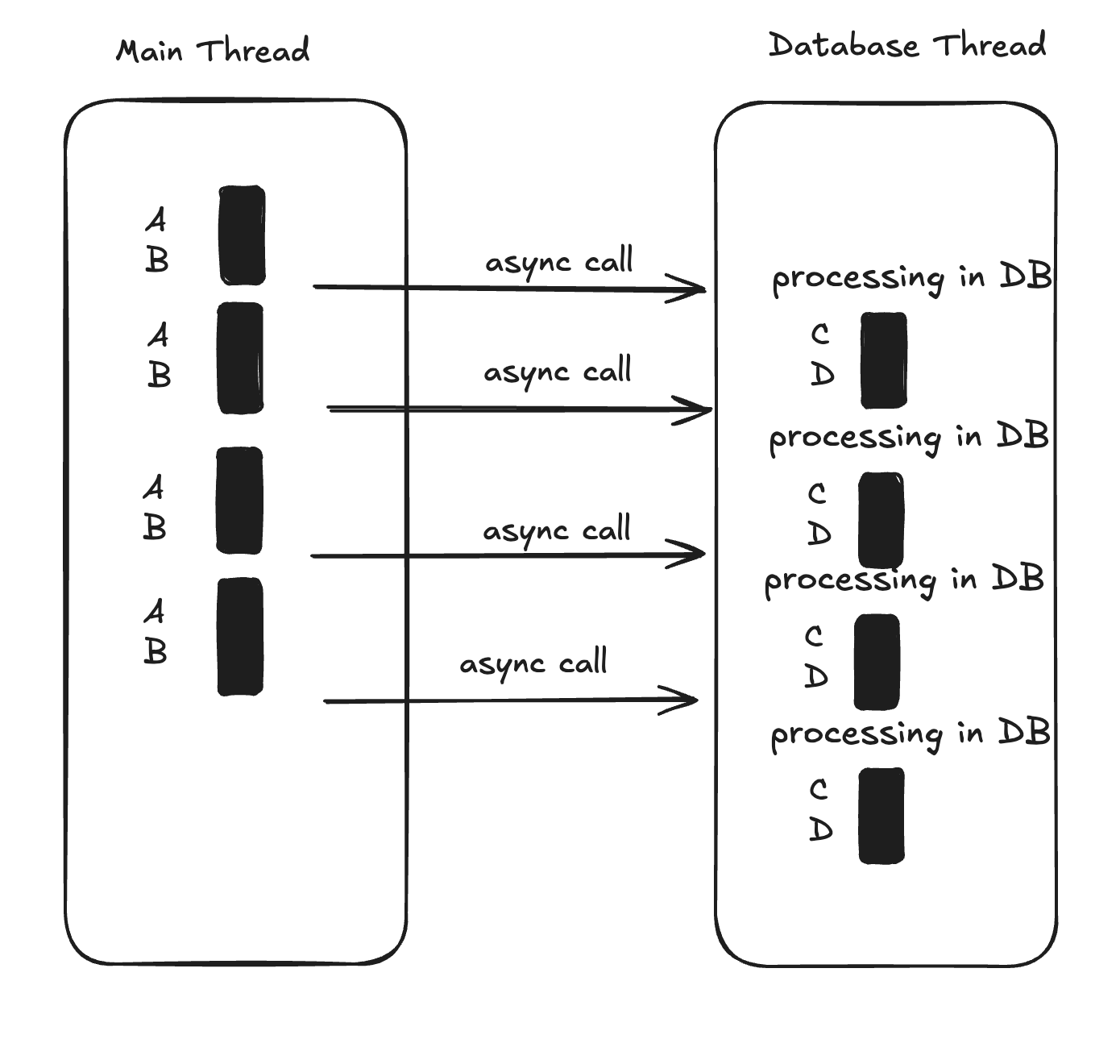
This time, the main thread doesn't care. So instead of the main thread handling 'C,D', database thread taking over that job in its own thread. The problem is, how does database thread knows what's next after db processing? - here comes callback function.
The following is pseudo code example:
fn handle_C_and_D_after_db(){
	C;
    D;
}
and then the main thread passes the handle_C_and_D_after_db function as argument.
db_processing(request, handle_C_and_D_after_db);When a caller needs the result of async task
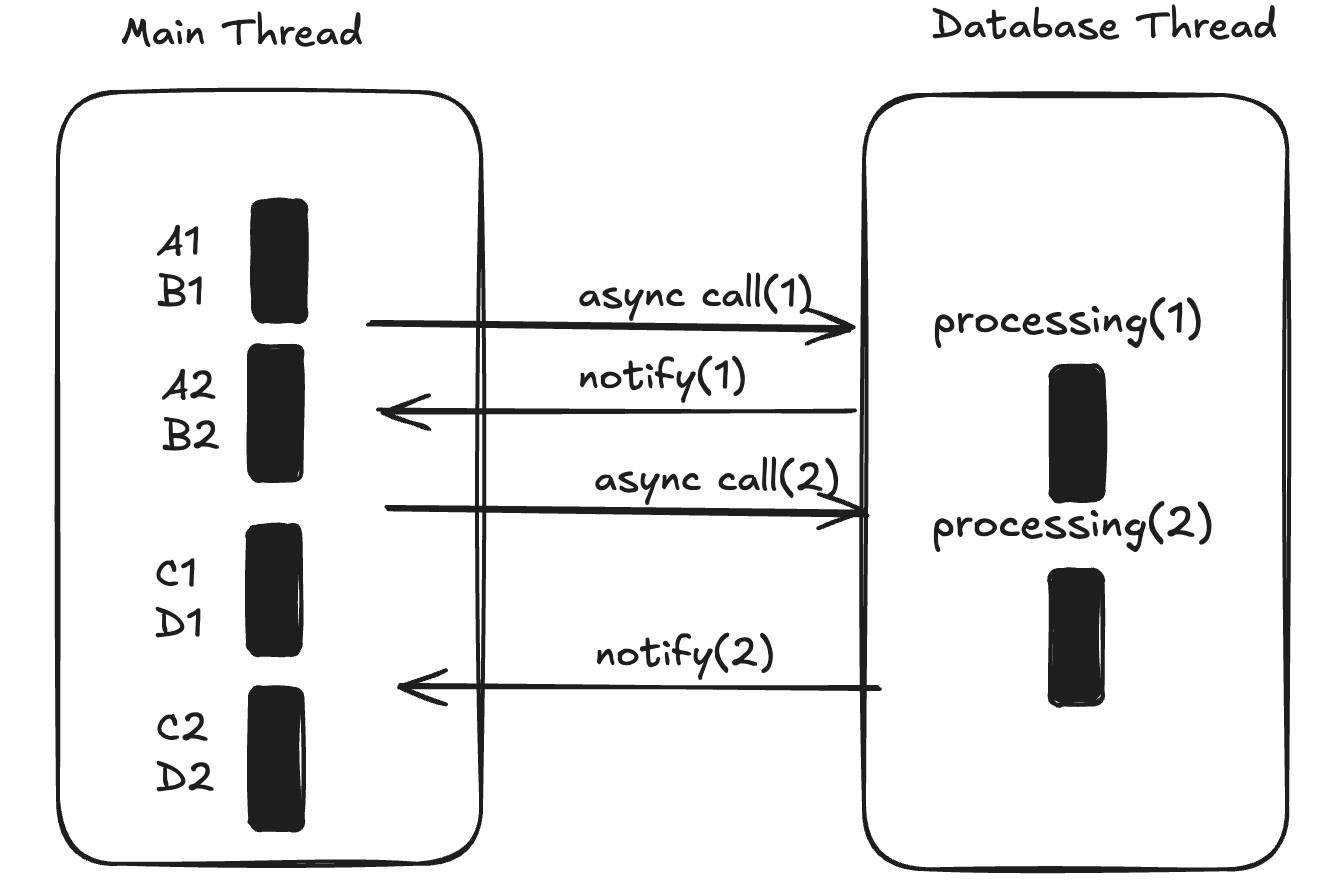
In this case, once A1 and B1 are completed, the main thread makes an async call and, without waiting for the result, moves on to processing the second request (A2, B2).
Notice that while the main thread is still processing A2 and B2, it can receive a notification about the completion of the first async request to the database (notify(1)).
This ensures that the main thread doesn't become idle, fully utilizing the CPU resources allocated to the application.