정처기 실기 공부하던 중에
한 번도 해보지 않은 c가 나와서
이김에 한 번 코드라도 따라 쳐보려고 c를 설치하고자 한다.
1. MinGW 설치
https://sourceforge.net/projects/mingw/files/latest/download 이 사이트에서 우선 MinGW를 설치해준다.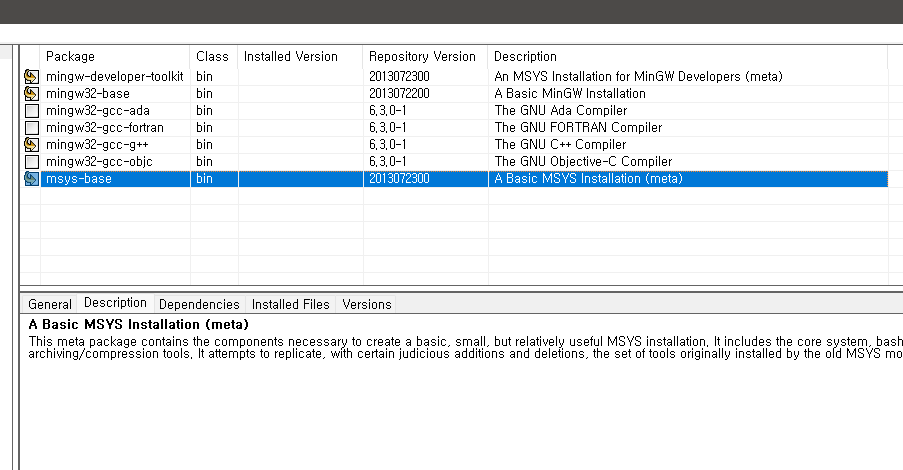 설치 후 이렇게 4개 체크하기
-> Installation에서 적용시켜주기
2. 환경변수 편집
 환경변수에 추가해주기3. 커맨드 창에서 버전 확인
커맨드 창에 `gcc -v`를 쳤을 때 이렇게 잘 나오면 성공4. vs code에서 빌드 설정해주기
터미널 -> 기본 빌드 작업 구성 -> 템플릿에서 tasks.json 파일 만들기 -> Others 임의의 외부 명령 실행 -> tasks.json 파일 생성생성된 파일의 내용을 전부 지우고
{
  "version": "2.0.0",
  "runner": "terminal",
  "type": "shell",
  "echoCommand": true,
  "presentation": {
      "reveal": "always"
  },
  "tasks": [
      {
          "label": "save and compile for C++",
          "command": "g++",
          "args": [
              "${file}",
              "-o",
              "${fileDirname}/${fileBasenameNoExtension}"
          ],
          "group": "build",
          "problemMatcher": {
              "fileLocation": [
                  "relative",
                  "${workspaceRoot}"
              ],
              "pattern": {
                  "regexp": "^(.*):(\\d+):(\\d+):\\s+(warning error):\\s+(.*)$",
                  "file": 1,
                  "line": 2,
                  "column": 3,
                  "severity": 4,
                  "message": 5
              }
          }
      },
      {
          "label": "save and compile for C",
          "command": "gcc",
          "args": [
              "${file}",
              "-o",
              "${fileDirname}/${fileBasenameNoExtension}"
          ],
          "group": "build",
          "problemMatcher": {
              "fileLocation": [
                  "relative",
                  "${workspaceRoot}"
              ],
              "pattern": {
                  "regexp": "^(.*):(\\d+):(\\d+):\\s+(warning error):\\s+(.*)$",
                  "file": 1,
                  "line": 2,
                  "column": 3,
                  "severity": 4,
                  "message": 5
              }
          }
      },
      {
          "label": "execute",
          "command": "cmd",
          "group": "test",
          "args": [
              "/C",
              "${fileDirname}\\${fileBasenameNoExtension}"
          ]
      },
      {
          "type": "cppbuild",
          "label": "C/C++: gcc.exe 활성 파일 빌드",
          "command": "C:\\MinGW\\bin\\gcc.exe",
          "args": [
              "-g",
              "${file}",
              "-o",
              "${fileDirname}\\${fileBasenameNoExtension}.exe"
          ],
          "options": {
              "cwd": "${fileDirname}"
          },
          "problemMatcher": [
              "$gcc"
          ],
          "group": "build",
          "detail": "디버거에서 생성된 작업입니다."
      },
      {
          "type": "cppbuild",
          "label": "C/C++: g++.exe 활성 파일 빌드",
          "command": "C:\\MinGW\\bin\\g++.exe",
          "args": [
              "-g",
              "${file}",
              "-o",
              "${fileDirname}\\${fileBasenameNoExtension}.exe"
          ],
          "options": {
              "cwd": "${fileDirname}"
          },
          "problemMatcher": [
              "$gcc"
          ],
          "group": "build",
//            "group": {
//               "kind": "build",
//                "isDefault": true
//            },

          "detail": "디버거에서 생성된 작업입니다."
      },
      {
          "type": "cppbuild",
          "label": "C/C++: gcc.exe 활성 파일 빌드",
          "command": "C:\\MinGW\\bin\\gcc.exe",
          "args": [
              "-g",
              "${file}",
              "-o",
              "${fileDirname}\\${fileBasenameNoExtension}.exe"
          ],
          "options": {
              "cwd": "${fileDirname}"
          },
          "problemMatcher": [
              "$gcc"
          ],
          "group": "build",

          // "group": {
          //     "kind": "build",
          //     "isDefault": true
          // },

          "detail": "컴파일러: C:\\MinGW\\bin\\gcc.exe"
      }
  ]
}
이렇게 입력해주기
5. 실행 결과 확인을 위한 단축키 설정
메뉴 -> 파일 -> 기본설정 -> 바로가기 키 -> 오른쪽 아이콘 중 바로가기키(json) 선택// 키 바인딩을 이 파일에 넣어서 기본값 재정의
[
// 컴파일
{
"key": "ctrl+alt+c",
"command": "workbench.action.tasks.build"
},
// 실행
{
"key": "ctrl+alt+r",
"command": "workbench.action.tasks.test"
}
]
설정해주기
다시 바로가기 키 탭으로 돌아와서
Ctrl + alt + c와 Ctrl + alt + r을 검색했을 때 잘 나오면 된 것 !!

공부 중입니다 ..