ArrayList와의 차이점
ArrayList는 인덱스를 가지고 있어 탐색이 빠르지만 삽입,삭제가 비효율적이고 연속, 순차적으로 메모리에 저장되어있어 메모리 활용이 비효율적이다.이러한 단점을 극복하기 위해 LinkedList가 고안되었다.
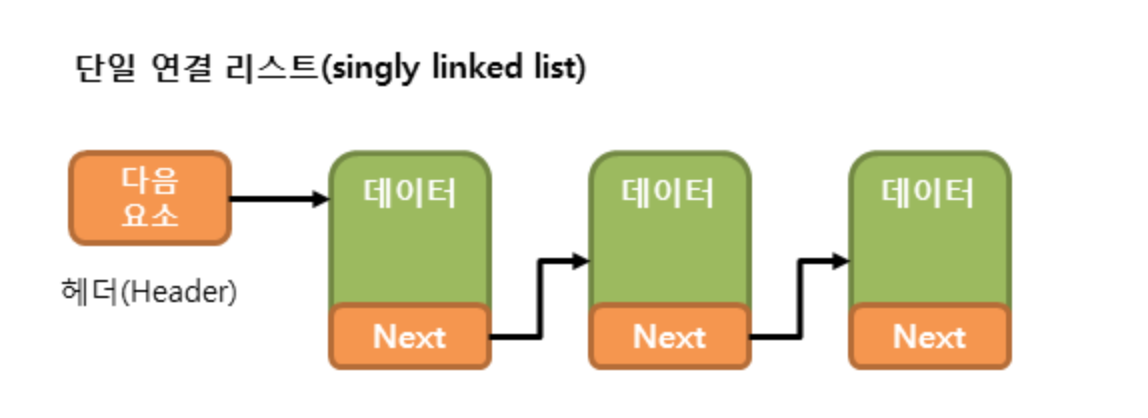
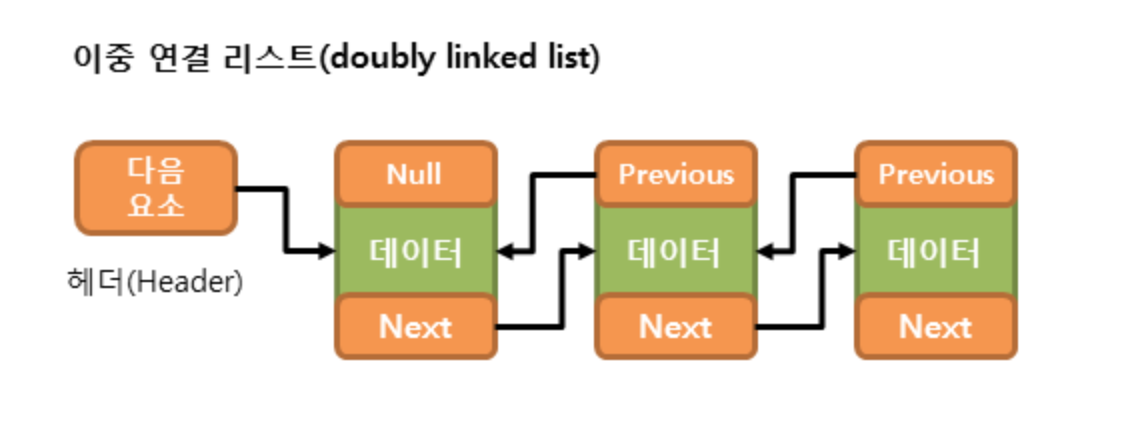
LinkedList는 각각의 노드를 포인터로 연결하는 방식으로 메모리 활용이 좋고, 삽입,삭제 작업은 포인터만 변경하면된다. 삭제되는 데이터는 java에서 제공되는 Garbeage Collection이 알아서 처리하기 때문에 연산이 빠르게 처리된다.단점은 탐색 시 헤더로부터 순차적으로 탐색하기 때문에 느리다.
탐색을 주로 한다면 ArrayList를 사용하고,
데이터의 삽입,삭제가 많은 경우 LinkedList를 사용하는게 좋다.
LinkedList 선언
LinkedList<타입> list1 = new LinkedList<타입(생략가능)>(); // 타입 지정
LinkedList<타입> list2 = new LinkedList<>(list1); // 다른 Collection값으로 초기화
LinkedList<Integer> list3 = new LinkedList<>(Arrays.asList(1, 2, 3, 4, 5)); // Arrays.asList()
ArrayList와 다른 점은 (크기)가용량이 의미가 없기 때문에 가용량을 받는 생성자가 존재하지 않는다.
잘못된 타입으로 캐스팅(Casting, 형변환)을 한 경우 에러가 발생할 수 있으므로 LinkedList를 생성할 때 타입을 명시하는게 좋다.
LinkedList 값 추가
LinkedList<Integer> list = new LinkedList<Integer>();
list.addFirst(10);//가장 앞에 데이터 추가
list.addLast(20);//가장 뒤에 데이터 추가
list.add(30);//데이터 추가
list.add(1, 10);//index 1에 데이터 10 추가- add(int index, Object) : index에 데이터를 추가
- add(Object) : index를 생략한 경우 가장 마지막에 데이터가 추가
- addFirst(Object) : 가장 앞에 데이터가 추가
- addLast(Object) : 가장 뒤에 데이터가 추가
노드의 중간에 데이터가 삽입되는 경우(노드1---(추가노드)--->노드2)
노드1.next는 추가되는 노드를, 추가되는 노드.next는 노드2를 가리킨다.
        LinkedList<String> link = new LinkedList<String>();

        link.add("JAVA");
        link.add("Hello");
        link.add(1, "World");

        System.out.println(link);    // JAVA World Hello

        link.set(1, "Hello");

        System.out.println(link);    // JAVA Hello Hello
LinkedList 값 삭제
LinkedList<Integer> list = new LinkedList<Integer>(Arrays.asList(1,2,3,4,5));
list.removeFirst(); //첫번째 데이터 제거  ->2,3,4,5
list.removeLast(); //가장 뒤의 데이터 제거 ->2,3,4
list.remove(); //생략시 0번째 index제거 ->3,4
list.remove(1); //index 1 제거 ->3
list.clear(); //모든 값 제거
삭제 대상 노드의 이전 노드가 삭제 대상 노드의 다음 노드를 가리키고 삭제 대상 노드는 Garbeage Collection이 처리하여 삭제된다.
LinkedList 값 출력
        LinkedList<String> colors = new LinkedList<>(Arrays.asList("Black", "White", "Green", "Red"));
        // for-each문
        for (String color : colors) {
            System.out.print(color + "  ");
        } // Black White Green Red
        System.out.println();

        // for문
        for (int i = 0; i < colors.size(); ++i) {
            System.out.print(colors.get(i) + "  ");
        } // Black White Green Red
        System.out.println();

        // iterator 사용
        Iterator<String> iterator = colors.iterator();
        while (iterator.hasNext()) {
            System.out.print(iterator.next() + "  ");
        } //Black White Green Red
        System.out.println();

        // listIterator 사용
        ListIterator<String> listIterator = colors.listIterator(colors.size());
        while (listIterator.hasPrevious()) { //.previous() 역순으로 출력
            System.out.print(listIterator.previous() + "  ");
        } // Red Green White Black
        System.out.println();
그 외 사용법
LinkedList<String> colors = new LinkedList<>(Arrays.asList("Black", "White", "Green", "Red"));
        boolean contains = colors.contains("Black");
        System.out.println(contains); // true

        int index = colors.indexOf("Blue");
        System.out.println(index); // -1

        index = colors.indexOf("Red");
        System.out.println(index); // 3

System.out.println(colors.size()); // 4- contains() : boolean 타입을 리턴
- indexOf(데이터값) : 데이터의 인덱스를 리턴, 값이 존재하지 않는 경우 -1을 리턴
- size() : LinkedList의 크기

개발 성장 기록