개요
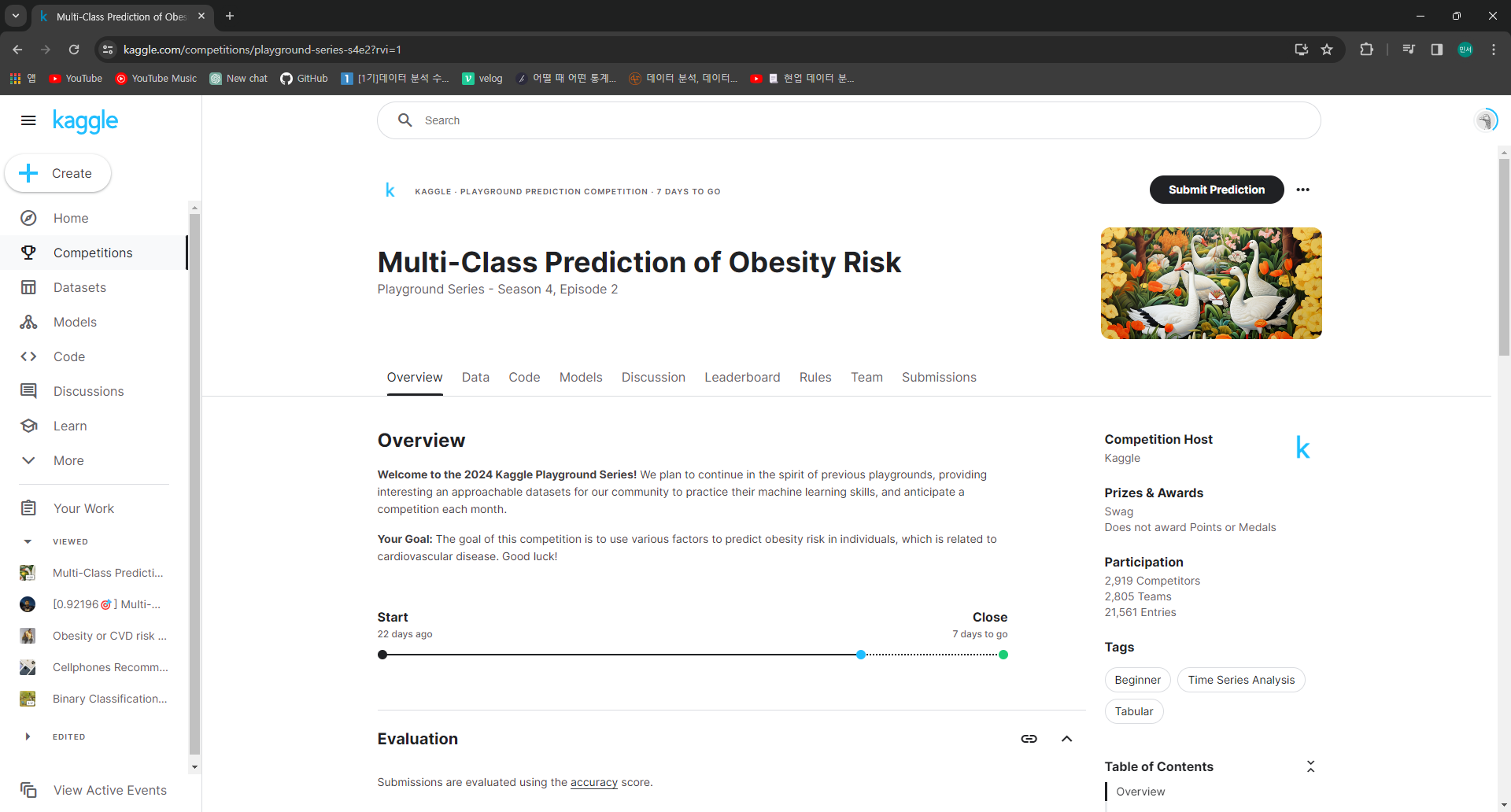
Kaggle에서 주관하는 2024 Kaggle Playground Series Season 4, Episode 2
Multi-Class Prediction of Obesity Risk
원본 데이터
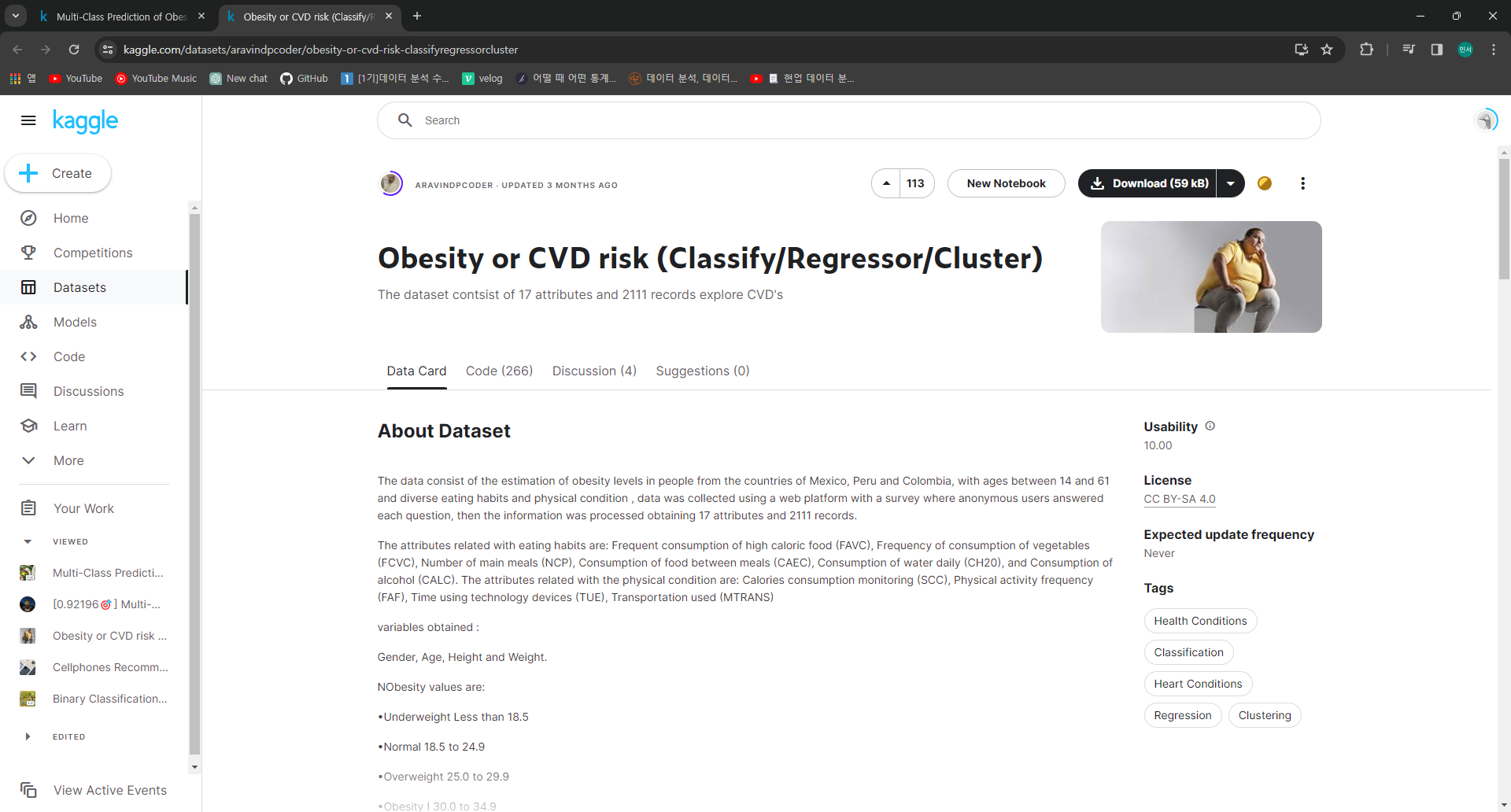
Obesity or CVD risk (Classify/Regressor/Cluster) 에서 데이터를 가져옴
목표
다양한 요인을 통해 NObeyesdad(비만도) 예측
NObeyesdad는
Insufficient_Weight
Normal_Weight
Overweight_Level_I
Overweight_Level_II
Obesity_Type_I
Obesity_Type_II
Obesity_Type_III
총 7단계로 구분
데이터 소개
id - 고유 id / int64
NObeyesdad - 비만도 / object
Gender - 성별 / object
Age - 나이 / float64
Height - 키 / float64
Weight - 몸무게 / float64
family_history_with_overweight - 가족 중 과체중 인원 여부 / object
FAVC - 고열량 음식 섭취 여부 / object
FCVC - 야채 섭취 빈도 / float64
NCP - 식사 빈도 / float64
CAEC - 식사 외 음식 섭취 빈도 / object
SMOKE - 흡연 여부 / object
CH2O - 수분 섭취 빈도 / float64
SCC - 칼로리 소비 모니터링 여부 / object
FAF - 활동 빈도 / float64
TUE - 전자기기 사용 빈도 / float64
CALC - 알코올 섭취 빈도 / object
MTRANS - 주로 사용하는 교통 수단 / object
EDA
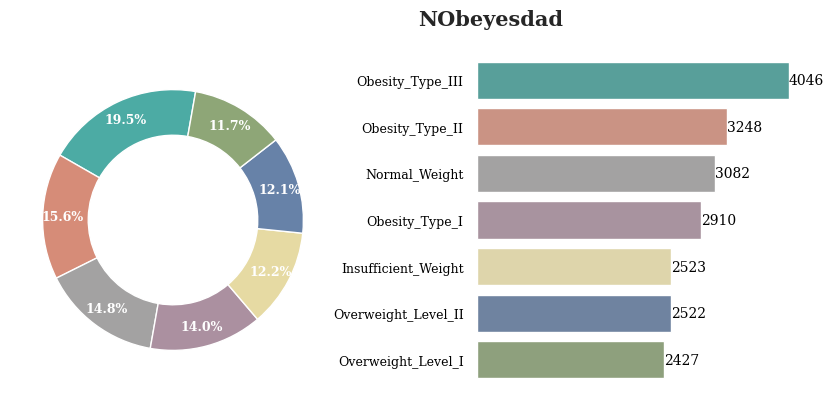
Obesity_Type_III가 가장 많은 것을 확인 할 수 있음
전체적으로 분포가 고르게 나타남
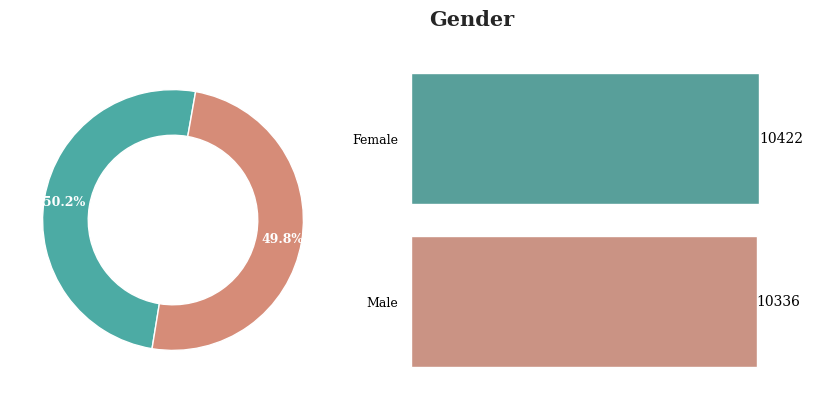
성별의 경우 남성이 미세하기 많지만 두 값의 비율은 차이가 없다고 할수 있음
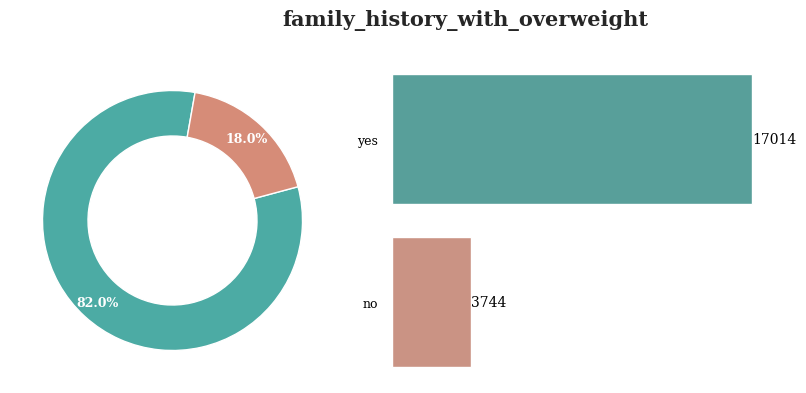
가족 중 과체중인 사람이 있는 경우는 대부분의 레코드에 대해서 yes로 나타남
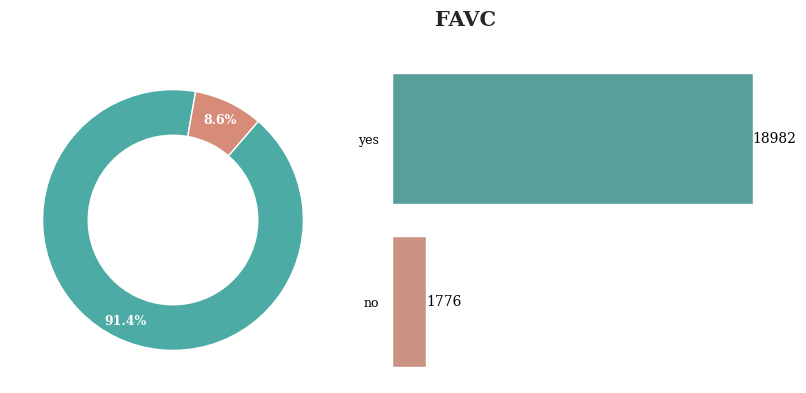
대부분의 레코드에 대해서 고열량 음식 섭취 여부는 yes로 나타남
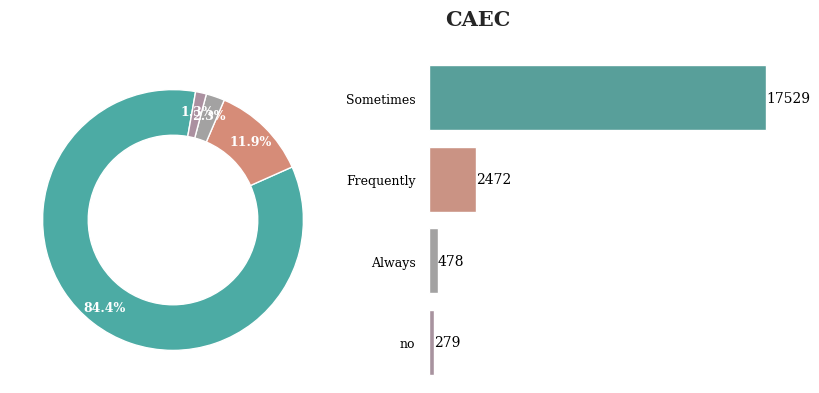
식사 외 음식을 섭취하는 빈도는 Sometimes가 가장 높게 나타났고, no가 가장 낮게 나타남
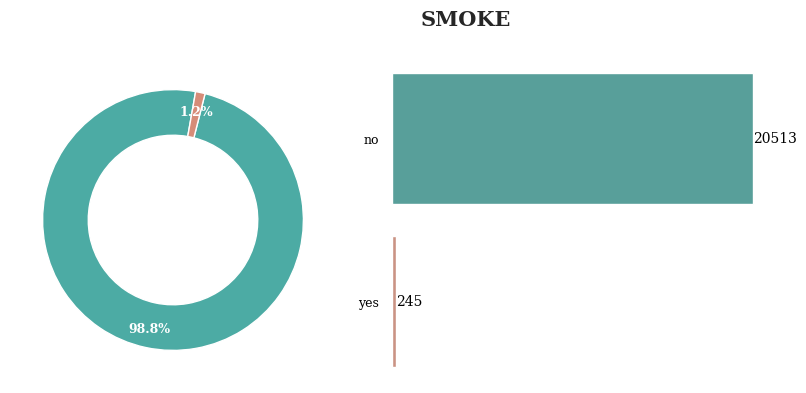
대부분의 경우 흡연을 하지 않음
따라서 특별하게 의미있다고 할 수 없음
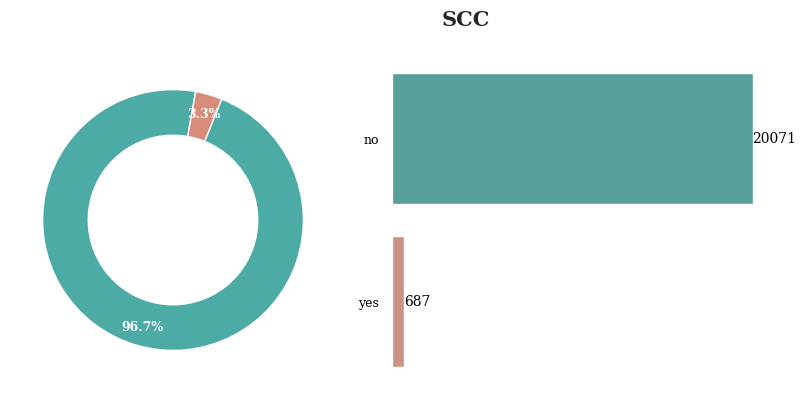
칼로리 소비 모니터링은 대부분의 경우 하지 않음
따라서 특별하게 의미있다고 할 수 없음
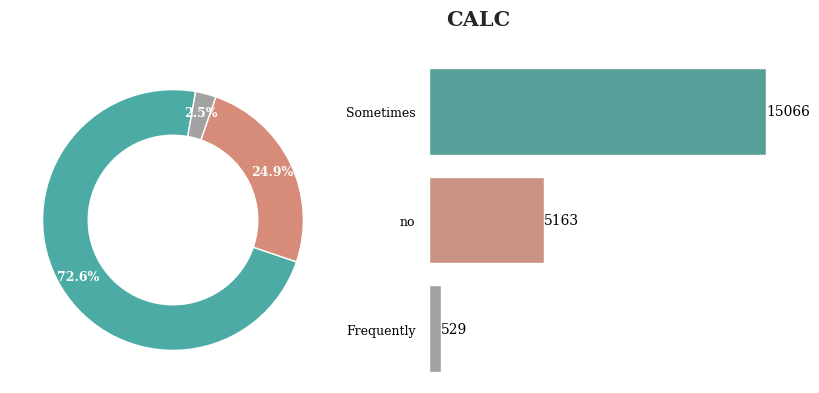
알코올 섭취 빈도는 Sometimes가 가장 높게 나타남
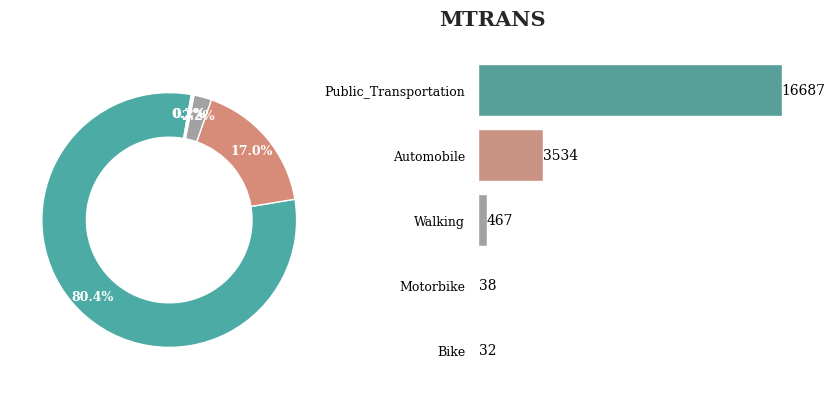
주로 이용하는 교통 수단은 대부분 Public_Transportation으로 나타남
약 97%의 사람들이 자동화 된 교통 수단을 이용하고 있고
약 2%의 사람들만이 직접 움직이는 방법을 사용하고 있음
Feature Engineering
결측치가 없는 관계로 결측치 대체는 따로 진행하지 않음
첫 번째 시도
각 feature에 대해 적절한 기준을 정의하고 그에 따라 값을 변환
Age
- AgeGroup이라는 새로운 feature 정의
Height & Weight
- BMI를 계산 후 새로운 feature 정의
no~Always로 나타난 feature
- 0~3으로 Encoding
yes or no로 나타난 feature
- yes는 1, no는 0으로 Encoding
NCP
- BMI에 따른 식사 빈도 계산
CH2O
- Weight에 따른 수분 섭취량 계산
Gender
- Male은 0, Female은 1로 Encoding
코드
def feature_engineering(df):
    # Age를 그룹화
    age_bins = [0, 18, 30, 40, 50, 80]
    df['AgeGroup'] = pd.cut(df['Age'], bins=age_bins, labels=False, right=False)

    # BMI 계산
    df['BMI'] = df['Weight'] / (df['Height'] ** 2)

    # 전자기기 사용 빈도 Encoding
    tech_bins = [0, 1, 2, 3]
    df['TechnologyUsageCategory'] = pd.cut(df['TUE'], bins=tech_bins, labels=False, right=False)

    # 활동 빈도 Encoding
    activity_bins = [0, 1, 2, np.inf]
    df['ActivityLevel'] = pd.cut(df['FAF'], bins=activity_bins, labels=['Low', 'Medium', 'High'], right=False)

    # BMI에 따른 식사 빈도 계산
    df['bmioncp'] = df['BMI'] / df['NCP']

    # 체중에 따른 수분 섭취 빈도 계산
    df['WIR'] = df['Weight'] / df['CH2O']

    # Gender Encoding
    df['Gender'] = df['Gender'].map({'Male':0, 'Female':1})

    # family_history_with_overweight Encoding
    df['family_history_with_overweight'] = df['family_history_with_overweight'].map({'no':0, 'yes':1})

    # FAVC Encoding
    df['FAVC'] = df['FAVC'].map({'no':0, 'yes':1})

    # CAEC Encoding
    df['CAEC'] = df['CAEC'].map({'no':0, 'Sometimes':1, 'Frequently':2, 'Always':3})

    # SMOKE Encoding
    df['SMOKE'] = df['SMOKE'].map({'no':0, 'yes':1})

    # SCC Encoding
    df['SCC'] = df['SCC'].map({'no':0, 'yes':1})

    # CALC 빈도 Encoding
    df['CALC'] = df['CALC'].map({'no':0, 'Sometimes':1, 'Frequently':2, 'Always':3})

    return df

train = feature_engineering(train)

test = feature_engineering(test)
두 번째 시도
첫 번째 방법과 다르게 복잡하게 생각하지 않고
새로 feature를 정의하지 않음
각 data type에 맞게 Encoding 진행
코드
# 범주형 데이터와 수치형 데이터를 구분 후 각각의 변수에 저장
# train과 test 두 데이터에 대해 각각 적용
num_cols = list(train.select_dtypes(exclude=['object']).columns)
cat_cols = list(train.select_dtypes(include=['object']).columns)

num_cols_test = list(test.select_dtypes(exclude=['object']).columns)
cat_cols_test = list(test.select_dtypes(include=['object']).columns)

# test의 경우 id는 제외하고 저장함
num_cols_test = [col for col in num_cols_test if col not in ['id']]

# StandardScaler를 통해 수치형 데이터를 표준화
scaler = StandardScaler()
train[num_cols] = scaler.fit_transform(train[num_cols])
test[num_cols_test] = scaler.transform(test[num_cols_test])

# LabelEncoder를 통해 범주형 데이터를 정수형으로 인코딩
labelencoder = LabelEncoder()
object_columns = train.select_dtypes(include='object').columns.difference(['NObeyesdad'])

# train 인코딩
for col_name in object_columns:
    if train[col_name].dtypes=='object':
        train[col_name]=labelencoder.fit_transform(train[col_name])

# test 인코딩
for col_name in test.columns:
    if test[col_name].dtypes=='object':
        test[col_name]=labelencoder.fit_transform(test[col_name])
Model Building
CatBoost / LGBM
두 모델 사용
공통적으로 최적 파라미터를 탐색(Grid Search)하고 최적 파라미터를 통해 결과물 출력
첫 번째 결과
CatBoost

LGBM

두 번째 결과
CatBoost

LGBM
두 번째 LGBM의 경우 Kaggle에 공개된 다른 코드를 통해 추가적인 방법 사용
- Optuna 패키지를 통해 클래스별 임계값을 최적화
- 최적 임계값을 도출
- .predict_proba를 통해 예측 확률 초기화
- 초기화 된 예측 확률과 최적 임계값을 통해 예측 확률을 예측값으로 변환
# Optuna를 통해 클래스별 임계값을 최적화

# objective 함수는 입력값의 임계값을 추출하고 thresholds 딕셔너리에 추가
def objective(trial):
    # Define the thresholds for each class
    thresholds = {}
    for i in range(num_classes):
        thresholds[f'threshold_{i}'] = trial.suggest_uniform(f'threshold_{i}', 0.0, 1.0)

    # apply_thresholds에서 변환된 값을 y_pred에 초기화
    y_pred = apply_thresholds(pred_proba, thresholds)

    # y_valid와 y_pred를 통해 accuracy score 계산
    accuracy = accuracy_score(y_valid, y_pred)

    return accuracy

# apply_thresholds 함수는 입력된 임계값을 통해 확률을 예측 레이블로 변환
def apply_thresholds(y_proba, thresholds):
    y_pred_labels = np.argmax(y_proba, axis=1)
    for i in range(y_proba.shape[1]):
        y_pred_labels[y_proba[:, i] > thresholds[f'threshold_{i}']] = i

    return y_pred_labels

# num_classes 정의(best_param에 따름)
num_classes = 7

# Optuna의 Study 객체를 생성
study = optuna.create_study(direction='maximize')

# Objective 함수를 최적화
study.optimize(objective, n_trials=100)

# 최적 임계값을 초기화
best_thresholds = study.best_params

# 최적 임계값 출력
print("Best Thresholds:", best_thresholds)

# X_test에 대한 예측 확률을 test_label에 초기화
test_label = model_lgb.predict_proba(X_test)

# test_label에 초기화된 예측 확률을 apply_thresholds 함수를 통해 예측값으로 변환
test_label = apply_thresholds(test_label, best_thresholds)
참고
Kaggle Code
https://www.kaggle.com/code/kuldeeprathoree/0-92196-multi-class-obesity
https://www.kaggle.com/code/ddosad/ps4e2-visual-eda-lgbm-obesity-risk
