사용기술 및 용어 설명
- API: FrontEnd에서 요청을 보낼 때 사용하는
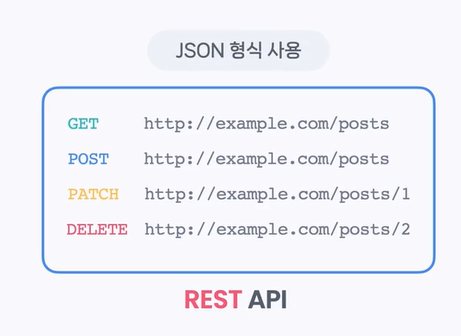
HTTP 메소드(GET, POST, PATCH, DELETE) + URL = 엔드포인트이며, 엔드포인트들의 조합을 API라고 부름
JSON 형식 사용
- Node.js: 웹브라우저 바깥에서 JavaScript를 실행하는 환경
- Express: request와 response를 쉽게 다룰 수 있는 라이브러리
- mongoDB: 데이터를 테이블에 저장하지 않고 문서 형태로 저장하며, 문서 하나를 document, 문서의 모음을 collection이라고 부름
모던 자바스크립트
Arguments(인수)
인수 개수에 따라 유연하게 동작하는 함수를 동작하고자 함
1. arguments는 배열처럼 .length로 길이를 출력할 수도 있고, 인덱싱 ([0], [1] 등)을 통해서 값 하나하나에 접근할 수도 있고, for문으로 순회할 수 있음
그러나 arguments객체는 유사배열이므로 그 외의 배열의 메소드들을 자유롭게 활용할 수는 없는 한계가 있음
function printArguments(a, b, c){
  for (const arg of arguments) {
    console.log(arg);
  };
  // arguments: 호출시 프린트한 함수를 전부 저장하고 있는 객체
};rest파라미터는 파라미터 자리의 변수 앞에...를 붙이는 문법으로, 완전한 배열이므로 배열의 메소드를 자유롭게 활용할 수 있음
// rest parameter 단독 사용
function printArguments(...args){
  for (const arg of args) {
    console.log(arg);
  };
  console.log(args.splice(0, 2)); // 인덱스 0 ~ 1까지 출력
};

// 일반 parameter와 동시에 사용
function printRank(first, second, ...others) {
  // rest parameter는 반드시 가장 마지막에 사용되어야 함
  console.log(`우승: $[first}`);
  console.log(`준우승: $[second}`);

  for (const arg of others) {
    console.log(`참가자: ${arg}`);
  }
}
Arrow Function
(인수) => {명령문}의 형태
만약 인수와 명령문이 각각 하나씩이라면()와{}를 사용하지 않은 채=>만 써도 됨 (단, return값이 있거나 명령문에 객체({})가 존재하면 생략 불가)
this 키워드
- 함수를 호출한 객체를 가리킴. 즉 함수를 호출한 대상에 따라 값이 상대적으로 바뀜
function getFullName() {
  return `${this.firstName} ${this.lastName}`;
}

const user = {
  firstName : "Minji",
  lastName : "Kim",
  getFullName : getFullName,
}

const admin = {
  firstName : "Code",
  lastName : "It",
  getFullName : getFullName,
}

console.log(user.getFullName());
console.log(admin.getFullName());- 단, Arrow function에서의 this 객체는 Arrow function이 선언되기 직전에 유효한 this값과 똑같은 값을 가지고 동작하게 됨
조건연산자
조건 ? truthy할 때 표현식 : falsy 할 때 표현식
spread 구문
...배열명으로 사용하면[1, 2, 3]을1, 2, 3으로 펼칠 수 있음- 주로 배열 복사에 잘 활용됨 (예:
arr = [1, 2, 3],arr2 = [...arr]) - 객체도 생성할 수 있음 (예:
obj = { ...arr }로 선언하면{0: 1, 1:2, 2:3}과 같이 인덱스가 key로 설정되며 생성됨)
객체의 프로퍼티 작성법
- 변수명과 프로퍼티명이 같다면
user:user와 같이 중복해서 적을 필요 없이 한번만 적어도 됨 - 함수를 프로퍼티값으로 사용할 때는
:와function키워드를 생략하고 적을 수 있음prop1 : function() {}->prop1() {} - 프로퍼티명을 변수나 함수의 리턴값으로 활용하고자 한다면
[]로 감싸서 사용하기
구조분해 (배열, 객체의 구조를 분해)
- 배열의 구조분해
const rank = ["민지", "민경", "서아", "다경"]; // 참가자 배열
const [macbook, ipad, airpods, coupon] = rank
// 상품 변수들로 배열을 생성해서 구조분해로 참가자 배열을 받아오기
console.log(macbook);
console.log(ipad);
console.log(airpods);
console.log(coupon);- 기본값 설정을 하면 해당 변수에 undefined가 할당되는 경우 (참가자 배열이 상품변수배열보다 짧은 경우) undefined 대신 기본값으로 설정됨
- rest 파라미터로 사용 가능. 단, 배열에서 가장 끝에만 사용할 수 있음.
- 추가로, 변수의 값 교환 시 temp처럼 추가적인 변수를 선언해서 임시로 할당해두고 여러줄의 코드를 작성할 필요 없이 한 줄로
[macbook, ipad] = [ipad, macbook]으로 해결 가능!
- 객체의 구조분해
const macbook = {
  title: "macbook pro 16",
  price: 3690000,
  memory: "16GB",
  storage: "1TB SSD",
  display: "Retina display"
}

const { title, price } = macbook
// title과 같은 이름의 프로퍼티가 macbook에 있으면 해당값이 할당됨
// 기본값, rest 문법(남은 프로퍼티를 하나의 변수에 전부 할당!) 가능-
{ title:product, price }처럼 콜론 이후에 변경하고자하는 이름을 작성하면 프로퍼티 이름과 다른 이름의 변수로 할당받는 것도 가능함 -
모던자바스크립트 > 자바스크립트의 문법과 표현 > 14강부터 복습하기
비동기 자바스크립트
https://www.codeit.kr/topics/asynchronous-javascript
자바스크립트 모듈
모듈 생성하기 (ES module을 주로 사용함!)
- import:
import {} from './경로' - export:
export function add() - 모듈을 사용하기 위해서는
mjs확장자를 사용해야 함
npm(node package manager), third-party module
third-party module:
- npm registry에서 검색하고
npm install로 설치하기, 모든 third-party module은 package임 package.json을 가진 디렉토리는 모두 package이며, 해당 파일(package.json)은 package의 정보를 기록함
package.json의 필드들:
"dependencies": 현재 패키지에 필요한 서드파티 모듈을 기록하는 필드"type": "module"로 해당 패키지의 모듈 문법을 디폴트인 CommonJS에서 ES module로 변경할 수 있음scripts": {"start":"node main.js", "test": "node test.js"}로 단축어 설정이 가능함 -> npm run start, npm run test로 간단히 프로그램 수행이 가능package-lock.json은 패키지들의 정확한 버전을 저장하며, 협업하는 동료간에 코드를 공유하고npm install커맨드로 패키지를 한꺼번에 설치할 때 정확도를 올려줌
API들 설명
- Todo API: task 관리 API
https://www.codeit.kr/topics/intro-to-javascript-backend/lessons/6300 - Subscription API: 구독 관리 API
https://www.codeit.kr/topics/intro-to-javascript-backend/lessons/6301
Express로 API 만들기
준비과정
npm install express로 express 설치npm install --save-dev nodemon으로 nodemon 설치- 확장 프로그램
Rest Client설치하기
(1) 일반 JS로 서버 시작하기
// app.js
import express from "express"

const app = express();

// 서버에 get '/hello' 인 request가 들어오면 (req, res) => {} 함수를 실행하라는 의미
app.get('/hello', (req, res) => {
    res.send("Hello Express!")
}) // '/hello'는 URL 경로, 함수는 콜백함수
// 콜백함수의 파라미터 req는 불러올 request 객체, res는 리턴할 response 객체

app.listen(3000, ()=>console.log("Server Started")); // node app.js를 터미널에 입력하면 서버가 시작되면서 우리가 설정한 안내메시지와 동일하게 "Server Started"를 반환함
// 'localhost:3000/hello'를 인터넷 주소창에 검색하면 "Hello Express!"가 출력됨
node app.js로 서버 시작하기npm run dev나npm start로도 시작 가능- 변화가 있을 때 이를 반영하기 위해서 서버를 껐다가 다시 켜야 함
(2) Node.js로 서버 시작하기
- 변화가 바로바로 반영됨
(3) GET request 처리하기
import express from 'express';
import tasks from './data/mock.js';
// tasks라는 이름으로 mock 데이터 불러오기

const app = express();

app.get('/tasks', (req, res) => {
  res.send(tasks); // 리턴객체
  // .send(): response로 json 형식의 tasks(mock.js)가 출력됨
}); // .get('/mock 데이터 불러온 이름', (req, res) => {})
// req: 불러올 request 객체, res: 리턴할 response 객체
app.listen(3000, () => console.log('Server Started'));
(4) 쿼리스트링 처리하기
###로 리퀘스트끼리 구분함- 쿼리스트링:
GET http://localhost:3000/tasks?sort=oldest&count=3에서?뒤의sort=oldest&count=3부분
해당 예시에서는 리퀘스트를 오래된 순서로 정렬하고, 총 3개만 받아오라는 뜻임 sort=oldest: 오래된 테스크 기준으로 정렬, 나머지 경우에는 태스크 기준으로 정렬count: 태스크 개수requests.http:GET http://localhost:3000/tasks?sort=oldest&count=3
import express from 'express';
import tasks from './data/mock.js';

const app = express();

app.get('tasks', (req, res) => {
  // 쿼리 파라미터 받아오기
  const sort = req.query.sort;
  const count = Number(req.query.count); // 쿼리파라미터는 항상 문자열로 전달되므로 count(태스크개수)는 숫자로 변경해주기

  const compareFn =
        sort === 'oldest'
  			? (a, b) => a.createdAt - b.createdAt
  			// a - b : 내림차순 (1, 2, 3, 4)
  			: (a, b) => b.createdAt - a.createdAt;
  			// b - a : 오름차순 (4, 3, 2, 1)
  let newTasks = task.sort(compareFn);

  if (count) {
    newTasks = newTasks.slice(0, count)
  }

  res.send(newTasks);
});

app.listen(3000, () => console.log('Server Started');
(5) Dynamic URL 처리하기
requests.http:GET http://localhost:3000/tasks/1
import express from 'express';
import tasks from './data/mock.js';

const app = express();

app.get('/tasks', (req, res) => {
  const sort = req.query.sort;
  const count = Number(req.query.count);

  const compareFn =
        sort === 'oldest'
  			? (a, b) => a.createdAt - b.createdAt
  			: (a, b) => b.createdAt - a.createdAt;

  let newTasks = tasks.sort(compareFn);

  if (count) {
    newTasks = newTasks.slice(0, count)
  }
  res.send(newTasks);
});

app.get('/tasks/:id', (req, res) => { // 추가된 부분
  const id = Number(req.params.id);
  const task = tasks.find((task) => task.id === id);
  if (task) {
    res.send(task); // task를 찾았으면 send하고,
  } else {
    res.status(404).send({ message: 'cannot find given id.'})
    // 찾지 못했으면 경고문구 출력
  }
});

app.listen(3000, () => console.log('Server Started'));
(6) POST request를 처리해서 새로운 task 생성하기
- 추가하기
POST http://localhost:3000/tasks
Content-Type: application/json

{
    "title": "강아지 산책",
    "description": "강아지랑 30분 산책하기"
}
import express from 'express';
import tasks from './data/mock.js';
const app = express();
// parsing: request body로 전달되는 json 데이터를 자바스크립트 객체로 변환하는 것
// express는 parsing을 자동으로 진행하지 않으므로 express.json() 함수를 사용해야 함
app.use(express.json()); // xpress.json() 함수를 app 전체에서 사용하겠다는 의미
app.get('/tasks', (req, res) => {
const sort = req.query.sort;
const count = Number(req.query.count);
const compareFn =
sort === 'oldest'
? (a, b) => a.createdAt - b.createdAt
: (a, b) => b.createdAt - a.createdAt;
let newTasks = tasks.sort(compareFn);
if (count) {
newTasks = newTasks.slice(0, count)
}
res.send(newTasks);
});
app.get('/tasks/:id', (req, res) => {
const id = Number(req.params.id);
const task = tasks.find((task) => task.id === id);
if (task) {
res.send(task);
} else {
res.status(404).send({ message: 'cannot find given id.'})
}
});
app.post('/tasks', (req, res) => { // 추가된 부분
const newTask = req.body;
const ids = tasks.map((task) => task.id);
newTask.id = Math.max(...ids) + 1;
newTask.isComplete = false;
newTask.createdAt = new Date();
newTask.updatedAt = new Date();
tasks.push(newTask);
res.status(201).send(newTask)
});
app.listen(3000, () => console.log('Server Started'));(7) PATCH request 처리하기
- 수정하기
PATCH http://localhost:3000/tasks/1
Content-Type: application/json

{
    "isComplete": true
}app.patch('/tasks/:id', (req, res) => {
const id = Number(req.params.id);
const task = tasks.find((task) => task.id === id);
if (task) {
// 수정한 부분
Object.keys(req.body).forEach((key) => {
task[key] = req.body[key];
});
res.send(task);
} else {
res.status(404).send({ message: 'cannot find given id.'})
}
});(7) DELETE request 처리하기
app.delete('/tasks/:id', (req, res) => {
  const id = Number(req.params.id);
  const idx = tasks.findIndex((task) => task.id === id);
  if (idx >= 0) {
    tasks.splice(idx, 1);
    res.sendStatus(204);
  } else {
    res.status(404).send({ message: 'cannot find given id.'})
  }
});
총 정리
https://www.codeit.kr/topics/intro-to-javascript-backend/lessons/6317
MongoDB 데이터베이스 사용하기
데이터베이스 생성, 연결 URL 준비
https://www.codeit.kr/tutorials/70/mongodb-atlas
- 데이터베이스 이름과 컬렉션 이름은 튜토리얼과 동일하게 todo-api, tasks로 설정
- 프로젝트 최상위 디렉토리에 env.js라는 파일을 만들고 연결 주소를 안에 복사
export const DATABASE_URL =
  'mongodb+srv://codeit:<password>@mongodb-cluster.t5eg2vz.mongodb.net/todo-api?retryWrites=true&w=majority';
npm i mongoose로 mongoose 라이브러리 설치
Mongoose 라이브러리: 자바스크립트를 사용해서 MongoDB 데이터베이스와 소통할 수 있게 해 줌. 즉, Mongoose가 제공하는 API를 이용해서 데이터베이스에 접속하고 CRUD(Create, Read, Update, Delete) 연산 가능
// app.js
import mongoose from 'mongoose';
import { DATABASE_URL } from './env.js';

// ...

mongoose.connect(DATABASE_URL).then(() => console.log('Connected to DB'));
스키마 정의하기
// Task.js
import mongoose from "mongoose";

const TaskSchema = new mongoose.Schema(
    {
        title: {
            type: String,
        },
        description: {
            type: String,
        },
        isComplete: {
            type: Boolean,
            default: false,
        }
    },
    {
        timestamps: true,
    },
);

const Task = mongoose.model('Task', TaskSchema);

export default Task;
시드 데이터 넣기
- 시드데이터 = 데이터베이스에 사용하는 초기데이터 (mock.js 데이터가 일반적인 초기데이터였다면 시드데이터는 데이터베이스용!)
// seed.js
import mongoose from "mongoose";
import data from "./mock.js";
import Task from "../models/Task.js";
import { DATABASE_URL } from "../env.js";

mongoose.connect(DATABASE_URL);

await Task.deleteMany({}); // deleteMany: 삭제 조건을 파라미터로 받음
await Task.insertMany(data); // insertMany: 삽입할 데이터를 파라미터로 받음

mongoose.connection.close();
데이터 조회하기
- mongoose model 메소드들: https://mongoosejs.com/docs/queries.html
- mongoose query 메소드들: https://mongoosejs.com/docs/api/query.html
app.js에서 각각 기존에 데이터베이스 없이 mock.js로 불러왔던 데이터들을 위의 메소드들을 적절히 사용하여 데이터베이스에서 불러오는 경로로 수정해줌
데이터 생성 및 유효성 검사
// Task.js
import mongoose from "mongoose";

const TaskSchema = new mongoose.Schema(
    {
        title: {
            type: String,
            required: true, // 유효성 검사
            maxLength: 30, // 유효성 검사
            validate: { // 유효성 검사
                validator: function (title) {
                    return title.split(' ').length > 1;
                },
                message: 'Must contain at least 2 words.',
            }
        },
        description: {
            type: String,
        },
        isComplete: {
            type: Boolean,
            required: true,
            default: false,
        }
    },
    {
        timestamps: true,
    },
);

const Task = mongoose.model('Task', TaskSchema);

export default Task;
비동기 코드 오류 처리하기: asyncHandler() - get, post
function asyncHandler(handler){
  return async function (req, res) {
    try {
      await handler(req, res)
    } catch (e) {
      if (e.name === 'ValidationError') {
        res.status(400).send({ message: e.message });
      } else if (e.name === 'CaseError') {
        res.status(404).send({ message: 'Cannot find given id.' });
      } else {
        res.status(500).send({ message: e.message });
      }
    }
  }
}

app.get('/tasks', asyncHandler(async (req, res) => {
  const sort = req.query.sort;
  const count = Number(req.query.count) || 0;

  const sortOption = { createdAt: sort === 'oldest' ? 'asc' : 'desc' };
  const tasks = await Task.find().sort(sortOption).limit(count);

  res.send(tasks);
}));

app.get('/tasks/:id', asyncHandler(async (req, res) => {
  const id = req.params.id;
  const task = await Task.findById(id); // 쿼리를 return
  if (task) {
    res.send(task);
  } else {
    res.status(404).send({ message: 'cannot find given id.'})
  }
}));

app.post('/tasks', asyncHandler(async (req, res) => {
  const newTask = await Task.create(req.body)
  res.status(201).send(newTask)
}));
데이터 수정, 삭제하기: patch, delete
app.patch('/tasks/:id', asyncHandler(async (req, res) => {
  const id = req.params.id;
  const task = await Task.findById(id);
  if (task) {
    // 수정한 부분
    Object.keys(req.body).forEach((key) => {
      task[key] = req.body[key];
    });
    await task.save();
    res.send(task);
  } else {
    res.status(404).send({ message: 'cannot find given id.'})
  }
}));

app.delete('/tasks/:id', asyncHandler(async (req, res) => {
  const id = req.params.id;
  const task = await Task.findByIdAndDelete(id);
  if (task) {
    res.sendStatus(204);
  } else {
    res.status(404).send({ message: 'cannot find given id.'})
  }
}));
MongoDB와 Mongoose 정리
https://www.codeit.kr/topics/intro-to-javascript-backend/lessons/6331
- 테스트 도중 데이터를 초기화 하고 싶다면?
npm run seed실행!