Event object
- 네트워크 활동이나 사용자와의 상호작용 같은 사건의 발생을 알리기 위한 객체
- 이벤트가 발생했을 때 생성되는 객체
- Event 발생
- 마우스를 클릭하거나 키보드를 누르는 등 사용자 행동으로 발생할 수도 있고
- 특정 메서드를 호출하여 프로그래밍적으로도 만들어 낼 수 있음
- DOM 요소는 Event를 받고(“수신”)
- 받은 Event를 “처리”할 수 있음
- Event 처리는 주로
addEventListener()메서드를 통해 Event 처리기(Event handler)를 다양한 html 요소에 “부착”해서 처리함
- Event 처리는 주로
Event handler
- 특별한 함수가 아닌 일반적인 JavaScript Function을 정의하여 사용
- 웹 페이지에서 발생하는 Event에 대해 반응하여 동작하는 함수를 지칭
- Event handler 함수는 이벤트가 발생했을 때 호출되며, Event 객체를 매개 변수로 전달 받음
EventTarget.addEventListener(type, handler function[, options])
- 지정한 Event가 대상에 전달될 때마다 호출할 함수를 설정
- Event를 지원하는 모든 객체(Element, Document, Window 등)를 대상(EventTarget)으로 지정 가능
type
- 반응 할 Event 유형을 나타내는 대소문자 구분 문자열
- 대표 이벤트 : input, click, submit, …
- Event reference | MDN
handler function
- 지정된 타입의 Event를 수신할 객체
- JavaScript function 객체(콜백 함수)여야 함
- 콜백 함수는 발생한 Event의 데이터를 가진 Event 객체를 유일한 매개변수로 받음
Event 실습
button 실습
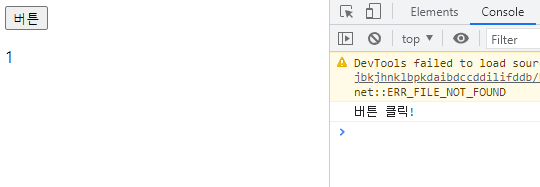
- 버튼을 클릭하면 특정 변수 값 변경하기
<button id="btn">버튼</button>
<p id="counter">0</p>
// 초기값
let counterNumber = 0
// ID가 btn인 요소를 선택
const btn = document.querySelector('#btn')
// btn이 클릭 되었을 때마다 함수가 실행됨
btn.addEventListener('click', function() {
console.log('버튼 클릭!')
// countNumber를 증가시키고
counterNumber += 1
// id가 counter인 것의 내용을 변경
const counter = document.querySelector('#counter')
counter.innerText = counterNumber
})- 실행 결과
- TIP - console 창에서 어떤 event가 생성되는지 확인하기
btn.addEventListener('click', function(event) {
  console.log(event) // console 창에서 어떤 event가 생성되는지 알 수 있음
})
값 입력 실습
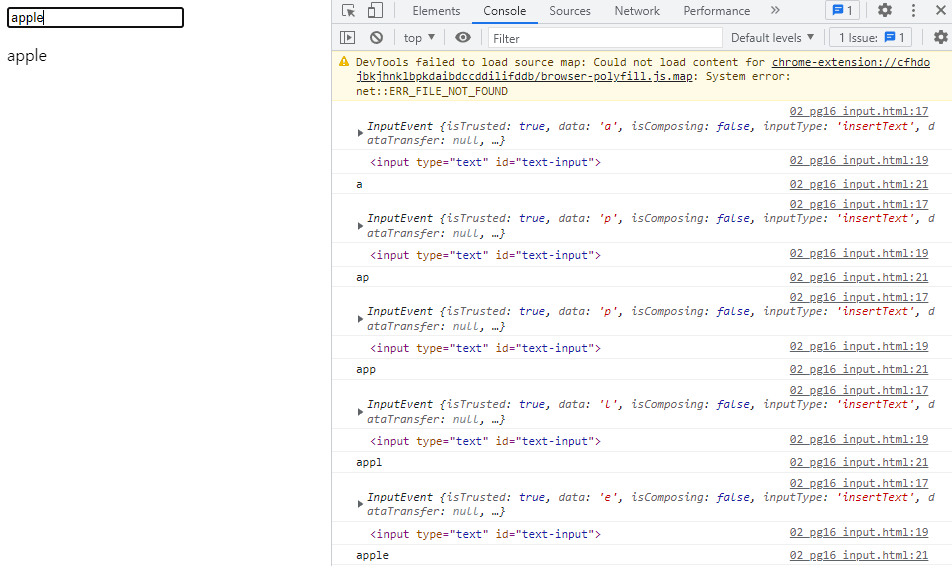
- input에 입력하면 입력 값을 실시간으로 출력하기
<input type="text" id="text-input">// 1. input 선택
const textInput = document.querySelector('input')
// 2. input 이벤트 등록
textInput.addEventListener('input', function(event) {
console.log(event)
// input은 이벤트의 대상
console.log(event.target)
// input의 value를 받아오기
console.log(event.target.value)
// 3. input에 작성한 값을 p 태그에 출력하기
const pTag = document.querySelector('p')
pTag.innerText = event.target.value
})- 실행 결과
복합 실습
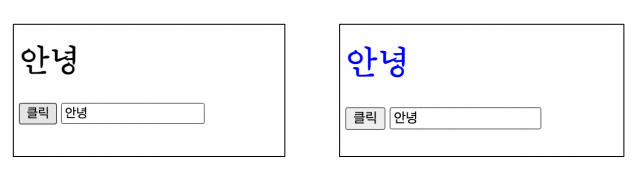
- input에 입력하면 입력 값을 실시간으로 출력하고 버튼을 클릭하면 출력된 값의 클래스를 토글하기
<h1></h1>
<button id="btn">클릭</button>
<input type="text">
const btn = document.querySelector('#btn')
// btn이 클릭되면 함수 실행
btn.addEventListener('click', function() {
// h1 태그 선택해서
const h1 = document.querySelector('h1')
// 클래스 blue를 토글하기
h1.classList.toggle('blue')
})
// input
const input = document.querySelector('input')
// input에 값이 입력되면 함수 실행
input.addEventListener('input', function(event) {
// h1 태그를 선택해서
const h1Tag = document.querySelector('h1')
// input 값을 태그의 컨텐츠로 채우기
h1Tag.innerText = event.target.value
})- 실행 결과
Event 전파와 취소
Event 전파란?
- DOM 요소에서 발생한 이벤트가 상위 노드에서 하위 노드 혹은, 하위 노드에서 상위 노드로 전파되는 현상을 의미
addEventListner메서드를 사용하여 전파 방식을 제어할 수 있음- 기본 값은 하위 노드에서 상위 노드로 전파되는 방식을 사용 – Event Bubbling
- 또한, 이러한 이벤트 전파 상황을 필요에 따라 제어 할 수도 있음
[참고] Event 전파 예시
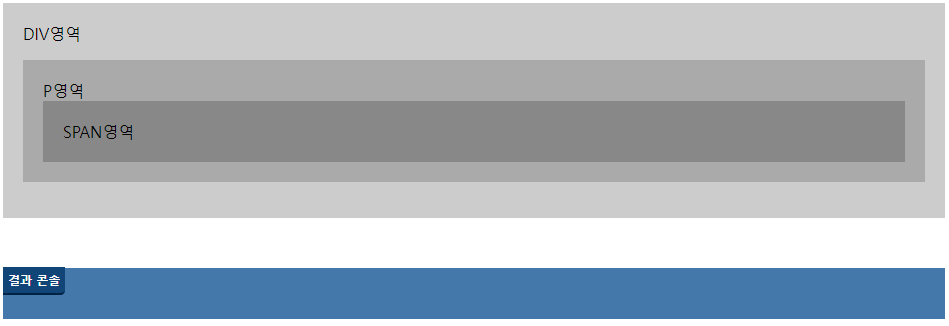
<div id="divTag">
  DIV영역
  <p id="pTag">
    P영역
    <span id="spanTag">SPAN영역</span>
  </p>
</div>

<section id="console"><br></section>
const divTag = document.querySelector('#divTag')
const pTag = document.querySelector('#pTag')
const spanTag = document.querySelector('#spanTag')
const consoleSection = document.querySelector('#console')divTag.addEventListener('click', function () {
const message = document.createElement("li")
message.innerText = "div 클릭"
consoleSection.append(message)
// consoleSection.innerHTML += "<br> div 클릭"
})
pTag.addEventListener('click', function () {
// consoleSection.innerHTML += "<br> p 클릭"
const message = document.createElement("li")
message.innerText = "p 클릭"
consoleSection.append(message)
})
spanTag.addEventListener('click', function () {
const message = document.createElement("li")
message.innerText = "span 클릭"
consoleSection.append(message)
// 상위로 이벤트가 전파되지 않도록 중단한다.
event.stopPropagation();
// 상위 뿐 아니라 같은 레벨로도 이벤트가 전파되지 않도록 중단한다.
event.stopImmediatePropagation();
})
// span 태그에 2번째 이벤트 등록
spanTag.addEventListener('click', function () {
const message = document.createElement("li")
message.innerText = "span 클릭2"
consoleSection.append(message)
// 상위로 이벤트가 전파되지 않도록 중단한다.
event.stopPropagation();
})- div 영역 클릭 실행 결과

- p 영역 클릭 실행 결과
- 상위 노드 까지 전파되어 div 이벤트까지 실행됨

- span 영역 클릭 실행 결과
event.stopPropagation();사용으로 상위로 이벤트가 전파 되지 않음

- 만약
event.stopImmediatePropagation();을 안쓰면?- span 태그의 두 번째 이벤트도 함께 실행됨

event.preventDefault()
- 현재 Event의 기본 동작을 중단
- HTML 요소의 기본 동작을 작동하지 않게 막음
- HTML 요소의 기본 동작 예시
- a 태그 : 클릭 시 특정 주소로 이동
- form 태그 : form 데이터 전송
이벤트 취소 실습
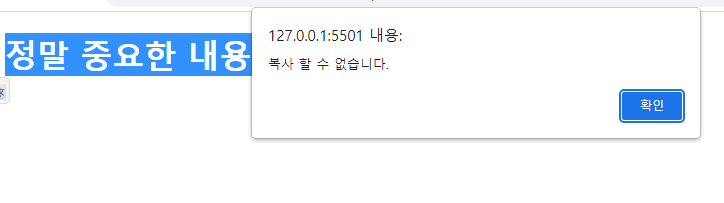
- 웹 페이지 내용을 복사하지 못하도록 막기
<div>
  <h1>정말 중요한 내용</h1>
</div>
const h1 = document.querySelector('h1')
h1.addEventListener('copy', function (event) {
console.log(event)
// copy event의 기본 동작을 막기
event.preventDefault()
alert('복사 할 수 없습니다.')
})- 실행 결과
Event 종합 실습
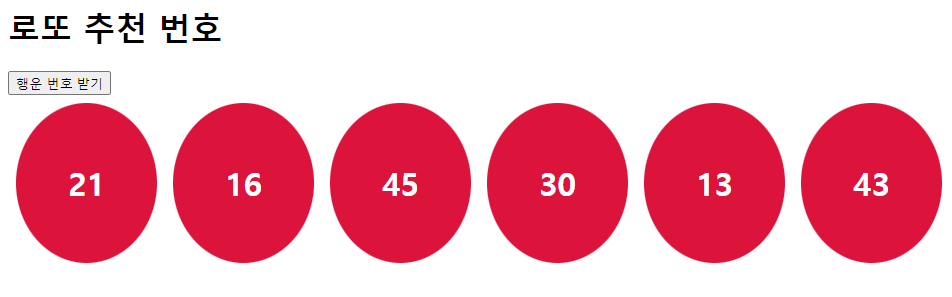
버튼을 클릭하면 랜덤 로또 번호 6개 출력하기
<h1>로또 추천 번호</h1>
<button id="lotto-btn">행운 번호 받기</button>
<div id="result"></div>
<script src="https://cdn.jsdelivr.net/npm/lodash@4.17.21/lodash.min.js"></script>
// 버튼을 클릭하면 로또 번호 뽑아주기
const button = document.querySelector('#lotto-btn')
button.addEventListener('click', function () {
// ball 컨테이너를 만들고
const ballContainer = document.createElement('div')
ballContainer.classList.add('ball-container')
// 랜덤 숫자 6개 만들기
const numbers = _.sampleSize(_.range(1, 46), 6)
// console.log(numbers) [3, 19, 12, 22, 6, 29]
// 공 만들기
numbers.forEach(number => {
const ball = document.createElement('div')
ball.classList.add('ball')
ball.innerText = number
ball.style.backgroundColor = 'crimson'
// ball을 ballContainer 자식으로 추가
ballContainer.appendChild(ball)
})
// ball 6개가 ballContainer에 들어가있음
// 컨테이너를 결과 영역의 자식으로 추가
const result = document.querySelector('#result')
result.appendChild(ballContainer)
})- 결과
[참고] lodash
- 모듈성, 성능 및 추가 기능을 제공하는 JavaScript 유틸리티 라이브러리
- array, object등 자료구조를 다룰 때 사용하는 유용하고 간편한 유틸리티 함수들을 제공
- 함수 예시
- reverse, sortBy, range, random …
- Lodash
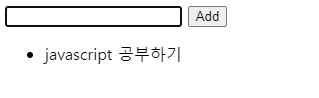
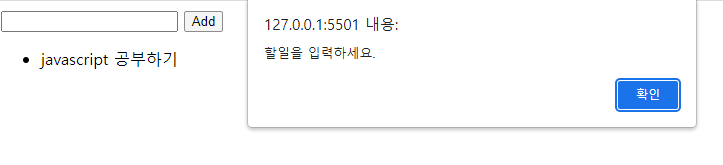
CREATE, READ 기능을 충족하는 todo app 만들기
<form action="#">
  <input type="text" class="inputData">
  <input type="submit" value="Add">
</form>
const formTag = document.querySelector('form')
const addTodo = function (event) {
event.preventDefault() // form 제출 기능 막기
const inputTag = document.querySelector('.inputData')
const data = inputTag.value
// trim() : 문자열 양 끝의 공백을 제거하는 메서드
// 데이터가 공백이 아닐 때만 실행하도록 조건문 작성
if (data.trim()) {
const liTag = document.createElement('li')
liTag.innerText = data
const ulTag = document.querySelector('ul')
ulTag.appendChild(liTag)
event.target.reset()
} else {
alert('할일을 입력하세요.')
}
}
formTag.addEventListener('submit', addTodo)- 결과
this와 addEventListener
- addEventListener에서의 콜백 함수는 특별하게 function 키워드의 경우 addEventListener를 호출한 대상을( event.target) 뜻함
- 반면 화살표 함수의 경우 상위 스코프를 지칭하기 때문에 window 객체가 바인딩 됨
- 결론
- “addEventListener 의 콜백 함수는 function 키워드를 사용하기”
<button id="function">function</button>
<button id="arrow">arrow function</button>
const functionButton = document.querySelector('#function')
const arrowButton = document.querySelector('#arrow')
functionButton.addEventListener('click', function(event) {
console.log(this) // <button id="function">function</button>
})
arrowButton.addEventListener('click', event => {
console.log(this) // window
})📍 소스코드 확인하기
https://github.com/mjieun0956/TIL/tree/master/JavaScript/07.%20Event
코드로 꿈을 펼치는 개발자의 이야기, 노력과 열정이 가득한 곳 🌈