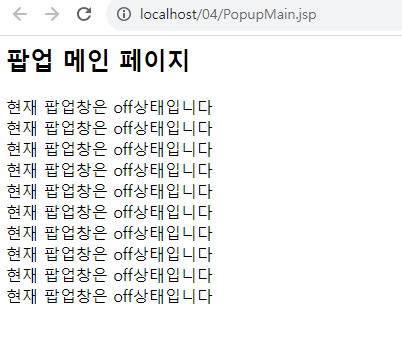
레이어 팝업창 제어
웹 애플리케이션을 개발할 때 팝업창을 많이 사용하게된다.
<%@ page contentType="text/html;charset=UTF-8" language="java" %>
<html>

<%
String popupMode = "on"; //팝업창 출력 여부

%>

<head>
    <title>PopupMain_01</title>
    <style> //css
        div#popup{
            position: absolute; top:100px; left:50px; color:yellow;
            width:270px; height:100px; background-color:gray;
        }
        div#popup>div{
            position: relative; background-color: #ffffff ; top:0px;
            border:1px solid gray; padding:10px; color:black;
        }

    </style>
    <script src="https://code.jquery.com/jquery-3.7.1.js" integrity="sha256-eKhayi8LEQwp4NKxN+CfCh+3qOVUtJn3QNZ0TciWLP4=" crossorigin="anonymous"></script>
//javascript 넣어주기.
</head>
<body>
<h2>팝업 메인 페이지</h2>
<%
    for (int i = 1; i <= 10 ; i++) {
        out.print("현재 팝업창은" + popupMode + "상태입니다.<br/>");

    }
    if(popupMode.equals("on")){ //popupmode값이 "on"일 때만 팝업창 표시
        %>
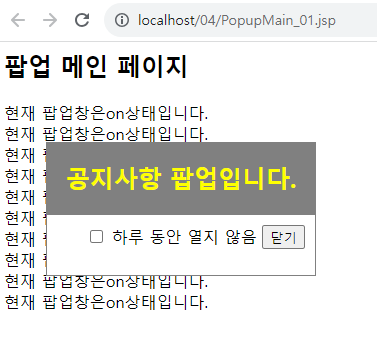
    <div id = "popup">
    <h2 align="center">공지사항 팝업입니다.</h2>
    <div align="right">
        <form name = "popFrm">
            <input type="checkbox" id="inactiveToday" value="1" /> //체크박스
            하루 동안 열지 않음
            <input type="button" value="닫기" id="closeBtn" /> //닫기버튼
        </form>

    </div>
    </div>
<%
    }

%>
<script> //javascript 넣어주기. 닫기 버튼을 누르면 팝업창을 숨김처리.
    $("#closeBtn").click(function (){
        $("#popup").hide();
    });

</script>
</body>
</html>
결과
<%@ page contentType="text/html;charset=UTF-8" language="java" pageEncoding="UTF-8" %>
<html>
<%
    String popupMode = "on"; //팝업창 출력 여부

    Cookie[] cookies = request.getCookies();
    if(cookies !=null){
        for(Cookie c : cookies){
            String cookieName = c.getName();
            String cookieValue = c.getValue();
            if(cookieName.equals("PopupClose")){
                popupMode = cookieValue;
            }
        }
    }
%>
<head>
    <title>Title</title>
    <style>
        div#popup{
            position: absolute; top: 100px; left: 50px; color: yellow;
            width: 270px; height: 100px; background-color: gray;
        }
        div#popup>div{
            position: relative;background-color: #fff; top: 0px;
            border:1px solid gray; padding-top: 10px; color: black;
        }

    </style>
    <script src="https://code.jquery.com/jquery-3.7.1.min.js" integrity="sha256-/JqT3SQfawRcv/BIHPThkBvs0OEvtFFmqPF/lYI/Cxo=" crossorigin="anonymous"></script>
</head>
<body>
<h2>팝업 메인 페이지</h2>
<%
    for(int i=1; i<=10; i++){
        out.println("현재 팝업창은 " + popupMode + "상태입니다</br/>");
    }

    if(popupMode.equals("on")){

%>
<div id="popup">
    <h2 align="center">공지사항 팝업</h2>
    <div align="right">
        <form name="popFrm">
            <input type="checkbox" id="inactiveToday" value="1"/>
            하루동안 열지않음
            <input type="button" value="닫기" id="closeBtn">
        </form>
    </div>
</div>
<%
    }
%>

<script>
    $("#closeBtn").click(function (){
        $("#popup").hide();

        var chkVal = $("input:checkbox[id=inactiveToday]:checked").val();
        if(chkVal ==1){
            $.ajax({
                url : './PopupCookie.jsp',
                type : 'get',
                data : {inactiveToday : chkVal},
                dataType : "text",
                success : function(res){ //요청 성공 후에 동작할 코드
                    console.log(res);
                    if(res != ''){
                        location.reload(); //페이지를 새로고침
                    }
                }
            });
        }
    });

</script>


</body>
</html>
<%@ page contentType="text/html;charset=UTF-8" language="java" %>
<%
    String chkVal = request.getParameter("inactiveToday");

    if(chkVal != null && chkVal.equals("1")){
        Cookie cookie = new Cookie("PopupClose", "off");
        cookie.setPath(request.getContextPath());
        cookie.setMaxAge(86400);
        response.addCookie(cookie);
        out.println("쿠키 : 하루 동안 열지 않음.");
    }
%>
결과
하루동안 닫는다 누르면 off로 뜬다