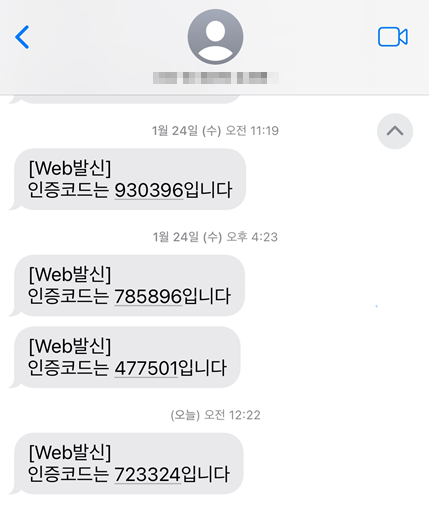
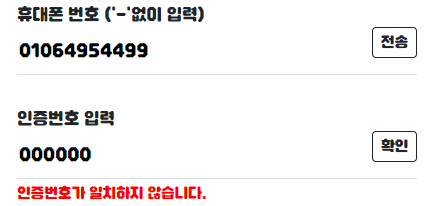
[Spring Boot] 스프링 부트로 문자 인증 API 구현(CoolSMS)
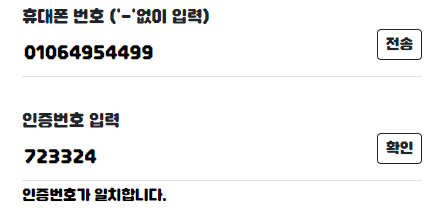
- 화면은 BootStrap을 통해 구현하였습니다.
구현 내용
👾 coolsms 사이트를 통한 문자인증 api 구현 (ajax)
👾 문자 인증번호 일치 여부 비교
coolSMS 사용 준비
1. 회원가입 후 KEY 발급
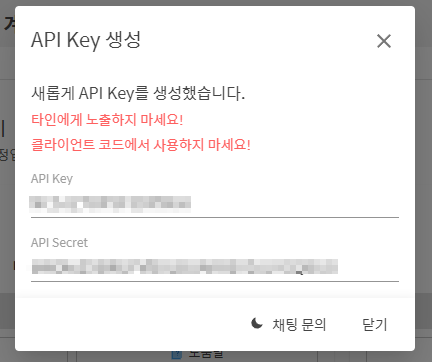
API key와 API Secret을 잘 복사해줍니다.
스프링 부트
CoolSMS에서 제공하는 Github을 참고하시면 도움이 많이 됩니다.
coolsms-java-examples
https://github.com/coolsms/coolsms-java-examples/blob/main/gradle-spring-demo/src/main/java/net/nurigo/gradlespringdemo/ExampleController.java
*저희는 단일 메시지 발송 예제를 참고하였습니다.
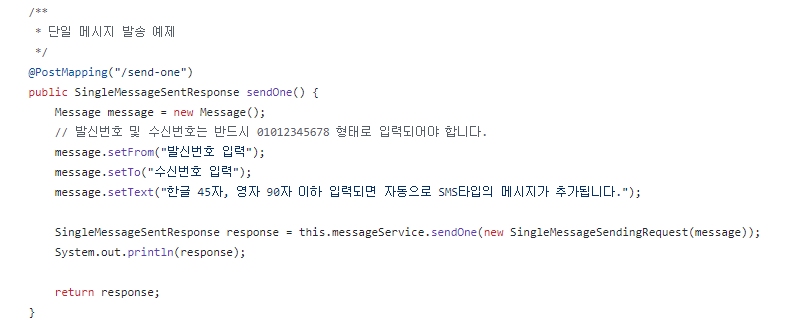
1. 의존성 주입
build.gradle에 의존성을 주입해줍니다.
//문자 api
implementation 'net.nurigo:sdk:4.3.0'
스프링 부트의 application.properties 파일에 추가해줍니다.
coolsms.api.key="api key 입력"
coolsms.api.secret="api 시크릿 입력"
2. view
<div class="mb-2">
	<p>휴대폰 번호 ('-'없이 입력)</p>
	<div class="border-bottom d-flex justify-content-between">
		<input type="text" id="mbPhone" name="mbTel"
			style="border: none; background: transparent;">
		<button type="button" id="injuengBtn" class="btn btn-outline-dark mb-3 btn-sm">전송</button>
	</div>
</div>
<br>
<div class="mb-2">
	<p>인증번호 입력</p>
	<div class="border-bottom d-flex justify-content-between">
		<input type="hidden" value="" id="injeungbunho"> <input type="text" id="injeung" name="injeung" style="border: none; background: transparent;">
		<button type="button" id="injeungCheckBtn" class="btn btn-outline-dark mb-3 btn-sm">확인</button>
	</div>
</div>
👾 사용자가 입력한 인증번호와 실제 인증번호를 비교해야하기 때문에 input type="hidden"으로 id를 하나 만들어 줍니다.
3. js
<script>
 	 //문자 인증 API
     document.getElementById('injuengBtn').addEventListener('click', function() {
         const pNum = document.getElementById('mbPhone').value;
            console.log(pNum);
            $.ajax({
                url: '/send-one',
                data: { pNum: pNum },
                success: data => {
                   if (data != 'bad') {
                    alert("인증번호가 전송되었습니다!")
                    console.log(data);
                       document.getElementById('injeungbunho').value = data;
                   } else {
                      alert();
                   }

                },
                error: function(error) {
                    console.log(error);
                }
            });
        });

     //인증번호 입력 문구
     $('#injeungCheckBtn').click(function() {
        const injeung = document.getElementById('injeung').value;
        const injeungbunho = document.getElementById('injeungbunho').value;

        if (injeungbunho == "") {
           injuengCheckWarn.innerText = "인증을 진행해주세요.";
           injuengCheckWarn.style.color = "red";
           check_sms=false;
         } else {
            if (injeung == "") {
               injuengCheckWarn.innerText = "인증번호를 입력해주세요.";
               injuengCheckWarn.style.color = "red";
               check_sms=false;
         } else {
            if (injeung == injeungbunho) {
               // 인증 번호가 맞을때 실행
               injuengCheckWarn.innerText = "인증번호가 일치합니다.";
               injuengCheckWarn.style.color = "black";
               check_sms=true;
         } else {
            // 인증 번호가 맞지 않을때 실행
            injuengCheckWarn.innerText = "인증번호가 일치하지 않습니다.";
            injuengCheckWarn.style.color = "red";
            check_sms=false;
         }
          }
        }
     });
</script>
👾 해당 문자인증은 회원가입 폼에서 진행했기 때문에, check_sms는 다른 아이디 중복확인이나 닉네임 중복확인 등 유효성 검사를 위한 것이니 프로젝트의 상황에 따라 참고하여 주시기 바랍니다.
3. Controller
public class AccountController {
    final DefaultMessageService messageService;

        public AccountController() {
            this.messageService = NurigoApp.INSTANCE.initialize("💡API 키 입력", "💡API Secrete 입력", "https://api.coolsms.co.kr");
        }

	@GetMapping("/send-one")
	@ResponseBody
    public String sendOne(@RequestParam("pNum") String mbPhone) {
        Message message = new Message();
        Random r = new Random();
		int checkNum = r.nextInt(888888) + 111111; // 난수 생성

        message.setFrom("010xxxxxxxx"); //발신 번호
        message.setTo(mbPhone);
        message.setText("인증코드는 " + checkNum + "입니다");

        SingleMessageSentResponse response = this.messageService.sendOne(new SingleMessageSendingRequest(message));
        System.out.println(response);

        if(response.getStatusCode().equals("2000")) { //2000은 정상으로 발송된 statusCode 번호임
        	return "" + checkNum;

        }else {
        	return "bad"; //발송 오류 모달창
        }
    }
👾 response는 해당 내용을 담고 있습니다.
SingleMessageSentResponse(groupId=, to=수신 번호, from=발신번호, type=SMS, statusMessage=정상 접수(이통사로 접수 예정) , country=82, messageId=, statusCode=2000, accountId=)
👾controller에서 view로 보낸 실제 인증번호 checkNum을 id "injeungbunho"에 값을 넣고 사용자가 입력한 인증번호 "injueng"과 비교합니다. (injeung == injeungbunho)
결과