[SpringBoot] 스프링부트로 비밀번호 찾기 구현 (메일 api & 임시 비밀번호 발급)
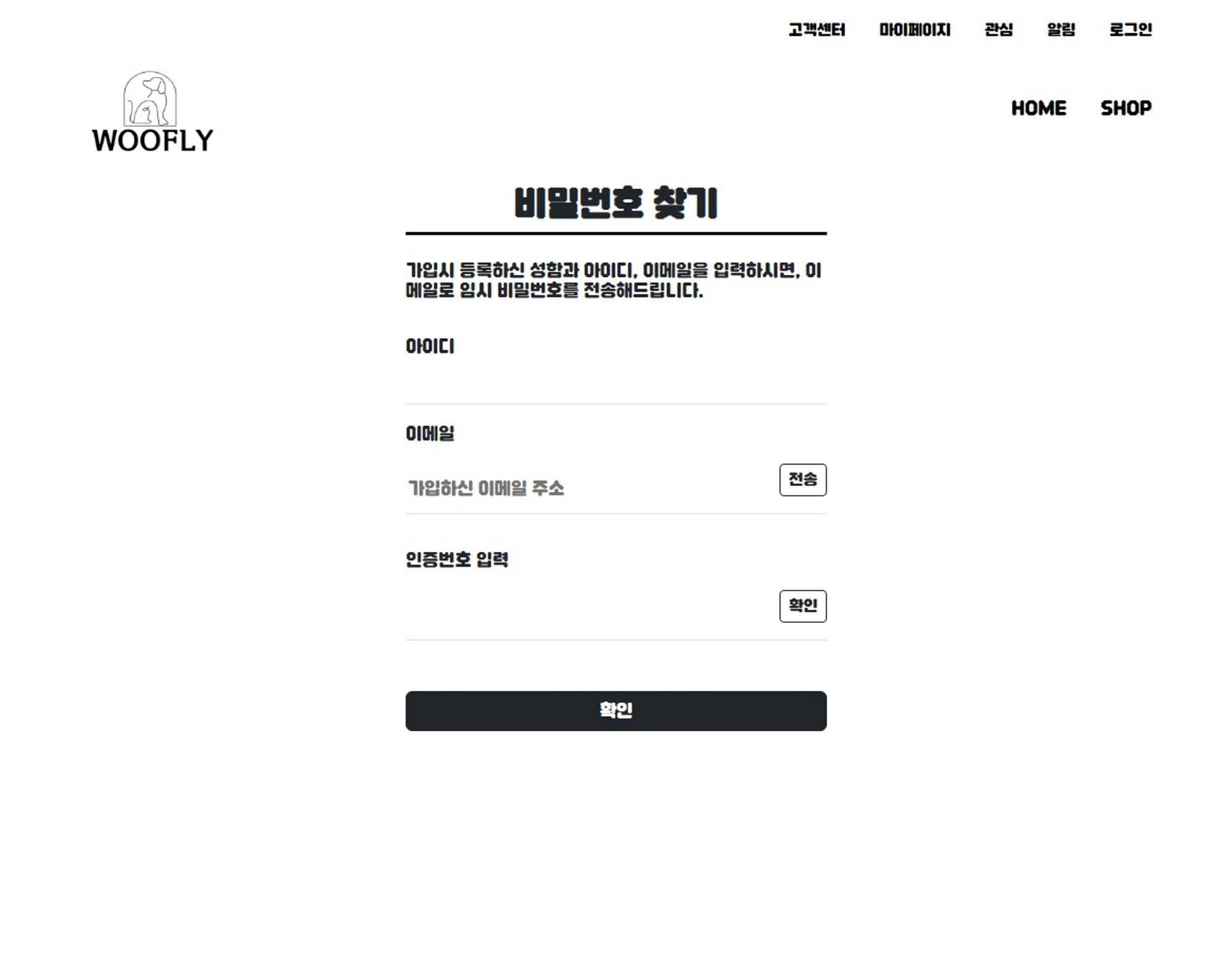
- 화면은 부트스트랩을 이용하여 구현하였습니다.
구현 내용
👾 이메일 인증을 구현하기 위해 Spring에서 제공하는 JavaMailSender를 사용하였습니다.
👾 아이디와 이메일이 일치하는지 비동기 방식으로 확인합니다.
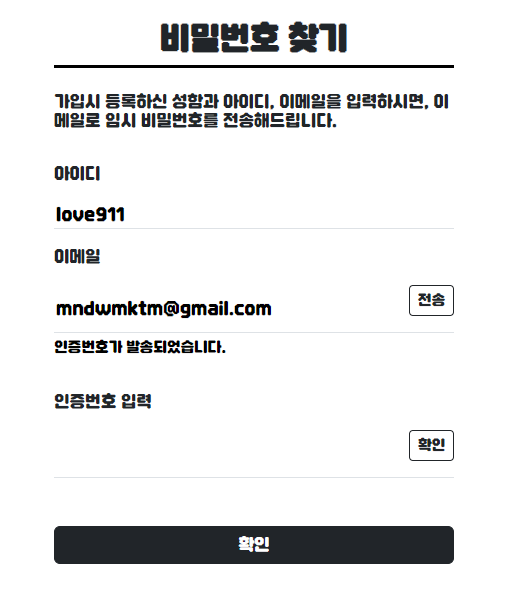
👾 일치한다면 인증번호를 발송하고 사용자가 입력한 값과 비교합니다.
👾 일치한다면 해당 이메일로 다시 13자리 숫자의 새로운 임시 비밀번호를 발송합니다.
구현 시작
1. build.gradle에 의존성 주입
dependencies {
implementation 'org.springframework.boot:spring-boot-starter-mail:3.2.0'
}
2. application.properties에서 SMTP 설정 추가
spring.mail.host=smtp.gmail.com
spring.mail.port=587
spring.mail.username=구글 아이디
spring.mail.password=비밀번호
spring.mail.properties.mail.smtp.auth=true
spring.mail.properties.mail.smtp.starttls.enable=true
3.View
<main>
	<div class="d-flex justify-content-center mx-5">
		<div class="col-10 pt-3 mb-5 d-flex justify-content-center">
			<div style="width: 400px">
				<div class="text-center border-bottom border-3 border-black">
					<h2 style="font-weight: 800">비밀번호 찾기</h2>
				</div>
				<br>
				<h6>가입시 등록하신 성함과 아이디, 이메일을 입력하시면, 이메일로 임시 비밀번호를 전송해드립니다.</h6>
				<br>
				<form action="/sendPwd.dw" method="POST" id="formId">
					<div class="mb-3">
						<p>아이디</p>
						<div class="border-bottom d-flex justify-content-between">
							<input type="text" name="mbId" id="mbId" style="border: none; background: transparent; width: 100%">
						</div>
						<div class="mt-1 form-text" id="idCheckWarn" style="font-weight: bolder;"></div>
					</div>
					<div class="mb-2">
						<p>이메일</p>
						<div class="border-bottom d-flex justify-content-between">
							<input type="email" name="mbEmail" id="mbEmail" placeholder="가입하신 이메일 주소" style="border: none; background: transparent; width: 80%">
							<button type="button" id="emailCheckBtn" class="btn btn-outline-dark mb-3 btn-sm">전송</button>
						</div>
						<div class="mt-1 form-text" id="emailCheckWarn" style="font-weight: bolder;"></div>
					</div>
					<br>
					<div class="mb-5">
						<p>인증번호 입력</p>
						<div class="border-bottom d-flex justify-content-between">
							<input type="hidden" id="injeungbunho" value="" style="border: none; background: transparent;"> <input type="text" id="injeung" style="border: none; background: transparent; width: 80%">
							<button type="button" id="injeungCheckBtn" class="btn btn-outline-dark mb-3 btn-sm">확인</button>
						</div>
						<div class="mt-1 form-text" id="injeungCheckWarn" style="font-weight: bolder;"></div>
					</div>
					<div>
						<button type="button" class="btn btn-dark mb-3" id="findPwdBtn" style="width: 100%">확인</button>
					</div>
					<input type="hidden" id="randomPwd" value="" style="border: none; background: transparent;">
				</form>
			</div>
		</div>
	</div>
</main>
4. js
<script>
	const emailCheckBtn = document.getElementById('emailCheckBtn');
	const injeungCheckBtn = document.getElementById('injeungCheckBtn');
	const findPwdBtn = document.getElementById('findPwdBtn');

	//아이디 이메일이 있는지 확인
	emailCheckBtn.addEventListener("click", function(){
		const mbId = document.getElementById('mbId').value;
		const mbEmail = document.getElementById('mbEmail').value;

		$.ajax({
			url:"/checkIdEmail.dw",
			data: {"mbId": mbId, "mbEmail": mbEmail},
			success: (data)=>{
				if(data === 'true') {

					//아이디와 이메일이 일치할 경우 인증번호 발송
					$.ajax({
						url:"/mailInjeung.dw",
						data: {"mbEmail": mbEmail},
						success: (data)=>{
							console.log(data);
							emailCheckWarn.innerText = '인증번호가 발송되었습니다.';
							emailCheckWarn.style.color = "black";
							document.getElementById('injeungbunho').value = data;
						},
						error: (error)=>{
							emailCheckWarn.innerText = '인증번호 발송에 실패하였습니다.';
							emailCheckWarn.style.color = "red";
						}
					})

				} else {
					emailCheckWarn.innerText = "아이디와 이메일 주소를 다시 확인해주세요.";
					emailCheckWarn.style.color = "red";
				}
			},
			error: (error)=> {
				console.log(error);
			}
		})

	});

	//유효성 검사 변수
	let check_email = false;

	//인증번호 일치여부 확인
	injeungCheckBtn.addEventListener("click", function(){
         const injeung = document.getElementById('injeung').value; //사용자가 입력한 인증번호
         const injeungbunho = document.getElementById('injeungbunho').value; //실제 발송된 인증번호

         if (injeungbunho == "") {
        	 injeungCheckWarn.innerText = "인증을 진행해주세요.";
        	 injeungCheckWarn.style.color = "red";
        	 check_email = false;
	         } else {
	            if (injeung == "") {
	            	injeungCheckWarn.innerText = "인증번호를 입력해주세요.";
	            	injeungCheckWarn.style.color = "red";
	            	check_email = false;
	         } else {
	            if (injeung == injeungbunho) {
	               // 인증 번호가 맞을때 실행할거
	               injeungCheckWarn.innerText = "인증번호가 일치합니다.";
	               injeungCheckWarn.style.color = "black";
	               check_email = true;
	         } else {
	            // 인증 번호가 맞지 않을때 실행할거
	            injeungCheckWarn.innerText = "인증번호가 일치하지 않습니다.";
	            injeungCheckWarn.style.color = "red";
	            check_email = false;
	         }
           }
         }
      });

    //유효성 검사
	findPwdBtn.addEventListener("click", function(){
		const mbId = document.getElementById('mbId').value;
		const formId = document.getElementById('formId');

		if(!check_email) {
			alert("이메일 인증을 완료해주세요!");
		} else {
			alert("고객님 이메일로 임시 비밀번호를 전송하였습니다.");
			formId.submit();
		}
	});

</script>
5.Controller
메일 인증
	@GetMapping("mailInjeung.dw")
	@ResponseBody
	public String mailFindPwd(HttpServletRequest request,@RequestParam("mbEmail") String mbEmail) throws IOException{

        Random r = new Random();
        int checkNum = r.nextInt(888888) + 111111;


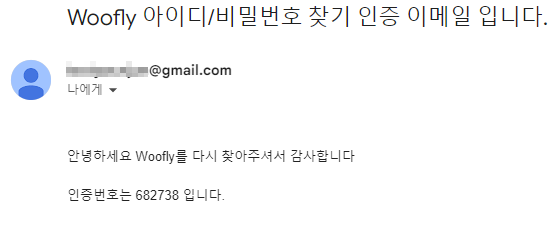
        String title = "Woofly 아이디/비밀번호 찾기 인증 이메일 입니다.";
        String from = "@gmail.com";
        String to = mbEmail;
        String content =
                System.getProperty("line.separator")+
                System.getProperty("line.separator")+
                "안녕하세요 Woofly를 다시 찾아주셔서 감사합니다"
                +System.getProperty("line.separator")+
                System.getProperty("line.separator")+
                "인증번호는 " +checkNum+ " 입니다. "
                +System.getProperty("line.separator");

        try {
            MimeMessage message = mailSender.createMimeMessage();
            MimeMessageHelper messageHelper = new MimeMessageHelper(message, true, "UTF-8");

            messageHelper.setFrom(from);
            messageHelper.setTo(to);
            messageHelper.setSubject(title);
            messageHelper.setText(content);

            mailSender.send(message);

        } catch (Exception e) {
            System.out.println(e);
        }
        return checkNum+"";
    }
아이디와 이메일 일치여부 확인 (ajax)
controller
	@GetMapping("/checkNameEmail.dw")
	@ResponseBody
	public String checkNameEmail(@RequestParam("mbName") String mbName, @RequestParam("mbEmail") String mbEmail) {
		Member m = new Member();
		m.setMbName(mbName);
		m.setMbEmail(mbEmail);

		int result = aService.checkNameEmail(m);

		if(result > 0) {
			return "true";
		} else {
			return "false";
		}
	}
랜덤 비밀번호 발송
controller

나의 코딩 다이어리🖥️👾✨