최근에 개발한 앱에서 사용하고 있는 Toast 혼틈 앱 홍보
서두
skydoves 님의 Manifest Android Interview 집필기를 읽으면서 아래와 같은 내용을 확인할 수 있었다.
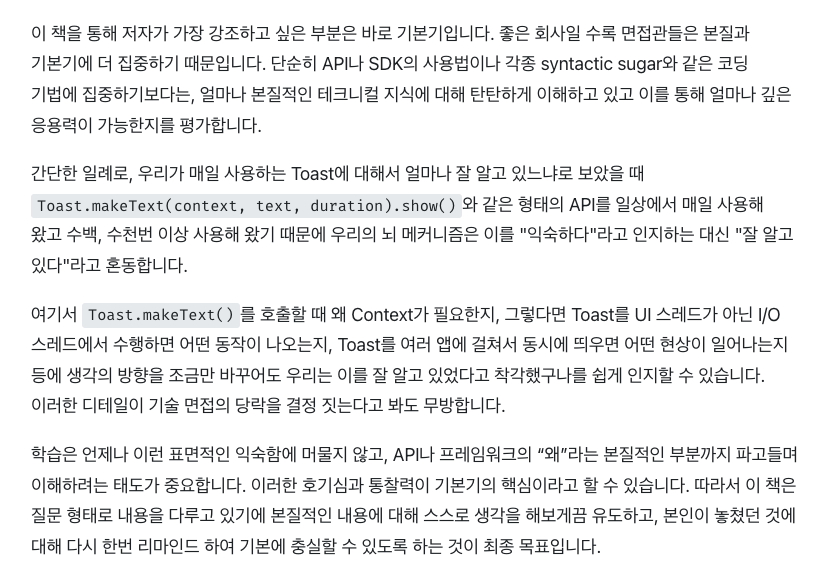
"여기서
Toast.makeText()를 호출할 때 왜 Context가 필요한지, 그렇다면 Toast를 UI 스레드가 아닌 I/O 스레드에서 수행하면 어떤 동작이 나오는지, Toast를 여러 앱에 걸쳐서 동시에 띄우면 어떤 현상이 일어나는지 등에 생각의 방향을 조금만 바꾸어도 우리는 이를 잘 알고 있었다고 착각했구나를 쉽게 인지할 수 있습니다. 이러한 디테일이 기술 면접의 당락을 결정 짓는다고 봐도 무방합니다."
매우 뜨끔했던 부분으로, 그동안 Toast는 별도의 Window로 구현되며, Snackbar와 다르게 액티비티 또는 Screen의 생명주기와 독립적이기에 화면이 닫혀도 토스트 출력이 지속된다... 정도로만 알고 사용하고 있었다.
출력 위치 커스텀 막힌거 짜증
iOS에서는 Toast와 같은 컴포넌트를 프레임워크 단에서 지원하지 않기 때문에, 별도의 라이브러리를 사용해야한다 정도... 그래서 KMP/CMP 개발의 경우 expect actual 패턴을 통해 iOS에서는 Toast스러운 무언가를 구현해주거나, 별도 KMP 지원 라이브러리를 사용하여 구현했었다.
이번 기회에 Toast의 내부 코드를 확인해 보며, 위의 질문들에 답변을 해보고자 글을 작성해본다.
본론
우선 Toast 를 출력할 때 사용하는 makeText()와 show() 함수의 구현체를 확인해보도록 하자.
/**
 * Make a standard toast that just contains text.
 *
 * @param context  The context to use.  Usually your {@link android.app.Activity} object.
 * @param text     The text to show.  Can be formatted text.
 * @param duration How long to display the message.  Either {@link #LENGTH_SHORT} or
 *                 {@link #LENGTH_LONG}
 *
 */
public static Toast makeText(Context context, CharSequence text, @Duration int duration) {
    return makeText(context, null, text, duration);
}

/**
 * Make a standard toast to display using the specified looper.
 * If looper is null, Looper.myLooper() is used.
 *
 * @hide
 */
public static Toast makeText(@NonNull Context context, @Nullable Looper looper,
        @NonNull CharSequence text, @Duration int duration) {
    Toast result = new Toast(context, looper);

    if (Compatibility.isChangeEnabled(CHANGE_TEXT_TOASTS_IN_THE_SYSTEM)) {
        result.mText = text;
    } else {
        result.mNextView = ToastPresenter.getTextToastView(context, text);
    }

    result.mDuration = duration;
    return result;
}
흔히 사용하는 makeText()는 내부적으로 Looper 파리미터가 null인 오버로드 함수를 호출한다.
Looper 파라미터를 받는 경우엔 CHANGE_TEXT_TOASTS_IN_THE_SYSTEM 플래그에 따라 분기처리 되며, 해당 플래그가 활성화 되면 텍스트만 저장하고, 비활성화된 경우, ToastPresenter.getTextToastView()를 통해 View를 생성한다.
Looper는 스레드를 살아있게 유지하여 메세지 또는 작업 큐를 순차적으로 처리하는 Android 스레딩 모델의 일부이다. 이는 Android의 Main 스레드(UI 스레드)및 다른 Worker 스레드에서 중심적인 역할을 한다. - Manifest Android Interview 참고
/**
 * Show the view for the specified duration.
 * Note that toasts being sent from the background are rate
 * limited, so avoid sending such toasts in quick succession.
 */
public void show() {
    // validation
    if (Compatibility.isChangeEnabled(CHANGE_TEXT_TOASTS_IN_THE_SYSTEM)) {
        checkState(mNextView != null || mText != null, "You must either set a text or a view");
    } else {
        if (mNextView == null) {
            throw new RuntimeException("setView must have been called");
        }
    }

    INotificationManager service = getService();
    String pkg = mContext.getOpPackageName();
    TN tn = mTN;
    if (Flags.toastNoWeakref()) {
        tn.mNextView = mNextView;
    } else {
        tn.mNextViewWeakRef = new WeakReference<>(mNextView);
    }
    // UI 컨텍스트 여부 확인(UI 스레드에서 Toast를 출력하는지 validation
    final boolean isUiContext = mContext.isUiContext();
    final int displayId = mContext.getDisplayId();

    boolean wasEnqueued = false;

    // Toast Queue에 등록
    try {
        if (Compatibility.isChangeEnabled(CHANGE_TEXT_TOASTS_IN_THE_SYSTEM)) {
            if (mNextView != null) {
                // It's a custom toast
                wasEnqueued = service.enqueueToast(pkg, mToken, tn, mDuration, isUiContext,
                        displayId);
            } else {
                // It's a text toast
                ITransientNotificationCallback callback =
                        new CallbackBinder(mCallbacks, mHandler);
                wasEnqueued = service.enqueueTextToast(pkg, mToken, mText, mDuration,
                        isUiContext, displayId, callback);
            }
        } else {
            // Toast를 Notification Manager 내부의 Queue에 등록
            wasEnqueued = service.enqueueToast(pkg, mToken, tn, mDuration, isUiContext,
                    displayId);
        }
    } catch (RemoteException e) {
        // Empty
    } finally {
        if (Flags.toastNoWeakref()) {
            if (!wasEnqueued) {
                // 메모리 해제
                tn.mNextViewWeakRef = null;
                tn.mNextView = null;
            }
        }
    }
}
자세한 설명은 후술하도록 하고, 이제 서두에 언급한 질문들에 대한 답변을 작성해 보겠다.
Toast.makeText()를 호출할 때 왜 Context가 필요한가?
당연한 말이지만, makeText() 함수 내부에서 context를 사용하니까 필요한 것일텐데, 어디서 사용하는지 확인해보도록 하겠다.
첫 번째로 System Service에 접근하기 위함이다. Toast는 WindowManager를 통해 화면에 표시되는데, 이때 Context에서 지원하는 getSystemService() 함수를 통해 WindowManager 객체를 가져와 사용한다.
private WindowManager getWindowManager(View view) {
    Context context = mContext.get();
    if (context == null && view != null) {
        context = view.getContext();
    }
    if (context != null) {
        return context.getSystemService(WindowManager.class);
    }
    return null;
}
Window는 화면에 표시되는 Activity 또는 다른 UI 컴포넌트의 모든 뷰를 담는 컨테이너를 나타내며, View 계층 구조의 최상위 요소로써, 애플리케이션 UI와 디스플레이 간의 다리역할을 한다.
이 Window는 System Service인 WindowManager에 의해 관리되며, WindowMananger에 의해 추가, 제거, 업데이트 된다. - Manifest Android Interview 참고
두 번째로 Resource에 접근하기 위함이다. Toast의 기본 위치, Gravity값, 레이아웃 등은 모두 System Resource에서 가져온다.
System Resource는 Android OS 내부 리소스를 의미하며, 시스템 전체에서 공유한다.
// 기본 Y Offset과 Gravity값을 리소스에서 가져옴
mTN.mY = context.getResources().getDimensionPixelSize(
    com.android.internal.R.dimen.toast_y_offset);
mTN.mGravity = context.getResources().getInteger(
    com.android.internal.R.integer.config_toastDefaultGravity);
마지막으로 Layout을 Inflation하기 위해 필요로 한다.
Toast의 기본 텍스트 뷰를 생성할 때 LayoutInflater가 필요하며, 이 역시 Context를 통해 접근한다.
public static View getTextToastView(Context context, CharSequence text) {
    View view = LayoutInflater.from(context).inflate(TEXT_TOAST_LAYOUT, null);
    TextView textView = view.findViewById(com.android.internal.R.id.message);
    textView.setText(text);
    return view;
}
I/O 스레드에서 Toast를 띄우면?
결론부터 말하면 RuntimeException이 발생하여 크래시가 발생한다.
Toast 생성자를 보면 Looper validation 로직이 있다.
/**
 * Construct an empty Toast object.  You must call {@link #setView} before you
 * can call {@link #show}.
 *
 * @param context  The context to use.  Usually your {@link android.app.Activity} object.
 */
public Toast(Context context) {
    this(context, null);
}

/**
 * Constructs an empty Toast object.  If looper is null, Looper.myLooper() is used.
 * @hide
 */
public Toast(@NonNull Context context, @Nullable Looper looper) {
    mContext = context;
    mToken = new Binder();
    looper = getLooper(looper);
    mHandler = new Handler(looper);
    mCallbacks = new ArrayList<>();
    mTN = new TN(context, context.getPackageName(), mToken,
            mCallbacks, looper);
    mTN.mY = context.getResources().getDimensionPixelSize(
            com.android.internal.R.dimen.toast_y_offset);
    mTN.mGravity = context.getResources().getInteger(
            com.android.internal.R.integer.config_toastDefaultGravity);
}

private Looper getLooper(@Nullable Looper looper) {
    // Looper 검증 로직!
    if (looper != null) {
        return looper;
    }
    return checkNotNull(Looper.myLooper(),
            "Can't toast on a thread that has not called Looper.prepare()");
}
Main 스레드의 Looper는 앱이 시작되는 시점에서 초기화가 이뤄지는 반면에, I/O 스레드는 기본적으로 Looper.prepare()가 호출되지 않은 상태이므로 Looper.myLooper()가 null을 반환한다.
이때 checkNotNull()에서 즉시 RuntimeException(정확히는 NullPointerException)을 던진다.
/**
 * Ensures that an object reference passed as a parameter to the calling
 * method is not null.
 *
 * @param messageTemplate a printf-style message template to use if the check fails; will
 *     be converted to a string using {@link String#format(String, Object...)}
 * @param messageArgs arguments for {@code messageTemplate}
 * @throws NullPointerException if {@code reference} is null
 */
public static @NonNull <T> T checkNotNull(
        final T reference,
        final @NonNull @CompileTimeConstant String messageTemplate,
        final Object... messageArgs) {
    if (reference == null) {
        throw new NullPointerException(String.format(messageTemplate, messageArgs));
    }
    return reference;
}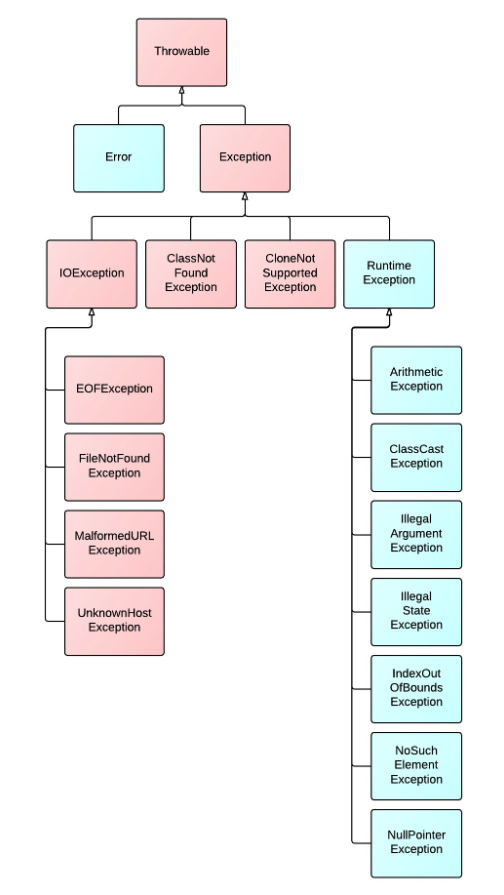
NullPointerException은 RuntimeException의 하위 클래스이며 Java의 예외 계층 구조에 대해선 이 글을 참고하면 도움이 될 듯하다.
왜 이런 제약 조건이 있을까?
Toast는 내부적으로 Handler를 사용해 UI 업데이트를 스케줄링하는데, Handler는 Looper가 있는 스레드에서만 동작할 수 있기 때문이다.
Handler는 스레드의 메세지 큐 내에서 메세지나 작업을 보내고 처리하는데 사용되며, Looper와 함께 작동한다. - Manifest Android Interview 참고
// TN 클래스 내부의 Handler
mHandler = new Handler(looper, null) {
    @Override
    public void handleMessage(Message msg) {
        switch (msg.what) {
            case SHOW: {
                // IBinder 등장!
                IBinder token = (IBinder) msg.obj;
                handleShow(token);
                break;
            }
            // ...
        }
    }
};
IBinder는 프로세스간 통신(IPC)을 위한 핵심 Android Interface이다. 클라이언트와 서비스와 같은 다른 컴포넌트 간의 저수준 통신 브릿지 역할을 하여 원격으로 데이터를 교환하거나 메서드를 호출하여 상호작용할 수 있도록 한다. - Manifest Android Interview 참고
프로세스 간 통신(IPC)은 서로 다른 프로세스가 서로 통신하고 데이터를 공유할 수 있도록 하는 메커니즘으로, 별도의 애플리케이션이나 시스템 서비스 간의 협업을 가능하게 한다. Android에서는 Binder, Intents, ContentProviders, Messenger와 같은 컴포넌트를 통해 IPC가 이루어지며, 이는 프로세스 간 데이터 교환을 안전하고 효율적으로 가능하게 한다. - Mainifest Android Interview 참고
Toast 내부에서 Binder를 사용하는지는 처음 알았다. Android IPC 통신을 위해 사용하는 Binder가 무엇인지 더 자세한 내용을 알고 싶다면 해당 글을 참고해보면 도움이 될듯 하다.
따라서 I/O 스레드에서 Toast를 띄우려면 Main 스레드로 전환해야 한다.
// I/O 스레드에서 안전하게 Toast 띄우기
new Handler(Looper.getMainLooper()).post(() -> {
    Toast.makeText(context, "메시지", Toast.LENGTH_SHORT).show();
});
Toast 내부에서 Looper의 존재 여부로 Main 스레드인지, Background 스레드인지를 판단하는 것을 확인할 수 있었는데, HandlerThread와 예외 케이스를 제외하면, 이를 Main 스레드와 Background 스레드의 차이점이라고도 볼 수 있을 듯하다.
HandlerThread는 내장된 Looper를 가진 특수한 Thread이다. 작업 또는 메세지 큐를 처리할 수 있는 백그라운드 스레드를 생성하는 과정을 단순화 한다. - Manifest Android Interview 참고
여러 앱에서 동시에 Toast를 띄우면?
┌──────────────────────────────────────┐
│           Android 시스템               │
│  ┌─────────────────────────────────┐ │
│  │    NotificationManagerService   │ │
│  │    (Toast 큐 관리)                │ │
│  └─────────────────────────────────┘ │
└──────────────────────────────────────┘
            ↑ IPC 통신 ↑
┌──────────────┐  ┌──────────────┐  ┌──────────────┐
│    앱 A       │  │    앱 B      │  │     앱 C      │
│ Toast.show() │  │ Toast.show() │  │ Toast.show() │
└──────────────┘  └──────────────┘  └──────────────┘
Toast는 Android 시스템 차원에서 전역적으로 관리되는 자원이므로 NotificationManagerService가 Toast들을 중앙 집중형으로 관리한다. Toast.show()를 호출하면 실제로는 NotificationManagerService의 enqueueToast() 함수가 호출된다.
// Toast.show() 함수 내부
wasEnqueued = service.enqueueToast(pkg, mToken, tn, mDuration, isUiContext, displayId);@UnsupportedAppUsage(maxTargetSdk = Build.VERSION_CODES.P)
static private INotificationManager getService() {
if (sService != null) {
return sService;
}
sService = INotificationManager.Stub.asInterface(
ServiceManager.getService(Context.NOTIFICATION_SERVICE));
return sService;
}enqueue라는 함수 네이밍에서 알 수 있듯이 Toast는 NotificationManager 내부의 Queue를 통해 관리된다. 여러 앱에서 동시에 Toast를 요청하는 경우 다음과 같은 규칙에 따라 처리된다.
1. 동시에 여러 Toast가 요청되어도 Queue를 통해 관리되어, 하나씩 순서대로 표시된다.
2. 백그라운드 앱의 Toast는 rate limiting이 적용되어 연속 요청이 제한된다.
// Toast.show() 함수 내부에서 백그라운드 관련 체크
final boolean isUiContext = mContext.isUiContext();

/**
 * Note that toasts being sent from the background are rate
 * limited, so avoid sending such toasts in quick succession.
 */
public void show() { ... }
3. 각 Toast는 정해진 시간(Timeout) 후 강제로 사라진다.
private static final long SHORT_DURATION_TIMEOUT = 4000;
private static final long LONG_DURATION_TIMEOUT = 7000;// Window 파라미터에 타임아웃 설정
params.hideTimeoutMilliseconds =
(duration == Toast.LENGTH_LONG) ? LONG_DURATION_TIMEOUT : SHORT_DURATION_TIMEOUT;이런 방식을 통해 Toast가 무분별하게 동시다발적으로 출력되는 현상을 방지하여 안정적인 UX를 보장한다.
각 Toast는 TYPE_TOAST 타입의 시스템 Window로 관리되며, WindowManagerService를 통해 실제 화면에 렌더링된다.
/**
 * Creates {@link WindowManager.LayoutParams} with default values for toasts.
 */
private WindowManager.LayoutParams createLayoutParams() {
    WindowManager.LayoutParams params = new WindowManager.LayoutParams();
    params.height = WindowManager.LayoutParams.WRAP_CONTENT;
    params.width = WindowManager.LayoutParams.WRAP_CONTENT;
    params.format = PixelFormat.TRANSLUCENT;
    params.windowAnimations = R.style.Animation_Toast;
    // 타입 지정!
    params.type = WindowManager.LayoutParams.TYPE_TOAST;
    params.setFitInsetsIgnoringVisibility(true);
    params.setTitle(WINDOW_TITLE);
    params.flags = WindowManager.LayoutParams.FLAG_KEEP_SCREEN_ON
            | WindowManager.LayoutParams.FLAG_NOT_FOCUSABLE
            | WindowManager.LayoutParams.FLAG_NOT_TOUCHABLE;
    setShowForAllUsersIfApplicable(params, mPackageName);
    return params;
}
Toast의 출력은 해당 앱이 아닌, Android 시스템이 담당하기 때문에, 앱이 종료되어도 Toast 출력은 그대로 유지되는 것이었다! 그동안 신기해하기만 했었는데 궁금증이 해결되는 순간!
결론
그동안 줄곧 아무런 생각없이 사용해왔던 Toast 의 내부 코드를 확인해보며, 실제로 어떤 방식으로 동작하는지 확인해볼 수 있었다.
Toast가 단순해 보이지만 내부적으로는 Window 시스템, 스레드 관리, Queue 시스템, IPC 통신 등 복잡한 아키텍처 구조로 구현되어 있었다.
왜 KMP 환경에서는 사용할 수 없는지도 알게 되었다. 내부 코드가 kotlin이 아닌 java로 구성되어 있고, Coroutine이 아닌 Handler를 사용하기 때문에, context와 같은 Android 플랫폼 의존성들도 사용하고...
번외
TN? TN은 뭐의 줄임말일까?
Toast 코드를 살펴보다 보면 TN 클래스가 등장한다. 정확한 약자는 코드내에 명시되어 있지 않지만, 몇 가지 단서를 통해 추론할 수 있다.
@VisibleForTesting
public static class TN extends ITransientNotification.Stub { ... }
TN 클래스는 ITransientNotification.Stub을 상속받고 있고, Toast 관련 코드 전반에서 transient notification 이라는 용어가 자주 등장한다.
ITransientNotification,
ITransientNotificationCallback,
TEXT_TOAST_LAYOUT = R.layout.transient_notification 등등...
Toast가 '일시적(transient)으로 나타났다가 사라지는 알림(notification)' 이므로, TN은 Transient Notification의 줄임말일 가능성이 높다!
ToastPresenter의 역할?
ToastPresenter는 화면에 Toast를 그리는 역할을 수행한다.
MVP 패턴의 Presenter와는 이름만 같지, 아예 다르다. 비즈니스 로직이나 데이터 처리 등을 수행하지 않는다. 개인적으론 ToastRenderer(?)라는 네이밍이 더 적절할 것 같다.
WindowManager 객체를 통해 ToastView(Window)를 추가(Add)하거나, 제거(hide)하는 역할을 수행하고, ToastView Layout을 Inflation 하는 역할 등을 수행한다.
private void addToastView() {
    final WindowManager windowManager = getWindowManager(mView);
    if (windowManager == null) {
        return;
    }
    if (mView.getParent() != null) {
        windowManager.removeView(mView);
    }
    try {
        windowManager.addView(mView, mParams);
    } catch (WindowManager.BadTokenException e) {
        // Since the notification manager service cancels the token right after it notifies us
        // to cancel the toast there is an inherent race and we may attempt to add a window
        // after the token has been invalidated. Let us hedge against that.
        Log.w(TAG, "Error while attempting to show toast from " + mPackageName, e);
    } catch (WindowManager.InvalidDisplayException e) {
        // Display the toast was scheduled on might have been meanwhile removed.
        Log.w(TAG, "Cannot show toast from " + mPackageName
                    + " on display it was scheduled on.", e);
    }
}/**
* Hides toast that was shown using {@link #show(View, IBinder, IBinder, int,
* int, int, int, float, float, ITransientNotificationCallback)}.
*
* <p>This method has to be called on the same thread on which {@link #show(View, IBinder,
* IBinder, int, int, int, int, float, float, ITransientNotificationCallback)} was called.
*/
public void hide(@Nullable ITransientNotificationCallback callback) {
checkState(mView != null, "No toast to hide.");
final WindowManager windowManager = getWindowManager(mView);
if (mView.getParent() != null && windowManager != null) {
windowManager.removeViewImmediate(mView);
}
try {
mNotificationManager.finishToken(mPackageName, mToken);
} catch (RemoteException e) {
Log.w(TAG, "Error finishing toast window token from package " + mPackageName, e);
}
if (callback != null) {
try {
callback.onToastHidden();
} catch (RemoteException e) {
Log.w(TAG, "Error calling back " + mPackageName + " to notify onToastHide()",
e);
}
}
mView = null;
mToken = null;
}reference)
https://velog.io/@skydoves/manifest-android-interview
https://cs.android.com/android/platform/superproject/main/+/main:frameworks/base/core/java/android/widget/Toast.java
https://cs.android.com/android/platform/superproject/main/+/main:frameworks/base/core/java/android/widget/ToastPresenter.java
https://developer.android.com/guide/topics/ui/notifiers/toasts?hl=ko
https://jtm0609.tistory.com/297
https://reference-m1.tistory.com/246