Deprecated Gradle features were used in this build, making it incompatible with Gradle 9.0.
You can use '--warning-mode all' to show the individual deprecation warnings and determine if they come from your own scripts or plugins.
무언가 deprecated 되려나보다. 아직 나오지도 않은 9.0 그레이들에서 deprecated 된 기능이 사용중이라는 것 같다.
--warning-mode all 옵션을 사용해서 다시 빌드하란다. 해당 옵션을 어디다 주어야하는지 찾느라 고생을 좀 한 것 같다.

gradlew 가 있는 경로로 들어온다.

gradlew 는 정확한 설명인지는 모르겠지만 실행가능한 gradle 빌드 스크립트로 보인다.
인텔리제이에서 프로젝트를 gradle로 프로젝트를 생성하면 로컬 pc에 그레이들이 설치되는것이 아니라, gradlew 라는 스크립트 파일을 통해 내장그레이들 설치 및 실행이 이루어지는 것으로 보인다.
./gradlew 명령으로 해당 빌드스크립트가 실행되며 위의 사진과 같이 옵션을 줄 수 있다.
테스트 코드를 실행할 때만 제목과 같은 경고메시지가 출력되었다. 따라서 바로 위의 사진과 같이 명령어를 실행했을 때 아무런 안내를 받지 못했다.
Cause
본인은 테스트 코드에서 경고가 출력된다. 따라서 아래와 같이 테스트 시 사용되는 task의 이름인 test 에 대하여 경고메시지 출력을 요청했다.

Task :test
The automatic loading of test framework implementation dependencies has been deprecated. This is scheduled to be removed in Gradle 9.0. Declare the desired test framework directly on the test suite or explicitly declare the test framework implementation dependencies on the test's runtime classpath. Consult the upgrading guide for further information: https://docs.gradle.org/8.4/userguide/upgrading_version_8.html#test_framework_implementation_dependencies
다음같은 경고를 출력받았다. 그레이들 9.0 부터는 테스트 프레임워크 구현체 의존성을 자동으로 로딩해주는 기능이 지원되지 않을 예정이란다.
Declare the desired test framework directly on the test suite or explicitly declare the test framework implementation dependencies on the test's runtime classpath.
필요한 테스트 프레임워크 의존성(dependencies)을 이제는 직접 선언,명시(declare) 해서 사용하라고 한다.
solution
testRuntimeOnly("org.junit.platform:junit-platform-launcher")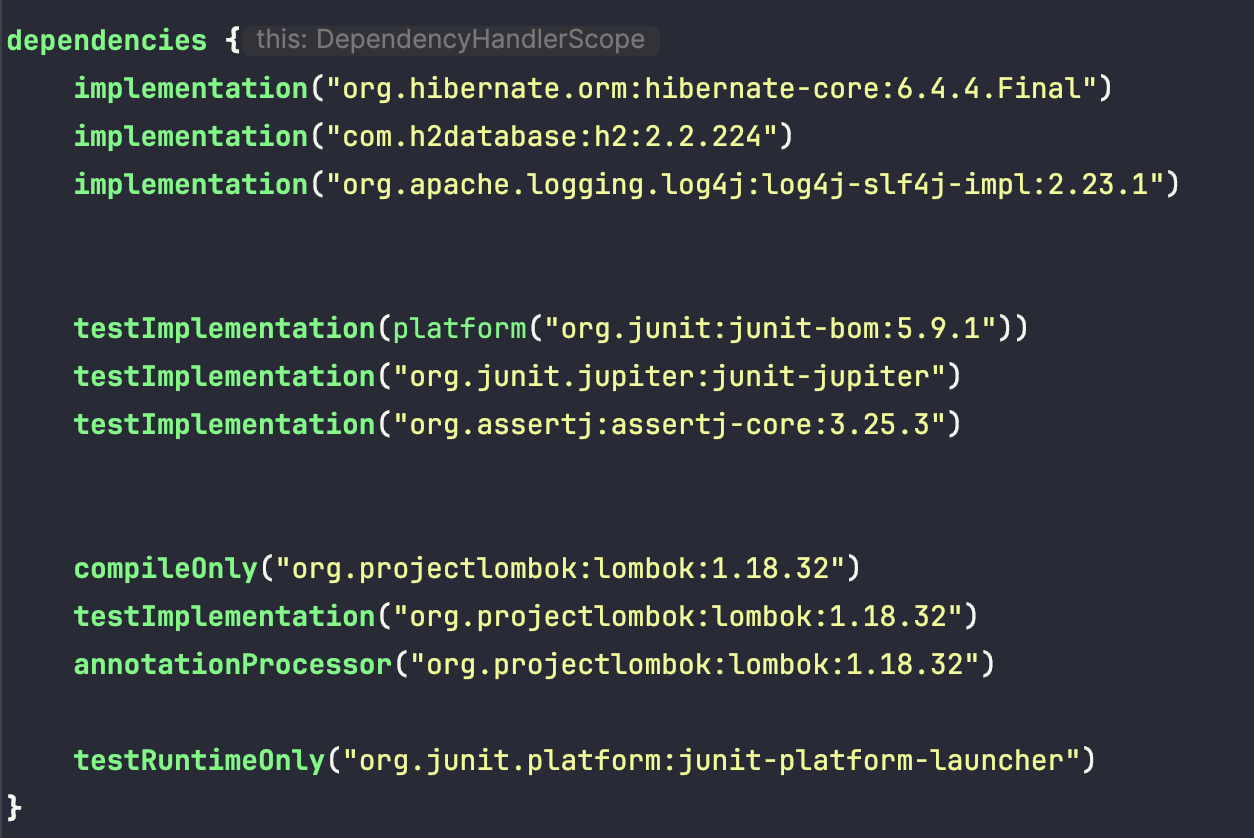

위의 dependency를 추가해주면 해결된다.
