
이 프로젝트는 이것저것 적용해서 테스트하기 위한 프로젝트입니다. 이번에는 Passport를 이용한 인증 시스템을 구현하려고 합니다.
아직은 간단한 내용이지만 조금씩 구현하면서 세부적인 내용을 채울 예정입니다.
현대 웹 애플리케이션에서 사용자 인증은 핵심 기능 중 하나입니다. 이번 글에서는 Express, TypeScript, Passport.js를 활용하여 확장 가능하고 타입 안전한 인증 시스템을 구축하는 과정을 구현 하도록 하겠습니다. TypeScript을 사용했기에 타입 안정성을 생각해야 했습니다.
인증에 사용할 타입 정의
TypeScript의 장점을 살리기 위해 먼저 타입 정의를 작성했습니다.
AuthenticatedRequest로 인증된 요청의 타입을 확장- DTO 패턴으로 입력/출력 데이터 구조 명확화
- 제네릭을 활용한 재사용 가능한 응답 타입
// apps/backend/src/types/auth.types.ts

import { Request } from 'express';

// User Entity Type
export interface UserEntity {
  id: string;
  email: string;
  createdAt: Date;
}

// Request DTO
export interface SignUpRequestDTO {
  email: string;
  password: string;
}

// 인증된 사용자 정보가 포함된 Request
export interface AuthenticatedRequest extends Request {
  user: UserEntity;
}

// Response DTO
export interface ApiResponse<T = any> {
  success: boolean;
  message?: string;
  data?: T;
}
export interface SignUpResponseDTO {
  user: UserEntity;
}
export interface AuthResponseDTO {
  user: UserEntity;
  token: string;
}

// Error Response DTO
export interface ErrorResponseDTO {
  success: false;
  message: string;
  error?: string;
}
Passport 전략 설정
Local Strategy와 JWT Strategy를 구성했습니다. 여기서 설정한 Passport에 대한 설정을 사용할 때는 항상 다른 라우터나 미들웨어보다 먼저 실행되어야 합니다.
Passport 전략들이 미리 등록되어야 passport.authenticate() 호출 시 정상 작동합니다.
// apps/backend/src/config/passport.config.ts

import passport from 'passport';
import { Strategy as LocalStrategy } from 'passport-local';
import { Strategy as JWTStrategy, ExtractJwt } from 'passport-jwt';
import bcrypt from 'bcrypt';
import { prisma } from '../utils/prisma.util';

// Local Strategy (로그인에서 사용)
passport.use(
  new LocalStrategy(
    {
      usernameField: 'email',
      passwordField: 'password',
    },
    async (email: string, password: string, done) => {
      try {
        // 사용자 찾기
        const user = await prisma.user.findUnique({
          where: { email },
        });

        if (!user) {
          return done(null, false, { message: '이메일 또는 비밀번호가 올바르지 않습니다.' });
        }

        // 비밀번호 확인
        const isPasswordValid = await bcrypt.compare(password, user.password);
        if (!isPasswordValid) {
          return done(null, false, { message: '이메일 또는 비밀번호가 올바르지 않습니다.' });
        }

        return done(null, user);
      } catch (error) {
        return done(error);
      }
    }
  )
);

// JWT Strategy (토큰 인증에서 사용)
passport.use(
  new JWTStrategy(
    {
      jwtFromRequest: ExtractJwt.fromAuthHeaderAsBearerToken(),
      secretOrKey: process.env.JWT_SECRET || 'your-secret-key',
    },
    async (payload, done) => {
      try {
        const user = await prisma.user.findUnique({
          where: { id: payload.id },
        });

        if (user) {
          return done(null, user);
        } else {
          return done(null, false);
        }
      } catch (error) {
        return done(error, false);
      }
    }
  )
);

export default passport;
JWT 서비스 분리
처음에는 AuthService에 JWT 로직이 포함되어 있었는데, 다음과 같은 이유로 분리시켰습니다.
AuthService가 너무 많은 책임을 가짐- JWT 로직을 다른 서비스에서 재사용 가능
- 테스트 및 유지보수 용이성 향상
사실 이렇게 작은 프로젝트에서는 굳이 분리할 필요는 없지만, 분리하는 방법도 구현해보고 싶었기에 찾아서 적용했습니다.
// apps/backend/src/services/jwt.service.ts

import jwt, { SignOptions } from 'jsonwebtoken';

export interface JwtPayload {
  id: string;
  iat?: number;
  exp?: number;
}

export class JwtService {
  private readonly secret: string;
  private readonly expiresIn: string;

  constructor() {
    this.secret = process.env.JWT_SECRET || 'your-secret-key';
    this.expiresIn = process.env.JWT_EXPIRES_IN || '7d';
  }

  // JWT 토큰 생성
  generateToken(userId: string): string {
    const payload: JwtPayload = { id: userId };

    const options: SignOptions = {
      expiresIn: this.expiresIn as any,
    };

    return jwt.sign(payload, this.secret, options);
  }

  // JWT 토큰 검증
  verifyToken(token: string): JwtPayload {
    try {
      return jwt.verify(token, this.secret) as JwtPayload;
    } catch (error) {
      throw new Error('유효하지 않은 토큰입니다.');
    }
  }
AuthService 간소화
JWT 로직을 분리한 후 AuthService는 순수한 인증 비즈니스 로직만 담당합니다. 회원가입, 사용자 정보 조회만 담당하도록 수정했습니다.
// apps/backend/src/services/auth.service.ts

import bcrypt from 'bcrypt';
import { prisma } from '../utils/prisma.util';
import { SignUpRequestDTO, UserEntity, SignUpResponseDTO } from '../types/auth.types';

export class AuthService {
  private readonly saltRounds = 10;

  // 회원가입
  async signUp(data: SignUpRequestDTO): Promise<SignUpResponseDTO> {
    const { email, password } = data;

    // 이메일 중복 확인
    const existingUser = await prisma.user.findUnique({
      where: { email },
    });

    if (existingUser) {
      throw new Error('이미 존재하는 이메일입니다.');
    }

    // 비밀번호 해싱
    const hashedPassword = await bcrypt.hash(password, this.saltRounds);

    // 사용자 생성
    const user = await prisma.user.create({
      data: {
        email,
        password: hashedPassword,
      },
    });

    // 비밀번호 제외하고 반환
    const { password: _, ...userWithoutPassword } = user;
    return { user: userWithoutPassword };
  }

  // 사용자 정보 조회
  async getUserById(id: string): Promise<UserEntity> {
    const user = await prisma.user.findUnique({
      where: { id },
      select: {
        id: true,
        email: true,
        createdAt: true,
      },
    });

    if (!user) {
      throw new Error('사용자를 찾을 수 없습니다.');
    }

    return user;
  }
}
인증 미들웨어 구현
Passport JWT Strategy를 활용한 미들웨어를 구현했습니다. 사용자의 로그인 여부를 확인하기 위한 미들웨어입니다.
// apps/backend/src/middlewares/auth.middleware.ts

import { Request, Response, NextFunction } from 'express';
import passport from 'passport';

// Passport JWT 미들웨어 (사용자 인증 확인용 미들웨어)
export const authenticateJWT = (req: Request, res: Response, next: NextFunction) => {
  passport.authenticate('jwt', { session: false }, (error: any, user: any, info: any) => {
    if (error) {
      return res.status(500).json({
        success: false,
        message: '인증 처리 중 오류가 발생했습니다.',
      });
    }

    if (!user) {
      return res.status(401).json({
        success: false,
        message: info?.message || '인증이 필요합니다.',
      });
    }

    // req.user에 사용자 정보 설정
    req.user = user;
    next();
  })(req, res, next);
};
의존성 주입 적용한 컨트롤러
Nest.js에서 사용했던 의존성 주입 패턴을 한 번 사용해 보았습니다. 의존성 주입을 사용하면 테스트 시 mock 함수에 주입이 용이하고, 서비스 간 결합도를 감소시켜 코드 유연성을 증가시킬 수 있습니다.
Passport Local 전략인 passport.authenticate('local', ...)을 사용해서 로그인 기능을 구현했습니다.
// apps/backend/src/controllers/auth.controller.ts

import { Request, Response, NextFunction } from 'express';
import passport from 'passport';
import { AuthService } from '../services/auth.service';
import {
  SignUpRequestDTO,
  AuthenticatedRequest,
  ApiResponse,
  ErrorResponseDTO,
  SignUpResponseDTO,
  AuthResponseDTO,
} from '../types/auth.types';
import { JwtService } from '../services/jwt.service';

export class AuthController {
  constructor(
    private authService: AuthService,
    private jwtService: JwtService
  ) {}

  // 회원가입
  signUp = async (req: Request, res: Response, next: NextFunction): Promise<void> => {
    try {
      const { email, password }: SignUpRequestDTO = req.body;

      // 입력값 검증
      if (!email || !password) {
        const errorResponse: ErrorResponseDTO = {
          success: false,
          message: '이메일과 비밀번호를 입력해주세요.',
        };
        res.status(400).json(errorResponse);
        return;
      }

      // 이메일 형식 검증
      const emailRegex = /^[^\s@]+@[^\s@]+\.[^\s@]+$/;
      if (!emailRegex.test(email)) {
        const errorResponse: ErrorResponseDTO = {
          success: false,
          message: '올바른 이메일 형식을 입력해주세요.',
        };
        res.status(400).json(errorResponse);
        return;
      }

      // 비밀번호 길이 검증
      if (password.length < 4) {
        const errorResponse: ErrorResponseDTO = {
          success: false,
          message: '비밀번호는 최소 4자 이상이어야 합니다.',
        };
        res.status(400).json(errorResponse);
        return;
      }

      const result = await this.authService.signUp({ email, password });

      const successResponse: ApiResponse<SignUpResponseDTO> = {
        success: true,
        message: '회원가입이 완료되었습니다.',
        data: result,
      };

      res.status(201).json(successResponse);
    } catch (error) {
      if (error instanceof Error) {
        const errorResponse: ErrorResponseDTO = {
          success: false,
          message: error.message,
        };
        res.status(400).json(errorResponse);
        return;
      }
      next(error);
    }
  };

  // Passport Local Strategy를 사용한 로그인
  signInWithPassport = (req: Request, res: Response, next: NextFunction): void => {
    passport.authenticate('local', (error: any, user: any, info: any) => {
      if (error) {
        return next(error);
      }

      if (!user) {
        const errorResponse: ErrorResponseDTO = {
          success: false,
          message: info?.message || '로그인에 실패했습니다.',
        };
        res.status(401).json(errorResponse);
        return;
      }

      // JWT 토큰 생성 (JwtService 통해서)
      const token = this.jwtService.generateToken(user.id);

      const { password: _, ...userWithoutPassword } = user;

      const successResponse: ApiResponse<AuthResponseDTO> = {
        success: true,
        message: '로그인이 완료되었습니다.',
        data: {
          user: userWithoutPassword,
          token,
        },
      };
      res.json(successResponse);
    })(req, res, next);
  };

  // 사용자 정보 조회
  getProfile = async (
    req: AuthenticatedRequest,
    res: Response,
    next: NextFunction
  ): Promise<void> => {
    try {
      const userId = req.user.id;

      const user = await this.authService.getUserById(userId);

      const successResponse: ApiResponse = {
        success: true,
        data: { user },
      };
      res.json(successResponse);
    } catch (error) {
      if (error instanceof Error) {
        const errorResponse: ErrorResponseDTO = {
          success: false,
          message: error.message,
        };
        res.status(404).json(errorResponse);
        return;
      }
      next(error);
    }
  };
}
라우터 구성과 타입 문제 해결
Express와 TypeScript의 타입 호환성 문제를 현실적으로 해결했습니다. 일단 프로젝트의 규모가 작기 때문에 as any 캐스팅으로 Express 호환성을 확보했습니다.
as any가 필요한 이유는 AuthController.getProfile 메서드가 AuthenticatedRequest 타입을 받지만, Express Router는 모든 핸들러가 기본 Request 타입을 받는다고 가정합니다. 미들웨어 체인에서 authenticateJWT가 req.user를 추가하는 동적 변화를 TypeScript가 추적하지 못하기 때문입니다.
그래도 혹시나 as any가 너무 많이 사용된다면 헬퍼 함수나 Request handler를 추가로 구현할 계획입니다.
// apps/backend/src/routes/auth.routes.ts

import { Router } from 'express';
import { AuthController } from '../controllers/auth.controller';
import { authenticateJWT } from '../middlewares/auth.middleware';
import { AuthenticatedRequest } from '../types/auth.types';
import { AuthService } from '../services/auth.service';
import { JwtService } from '../services/jwt.service';

const router = Router();
const authController = new AuthController(new AuthService(), new JwtService());

// 회원가입
router.post('/signup', authController.signUp);

// 로그인 (Passport Local Strategy 사용)
router.post('/signin', authController.signInWithPassport);

// 사용자 프로필 조회 (인증 필요)
router.get('/profile', authenticateJWT, authController.getProfile as any);

// 토큰 유효성 검증
router.get('/verify', authenticateJWT, (req, res) => {
  const authReq = req as AuthenticatedRequest;
  res.json({
    success: true,
    message: '유효한 토큰입니다.',
    data: {
      user: authReq.user,
    },
  });
});

export default router;
메인 서버 통합
모든 구성 요소를 연결하는 메인 서버를 설정했습니다.
// apps/backend/src/index.ts

import express, { NextFunction, Request, Response } from 'express';
import cors from 'cors';
import dotenv from 'dotenv';
import cookieParser from 'cookie-parser';

dotenv.config();

import { errorHandlerMiddleware } from './middlewares/error-handler.middleware';
import { prisma } from './utils/prisma.util';
import './config/passport.config'; // Passport 설정 초기화
import authRoutes from './routes/auth.routes';

const app = express();
const SERVER_PORT = process.env.SERVER_PORT || 3000;

// 미들웨어
app.use(cors());
app.use(express.json());
app.use(cookieParser());

// 라우트 정의
app.get('/', (req: Request, res: Response) => {
  res.json({ message: 'API 서버가 실행 중입니다.' });
});

// 인증 라우트
app.use('/api/auth', authRoutes);

console.log('DB 연결 테스트 시작...');
prisma.$queryRaw`SELECT 1`;

// 에러 처리 미들웨어 등록
app.use(errorHandlerMiddleware);

app.listen(SERVER_PORT, () => {
  console.log(`서버가 포트 ${SERVER_PORT}에서 실행 중입니다`);
});
실행 결과
-
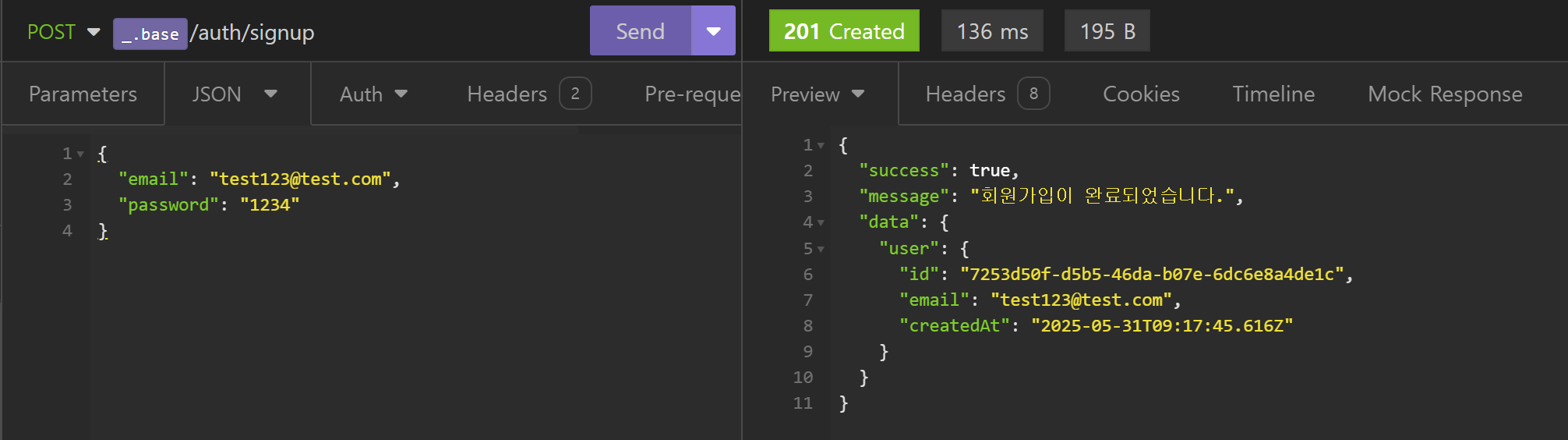
회원가입
-
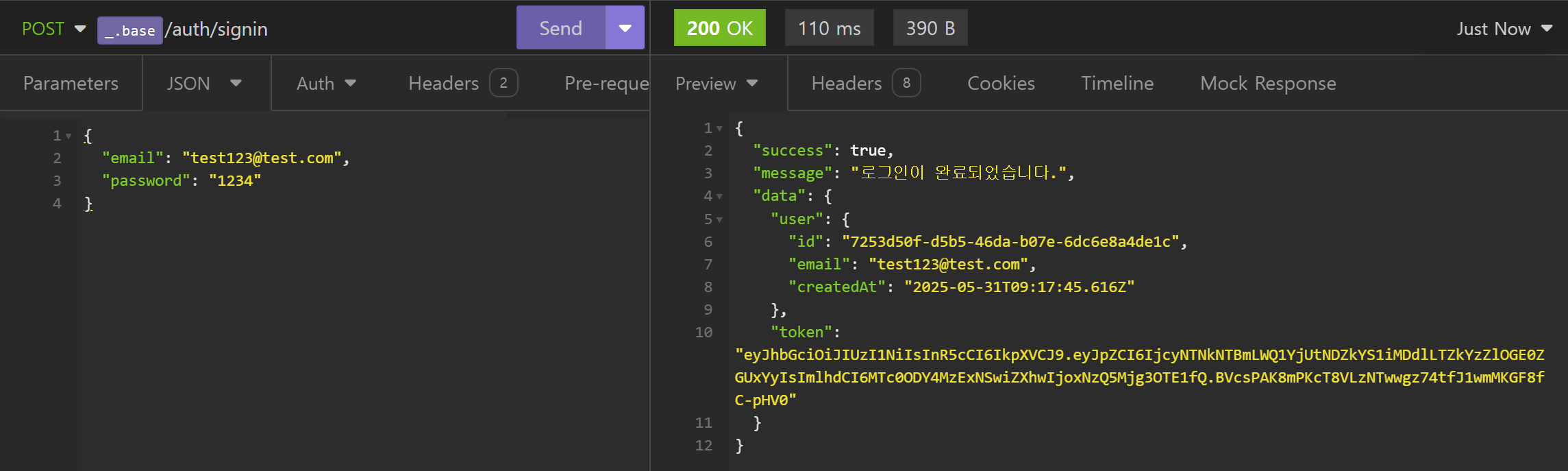
로그인
-
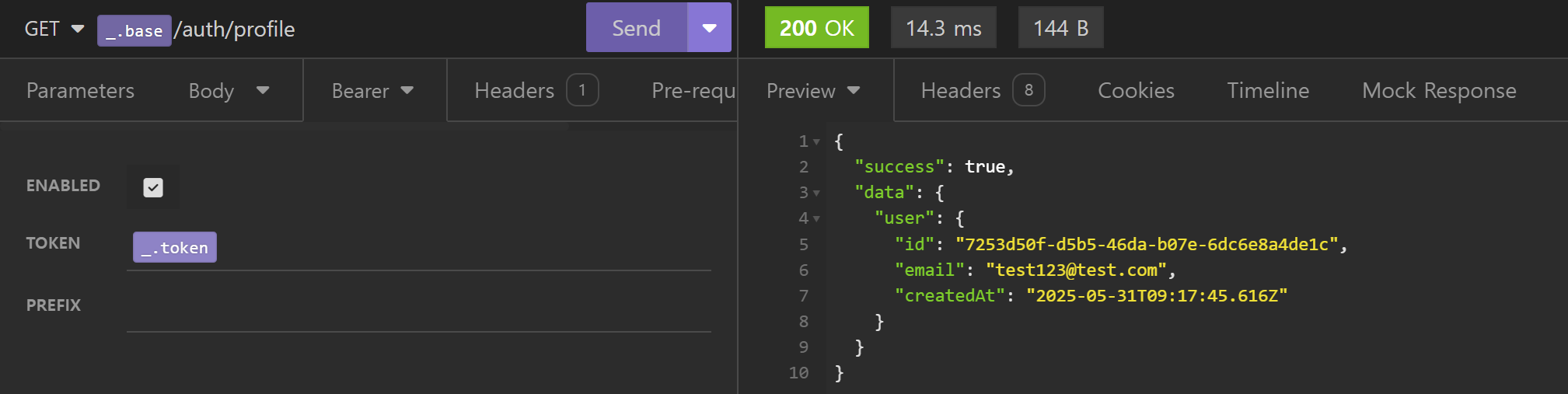
프로필 조회
트러블 슈팅
JWT 토큰 생성 시 TypeScript 타입 에러
문제:
JWT 토큰 생성 시 expiresIn 옵션에서 타입 에러가 발생했습니다.
generateToken(userId: string): string {
  return jwt.sign({ id: userId }, this.jwtSecret, {
    expiresIn: this.jwtExpiresIn  // Type 'string' is not assignable to type 'number'
  });
}
No overload matches this call.
Type 'string' is not assignable to type 'number | StringValue | undefined'.원인:
jsonwebtoken라이브러리의 TypeScript 타입 정의가 불완전함expiresIn은 실제로는 '7d', '1h' 같은 문자열을 받지만, 타입 정의에서는 제한적으로 정의됨- 환경변수에서 가져온 문자열이 라이브러리 타입과 정확히 일치하지 않음
해결:
타입 캐스팅을 사용하여 해결했습니다.
- 실제 런타임에서는 완벽하게 작동함이 확인됨
- 라이브러리 자체의 타입 정의 문제이므로 우리 코드의 문제가 아님
generateToken(userId: string): string {
  const payload: JwtPayload = { id: userId };

  const options: SignOptions = {
    expiresIn: this.expiresIn as any, // 타입 캐스팅으로 해결
  };

  return jwt.sign(payload, this.secret, options);
}
Express Router에서 AuthenticatedRequest 타입 호환성 문제
문제:
Express Router에서 AuthenticatedRequest 타입을 사용하는 컨트롤러 메서드를 등록할 때 타입 에러가 발생했습니다.
router.get('/profile', authenticateJWT, authController.getProfile);Argument of type '(req: AuthenticatedRequest, res: Response, next: NextFunction) => Promise<void>'
is not assignable to parameter of type 'RequestHandler'.
Type 'AuthenticatedRequest' is not assignable to parameter of type 'Request'.원인:
- Express Router의 타입 시스템 한계: Express에서는 모든 핸들러가 동일한
Request타입을 받는다고 가정함 - 미들웨어 체인의 동적 특성:
authenticateJWT미들웨어가req.user를 추가하지만, 컴파일 타임에는 이를 추적할 수 없음 - 컴파일 타임 vs 런타임 차이:
- 컴파일 타임: TypeScript는
req.user가 없다고 판단 - 런타임: Passport가 실제로
req.user를 설정함
- 컴파일 타임: TypeScript는
해결:
타입 캐스팅을 사용하여 Express와의 호환성을 확보했습니다.
- 명확하고 즉시 적용 가능
- 타입 캐스팅 위치가 명확하여 유지보수 용이
- 프로젝트 규모에 적합한 현실적 접근
router.get('/profile', authenticateJWT, authController.getProfile as any);

// 인라인 핸들러에서는 명시적 캐스팅 사용
router.get('/verify', authenticateJWT, (req, res) => {
  const authReq = req as AuthenticatedRequest;
  res.json({
    success: true,
    data: { user: authReq.user },
  });
});
추가로 찾은 해결 방법들:
1. Module Augmentation: 전역 타입 확장
declare global {
  namespace Express {
    interface Request {
      user?: UserEntity;
    }
  }
}- 헬퍼 함수: 타입 변환 유틸리티
// 복잡도 대비 효과가 낮아 제외
const authenticatedRoute = (handler: (req: AuthenticatedRequest, res: Response) => void) => {
  return (req: Request, res: Response, next: NextFunction) => {
    handler(req as AuthenticatedRequest, res);
  };
};
Passport 설정 로딩 순서 문제
문제:
Passport 설정이 제대로 로드되지 않아 인증이 작동하지 않았습니다.
import authRoutes from './routes/auth.routes';
import './config/passport.config'; // 늦게 로드됨
원인:
- 모듈 로딩 순서: Passport 전략 설정이 라우트보다 늦게 로드됨
- passport.authenticate() 호출 시점: 전략이 등록되기 전에 사용하려고 함
- ES6 import의 호이스팅: import 순서가 실행 순서에 영향
해결:
Passport 설정을 다른 모듈들보다 먼저 로드하도록 순서를 조정했습니다.
- 환경변수 로딩 → Passport 설정 → 라우트 순서 준수
- 의존성 있는 모듈들의 로딩 순서 중요성 인식
dotenv.config();                    // 1. 환경변수 먼저
import './config/passport.config';  // 2. Passport 설정
import authRoutes from './routes/auth.routes'; // 3. 라우트 마지막