배열
프로그래밍을 하다보면 정말 많은 데이터를 다루게 된다.
많은 데이터를 각각의 변수로 선언하였다가는 코드는 변수가 90%이상인 코드가 될 수 있다.
이런 데이터 중 비슷한 성질의 데이터를 묶을 수 있는 기능을 언어에서는 제공하고 있다.
그 중 하나인 배열에 대해 오늘 학습한다.
배열 선언
배열은 크기가 정해져 있는 방. 이라고 보면 된다.
아파트한층 혹은 아파트 전체나 엑셀문서의 한 sheet 와 비슷하다고 보면 이해하기 좋다.
배열의 선언은 아래와 같이 할 수 있다.
코드
// 당연하지만 크기는 변수로도 받을 수 있다!
int[] arr1 = new int[4];
arr1[0] = 10;
arr1[1] = 20;
arr1[2] = 30;
arr1[3] = 40;

// 위와 아래는 같은 의미.
int[] arr2 = { 10, 20, 30, 40 };
빈 방 선언?
보통 예제를 보면 특정 값을 넣어 선언하는 경우가 많다. 그렇다면 값을 넣지 않고 선언하면 어떠한 결과가 될까?
결과는 아래 참고!
코드
int[] arrInt = new int[3];
Console.WriteLine(arrInt[0]);
// 선언만 하면 0이 담긴다.

string[] arrStr = new string[3];
Console.WriteLine(arrStr[0]);
// 선언만 하면 빈 문자열이 담긴다.

float[] arrFloat = new float[3];
Console.WriteLine(arrFloat[0]);
// 선언만 하면 0이 담긴다.
배열에 접근하기
배열은 Index를 갖고 있다. Index 는 엑셀에서 A1, B1처럼 해당 데이터가 위치하는 방 번호로 보면 된다.
컴퓨터의 대부분의 Index 는 0에서 시작하니 참고하자.
배열 내 모든 값에 대해 다루고 싶다면 반복문을 이용하여 값에 하나씩 Access 해야 한다.
int[] arr = { 1, 2, 3, 4, 5, 6 };
// 배열은 for문으로 access 하는 것이 일반적이다.
for (int i = 0; i < arr.Length; i++)
{
    Console.WriteLine(arr[i]);
    // 해당 index 의 방 내 값이 변경이 된다.
    arr[i] += 10;
}

// foreach 로 할 경우 해당 값은 Readonly 속성이 되기 때문에 변경할 수 없다.
foreach(int i in arr) {
    Console.WriteLine(i);
}
다차원 배열
배열은 앞서 이야기 했다시피, 1차원 뿐만 아니라 아파트나 엑셀처럼 다차원으로도 가능하다.
코드
아래는 간단한 2차원 배열에 대한 예시이다.
// 선언된 앞쪽이 행, 뒷쪽이 열이다. 혹은, 뒷쪽부터 작은 차원이라 보아도 무방하다.
// 선언에 사용된 표현은 뒤에 GetLength 에서도 활용된다.
int[,] metrixInt = new int[3, 4]
{
    {1, 2, 3, 4 },
    {5, 6, 7, 8 },
    {9, 10, 11, 12 }
};
Console.WriteLine($"Total Length: {metrixInt.Length}");
// GetLength(0) - number of rows
for (int i = 0; i < metrixInt.GetLength(0); i++)
{
    // GetLength(1) - number of columns
    for (int j = 0; j < metrixInt.GetLength(1); j++)
    {
        Console.Write($"{metrixInt[i, j]}\t");
    }
    Console.WriteLine();
}
// access element
Console.WriteLine($"metrixInt[1, 2] : {metrixInt[1, 2]}");
Console.WriteLine($"metrixInt[2, 0] : {metrixInt[2, 0]}");문자열은 배열과 비슷하다
제목과 같이 문자열은 배열처럼 활용이 가능하다.
단, 일반적인 배열처럼 item 의 값을 변동하는 것은 할 수 없다.
변동을 위해서는 복잡한 방법을 사용하거나 내장 함수인 "replace"를 사용해야 한다.
// String 을 배열처럼 다루기
// 단 String Readonly.
string name = "John Doe";
foreach (char c in name)
{
    Console.Write($"{c} ");
}

// 변경을 하려면 아래와 같이 해야함.
char[] chars = name.ToCharArray();
chars[5] = 'S';
string _name = new string(chars);
Console.WriteLine($"\nModified Name: {_name}");

name = "John Doe";
// 사실 "Replace"함수로 간단히 변경이 되긴함
name = name.Replace("Doe", "Meme")
Console.WriteLine($"\nModified Name: {name}");
함수
개인적으로 함수는 프로그래밍 언어의 "꽃"이라고 생각한다.
함수를 제대로 활용할 수 있냐 없냐에 따라 코드의 복잡성, 유연성등이 많이 다르다.
유지보수에도 많은 역할을 하게 해주며 코드를 오히려 조금 더 보기 편하게해주기도 한다고 본다.
때문에 함수명은 되도록 함수명만 보아도 해당 기능이 무엇인지 알 수 있게적는 것이 좋다.
코드
아래 간단한 예제를 살펴보자.
// Callback 이 있는 함수
static string PrintHello()
{
    Console.WriteLine("Greeting Player~!");
    Console.Write("Enter your name: ");
    string playerName = Console.ReadLine();
    Console.WriteLine($"Welcome, {playerName}!");
    Console.WriteLine("You can move clike the 'wsad' keys. Press 'Escape' to stop moving.");
    return playerName;
}

// 매게변수는 있으며, Callback 이 없는 함수
static void MovePlayer(string name)
{
    while(true) {
        switch (Console.ReadKey(true).Key)
        {
            case ConsoleKey.W:
                Console.WriteLine("Player moves up!");
                break;
            case ConsoleKey.S:
                Console.WriteLine("Player moves down!");
                break;
            case ConsoleKey.A:
                Console.WriteLine("Player moves left!");
                break;
            case ConsoleKey.D:
                Console.WriteLine("Player moves right!");
                break;
            case ConsoleKey.Escape:
                Console.WriteLine($"{name} has stopped moving.");
                return;
        }
    }
}

static void Main(string[] args)
{
    string name = PrintHello();
    MovePlayer(name);
}
위와 같이 함수명 앞에 string처럼 특정 자료형이 있는 경우는 반환할 값이 있는 함수이다.
만약 반환할 값이 없다면 void라고 붙이면 된다.
함수는 결국 호출(call)을 해야 한다. 호출할 함수에서 활용할 데이터를 넣어주어야 하는 경우는 빈번하게 발생한다.
이때 함수에 들어갈 데이터를 매개변수라고 하며 해당 변수의 자료형을 같이 표기한다.
실행 결과
Greeting Player~!
Enter your name: mybeang
Welcome, mybeang!
You can move clike the 'wsad' keys. Press 'Escape' to stop moving.
Player moves up!
Player moves left!
Player moves down!
Player moves right!
Player moves left!
Player moves up!
Player moves left!
Player moves right!
mybeang has stopped moving.
Call by Value / Call by Reference
함수에 매개변수를 넣어 데이터를 변조할 때, 변수의 타입에 따라 그 결과가 상당히 다르다.
어떤 변수는 분명 함수에서 새로운 데이터를 덮어 씌웠는데 함수 외부에서는 변경되지 않았으며,
어떤 변수는 변경이 되어버려 잘못된 결과를 가져오는 경우가 있다.
내가 정의한 함수내에서 값 변경시 변경이 일어나지 않는 변수의 호출은 Call by value 이며
변경이 일어나는 변수의 호출은 Call by reference이다.
일단 아래 코드를 통해 설명한다.
코드
// 함수내 a, b 는 call by value 이기 때문에 값을 덮어 써도 main 에서는 변동되지 않는다.
static void SwapTwoNumbers(int a, int b)
{
    int tmp = a;
    a = b;
    b = tmp;
}
// 함수내 a, b 는 call by reference 이기 때문에 값을 덮어 쓰면 main 에서도 변동된다.
static void SwapTwoNumbersRef(ref int a, ref int b) {
    int tmp = a;
    a = b;
    b = tmp;
}

// 배열, 문자열등은 기본적으로 참조 자료형이기 때문에 그대로 넘겨도 된다.
static void ChgFirstArray(int[] a)
{
    a[0] = 100;
}

static void Main(string[] args)
{
    int a = 5;
    int b = 10;
    Console.WriteLine($"Before Swap: a = {a}, b = {b}");
    SwapTwoNumbers(a, b);
    Console.WriteLine($"After Swap: a = {a}, b = {b}");
    SwapTwoNumbersRef(ref a, ref b);
    Console.WriteLine($"After Swap: a = {a}, b = {b}");

    int[] arr = { 1, 2, 3 };
    Console.Write($"Array is ");
    foreach (var item in arr)
    {
        Console.Write(item + " ");
    }
    Console.WriteLine();
    Console.WriteLine($"Before arr[0]: {arr[0]}");
    ChgFirstArray(arr);
    Console.WriteLine($"After arr[0]: {arr[0]}");
}
실행 결과
Before Swap: a = 5, b = 10
After Swap: a = 5, b = 10
After Swap: a = 10, b = 5
Array is 1 2 3
Before arr[0]: 1
After arr[0]: 100
왜 그런걸까?
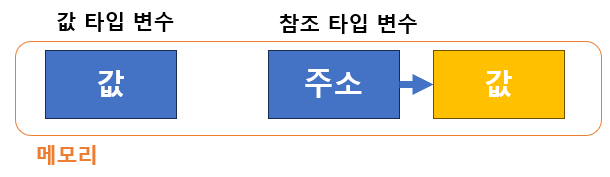
위 그림에서 보다시피, 값 타입의 변수는 실제 메모리에 우리가 넣은 값을 저장하지만,
참조 타입의 변수는 우리가 정의한 변수에는 실제 값이 들어있는 메모리의 주소가 저장된다.
메모리 종류
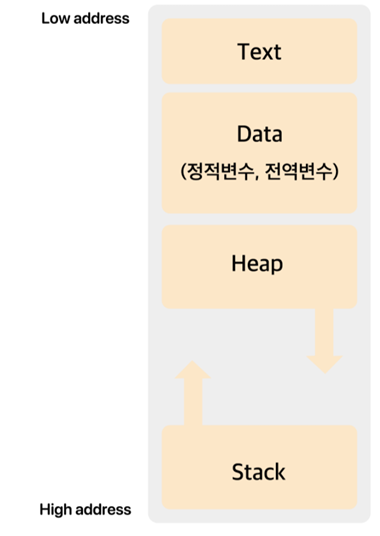
- Text
- 흔히 코드 영역이라 부르며 제어문, 반복문 등이 저장되는 영역이다.
- Data
- 전역변수/main 함수내 변수 등? 프로그램 실행 후 종료 전까지 계속 할당되어야 하는 메모리.
- Heap
- 우리가 자주 사용하는 메모리 영역 중 하나. 참조 타입의 값이 실제 저장되는 영역이기도 하다.
- Stack
- 값 타입이 저장되거나 참조 타입의 주소가 저장되는 영역
참조 종류: ref / in / out
ref는 어느 정도 자유롭게 사용 가능하다.out에는 필히 값을 할당해야 한다. (int.TryParse에서 보았다.)in은ReadOnly이다. (foreach에서 보았다.)