클래스와 인스턴스 (Class & Instance)
클래스란?
- 일종의 설계서라고 보면 된다.
객체 지향개발 방법을 코드화 시킨 것에 가깝다.
필드 (Field)
- 클래스 속성이다.
- 필드를
Property화 하여 사용할 수 있다.
// property example
class MyClass {
    private _num;
    public int Num {
        get;
        private set {
            someLogging.Debug("debug message")
            _num = value;
        };
    }
}
메소드 (Method)
- 클래스 내 함수이다. 특정 객체의 "기능"이 이에 해당한다 봐도 무방하다.
함수 -> 메소드는 애매하지만메소드 -> 함수는 맞는 이야기다.- 애매하다고 한 것은
함수가 조금 더 포괄적인 의미를 갖고 있기 때문이다.
- 애매하다고 한 것은
메소드또한 캡슐화되어 있기 때문에 접근 제한자를 통한 접근 제어가 가능하다.
Null
null은 아에 없다. 라는 뜻이다.0이나""와는 다르다!
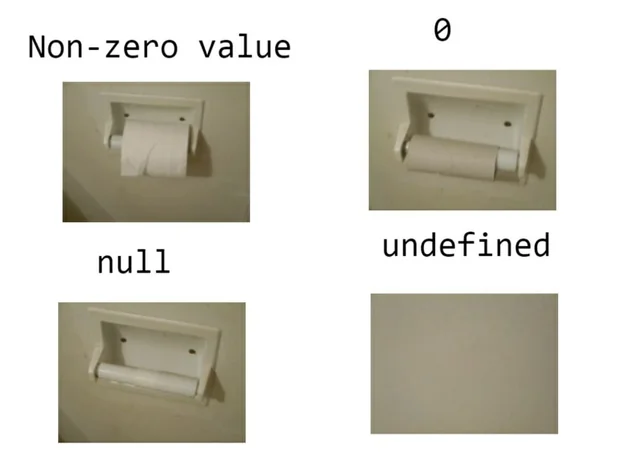
null은참조형 자료만 가능하다.
인스턴스(Instance)란?
인스턴스의 사전적 의미는 "사례", "예", "경우"를 뜻한다.- 클래스를 이용하여 생성된
메모리에 올라간 실체이다. 인스턴스화는 영어로는Instanciate라고 하며,인스턴스화하여 할당된 변수는 Heap 메모리 주소값을 갖는다.- 즉, 실제 데이터는
Heap메모리에 할당되게 된다.
- 즉, 실제 데이터는
실습 코드
UpDown.cs
using System;
namespace OOP;

public class UpDown
{
    private int _inputNum;
    private int _targetNum;

    public int InputNum
    {
        // 굳이 써보긔
        get { return _inputNum; }
        private set { _inputNum = value; }
    }

    public UpDown()
    {
        int start = 1;
        int end = 1000;
        Random random = new Random();
        _targetNum = random.Next(start, end);
        Console.WriteLine("UpDown 게임 시작.");
        Console.WriteLine($"- 숫자는 {start} ~ {end}");
        Console.WriteLine("총 10회의 기회");
    }

    public void StartGame()
    {
        bool result = false;
        for (int i = 0; i < 10; i++)
        {
            Console.Write("숫자 입력: ");
            InputNum = int.Parse(Console.ReadLine());
            if (InputNum > _targetNum)
            {
                Console.WriteLine("DOWN!");
            } else if (InputNum < _targetNum)
            {
                Console.WriteLine("UP!");
            }
            else
            {
                result = true;
                break;
            }
        }

        if (result)
        {
            Console.WriteLine("숫자를 맞추셨네요!");
        }
        else
        {
            Console.WriteLine($"실패!! 숫자는 {_targetNum} 이었습니다!");
        }
    }
}
Program.cs
using System;

namespace  OOP
{
    public class Program
    {
        public static void StartUpDonwGame()
        {
            UpDown upDown = new UpDown();
            upDown.StartGame();
        }

        public static void Main(string[] args)
        {
            StartUpDonwGame();
        }
    }
}
기타
new키워드; 메모리에 할당한다!인스턴스vs오브젝트오브젝트(Object)는객체라는 큰 단위의 의미.인스턴스(Instance)는메모리에 올라간 객체로 생각해도 됨.
nullvsnavsnannull: 없다 의 독일말na: not availablenan: not a number
Type.IsInstanceOfType; 해당 Instance 가 특정 Class 가 Istanciate 된 것인지 확인. MSDN 링크
using System;

namespace Examples
{
    class MyClass
    {
        public int a = 1;
        public char c = 'a';
    }
    internal class Program
    {
        static void Main(string[] args)
        {
            MyClass a = new MyClass();
            if (typeof(MyClass).IsInstanceOfType(a))
            {
                Console.WriteLine("맞습네다?");
            }
        }
    }
}Type.IsSubclassOf; 해당 클래스의 부모 클래스 확인. MSDN 링크
using System;

namespace Examples
{
    class MyParent
    {
        public int a = 1;
        public char c = 'a';
    }
    class MyChild : MyParent {}
    internal class Program
    {
        static void Main(string[] args)
        {
            if (typeof(MyChild).IsSubclassOf(typeof(MyParent)))
            {
                Console.WriteLine("맞습네다?");
            }
        }
    }
}
Python Dev with Infra -> Game Programmer