라이프사이클
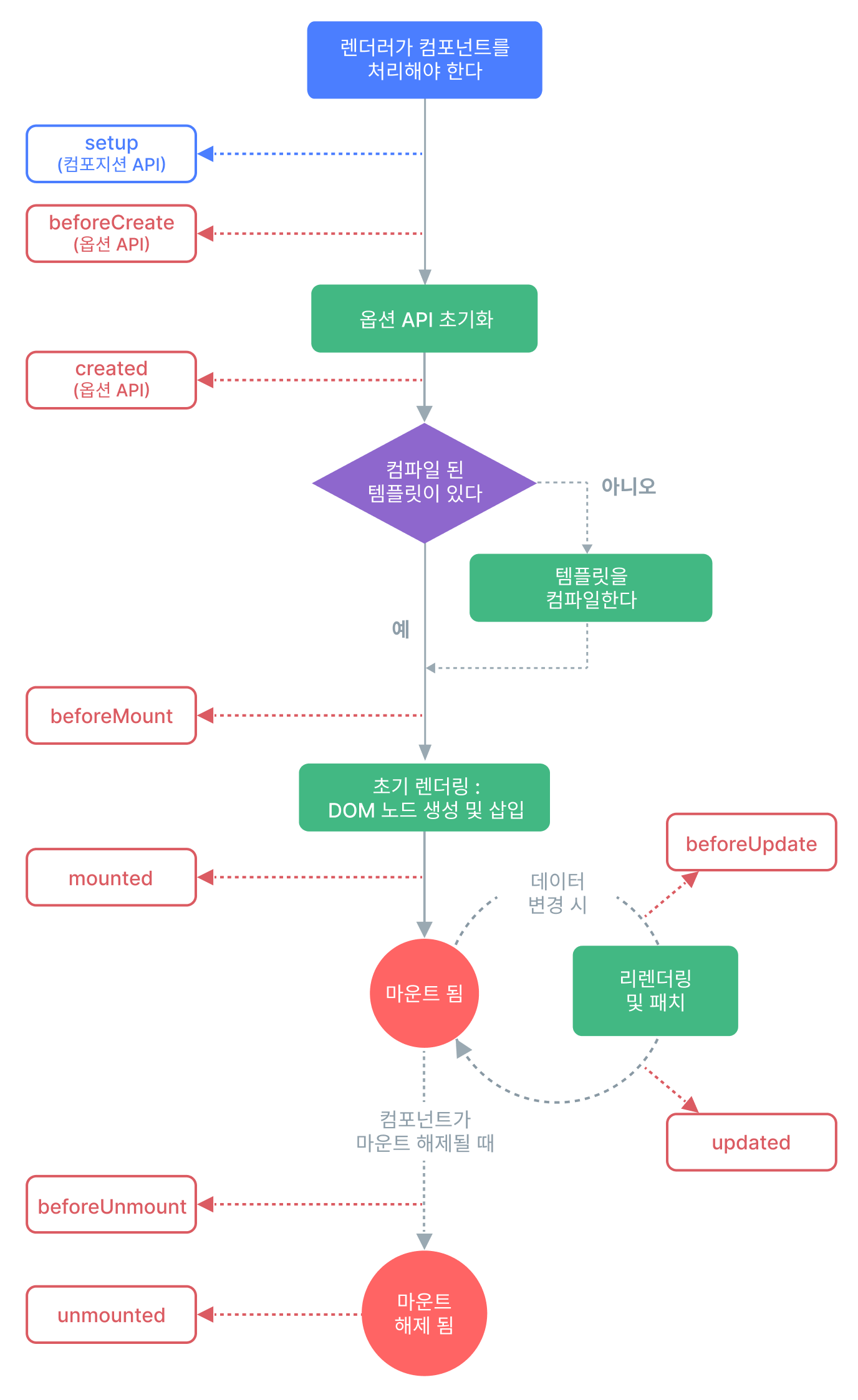
beforeCreate: 초기화 전
create : 초기화
beforeMount: html이랑 연결 이전 (DOM)
mount : html이랑 연결 (DOM)
update랑 unmount로 위 사진보면서 이해하면 된다.
<template>
  <h1>{{ count }}</h1>
</template>

<script>

export default{
  data() {
    return {
      count: 2
    }
  },
  beforeCreate() {
  console.log('beforeCreate', this.count)    //count 를 읽지 못함
  },
  created() {
  console.log('Create', this.count)         //count 읽음
  console.log(document.querySelector('h1')) //h1못읽음
  },
  beforeMount() {
  console.log('beforeMount', this.count)    //count 읽음
  console.log(document.querySelector('h1')) //h1못읽음
  },
  mounted() {
  console.log('Mount', this.count)          //count 읽음
  console.log(document.querySelector('h1')) //h1읽음
  }
}

</script>
템플릿 문법
보간법
데이터 바인딩의 가장 기본적인 형태는 "Mustache"(이중 중괄호) 문법을 사용한 텍스트 보간법입니다
<span>메세지: {{ msg }}</span>
v-once를 사용하면 데이터가 변경되어도 갱신되지 않는다.
<span v-once >안변함: {{ msg }}</span>
원시 HTML
이중 중괄호는 데이터를 HTML이 아닌 일반 텍스트로 해석합니다. 실제 HTML을 출력하려면 v-html 디렉티브을 사용해야 합니다
<p>텍스트 보간법 사용: {{ rawHtml }}</p>
<p>v-html 디렉티브 사용: <span v-html="rawHtml"></span></p>
속성 바인딩
이중 중괄호는 HTML 속성(attribute) 내에서 사용할 수 없습니다. 대신 v-bind 디렉티브를 사용하세요
<div v-bind:id="dynamicId"></div>
- 단축 문법
<div :id="dynamicId"></div>
이벤트
DOM 이벤트를 수신하는 v-on 디렉티브
<a v-on:click="doSomething"> ... </a>
- 단축문법
<a @click="doSomething"> ... </a>
동적인 인자
디렉티브의 인자를 대괄호로 감싸서 JavaScript 표현식으로 사용
<a v-bind:[attributeName]="url"> ... </a>
- 단축문법
<a :[attributeName]="url"> ... </a>
간단한 예제로 살펴보겠습니다.
<template>
	<h1 v-once          //사용하면 데이터가 변하지 않는다.
    @click = 'add'>
    {{ msg }}
    </h1>

    <h1 v-html="msg2"></h1> //html을 텍스트가 아닌html로 인식

    <h1
    	:[attr] = "'active'" //'active= 문자데이터로 해석'
        @[event]="add">
    	{{ msg3}}
    </h1>

</template>

<script>
export default{
  data() {
    return {
      msg : 'hello world',
      msg2 : '<div style = "color = red;"> hello </div>'
      msg3: 'active',
      attr: 'class',
      event: 'click'
    }
  },
  methods: {
    add() {
      this.msg += '!'
    }
  }
}
</script>
일단 만들고 본다