SQL query문
1. 데이터 조회
테이블 내 데이터 조회하기
SELECT * FROM 테이블명;  -- *온 해당 테이블의 모든 데이터 열람을 의미

USE book_db;
select * from booklist;
생성된 테이블 조회하기
show tables; -- db 내 생성된 테이블 조회하기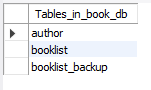
desc author;  -- author 테이블의 구조를 설명
desc booklist; -- booklist 테이블의 구조를 설명- 테이블 구조 설명이란?
- 테이블의 컬럼 정보, 데이터 타입, 키 제약 조건 등을 보여주는 것
2. 데이터 삽입/추가
테이블 생성
create table booklist(
	id int(11) not null auto_increment,
	title varchar(30) not null,
	description text,
	createdAt datetime not null,
	author_id int(11) default null,
	primary key(id));

create table author(
	id int(11) not null auto_increment,
	name varchar(20) not null,
	profile varchar(200) default null,
	primary key(id));
실제 데이터 입력
-- author 테이블에 데이터 입력하기
insert into author (id, name, profile) values (1, 'lee', 'developer');
insert into author (id, name, profile) values (2, 'kim', 'CEO');
insert into author (id, name, profile) values (3, 'park', 'data scientist');

-- booklist 테이블에 데이터 입력하기
insert into booklist (title, description, createdAt, author_id) values ('mySQL', 'mySQL is ...', now(), 1);
insert into booklist (title, description, createdAt, author_id) values ('C#', 'C# is ...', now(), 1);
insert into booklist (title, description, createdAt, author_id) values ('C++', 'C++ is ...', now(), 1);
insert into booklist (title, description, createdAt, author_id) values ('python', 'python is ...', now(), 3);
insert into booklist (title, description, createdAt, author_id) values ('Java', 'Java is ...', now(), 2);
3. 데이터 필터링하기
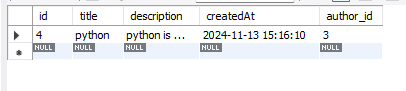
조건절(where)
select * from booklist where title = 'python';결과값
조회 갯수 제한(limit)
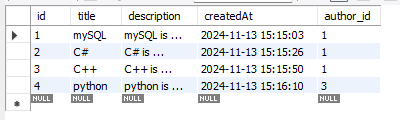
select * from booklist limit 4;
select * from booklist order by id desc limit 2;
select title from booklist order by id desc limit 2;
결과값
- 4개로 제한
- 내림차순 2개 제한

- 타이틀을 내림차순으로 2개만 제한

데이터 중복 제거(distinct)
select distinct author_id from booklist;결과값
4. 2개의 테이블 데이터 연결하기
Join해서 테이블 간 데이터 관계 연결하기
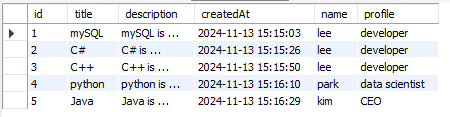
select * from booklist join author on booklist.author_id = author.id;
select booklist.id, title, description, createdAt, name, profile from booklist join author on booklist.author_id = author.id;
결과값
데이터 백업하기
rename table booklist to booklist_backup;5. 그 외 기본 문법
- lower()/upper(): 데이터를
소문자/대문자화 하기 - substr(
데이터,시작 위치,길이): 대상데이터를시작 위치로부터길이만큼 잘르기 - replace(
데이터,변경 데이터,변경할 데이터): 대상데이터에서변경 데이터를변경할 데이터로 대체
select title, lower(title), upper(title) from booklist;
select title, substr(title, 1, 2) from booklist;
select createdAt, replace(createdAt, '2024', '2025') from booklist;- as: 데이터 열에 별칭 생성하기
select 열이름 as 별칭 from 테이블이름;

select title as 제목 from booklist;
select description as 설명 from booklist;

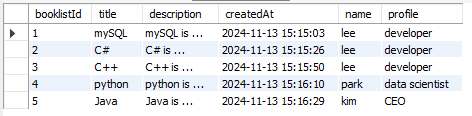
select booklist.id as booklistId, title, description, createdAt, name, profile from booklist join author on booklist.author_id = author.id;
결과값
id → booklistId 로 변경됨

SEO 최적화 마크업 개발자입니다.