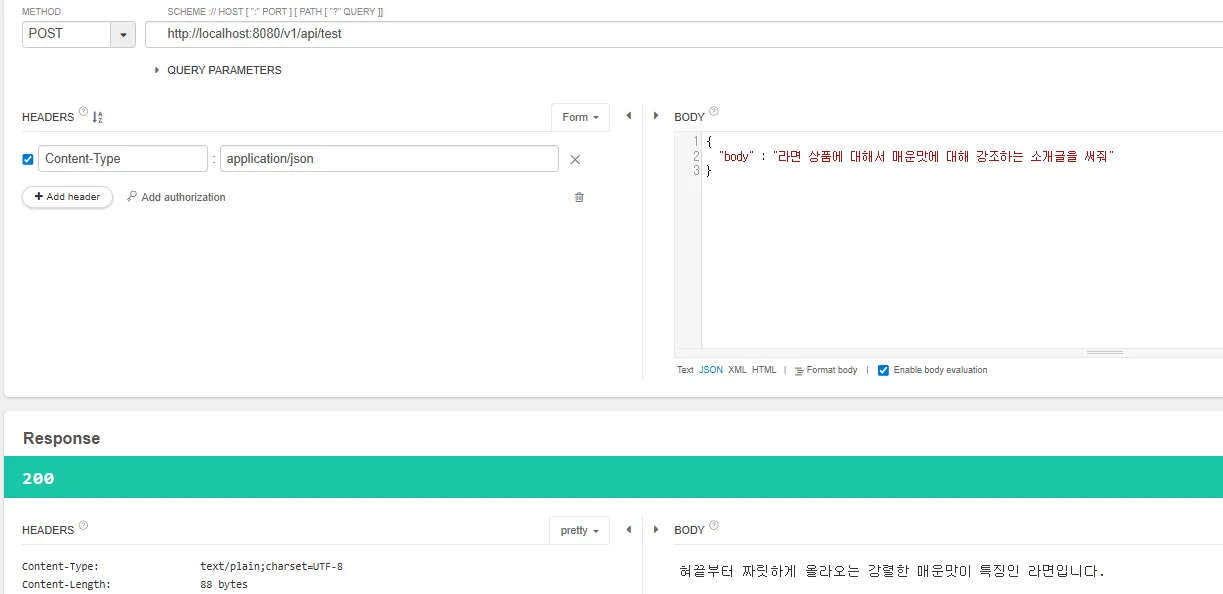
아마 Gemini를 사용해볼 것 같다.
먼저 https://aistudio.google.com/prompts/new_chat 사이트에 들어가서 프로젝트를 생성한다.
그리고 그 프로젝트에 대한 API Key를 생성해준다.

API key : ~
Project Id : ~
해당 API의 명세는 다음과 같다.
curl "https://generativelanguage.googleapis.com/v1beta/models/gemini-2.5-flash:generateContent" \
  -H "x-goog-api-key: $GEMINI_API_KEY" \
  -H 'Content-Type: application/json' \
  -X POST \
  -d '{
    "contents": [
      {
        "parts": [
          {
            "text": "Explain how AI works in a few words"
          }
        ]
      }
    ]
  }'
파이썬이나 Go 같은 건 SDK도 제공해주는 것 같은데 우리는 Java를 써야 하기에 RestTemplate이나 Open Feign을 써야 한다.
RestTemplate 코드를 작성했는데 결과가 미쳤다
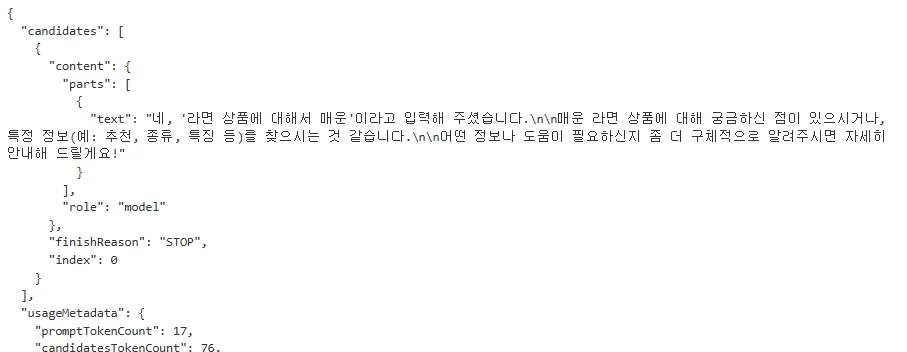
이렇게 나오면 안되는데 뭐가 더 필요한 거 같다. ㅋㅋㅋㅋㅋ
-
Json으로 오는 응답을 parsing 해줘야 함
⇒ parsing에 대한 코드 작성
-
text 내에 끼어있는 mark down 문법이나 저런 것들을 없애주면 좋을 것 같음
⇒ 프롬프트를 가공해서 추가 요청을 미리 내자.
@Service
public class DemoService {
    private final RestTemplate restTemplate;

    @Value("${gemini.api.key}")
    private String apiKey;

    @Value("${gemini.api.url}")
    private String url;

    public DemoService(RestTemplateBuilder builder) {
        this.restTemplate = builder.build();
    }

    public String test(String body) {
        HttpHeaders headers = new HttpHeaders();
        headers.add("x-goog-api-key", apiKey);
        headers.setContentType(MediaType.APPLICATION_JSON);

        Map<String, Object> textPart = new HashMap<>();
        textPart.put("text", "상품에 대한 소개글을 한 문장으로 하나만 작성해줘. 그냥 Plain Text로 답해줘. " + body);

        Map<String, Object> parts = new HashMap<>();
        parts.put("parts", List.of(textPart));

        Map<String, Object> contents = new HashMap<>();
        contents.put("contents", List.of(parts));

        HttpEntity<Map<String, Object>> entity = new HttpEntity<>(contents, headers);

        ResponseEntity<String> response = restTemplate.exchange(
            url,
            HttpMethod.POST,
            entity,
            String.class
        );

        return extractString(response.getBody());
    }

    public String extractString(String body) {
        ObjectMapper mapper = new ObjectMapper();
        JsonNode root = null, candidates = null;
        try {
            root = mapper.readTree(body);
            candidates = root.path("candidates");
        } catch (JsonProcessingException e) {
            throw new RuntimeException(e); // fix
        }
        if (candidates.isArray()) {
            for (JsonNode candidate : candidates) {
                JsonNode parts = candidate.path("content").path("parts");
                if (parts.isArray()) {
                    for (JsonNode part : parts) {
                        return part.path("text").asText();
                    }
                }
            }
        }
        return "";
    }

}