SpoonOS는 서로 다른 상황에 맞는 세 가지 그래프 빌드 방식을 제공합니다. 워크플로 복잡도와 팀 요구에 맞게 선택하세요.
이번 글에서 다룰 내용: 명령형, 선언형, 고수준 API와 각각의 사용 시점
대상 독자: 핵심 개념을 이해하고 API 스타일을 고르고 싶은 분
예상 소요 시간: 약 6–10분
API 비교
| 항목 | 명령형(Imperative) | 선언형(Declarative) | 고수준(High-Level) |
|---|---|---|---|
| 복잡도 | 단순 | 중간 | 고급 |
| 사용 사례 | 빠른 프로토타입, 단순 워크플로 | 대규모 워크플로, 팀 협업 | LLM 기반, 동적 라우팅 |
| 직렬화 | 불가 | 가능 | 가능 |
| 코드 스타일 | 메서드 체이닝 | 템플릿 객체 | 자동 추론 |
| 적합한 경우 | 학습, 소규모 그래프 | 프로덕션 시스템 | 지능형 에이전트 |
명령형 API
가장 단순한 그래프 빌드 방식입니다. 메서드 호출로 노드와 엣지를 직접 추가합니다.
사용 시점
- ✅ 빠른 프로토타입과 실험
- ✅ 단순한 직선형·분기형 워크플로
- ✅ 그래프 시스템 학습
- ❌ 대규모·복잡한 워크플로(유지보수 어려움)
- ❌ 팀 협업(직렬화 미지원)
기본 예제
import asyncio
from typing import TypedDict
from spoon_ai.graph import StateGraph, END

class WorkflowState(TypedDict):
    input: str
    step1_result: str
    step2_result: str
    final_result: str

async def step1(state: WorkflowState) -> dict:
    return {"step1_result": f"Step1 processed: {state['input']}"}

async def step2(state: WorkflowState) -> dict:
    return {"step2_result": f"Step2 processed: {state['step1_result']}"}

async def finalize(state: WorkflowState) -> dict:
    return {"final_result": f"Final: {state['step2_result']}"}

# 명령형으로 그래프 구성
graph = StateGraph(WorkflowState)

# 노드 추가
graph.add_node("step1", step1)
graph.add_node("step2", step2)
graph.add_node("finalize", finalize)

# 엣지 추가 (직선 흐름)
graph.add_edge("step1", "step2")
graph.add_edge("step2", "finalize")
graph.add_edge("finalize", END)

# 진입점 설정
graph.set_entry_point("step1")

# 컴파일 및 실행
app = graph.compile()

async def main():
    result = await app.invoke({
        "input": "Hello",
        "step1_result": "",
        "step2_result": "",
        "final_result": ""
    })
    print(result["final_result"])
    # 출력: Final: Step2 processed: Step1 processed: Hello

if __name__ == "__main__":
    asyncio.run(main())
조건부 라우팅
from spoon_ai.graph import StateGraph, END
from typing import TypedDict

class RouterState(TypedDict):
    query: str
    category: str
    result: str

async def classify(state: RouterState) -> dict:
    query = state["query"].lower()
    if "price" in query:
        return {"category": "price"}
    elif "news" in query:
        return {"category": "news"}
    return {"category": "general"}

async def handle_price(state: RouterState) -> dict:
    return {"result": f"Price handler: {state['query']}"}

async def handle_news(state: RouterState) -> dict:
    return {"result": f"News handler: {state['query']}"}

async def handle_general(state: RouterState) -> dict:
    return {"result": f"General handler: {state['query']}"}

def route_by_category(state: RouterState) -> str:
    return state.get("category", "general")

# 그래프 구성
graph = StateGraph(RouterState)

graph.add_node("classify", classify)
graph.add_node("price", handle_price)
graph.add_node("news", handle_news)
graph.add_node("general", handle_general)

graph.set_entry_point("classify")

# 조건부 라우팅
graph.add_conditional_edges(
    "classify",
    route_by_category,
    {
        "price": "price",
        "news": "news",
        "general": "general"
    }
)

# 모든 핸들러는 END로
graph.add_edge("price", END)
graph.add_edge("news", END)
graph.add_edge("general", END)

app = graph.compile()

async def main():
    # 다양한 쿼리로 테스트
    test_queries = [
        "What is the price of Bitcoin?",
        "Show me crypto news",
        "Tell me about blockchain"
    ]

    for query in test_queries:
        result = await app.invoke({
            "query": query,
            "category": "",
            "result": ""
        })
        print(f"Query: {query}")
        print(f"Category: {result['category']}")
        print(f"Result: {result['result']}")

if __name__ == "__main__":
    import asyncio
    asyncio.run(main())
API 레퍼런스
| 메서드 | 설명 | 예시 |
|---|---|---|
add_node(name, fn) | 노드 추가 | graph.add_node("process", my_fn) |
add_edge(from, to) | 정적 엣지 추가 | graph.add_edge("a", "b") |
add_conditional_edges(source, condition, path_map) | 조건부 라우팅 추가 | 위 예제 참고 |
set_entry_point(name) | 시작 노드 설정 | graph.set_entry_point("start") |
compile() | 실행 가능한 앱 생성 | app = graph.compile() |
선언형 API
템플릿 객체로 그래프를 정의합니다. 대규모 워크플로와 팀 협업에 적합합니다.
사용 시점
- ✅ 대규모·복잡한 워크플로
- ✅ 팀 협업(직렬화 가능한 템플릿)
- ✅ 버전 관리 가능한 그래프 정의
- ✅ 병렬 실행 그룹
- ❌ 빠른 프로토타입(보일러플레이트가 많음)
템플릿 구성 요소
from spoon_ai.graph.builder import (
    DeclarativeGraphBuilder,
    GraphTemplate,
    NodeSpec,
    EdgeSpec,
    ParallelGroupSpec,
)
from spoon_ai.graph.config import GraphConfig, ParallelGroupConfig| 구성 요소 | 용도 |
|---|---|
NodeSpec | 이름, 함수, 선택적 그룹으로 노드 정의 |
EdgeSpec | 노드 간 엣지 정의 |
ParallelGroupSpec | 동시 실행할 노드 그룹 정의 |
GraphTemplate | 모든 스펙을 담는 컨테이너 |
DeclarativeGraphBuilder | 템플릿으로 StateGraph 빌드 |
기본 선언형 예제
import asyncio
from typing import TypedDict, Dict, Any
from spoon_ai.graph import END
from spoon_ai.graph.builder import (
    DeclarativeGraphBuilder,
    GraphTemplate,
    NodeSpec,
    EdgeSpec,
)
from spoon_ai.graph.config import GraphConfig

class AnalysisState(TypedDict):
    query: str
    analysis: str
    summary: str

async def analyze(state: AnalysisState) -> dict:
    return {"analysis": f"Analysis of: {state['query']}"}

async def summarize(state: AnalysisState) -> dict:
    return {"summary": f"Summary: {state['analysis']}"}

# 노드 정의
nodes = [
    NodeSpec("analyze", analyze),
    NodeSpec("summarize", summarize),
]

# 엣지 정의
edges = [
    EdgeSpec("analyze", "summarize"),
    EdgeSpec("summarize", END),
]

# 템플릿 생성
template = GraphTemplate(
    entry_point="analyze",
    nodes=nodes,
    edges=edges,
    config=GraphConfig(max_iterations=50),
)

# 그래프 빌드
builder = DeclarativeGraphBuilder(AnalysisState)
graph = builder.build(template)
app = graph.compile()

async def main():
    result = await app.invoke({
        "query": "Bitcoin trend",
        "analysis": "",
        "summary": ""
    })
    print(result["summary"])

if __name__ == "__main__":
    asyncio.run(main())
병렬 그룹 사용
from typing import Any, Dict, TypedDict

from spoon_ai.graph import END
from spoon_ai.graph.builder import (
    DeclarativeGraphBuilder,
    GraphTemplate,
    NodeSpec,
    EdgeSpec,
    ParallelGroupSpec,
)
from spoon_ai.graph.config import GraphConfig, ParallelGroupConfig

class DataState(TypedDict):
    symbol: str
    binance_data: Dict[str, Any]
    coinbase_data: Dict[str, Any]
    kraken_data: Dict[str, Any]
    aggregated: Dict[str, Any]

async def fetch_binance(state: DataState) -> dict:
    # 시뮬레이션 API 호출
    return {"binance_data": {"source": "binance", "price": 45000}}

async def fetch_coinbase(state: DataState) -> dict:
    return {"coinbase_data": {"source": "coinbase", "price": 45050}}

async def fetch_kraken(state: DataState) -> dict:
    return {"kraken_data": {"source": "kraken", "price": 44980}}

async def aggregate(state: DataState) -> dict:
    prices = [
        state.get("binance_data", {}).get("price", 0),
        state.get("coinbase_data", {}).get("price", 0),
        state.get("kraken_data", {}).get("price", 0),
    ]
    avg_price = sum(prices) / len([p for p in prices if p > 0])
    return {"aggregated": {"average_price": avg_price}}

# 병렬 그룹을 지정한 노드 정의
nodes = [
    NodeSpec("fetch_binance", fetch_binance, parallel_group="data_fetch"),
    NodeSpec("fetch_coinbase", fetch_coinbase, parallel_group="data_fetch"),
    NodeSpec("fetch_kraken", fetch_kraken, parallel_group="data_fetch"),
    NodeSpec("aggregate", aggregate),
]

# 엣지 정의
edges = [
    EdgeSpec("fetch_binance", "aggregate"),
    EdgeSpec("fetch_coinbase", "aggregate"),
    EdgeSpec("fetch_kraken", "aggregate"),
    EdgeSpec("aggregate", END),
]

# 병렬 그룹 정의
parallel_groups = [
    ParallelGroupSpec(
        name="data_fetch",
        nodes=["fetch_binance", "fetch_coinbase", "fetch_kraken"],
        config=ParallelGroupConfig(
            join_strategy="all",      # 모두 완료 대기
            timeout=30.0,             # 30초 타임아웃
            error_strategy="collect_errors",
        )
    )
]

# 템플릿 생성
template = GraphTemplate(
    entry_point="fetch_binance",  # 병렬 그룹 진입점
    nodes=nodes,
    edges=edges,
    parallel_groups=parallel_groups,
    config=GraphConfig(max_iterations=50),
)

# 빌드 및 컴파일
builder = DeclarativeGraphBuilder(DataState)
graph = builder.build(template)
app = graph.compile()


async def main():
    # 병렬 그룹 실행 테스트
    result = await app.invoke({
        "symbol": "BTC",
        "binance_data": {},
        "coinbase_data": {},
        "kraken_data": {},
        "aggregated": {}
    })

    print("Parallel Group Execution Results:")
    print(f"Symbol: {result['symbol']}")
    print(f"\nBinance Data: {result['binance_data']}")
    print(f"Coinbase Data: {result['coinbase_data']}")
    print(f"Kraken Data: {result['kraken_data']}")
    print(f"\nAggregated Average Price: {result['aggregated']['average_price']}")


if __name__ == "__main__":
    import asyncio
    asyncio.run(main())
템플릿 직렬화
선언형 템플릿의 장점 중 하나는 직렬화입니다.
import json
import tempfile
from pathlib import Path
from typing import TypedDict, List, Dict, Any

from spoon_ai.graph import END
from spoon_ai.graph.builder import GraphTemplate, NodeSpec, EdgeSpec


class DemoState(TypedDict, total=False):
    input: str
    output: str


async def process(state: DemoState) -> dict:
    return {"output": state.get("input", "")}


template = GraphTemplate(
    entry_point="process",
    nodes=[NodeSpec("process", process)],
    edges=[EdgeSpec("process", END)],
)

# 템플릿 직렬화 (저장/버전 관리용)
template_dict = {
    "entry_point": template.entry_point,
    "nodes": [{"name": n.name, "parallel_group": n.parallel_group} for n in template.nodes],
    "edges": [{"start": e.start, "end": e.end} for e in template.edges],
}

# 임시 파일로 저장 (반복 실행에 안전)
out_path = Path(tempfile.gettempdir()) / "workflow_template.json"
out_path.write_text(json.dumps(template_dict, indent=2), encoding="utf-8")
print(f"Wrote template: {out_path}")
고수준 API
가장 고급 방식입니다. (선택적으로) LLM으로 의도/파라미터를 추론하고, 사용자 쿼리마다 그래프를 빌드·실행하는 데 도움을 줍니다.
사용 시점
- ✅ 복잡하고 동적인 워크플로
- ✅ LLM 기반 의사결정
- ✅ 자연어 파라미터 추출
- ✅ 적응형 라우팅이 있는 지능형 에이전트
- ❌ 단순·결정론적 워크플로(과한 선택)
주요 구성 요소
from spoon_ai.graph.builder import HighLevelGraphAPI, Intent, GraphTemplate, NodeSpec, EdgeSpec
from spoon_ai.graph.mcp_integration import MCPToolSpec| 구성 요소 | 용도 |
|---|---|
HighLevelGraphAPI | 지능형 그래프용 메인 인터페이스 |
Intent | 의도 분석 결과 (category, confidence, metadata) |
GraphTemplate / NodeSpec / EdgeSpec | StateGraph 빌드에 쓰는 선언형 그래프 정의 |
MCPToolSpec | 특정 의도 카테고리에 MCP 도구 등록 |
최소 예제 (추론된 의도로 템플릿 선택)
import asyncio
import json
from typing import Any, Dict, List, TypedDict

from spoon_ai.graph import END
from spoon_ai.graph.builder import HighLevelGraphAPI, Intent, GraphTemplate, NodeSpec, EdgeSpec
from spoon_ai.schema import Message


class AnalysisState(TypedDict, total=False):
    user_query: str
    query_intent: str
    result: str


async def price_handler(state: Dict[str, Any]) -> dict:
    return {"result": f"Price handler (stub): {state['user_query']}"}


async def general_handler(state: Dict[str, Any]) -> dict:
    return {"result": f"General handler (stub): {state['user_query']}"}


def intent_prompt_builder(query: str) -> List[Message]:
    return [
        Message(
            role="system",
            content='Return JSON only: {"category": "price_query|general_qa", "confidence": 0.0-1.0}',
        ),
        Message(role="user", content=query),
    ]


def intent_parser(text: str) -> Dict[str, Any]:
    try:
        return json.loads(text)
    except Exception:
        return {}


def build_template(intent: Intent) -> GraphTemplate:
    if intent.category == "price_query":
        return GraphTemplate(
            entry_point="price_handler",
            nodes=[NodeSpec("price_handler", price_handler)],
            edges=[EdgeSpec("price_handler", END)],
        )
    return GraphTemplate(
        entry_point="general_handler",
        nodes=[NodeSpec("general_handler", general_handler)],
        edges=[EdgeSpec("general_handler", END)],
    )


async def main():
    api = HighLevelGraphAPI(
        AnalysisState,
        intent_prompt_builder=intent_prompt_builder,
        intent_parser=intent_parser,
    )

    intent, state = await api.build_initial_state("What is BTC price?")
    template = build_template(intent)
    graph = api.build_graph(template)
    app = graph.compile()

    result = await app.invoke(state)
    print("intent:", intent.category)
    print("result:", result["result"])


if __name__ == "__main__":
    asyncio.run(main())
자동 파라미터 추론 (선택)
고수준 API는 다음 두 가지를 제공할 때만 추가 파라미터를 추론해 초기 상태에 병합할 수 있습니다.
parameter_prompt_builder(query, intent) -> List[Message]parameter_parser(text, intent) -> Dict[str, Any]
# 예:
# 사용자 쿼리: "Analyze ETH trend for the past week"
# 파라미터 파서가 반환할 수 있는 값:
# {"symbol": "ETH", "timeframe": "1w"}
MCP 도구 연동 (선택)
from typing import TypedDict

from spoon_ai.graph.builder import HighLevelGraphAPI
from spoon_ai.graph.mcp_integration import MCPToolSpec


class MyState(TypedDict, total=False):
    user_query: str


api = HighLevelGraphAPI(MyState)

api.register_mcp_tool(
    intent_category="research",
    spec=MCPToolSpec(name="tavily-search"),
    config={
        "command": "npx",
        "args": ["--yes", "tavily-mcp"],
        "env": {"TAVILY_API_KEY": "..."},
    },
)

tool = api.create_mcp_tool("tavily-search")
모범 사례
1. 단순하게 시작하고 점진적으로 확장
# 프로토타입은 명령형으로 시작
from typing import TypedDict

from spoon_ai.graph import StateGraph, END
from spoon_ai.graph.builder import GraphTemplate, NodeSpec, EdgeSpec
from spoon_ai.graph.builder import DeclarativeGraphBuilder

class MyState(TypedDict, total=False):
    input: str
    output: str


async def process_fn(state: MyState) -> dict:
    return {"output": f"processed: {state.get('input', '')}"}


graph = StateGraph(MyState)
graph.add_node("process", process_fn)
graph.set_entry_point("process")

# 워크플로가 안정되면 선언형으로 전환
template = GraphTemplate(
    entry_point="process",
    nodes=[NodeSpec("process", process_fn)],
    edges=[EdgeSpec("process", END)],
)

# 선언형 그래프 빌드
builder = DeclarativeGraphBuilder(MyState)
declarative_graph = builder.build(template)
declarative_app = declarative_graph.compile()
2. 의미 있는 노드 이름 사용
# 좋은 예: 설명적인 이름
from typing import TypedDict

from spoon_ai.graph import StateGraph


class MyState(TypedDict, total=False):
    user_query: str


async def classify_fn(state: MyState) -> dict:
    return {}


async def fetch_fn(state: MyState) -> dict:
    return {}


async def recommend_fn(state: MyState) -> dict:
    return {}


graph = StateGraph(MyState)

graph.add_node("classify_user_intent", classify_fn)
graph.add_node("fetch_market_data", fetch_fn)
graph.add_node("generate_recommendation", recommend_fn)
3. 관련 기능 그룹화
# 데이터 조회 노드 그룹화
from spoon_ai.graph.builder import ParallelGroupSpec
from spoon_ai.graph.config import ParallelGroupConfig

parallel_groups = [
    ParallelGroupSpec(
        name="market_data",
        nodes=["fetch_price", "fetch_volume", "fetch_sentiment"],
        config=ParallelGroupConfig(join_strategy="all")
    )
]
print(parallel_groups)
4. 모든 라우팅 케이스 처리
# 항상 폴백을 두기
from typing import TypedDict

from spoon_ai.graph import StateGraph, END


class RoutingState(TypedDict, total=False):
    route: str
    output: str


async def classifier(state: RoutingState) -> dict:
    # 실제 그래프에서는 사용자 입력에 따라 intent/category를 설정합니다.
    return {"route": state.get("route", "unknown")}


async def handler_1(state: RoutingState) -> dict:
    return {"output": "handled by handler_1"}


async def handler_2(state: RoutingState) -> dict:
    return {"output": "handled by handler_2"}


async def fallback_handler(state: RoutingState) -> dict:
    return {"output": "handled by fallback_handler"}


def route_function(state: RoutingState) -> str:
    return state.get("route", "unknown")


graph = StateGraph(RoutingState)
graph.add_node("classifier", classifier)
graph.add_node("handler_1", handler_1)
graph.add_node("handler_2", handler_2)
graph.add_node("fallback_handler", fallback_handler)
graph.set_entry_point("classifier")

graph.add_conditional_edges(
    "classifier",
    route_function,
    {
        "known_intent_1": "handler_1",
        "known_intent_2": "handler_2",
        "unknown": "fallback_handler"  # 이걸 빼먹지 마세요!
    }
)

graph.add_edge("handler_1", END)
graph.add_edge("handler_2", END)
graph.add_edge("fallback_handler", END)
5. 템플릿 문서화
from typing import TypedDict

from spoon_ai.graph import END
from spoon_ai.graph.builder import GraphTemplate, NodeSpec, EdgeSpec
from spoon_ai.graph.config import GraphConfig
from spoon_ai.graph.builder import DeclarativeGraphBuilder

class MyState(TypedDict, total=False):
    input: str
    output: str


async def start(state: MyState) -> dict:
    return {"output": "ok"}


nodes = [NodeSpec("start", start)]
edges = [EdgeSpec("start", END)]

template = GraphTemplate(
    entry_point="start",
    nodes=nodes,
    edges=edges,
    config=GraphConfig(
        max_iterations=100,
        # 목적 문서화
        # 이 그래프는 암호화폐 가격 및 시장 분석 관련
        # 사용자 쿼리를 LLM 기반 라우팅으로 처리합니다.
    ),
)
# 빌드 및 컴파일
builder = DeclarativeGraphBuilder(MyState)
graph = builder.build(template)
app = graph.compile()
비교 요약
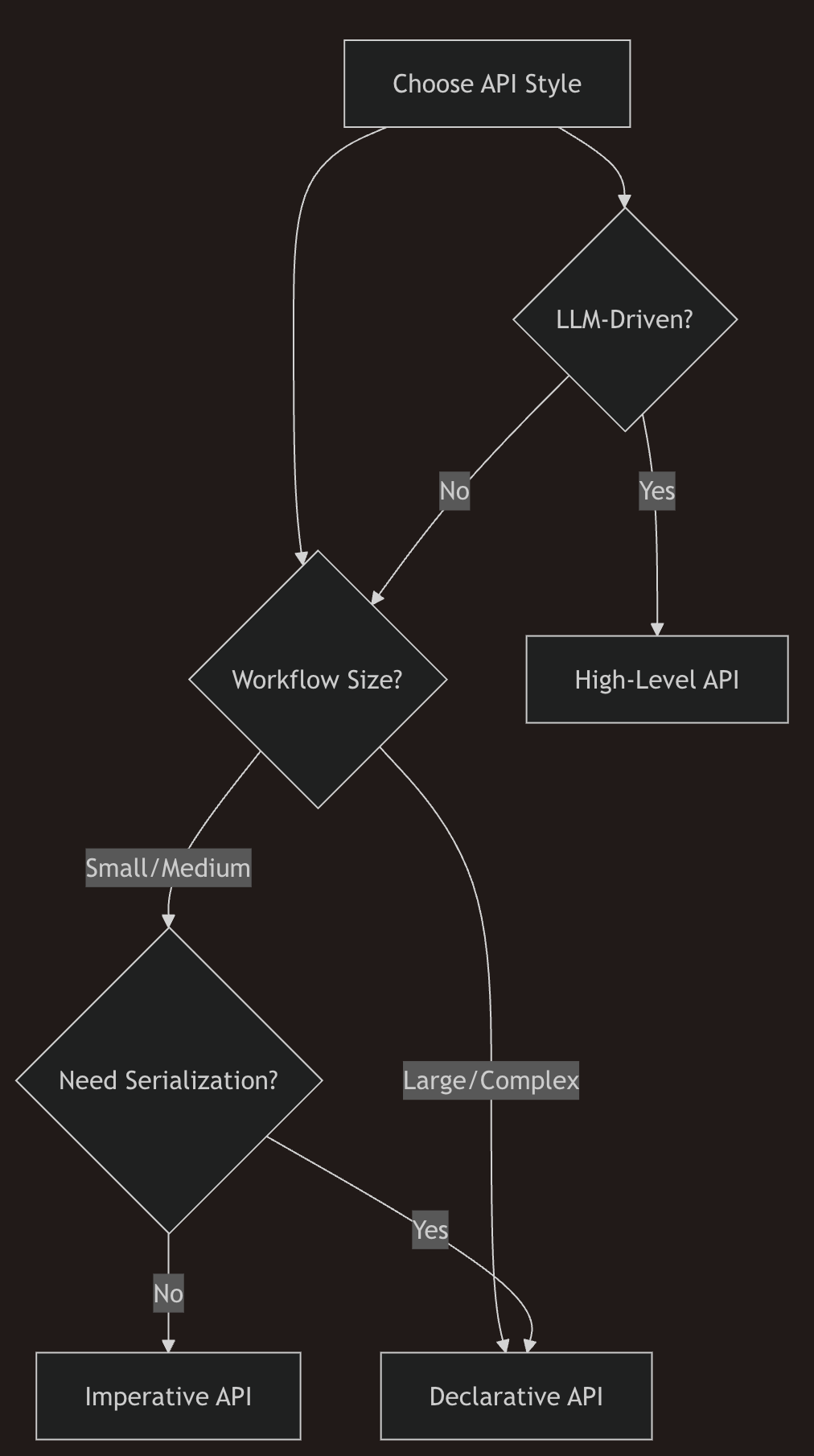
| 상황 | 권장 API |
|---|---|
| 학습/프로토타입 | 명령형 |
| 프로덕션 워크플로 | 선언형 |
| 팀 협업 | 선언형 |
| 지능형 에이전트 | 고수준 |
| 단순 자동화 | 명령형 |
| 동적 라우팅 | 고수준 |

스마트 이코노미를 위한 퍼블릭 블록체인, 네오에 대한 모든것