
여행 앱에 prop-types 도입하기
정의한 props 값이 컴포넌트에 제대로 전달되지 않으면 어떻게 해야 할까?
예를 들어 picture props에 {country.image}가 아닌 {true}를 전달한다면 원하는 대로 작동이 되지 않을 것이다.
props를 검사하는 과정이 의미가 있도록 '평점'이라는 항목을 추가해보자.
1. 여행 앱에 rating 추가하기
./src/App.js
import React from "react";

function Trip({ place, picture }) {
    return (
        <div>
            <h2>I went to {place}</h2>
            <img src={picture} />
        </div>
    );
}

const tripPlace = [
    {
        place: "Jeju",
        image: "https://cdn.crowdpic.net/list-thumb/thumb_l_319B5AA716BAB8C7AACB2D52875E6DD4.jpg",
        rating: 4.9,
    },
    {
        place: "Japan",
        image: "https://t1.daumcdn.net/cfile/tistory/2527613A589297492D",
        rating: 4.9,
    },
    {
        place: "America",
        image: "https://image.theminda.com/data/tg/image/item/high/201906/a6f59222e5a21779ec7522ceb6e09319.jpg",
        rating: 5,
    },
];

function App() {
    return (
        <div>
            {tripPlace.map((country) => (
                <Trip place={country.place} picture={country.image} />
            ))}
        </div>
    );
}

export default App;
그 다음으로 rating props를 Trip 컴포넌트에 전달하면서 이 값을 검사한다. 그러려면 props의 자료형을 검사할 수 있는 prop-types 도구를 설치한다.
2. prop-types 설치하기
% npm install prop-types3. pakage.json에서 설치 확인하기
./package.json
{
"name": "movie-app",
"version": "0.1.0",
"private": true,
"dependencies": {
    "@testing-library/jest-dom": "^5.13.0",
    "@testing-library/react": "^11.2.7",
    "@testing-library/user-event": "^12.8.3",
    "prop-types": "^15.7.2",	// 자동으로 입력되므로 수정 ✕
    "react": "^17.0.2",
    "react-dom": "^17.0.2",
    "react-scripts": "4.0.3",
    "web-vitals": "^1.1.2"
  },
4. prop-types 적용하기
Trip.propTypes를 작성하여 place와 rating은 문자열이고, rating은 숫자여야 하고, 모든 props는 반드시 있어야 한다는 조건을 추가했다.
./src/App.js
import React from "react";
import PropTypes from "prop-types";

function Trip({ place, picture, rating }) {
    return (
        <div>
            <h2>I went to {place}</h2>
            <h4>{rating}/5.0</h4>
            <img src={picture} />
        </div>
    );
}

const tripPlace = [
    {
        place: "Jeju",
        image: "https://cdn.crowdpic.net/list-thumb/thumb_l_319B5AA716BAB8C7AACB2D52875E6DD4.jpg",
        rating: 4.9,
    },
    {
        place: "Japan",
        image: "https://t1.daumcdn.net/cfile/tistory/2527613A589297492D",
        rating: 4.9,
    },
    {
        place: "America",
        image: "https://image.theminda.com/data/tg/image/item/high/201906/a6f59222e5a21779ec7522ceb6e09319.jpg",
        rating: 5,
    },
];

function App() {
    return (
        <div>
            {tripPlace.map((country) => (
                <Trip place={country.place} picture={country.image} rating={country.rating} />
            ))}
        </div>
    );
}

Trip.propTypes = {
    place: PropTypes.string.isRequired,
    picture: PropTypes.string.isRequired,
    rating: PropTypes.number.isRequired,
};

export default App;

prop-types는 props의 자료형과 props의 이름을 검사해 준다.
예를 들어 Trip 컴포넌트에 전달하는 picture props의 이름을 image로 바꾼다면 오류가 발생한다.
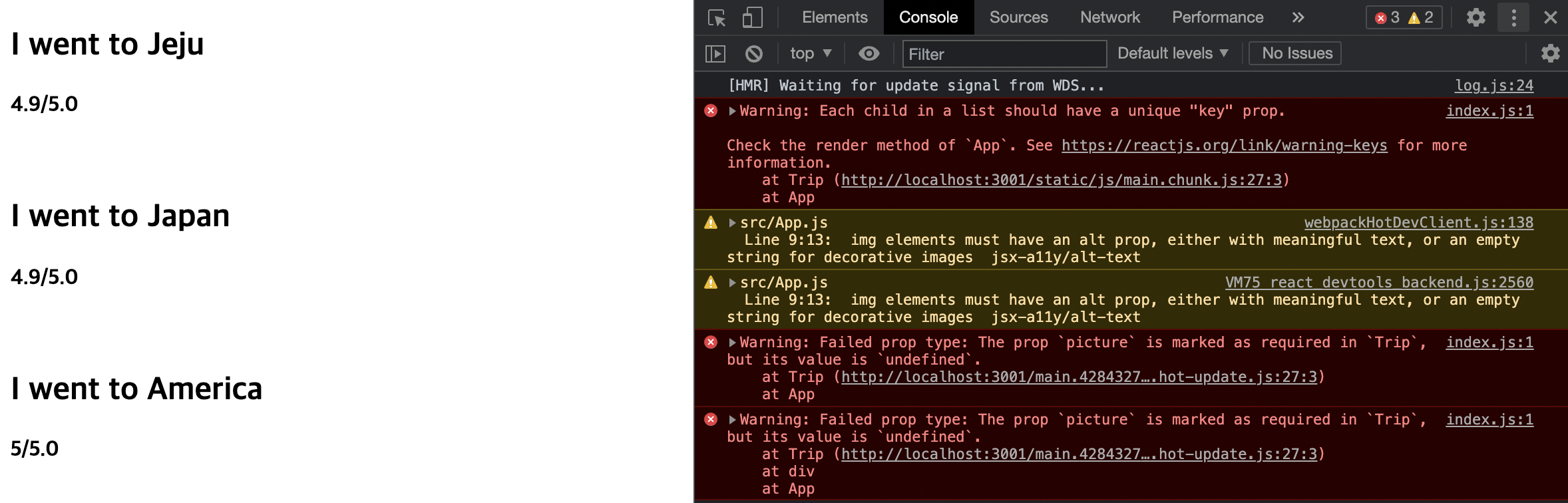
앱을 실행하면 사진이 나오지 않는다.
Warning: Failed prop type: The prop `picture` is marked as required in `Trip`,
but its value is `undefined`.
'Trip 컴포넌트에 picture라는 이름의 props가 필요한데, 그 값이 undefined이다.' 라고 오류가 발생한다. Trip 컴포넌트에 picture prop가 아니라 image prop를 전달했기 때문이다.
isRequired를 작성하지 않으면 해당 props는 필수가 아니어도 되는 값이 된다. 단, 값이 전달되는 경우 해당 자료형이어야 한다.

이게 왜 🐷