오늘은 Input System에서 Send Messages를 활용하여 개인 과제를 진행해 보았다.
그래서, 이번 포스팅에서는 이와 관련한 포스팅을 작성해 보았다.
🎮 Input System : Send Messages
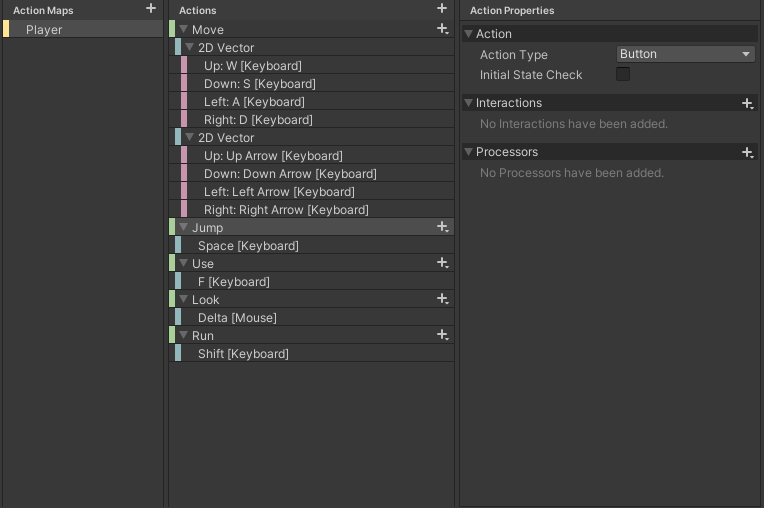
위와 같이, 개인 과제에 필요한 키 값에 대한 바인딩을 정해주었다.
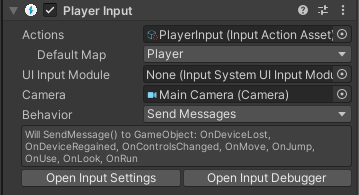
그리고, 위처럼 Behavior를 Send Messages로 바꿔주었다.
위처럼 설정하면, Actions에 대한 메서드 이름이 정의된 것을 볼 수가 있다.
🔍 로직
// 방향키(WASD, ↑←↓→)
void OnMove(InputValue value)
{
    moveDir = value.Get<Vector2>();
}

// 점프(Space)
void OnJump()
{
    if (IsGrounded())
    {
        if(playerInfo.CanJump())
            rigid.AddForce(Vector2.up * playerInfo.JumpPower, ForceMode.Impulse);
    }
}

// 아이템 사용(F)
void OnUse()
{
    playerInfo.Damage(10f);
}

// 카메라 이동(마우스 Delta)
void OnLook(InputValue value)
{
    mouseDelta = value.Get<Vector2>();
}

// 달리기 상태(Shift)
void OnRun()
{
    if (!playerInfo.isRun)
    {
        playerInfo.SetSpeedRun();
    }
    else
    {
        playerInfo.SetSpeedOrigin();
    }
    playerInfo.isRun = !playerInfo.isRun;
}
위와 같이, 매우 간단하게 키보드 및 마우스의 값을 받아서 적용할 수 있다.
아직 달리기 로직에 대해서는 좀 더 연구가 필요한 부분이다.
아이템 사용은 현재 테스트용으로 넣어 놓은 것이다.
✨ 마무리
아직은 개인 과제 첫 시작 단계라서 과제의 난이도를 잘 못 느끼겠다.
첫 3D 개인 프로젝트인 만큼 최선을 다해서 완성해 볼 것이다.

유니티 개발자(진)